Billing Overview
Download
フォーカスモード
フォントサイズ
This document describes the Cloud Exchange (CX) billing and pricing for Direct Connect.
Supported CX Platforms and Regions for CX
Region | Access Point | EQUINIX | Megaport | KT Cloud |
Tokyo, Japan | Tokyo - B - Ariake | Supported | Supported | - |
| Tokyo - C - Chiba | Supported | Supported | - |
Singapore | Singapore - A - Ayer Rajah | Supported | Supported | - |
| Singapore - B - Tai Seng | Supported | Supported | - |
Hong Kong (China) | Hong Kong (China) - A - Kwai Chung | Supported | Supported | - |
| Hong Kong (China) - B - Tseung Kwan O | Supported | - | - |
Sao Paulo | Sao Paulo - A - Santa Ana | Supported | - | - |
Germany | Frankfurt - A-Hanauer | Supported | Supported | - |
| Frankfurt - B - Moerfelden | Supported | - | - |
Eastern US | Virginia - A - Ashburn | Supported | - | - |
| Virginia - B - Stirling | Supported | Supported | - |
Western US | Silicon Valley - A - San Jose | Supported | Supported | - |
| Silicon Valley - B - Santa Clara | Supported | - | - |
South Korea | Seoul - A - Yangcheon | Supported | - | Supported |
| Seoul - B - Sangam | Supported | - | - |
Billing Instructions
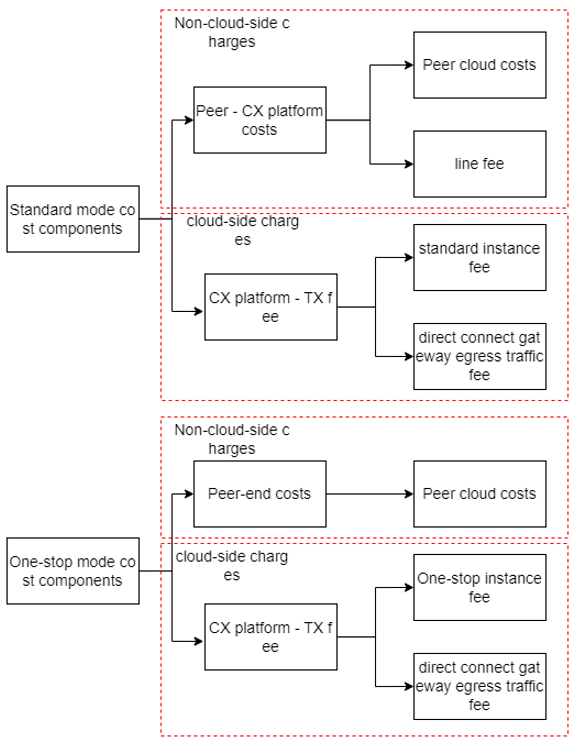
The CX billing and pricing for Direct Connect vary depending on the access mode:
The fee for the standard model consists of two parts: CX standard instance fee and Direct Connect Gateway Traffic Fee.
The fee for the one-stop mode consists of two parts: CX one-stop instance fee and Direct Connect Gateway Traffic Fee.
The specific components are shown in the figure below:
Note:
Standard Mode
Standard instance fee: The billing method is pay-as-you-go on a daily basis. The fees incurred each day will be deducted the next day.
Billing time: When you click to receive the CX instance in the console and the construction is successful, the instance status will change to "In Operation" and billing will start. When you apply to withdraw the instance in the CX console and the application is approved, the instance status will change to "Withdrawn" and billing will stop. If the billing time is shorter than one day, billing will be based on the actual effective hours.
Billing formula: Instance Fee = (Effective Hours of the Day / Natural Hours of the Day) * Instance Unit Price
Bandwidth (Mbps) | Published Price on International Site/Chinese Site (USD/Day) |
50 | 0.71 |
100 | 1.39 |
200 | 1.94 |
300 | 2.83 |
400 | 3.68 |
500 | 4.49 |
1000 | 7.96 |
2000 | 15.91 |
5000 | 39.85 |
10000 | 70.82 |
25000 | 149.83 |
One-Stop Mode
Standard instance fee: The billing method is pay-as-you-go on a daily basis. The fees incurred each day will be deducted the next day.
Billing time: When you click to receive the CX instance in the console and the construction is successful, the instance status will change to "In Operation" and billing will start. When you apply to withdraw the instance in the CX console and the application is approved, the instance status will change to "Withdrawn" and billing will stop. If the billing time is shorter than one day, billing will be based on the actual effective hours.
Billing formula: Instance Fee = (Effective Hours of the Day / Natural Hours of the Day) * Instance Unit Price
Bandwidth Specification (Mbps) | Published Price on International Site/Chinese Site (USD/Day) |
50 | 15 |
100 | 30 |
200 | 60 |
300 | 90 |
400 | 120 |
500 | 150 |
1000 | 233 |
2000 | 467 |
5000 | 1000 |
10000 | 2000 |
25000 | 5000 |
フィードバック