CLS Log Shipping
Download
フォーカスモード
フォントサイズ
The log shipping feature of TencentDB for MongoDB (MongoDB) automatically delivers key slow logs, error logs, and operation logs to the Cloud Log Service (CLS). This enables users to leverage CLS's powerful analysis and retrieval capabilities to gain deep insights into log data and quickly identify and resolve issues.
Supported Log Types for Shipping
Slow logs: Record database operations that exceed a specified execution time threshold. These logs are typically used for performance monitoring and optimization, helping developers and Ops personnel identify and resolve performance bottlenecks.
Error logs: Record error information that occurs during database operations, including fatal errors, general errors, and warnings. These logs are used for troubleshooting and system maintenance, helping quickly locate and resolve runtime issues.
Operation logs: Record all database operation events, including queries, updates, deletions, and more. They also capture the users performing these operations and related permission details, supporting auditing and compliance checks to ensure data security and integrity.
Billing Overview
CLS is an independently billed third-party cloud product. When log shipping is enabled for MongoDB, CLS charges traffic fees based on the volume of shipped logs. It supports two billing methods: pay-as-you-go (postpaid) and resource package (prepaid). For detailed billing standards, see CLS Billing Overview.
Enabling Log Shipping
1. Log in to the TencentDB for MongoDB console.
2. In the left sidebar, expand the MongoDB dropdown list and select either Replica Set Instance or Shard Instance. The operations for replica set instances and sharded instances are similar.
3. Select a region at the top of the instance list page on the right.
4. Locate the target instance in the instance list.
5. Click the Target Instance ID to go to the Instance Details page.
6. Select the Log Management tab, and then select the CLS Log Shipping tab, as shown below.
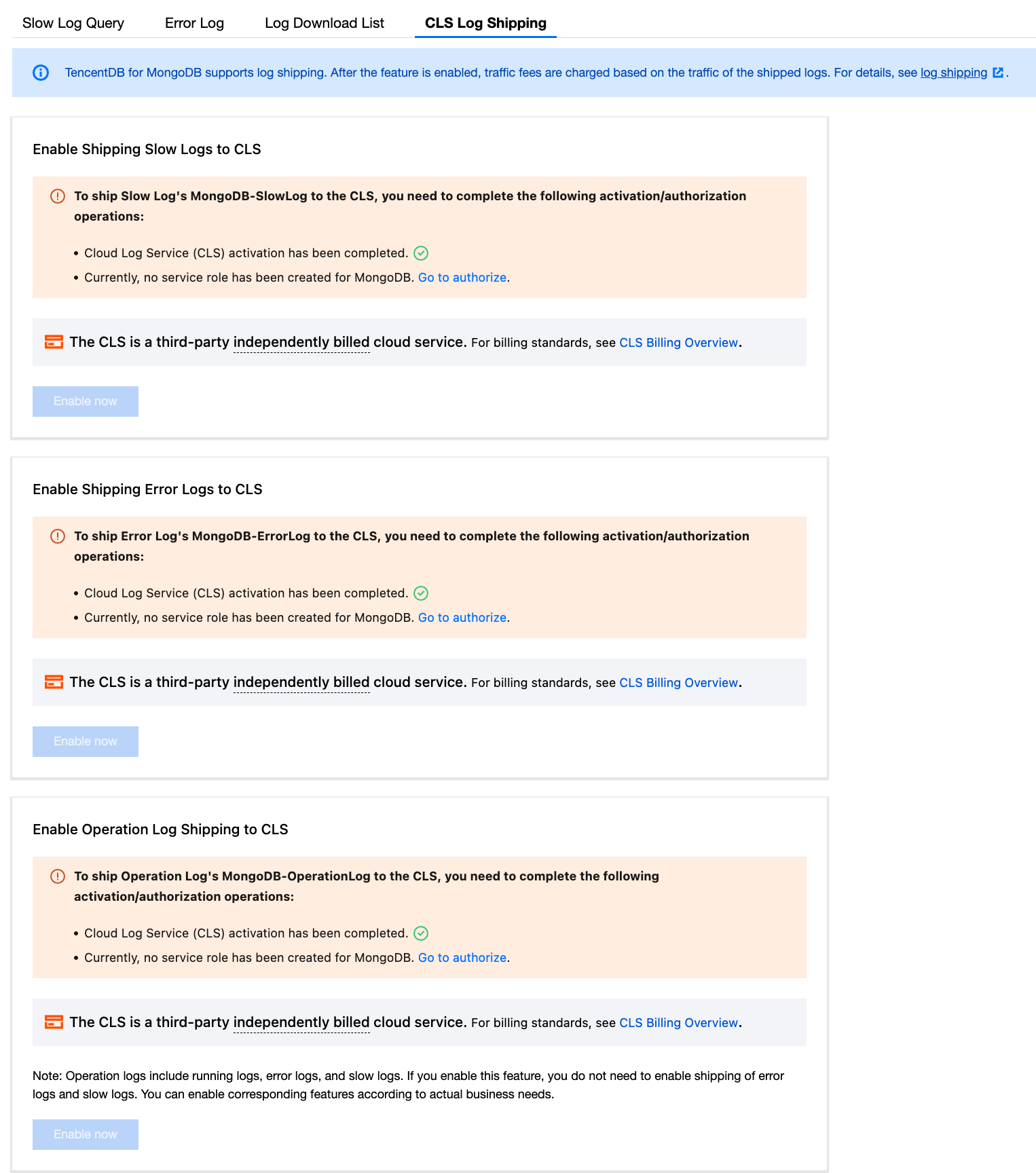
7. MongoDB Log Management automatically detects whether CLS is enabled and whether the service role is authorized. Follow the on-screen prompts to enable the service or grant the required permissions. Slow logs, error logs, and operation logs can be configured individually as needed. For example, to enable slow logs, click Enable now, and in the Enable Log Delivery window, select the log topic and logset for shipping.
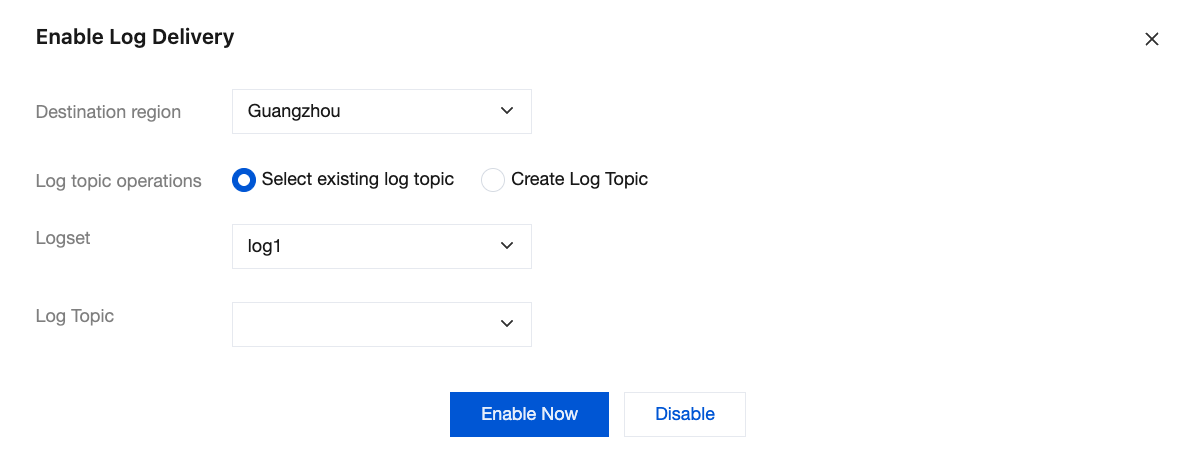
Parameter | Description |
Destination region | Select the region for log shipping. Cross-region shipping is supported. |
Log topic operations | Note: CLS manages stored log data using log topics and logsets. A log topic is the basic unit for log data collection, storage, retrieval, and analysis, while a logset serves as a classification method for organizing log topics to simplify management. Select existing log topic: In the logset dropdown list, select a logset that has already been created in the CLS console, and then choose the corresponding log topic from the Log topic dropdown list. Create Log Topic: Create a logset for log shipping. In the Log Topic input box below, enter the name of the log topic. For specific requirements, see log topic. Then, in logset operation, choose whether to add the new log topic to an existing logset or to create a logset for the topic. Select the existing logset In the logset dropdown list, select an existing logset for the created log topic. Create Logset: In the logset input box, enter a new logset name. For specific requirements, see logset. |
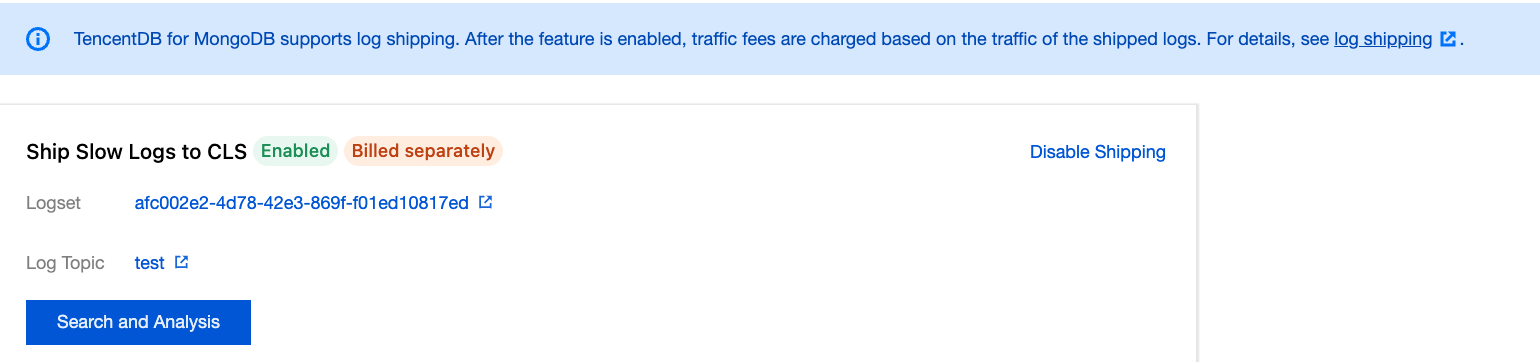
8. Click Enable Now to enable the log shipping feature. As shown below, click Search and Analysis to go to the retrieval and analysis page of the CLS service, where you can directly analyze logs using CLS retrieval and analysis rules. For details, see Search and Analysis.
フィードバック