tencent cloud

Tencent Cloud Observability Platform

Release Notes and Announcements
Release Notes
Product Introduction
Overview
Strengths
Basic Features
Basic Concepts
Use Cases
Use Limits
Purchase Guide
Tencent Cloud Product Monitoring
Application Performance Management
Mobile App Performance Monitoring
Real User Monitoring
Cloud Automated Testing
Prometheus Monitoring
Grafana
EventBridge
PTS
Quick Start
Monitoring Overview
Instance Group
Tencent Cloud Product Monitoring
Application Performance Management
Real User Monitoring
Cloud Automated Testing
Performance Testing Service
Prometheus Getting Started
Grafana
Dashboard Creation
EventBridge
Alarm Service
Cloud Product Monitoring
Tencent Cloud Service Metrics
Operation Guide
CVM Agents
Cloud Product Monitoring Integration with Grafana
Troubleshooting
Practical Tutorial
Application Performance Management
Product Introduction
Access Guide
Operation Guide
Practical Tutorial
Parameter Information
FAQs
Mobile App Performance Monitoring
Overview
Operation Guide
Access Guide
Practical Tutorial
Tencent Cloud Real User Monitoring
Product Introduction
Operation Guide
Connection Guide
FAQs
Cloud Automated Testing
Product Introduction
Operation Guide
FAQs
Performance Testing Service
Overview
Operation Guide
Practice Tutorial
JavaScript API List
FAQs
Prometheus Monitoring
Product Introduction
Access Guide
Operation Guide
Practical Tutorial
Terraform
FAQs
Grafana
Product Introduction
Operation Guide
Guide on Grafana Common Features
FAQs
Dashboard
Overview
Operation Guide
Alarm Management
Console Operation Guide
Troubleshooting
FAQs
EventBridge
Product Introduction
Operation Guide
Practical Tutorial
FAQs
Report Management
FAQs
General
Alarm Service
Concepts
Monitoring Charts
CVM Agents
Dynamic Alarm Threshold
CM Connection to Grafana
Documentation Guide
Related Agreements
Application Performance Management Service Level Agreement
APM Privacy Policy
APM Data Processing And Security Agreement
RUM Service Level Agreement
Mobile Performance Monitoring Service Level Agreement
Cloud Automated Testing Service Level Agreement
Prometheus Service Level Agreement
TCMG Service Level Agreements
PTS Service Level Agreement
PTS Use Limits
Cloud Monitor Service Level Agreement
API Documentation
History
Introduction
API Category
Making API Requests
Monitoring Data Query APIs
Alarm APIs
Legacy Alert APIs
Notification Template APIs
TMP APIs
Grafana Service APIs
Event Center APIs
TencentCloud Managed Service for Prometheus APIs
Monitoring APIs
Data Types
Error Codes
Glossary

Service Role

PDF
フォーカスモード
フォントサイズ
最終更新日: 2024-11-01 21:26:24
After you authorize your Grafana instance with a service role, it can access corresponding APIs with the temporary key of the service role. Do not enter sensitive SecretID/SecretKey; otherwise, the data security may be compromised.

Prerequisites

1. Log in to the TCMG console.
2. In the instance list, find the target instance and click Instance ID.
3. On the instance details page, click Tencent Cloud Service Integration in the list on the left.

Directions

Click the service role editing icon in the top-right corner of the Tencent Cloud Service Integration page to configure a service role for the current instance.


Selecting service role

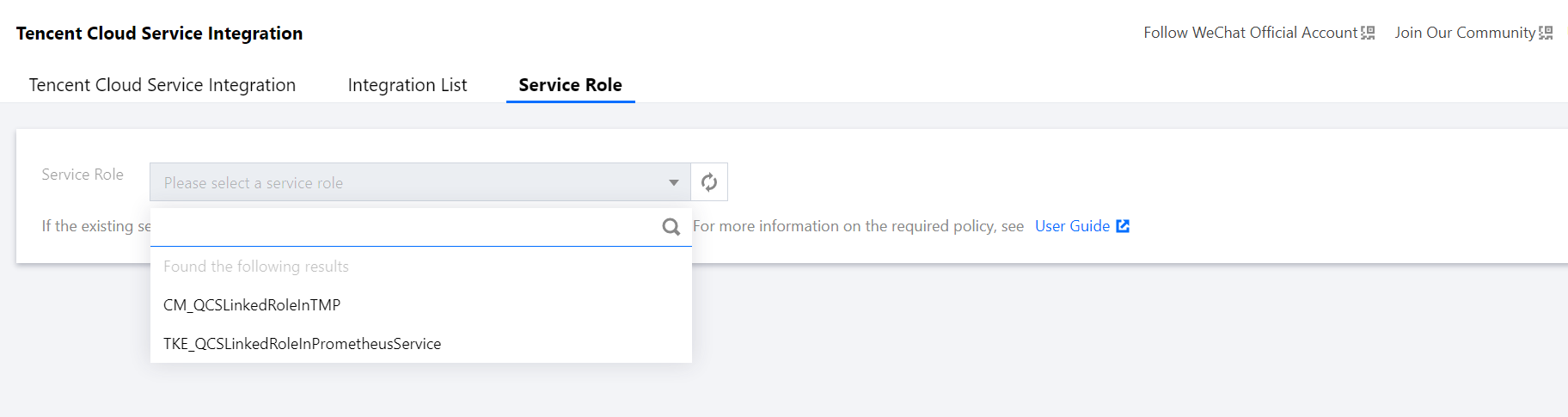
1. Click the Service Role drop-down list, and eligible service roles will be automatically loaded.
2. Select a preconfigured or self-created service role. Different Tencent Cloud services have different requirements for service role permissions, and you can create service roles as needed.
3. Click Save, and the instance will be rebooted.


Creating service role

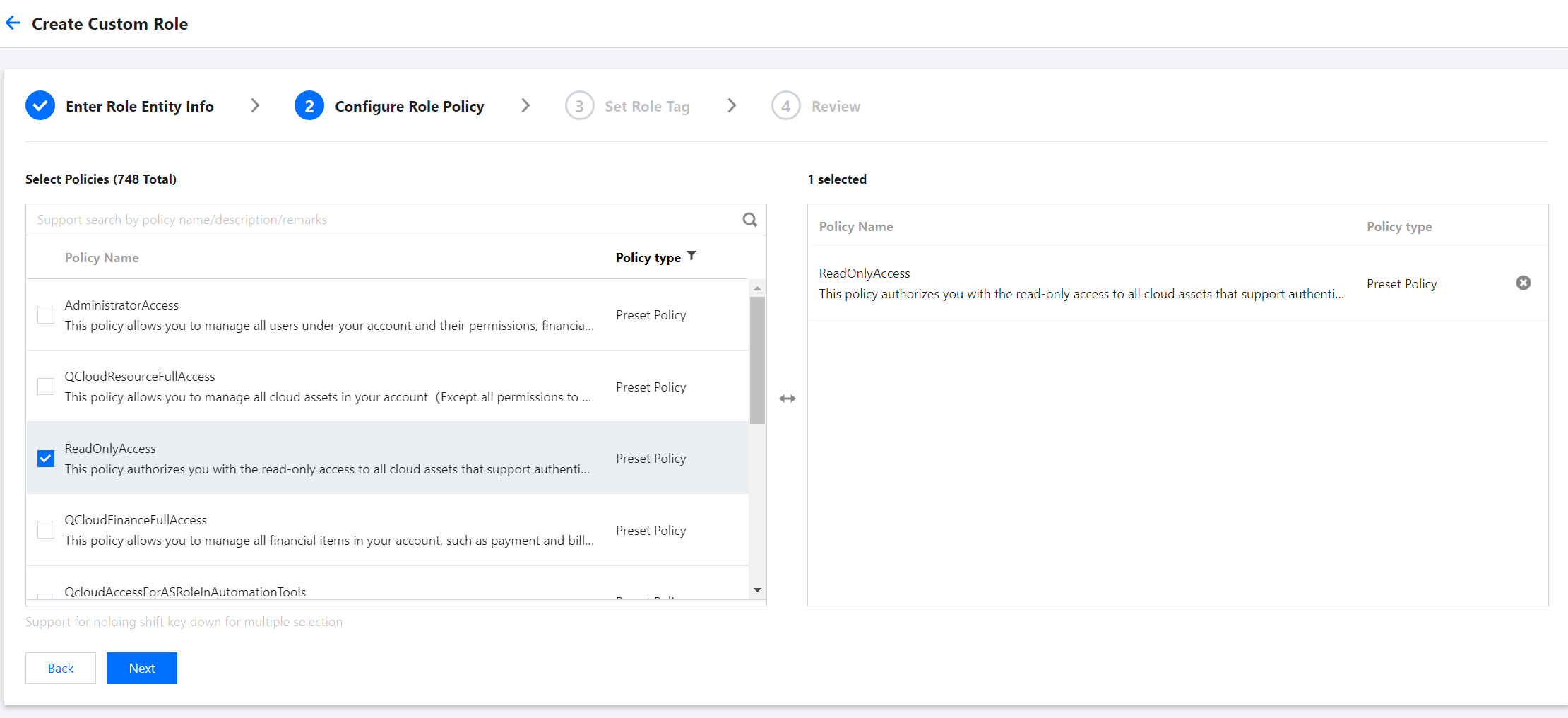
For demonstration purposes, this section uses the preconfigured ReadOnlyAccess policy as an example. You can view the policies required by Tencent Cloud services at the end of this document and configure read-only access as needed.

1. Go to the CAM > Role page.
2. Click Create Role in the top-right corner and select Tencent Cloud Product Service in the pop-up window.
3. In the Enter role entity info step, select Cloud Virtual Machine (CVM) and click Next.
4. In the Configure role policy step, search for and select ReadOnlyAccess and click Next.

5. Preview the custom role, name it, and click Complete.

Policies required by Tencent Cloud services

Policies required by TCMG plugins

Policy Description
Policy Name
Read-Only access to CM
QcloudMonitorReadOnlyAccess
Read-Only access to CVM resources
QcloudCVMReadOnlyAccess
Read-Only access to CLS
QcloudCLSReadOnlyAccess

Policy required by CLS

Policy Description
Policy Name
Read-Only access to CLS
QcloudCLSReadOnlyAccess

ヘルプとサポート

この記事はお役に立ちましたか?

フィードバック