Release Notes
Accessing Nginx
The Nginx community provides the nginx-module-otel dynamic module, which supports OpenTelemetry standard reporting of observable data. After installing this module, you can access Application Performance Management (APM) with simple configuration.
Prerequisites
Operating System Requirements
The following operating systems have been tested and confirmed to support Nginx integration. For operating systems not in this range, we cannot guarantee the effect and stability of integration due to differences in underlying architecture, system settings, and runtime environment.
Edition | Version | Architecture |
Ubuntu | 20.04,22.04,24.04,24.10 | x86_64,aarch64/arm64 |
RHEL and its derivatives (CentOS, etc.) | 8.x,9.x | x86_64,aarch64/arm64 |
Alpine | 3.18,3.19,3.20,3.21 | x86_64,aarch64/arm64 |
Debian | 11.x,12.x | x86_64,aarch64/arm64 |
SLES | 15 SP2+ | x86_64 |
Nginx Version Requirements
Please ensure Nginx is already installed with a version not less than 1.23.4. Nginx that does not meet version requirements may cannot install the nginx-module-otel dynamic module.
Getting Access Point and Token
1. Log in to the TCOP console.
2. In the left menu bar, select Application Performance Management > Application list, then click Access application.
3. In the data access drawer frame that pops up on the right, click the Go language.
4. On the Access Go application page, select the Region and Business System.
5. Select OpenTelemetry as Access protocol type.
6. Select your preferred Reporting method, then obtain the access point and Token.
Note:
Report over private network: This reporting method requires your service to run in the Tencent Cloud VPC. The direct connection through VPC can help avoid the security risks of public network communication and save costs on reporting traffic.
Report over public network: If your service is deployed locally or in non-Tencent Cloud VPC, you can report data in this method. However, it involves security risks in public network communication and incurs reporting traffic fees.
Compiling Dynamic Module Nginx-Module-Otel
Currently, the published nginx-module-otel version in the Nginx community does not support specifying Resource Attributes. However, integrating to APM requires filling in the correct token in Resource Attributes, which prevents us from direct use of the published nginx-module-otel module in the official Nginx repository. In fact, the latest code in the Nginx community's source code repository already supports specifying Resource Attributes. Therefore, we manually compile nginx-module-otel based on the community's latest code. This document uses the Ubuntu system as an example to introduce the compilation process.
1. Get Nginx's configure parameters (ALL configuration options when compiling).
nginx -V
Output example:
nginx version: nginx/1.26.2built by gcc 11.4.0 (Ubuntu 11.4.0-1ubuntu1~22.04)built with OpenSSL 3.0.2 15 Mar 2022TLS SNI support enabledconfigure arguments: --prefix=/etc/nginx --sbin-path=/usr/sbin/nginx --modules-path=/usr/lib/nginx/modules --conf-path=/etc/nginx/nginx.conf --error-log-path=/var/log/nginx/error.log --http-log-path=/var/log/nginx/access.log --pid-path=/var/run/nginx.pid --lock-path=/var/run/nginx.lock --http-client-body-temp-path=/var/cache/nginx/client_temp --http-proxy-temp-path=/var/cache/nginx/proxy_temp --http-fastcgi-temp-path=/var/cache/nginx/fastcgi_temp --http-uwsgi-temp-path=/var/cache/nginx/uwsgi_temp --http-scgi-temp-path=/var/cache/nginx/scgi_temp --user=nginx --group=nginx --with-compat --with-file-aio --with-threads --with-http_addition_module --with-http_auth_request_module --with-http_dav_module --with-http_flv_module --with-http_gunzip_module --with-http_gzip_static_module --with-http_mp4_module --with-http_random_index_module --with-http_realip_module --with-http_secure_link_module --with-http_slice_module --with-http_ssl_module --with-http_stub_status_module --with-http_sub_module --with-http_v2_module --with-http_v3_module --with-mail --with-mail_ssl_module --with-stream --with-stream_realip_module --with-stream_ssl_module --with-stream_ssl_preread_module --with-cc-opt='-g -O2 -ffile-prefix-map=/data/builder/debuild/nginx-1.26.2/debian/debuild-base/nginx-1.26.2=. -flto=auto -ffat-lto-objects -flto=auto -ffat-lto-objects -fstack-protector-strong -Wformat -Werror=format-security -Wp,-D_FORTIFY_SOURCE=2 -fPIC' --with-ld-opt='-Wl,-Bsymbolic-functions -flto=auto -ffat-lto-objects -flto=auto -Wl,-z,relro -Wl,-z,now -Wl,--as-needed -pie'
2. Record the version number (nginx version) and config parameters (configure arguments) in the output result. Based on the version number, go to the Nginx official repository to download the corresponding version of Nginx source code.
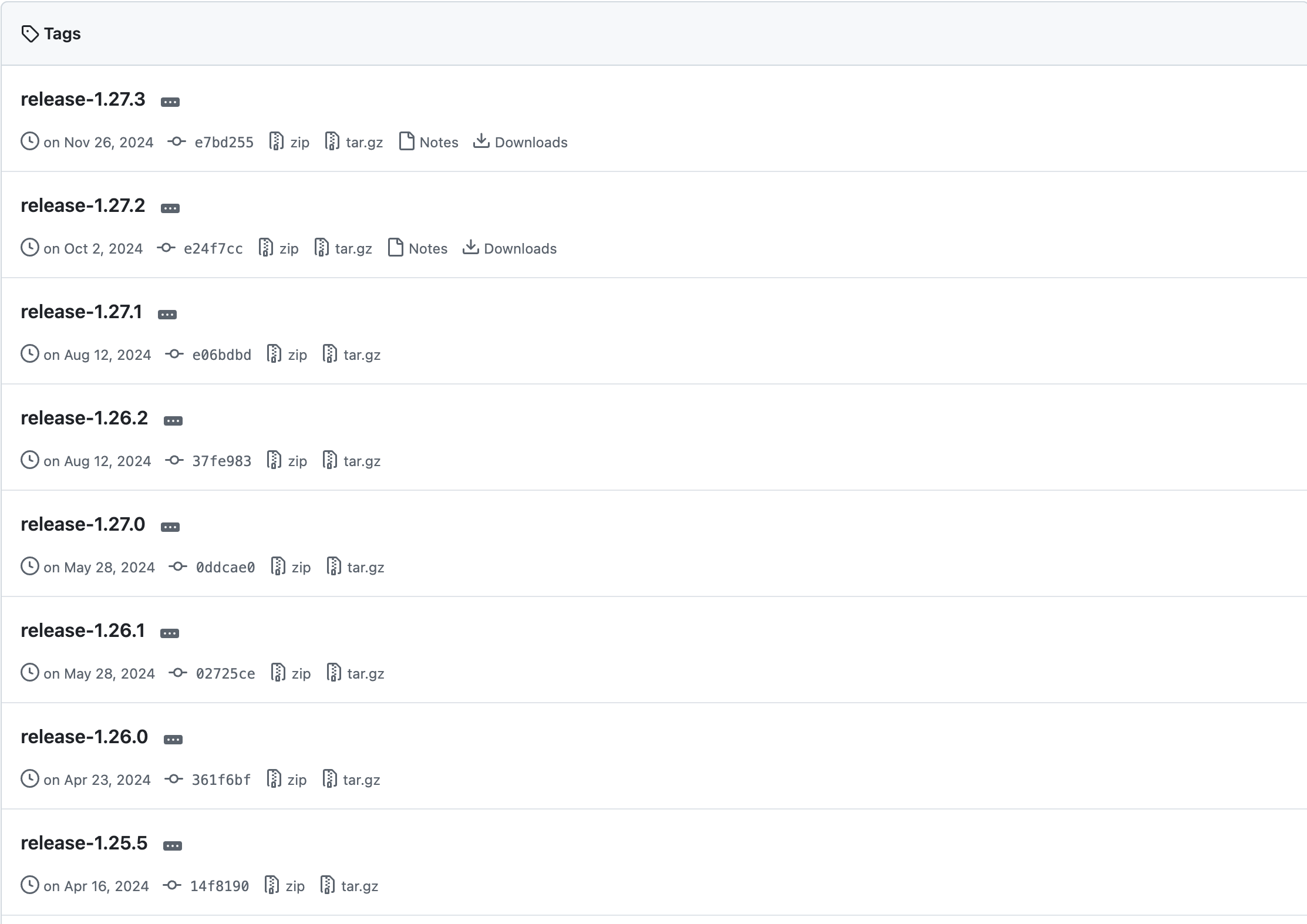
3. Using version 1.26 as an example, download and unzip the project.
wget https://github.com/nginx/nginx/archive/refs/tags/release-1.26.2.zipunzip release-1.26.2.zip
4. Enter the project folder, configure and generate the necessary compilation files. Add the previously recorded configure parameters after the
configure command.cd nginx-release-1.26.2auto/configure --prefix=/etc/nginx --sbin-path=/usr/sbin/nginx --modules-path=/usr/lib/nginx/modules --conf-path=/etc/nginx/nginx.conf --error-log-path=/var/log/nginx/error.log --http-log-path=/var/log/nginx/access.log --pid-path=/var/run/nginx.pid --lock-path=/var/run/nginx.lock --http-client-body-temp-path=/var/cache/nginx/client_temp --http-proxy-temp-path=/var/cache/nginx/proxy_temp --http-fastcgi-temp-path=/var/cache/nginx/fastcgi_temp --http-uwsgi-temp-path=/var/cache/nginx/uwsgi_temp --http-scgi-temp-path=/var/cache/nginx/scgi_temp --user=nginx --group=nginx --with-compat --with-file-aio --with-threads --with-http_addition_module --with-http_auth_request_module --with-http_dav_module --with-http_flv_module --with-http_gunzip_module --with-http_gzip_static_module --with-http_mp4_module --with-http_random_index_module --with-http_realip_module --with-http_secure_link_module --with-http_slice_module --with-http_ssl_module --with-http_stub_status_module --with-http_sub_module --with-http_v2_module --with-http_v3_module --with-mail --with-mail_ssl_module --with-stream --with-stream_realip_module --with-stream_ssl_module --with-stream_ssl_preread_module --with-cc-opt='-g -O2 -ffile-prefix-map=/data/builder/debuild/nginx-1.26.2/debian/debuild-base/nginx-1.26.2=. -flto=auto -ffat-lto-objects -flto=auto -ffat-lto-objects -fstack-protector-strong -Wformat -Werror=format-security -Wp,-D_FORTIFY_SOURCE=2 -fPIC' --with-ld-opt='-Wl,-Bsymbolic-functions -flto=auto -ffat-lto-objects -flto=auto -Wl,-z,relro -Wl,-z,now -Wl,--as-needed -pie'
5. Clone the nginx-otel source code locally.
git clone https://github.com/nginxinc/nginx-otel.git
6. Enter the nginx-otel folder and create a compilation folder.
cd nginx-otelmkdir buildcd build
7. Enable the configuration and start compilation.
Note:
Here
/path/to/configured/nginx/objs is the path to the objs folder generated earlier in the Nginx compilation file, you can find it in the Nginx source folder.cmake -DNGX_OTEL_NGINX_BUILD_DIR=/path/to/configured/nginx/objs ..make
After compilation is complete, the dynamic module file
ngx_otel_module.so will be generated under the nginx-otel/build folder. The following is a file example of ALL files under the nginx-otel/build folder.CMakeCache.txt CMakeFiles cmake_install.cmake _deps gens http_archives Makefile ngx_otel_module.so opentelemetry protos
8. Move the
ngx_otel_module.so file to the /etc/nginx/modules folder (this document uses the configuration path for Nginx in Ubuntu system, other systems may be different).mvngx_otel_module.so /etc/nginx/modules
Configuring Nginx-Otel
Modify the Nginx configuration file
/etc/nginx/nginx.conf.load_module modules/ngx_otel_module.so; # Load dynamic module...http {...otel_exporter {endpoint ${ENDPOINT}; # APM Access Point}otel_trace on; # Activate linkage tracingotel_service_name ${SERVICE_NAME}; # APM application nameotel_trace_context propagate; # Inject TraceID into W3C request headers, enablement requiredotel_resource_attr token ${TOKEN}; # Integration tokenotel_resource_attr host.name ${HOST.NAME}; # The instance's hostname...}
The corresponding field descriptions are as follows:
${SERVICE_NAME}: application name. Multiple processes accessed with the same application name are displayed as multiple instances under the same application in APM. It is recommended to name it directly as
nginx.${ENDPOINT}: The access point obtained in the previous step. Please note this is the OpenTelemetry access point for Go applications and does not include the http prefix.
${TOKEN}: The token obtained in the preliminary step.
${HOST.NAME}: The instance's hostname, which is the unique identifier of the application instance. Normally, it can be set to the Nginx instance's IP address.
Once configured, reload the configuration file with
sudo nginx -s reload or restart the Nginx service with service nginx restart to complete the integration.
フィードバック