CLS allows you to embed the CLS console into an external system, so that you can conduct log search and analysis without logging in to the Tencent Cloud console. This feature offers the following benefits:
Quickly integrate CLS search and analysis capabilities into an external service system (e.g., for business maintenance or operation).
Easily share your log data with others without needing to manage additional Tencent Cloud sub-accounts.
Demo Code for Login-Free Implementation
Directions
1. Go to the CAM page, create a CAM role, select a Tencent Cloud Account as the role carrier, enable console login, and assign appropriate access permissions to the CAM role, such as the read-only policy QcloudCLSReadOnlyAccess. Name the role CLSReadOnly. Then, copy the RoleArn information of the policy.
2. On the Policies page, create a custom policy and select Create by Policy Generator. Then, select the JSON tag and enter the following information in Policy Content. Note that you need to replace ${YOUR_UIN} with the account UIN (the resource content is the RoleArn of the created role; modify the policy name in case of any inconsistency). Click Next and set Policy Name to PlayClsPolicy.
{
"version":"2.0",
"statement":[
{
"effect":"allow",
"action":[
"sts:AssumeRole"
],
"resource":[
"qcs::cam::uin/${YOUR_UIN}:roleName/CLSReadOnly"
]
}
]
}
3. On the Create User page, select Custom Creation and set Type to Access Resources and Receive Messages, Username to PlayClsUser, Access Method to Programming access, and User permissions to PlayClsPolicy created in the previous step. After submitting the user creation operation, copy the generated SecretId and SecretKey.
4. Clone the demo codecls-iframe-demo for login-free implementation. As instructed in the ReadMe content of the demo project, create the .env file in the root directory and enter the required parameters RoleArn, SecretId, and SecretKey.
Note:
Code leakage may lead to the exposure of SecretId and SecretKey, thereby compromising account security. To ensure account security, refer to the TencentCloud API key security recommendations for secure key usage. Additionally, follow the principle of least privilege by using sub-account keys with minimal permissions.
Refer to the ReadMe document of the login-free console demo program. After running the project, you can view the login-free console effect.
Note:
This example does not include the authentication logic of external systems. After deployment, all users (even if they have not logged in to Tencent Cloud) can view the data under their accounts with the role permissions configured in the example. To ensure data privacy and security, add the authentication logic of external systems or restrict their access to the private network only to ensure that only authorized users can view the page.
5. Concatenate the destination login-free address s_url of CLS (optional). If you enter the obtained address in the configuration file of the login-free project, access to the login-free service will be automatically redirected to this address.
The basic address of the CLS search and analysis page:
Parameters in the CLS search and analysis page URL:
Parameter
Required
Type
Description
region
Yes
String
Region abbreviation, e.g., ap-shanghai for Shanghai region. For other available region abbreviations, see Available Regions
topic_id
No
String
Log topic ID
logset_name
No
String
Logset name
topic_name
No
String
Log topic name
time
No
String
Time range for log search. Format example:2021-07-15T10:00:00.000,2021-07-15T12:30:00.000
queryBase64
No
String
Search and analysis statement, which is base64Url-encoded
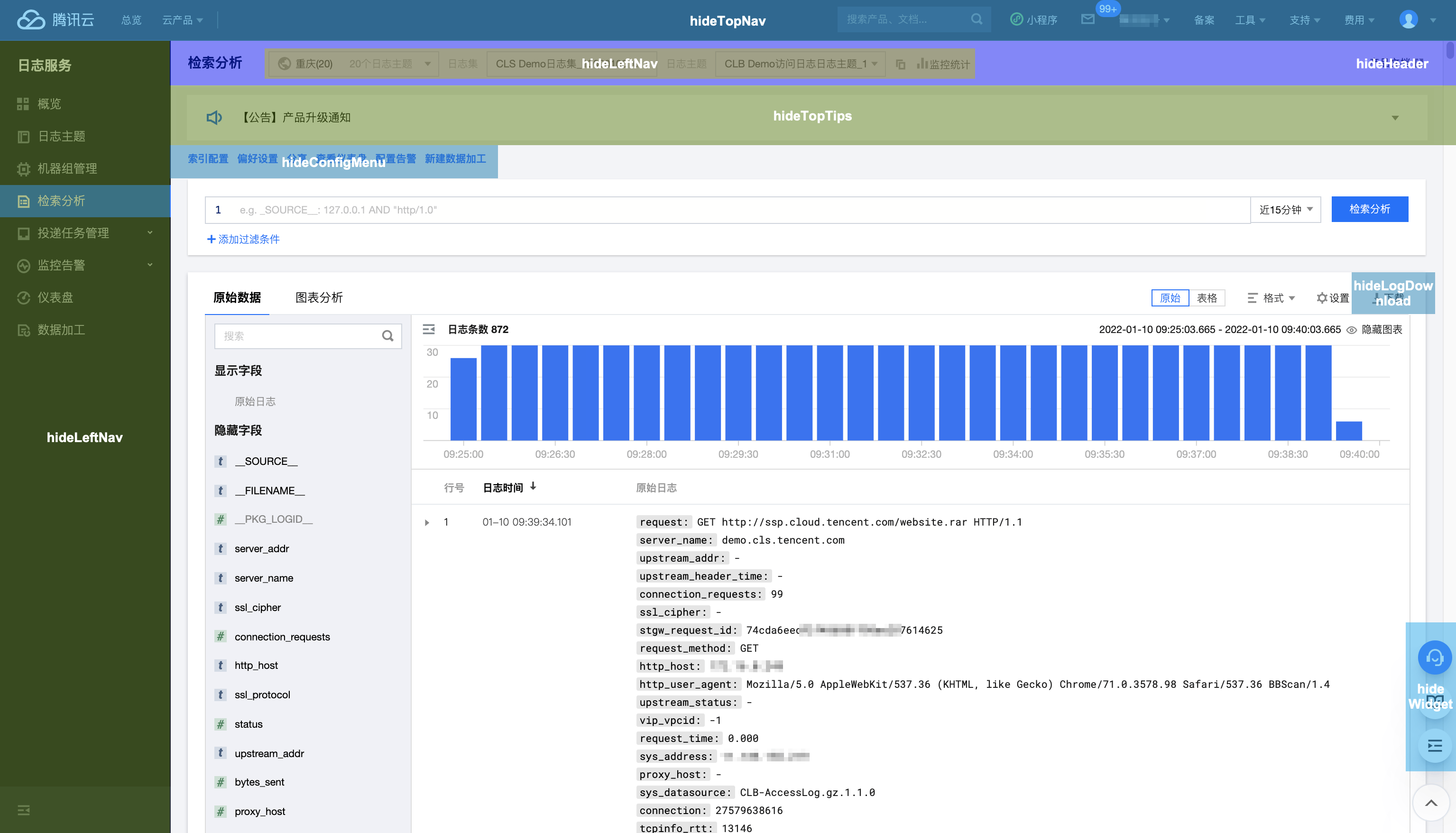
hideWidget
No
Boolean
Indicates whether to hide agent/documentation button in the bottom-right corner. `true`: Yes; `false`: No (default)
hideTopNav
No
Boolean
Indicates whether to hide the top navigation bar in the Tencent Cloud console. `true`: Yes; `false`: No (default)
hideLeftNav
No
Boolean
Indicates whether to hide the left navigation bar in the Tencent Cloud console. `true`: Yes; `false`: No (default)
hideTopicSelect
No
Boolean
Indicates whether to hide the log topic selection controls (including the region, logset, and log topic controls). `true`: Yes; `false`: No (default)
hideHeader
No
Boolean
Indicates whether to hide the log topic selection control and the row where the control resides. `true`: Yes; `false`: No (default). This parameter is valid only when `hideTopicSelect` is `true`.
hideTopTips
No
Boolean
Indicates whether to hide the announcements on the top of the page. `true`: Yes; `false`: No (default)
hideConfigMenu
No
Boolean
Indicates whether to hide the log topic configuration management menu. `true`: Yes; `false`: No (default)
hideLogDownload
No
Boolean
Indicates whether to hide the raw log download button. `true`: Yes; `false`: No (default)
Note:
You can specify the log topic to search using URL parameters in either the following modes:
topic_id: use the log topic ID to specify the log topic to search.
logset_name+topic_name: use the logset name and log topic name to specify the log topic to search. Note that if the logset or log topic name changes, the URL adopting this mode will become invalid.
If `topic_id`, `logset_name`, and `topic_name` exist at the same time, `topic_id` prevails.
Self-Development for Login-Free Implementation
Directions
Note:
Code leakage may lead to the exposure of SecretId and SecretKey, thereby compromising account security. To ensure account security, refer to the TencentCloud API key security recommendations for secure key usage. Additionally, follow the principle of least privilege by using sub-account keys with minimal permissions.
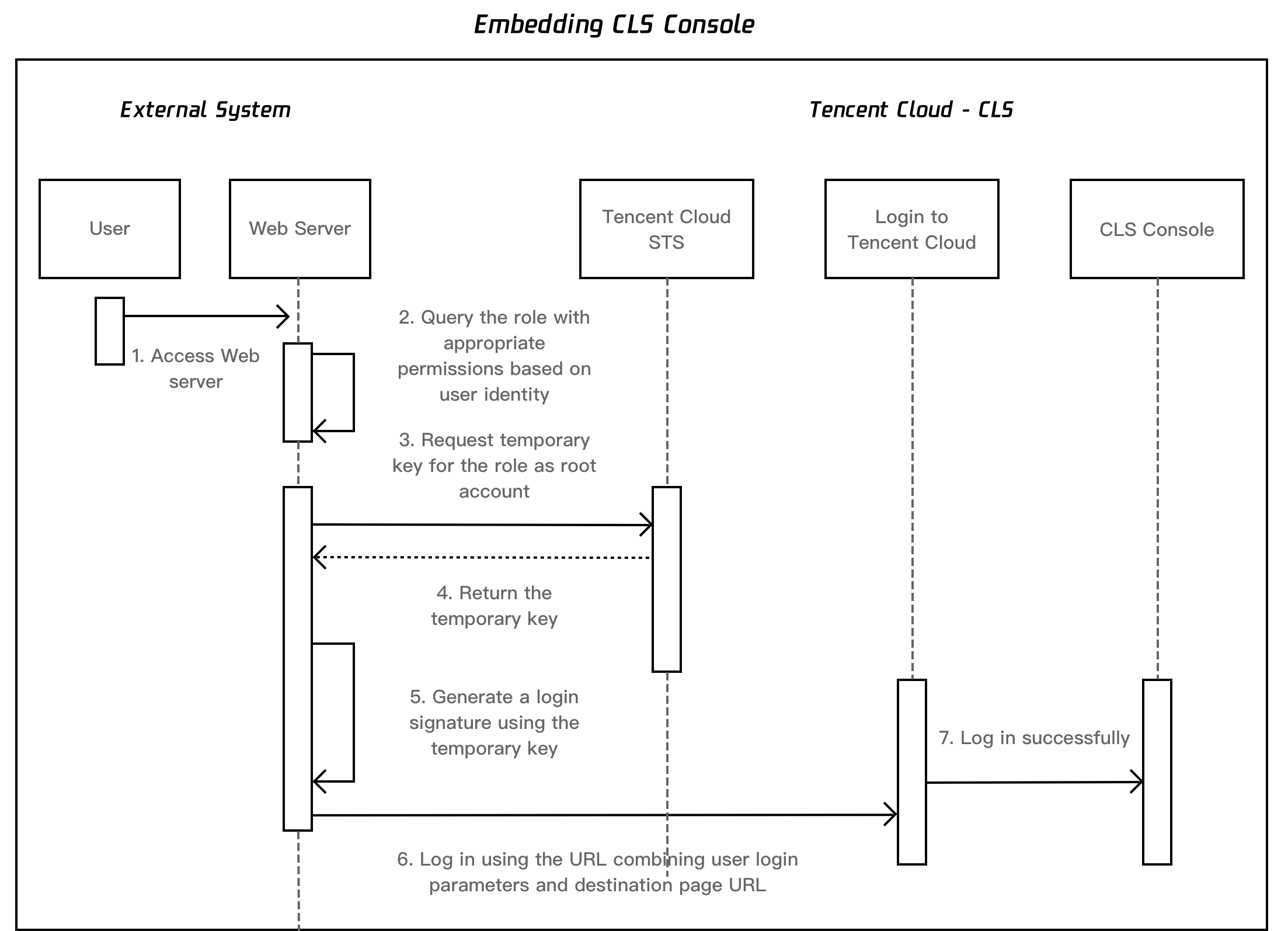
1. Configure the CLS read-only role, custom policy of the target role, and sub-account bound to the custom policy as instructed in Demo Code for Login-Free Implementation. Then, save the RoleArn, SecretId, and SecretKey information.
2. Get the destination login-free address s_url as needed as instructed in Demo Code for Login-Free Implementation.
3. Repeat the following steps every time you need to open a login-free page.
4. Call the STS AssumeRole API with the obtained key to apply for the temporary key of the target role.
5. Generate the login signature information with the obtained temporary key.
5.1 Sort parameters to be signed.
Sort parameters to be signed listed below in ascending alphabetical or numerical order. That is, sort the parameters by their first letters, then by their second letters if their first letters are the same, and so on. You can do this with the aid of sorting functions in programming languages, such as the ksort function in PHP.
Parameter
Required
Type
Description
action
Yes
String
Action; fixed as `roleLogin`
timestamp
Yes
Int
Current timestamp
nonce
Yes
Int
Random integer. Value range: 10000-100000000
secretId
Yes
String
Temporary AK returned by STS
5.2 Combine the parameters.
Combine the above sorted parameters into the form of "parameter name=parameter value". Example:
algorithm=<Encryption algorithm for signing. Currently, only `sha1` and `sha256` are supported. `sha1` will be used by default if the parameter is not specified.>
&secretId=<secretId for signing>
&token=<Temporary key token>
&nonce=<nonce for signing>
×tamp=<Timestamp for signing>
&signature=<Signature string>
&s_url=<Destination URL after login>
7. Use the final URL to access the embedded CLS page of the Tencent Cloud console. The sample below is a URL to the CLS search analysis page: