WAF supports the configuration and protection of HTTPS access to domain names. If your website has not been altered for the HTTPS protocol, you can apply for a DV certificate free of charge in the SSL Certificate Service console. After your application is approved, you can associate the certificate in the WAF console and then easily implement access and client connection to the entire website over HTTPS without modifying the real server.
Associating HTTPS Certificate
1. Log in to the WAF console and select Instance management > Instance list on the left sidebar.
2. On the Instance list page, select the target instance and click Domain name connection.
3. On the Domain name connection page, click Add domain name.
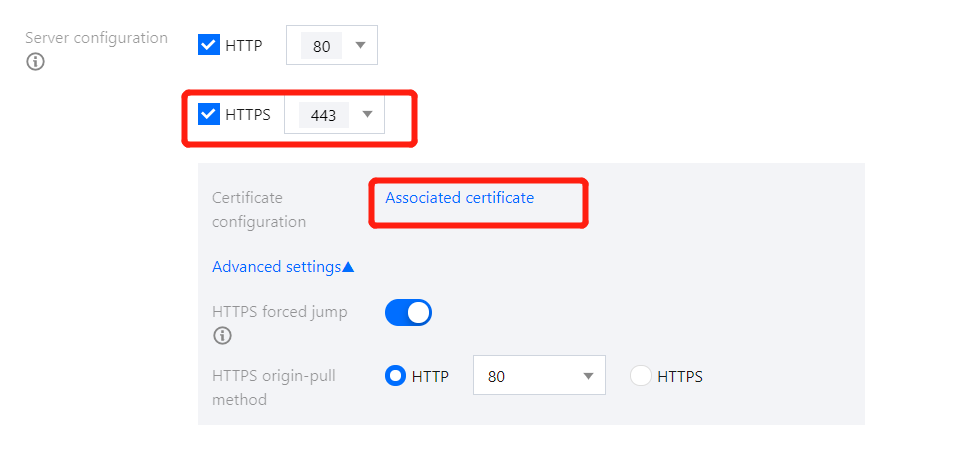
4. In Server configuration of the domain name configuration, select HTTPS. In Certificate configuration, click Associated certificate.
Note:
The certificate format should be PEM and the content should be text.
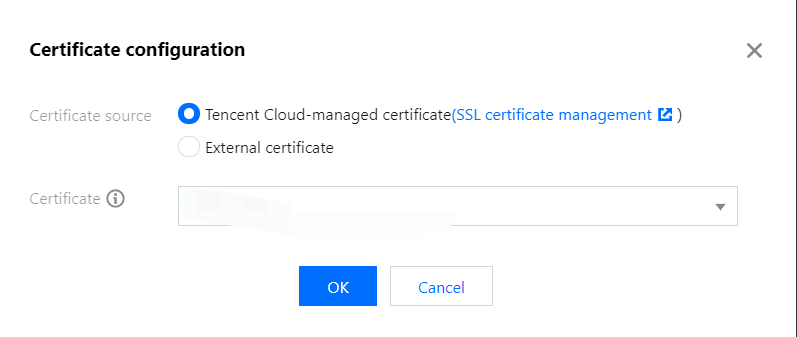
5. Select Tencent Cloud-managed certificate as the Certificate source. Then, WAF will automatically associate an available certificate of the domain name. After the configuration is completed, click Save.
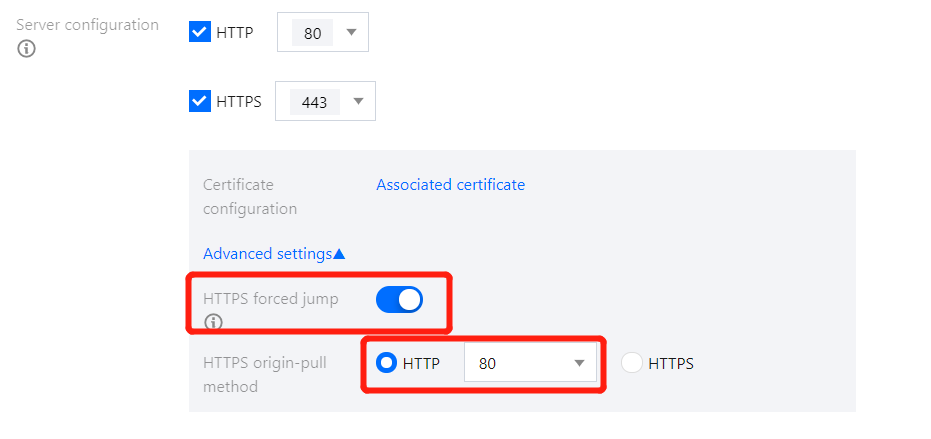
6. Enable HTTPS forced jump and select the HTTP access protocol above. Select HTTP for HTTPS origin-pull method and set other parameters as needed; then, your website will support HTTPS access.
Note:
To enable HTTPS forced jump, you need to select both HTTP and HTTPS access protocols.