tencent cloud

Tencent Real-Time Communication

お知らせ・リリースノート
製品アップデート情報
Tencent Cloudオーディオビデオ端末SDKの再生アップグレードおよび承認チェック追加に関するお知らせ
TRTCアプリケーションのサブスクリプションパッケージサービスのリリースに関する説明について
製品の説明
製品概要
基礎概念
製品の機能
製品の強み
ユースケース
性能データ
購入ガイド
Billing Overview
無料時間の説明
Monthly subscription
Pay-as-you-go
TRTC Overdue and Suspension Policy
課金に関するよくあるご質問
Refund Instructions
初心者ガイド
Demo体験
Call
コンポーネントの説明(TUICallKit)
Activate the Service
Run Demo
クイック導入
オフライン通知
Conversational Chat
クラウドレコーディング(TUICallKit)
AI Noise Reduction
インターフェースのカスタマイズ
Calls integration to Chat
Additional Features
No UI Integration
Server APIs
Client APIs
Solution
ErrorCode
公開ログ
よくある質問
ライブ配信
Billing of Video Live Component
Overview
Activating the Service (TUILiveKit)
Demo のクイックスタート
No UI Integration
UI Customization
Live Broadcast Monitoring
Video Live Streaming
Voice Chat Room
Advanced Features
Client APIs
Server APIs
Error Codes
Release Notes
FAQs
RTC Engine
Activate Service
SDKのダウンロード
APIコードサンプル
Usage Guidelines
クライアント側 API
高度な機能
RTC RESTFUL API
History
Introduction
API Category
Room Management APIs
Stream mixing and relay APIs
On-cloud recording APIs
Data Monitoring APIs
Pull stream Relay Related interface
Web Record APIs
AI Service APIs
Cloud Slicing APIs
Cloud Moderation APIs
Making API Requests
Call Quality Monitoring APIs
Usage Statistics APIs
Data Types
Appendix
Error Codes
コンソールガイド
アプリケーション管理
使用統計
監視ダッシュボード
開発支援
Solution
Real-Time Chorus
よくあるご質問
課金関連問題
機能関連
UserSig関連
ファイアウォールの制限の対応関連
インストールパッケージの圧縮に関するご質問
AndriodおよびiOS関連
Web端末関連
Flutter関連
Electron関連
TRTCCalling Web関連
オーディオビデオ品質関連
その他のご質問
旧バージョンのドキュメント
TUIRoom(Web)の統合
TUIRoom (Android)の統合
TUIRoom (iOS)の統合
TUIRoom (Flutter)の統合
TUIRoom (Electron)の統合
TUIRoom APIのクエリー
クラウドレコーディングと再生の実現(旧)
Protocols and Policies
セキュリティコンプライアンス認証
セキュリティホワイトペーパー
情報セキュリティの説明
Service Level Agreement
Apple Privacy Policy: PrivacyInfo.xcprivacy
TRTC ポリシー
プライバシーポリシー
データ処理とセキュリティ契約
用語集

SDK Integration Guide (Flutter)

PDF
フォーカスモード
フォントサイズ
最終更新日: 2025-04-10 11:38:07

Step 1: Seamless Integration of Tencent Special Effect Resources

2. Migrate Tencent special effect resources
Android
iOS
1. Find the src/main/assets folder in the android/app module of your project. Copy the lut and MotionRes folders from demo/android/app/src/main/assets in the demo project to android/app/src/main/assets in your project. If your project does not have an assets folder, you can manually create one.
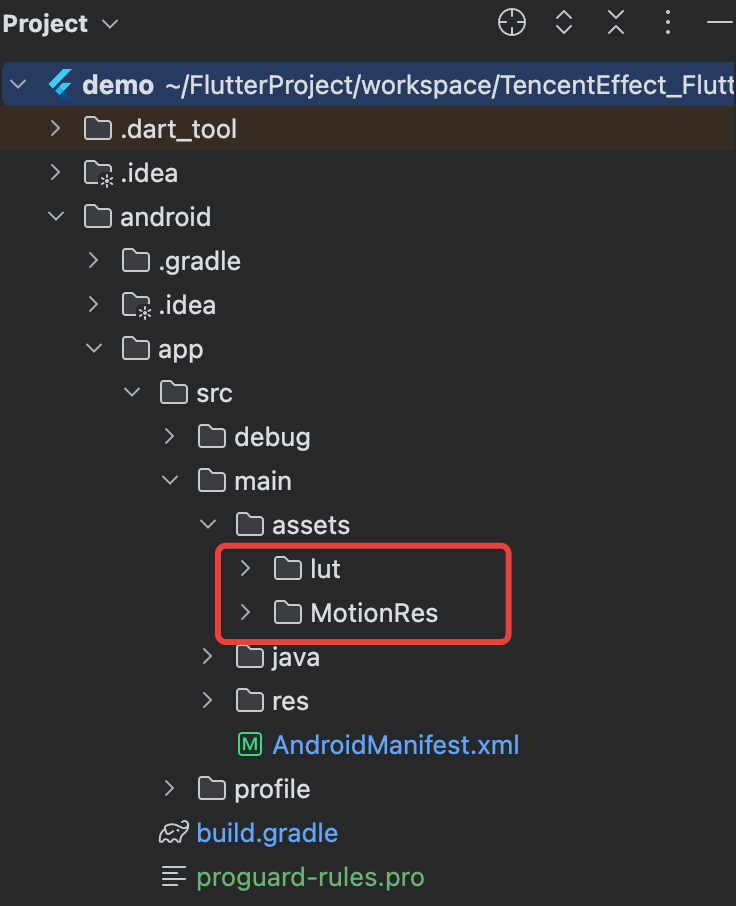
2. In the android/app/build.gradle file of your project, add the dependency of the Beauty SDK for the Android side. The specific dependency depends on the package you selected. For example, if you selected the S1-04 package, add the following:
dependencies {
implementation 'com.tencent.mediacloud:TencentEffect_S1-04:latest.release'
}
Note:
The maven urls corresponding to each package, please see Documentation. The latest version number of the SDK can be viewed in Version History.
3. If you use an Android version of beauty SDK less than 3.9, you need to find the AndroidManifest.xml file under the app module and add the following tags in the application table:
<uses-native-library
android:name="libOpenCL.so"
android:required="false" />
//true indicates that libOpenCL is necessary for the current app. If there is no such library, the system will not allow the app to install.
//false indicates that libOpenCL is not necessary for the current app. The app can be properly installed regardless of whether this library is present. If the device has this library, the GAN type effects in the beauty effect SDK (for example, Fairy Tale Face, Chinese Cartoon face) will take effect normally. If the device does not have this library, the GAN type will not take effect, but it does not affect the usage of other functions in the SDK.
//For the description of uses-native-library, please refer to the Android official website introduction: https://developer.android.com/guide/topics/manifest/uses-native-library-element
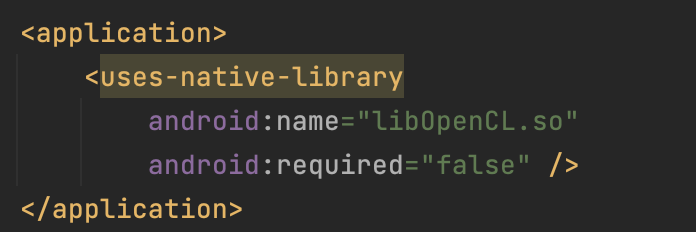
As shown below after addition:

4. Obfuscation configuration.
When building a release package with code optimization and obfuscation features enabled (minifyEnabled = true), the compilation tool may remove code that is not explicitly called at the Java/Kotlin layer. If this code is dynamically called by the native layer, a NoSuchMethodError exception (such as no xxx method) will be triggered.
It is recommended to proactively retain the necessary code of the Xmagic module through ProGuard rules in proguard-rules.pro:
-keep class com.tencent.xmagic.** { *;}
-keep class org.light.** { *;}
-keep class org.libpag.** { *;}
-keep class org.extra.** { *;}
-keep class com.gyailib.**{ *;}
-keep class com.tencent.cloud.iai.lib.** { *;}
-keep class com.tencent.beacon.** { *;}
-keep class com.tencent.qimei.** { *;}
-keep class androidx.exifinterface.** { *;}
-keep class com.tencent.effect.** { *;}
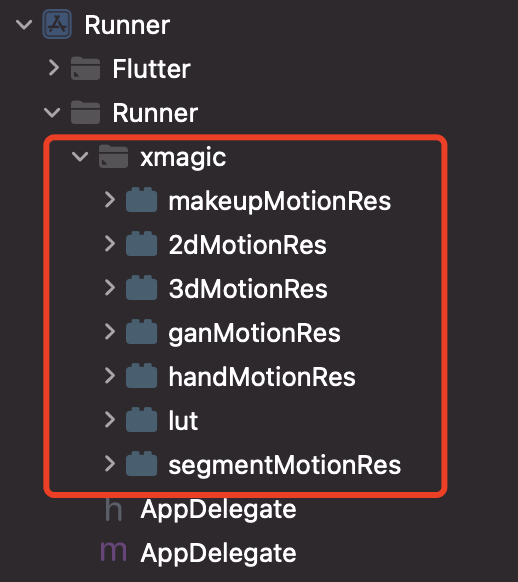
Copy the xmagic folder under the ios/Runner directory in the demo project to the ios/Runner directory in your project. After addition, it is as shown in the figure below:

Note:
The above materials copied from the demo project are test materials. For official materials, you need to contact the staff of Tencent Special Effect Beauty after purchasing a package to obtain and re-add them.

Step Two: Integration of tencent_effect_flutter

You can depend on tencent_effect_flutter in your Flutter project in the following ways.
1. Remote dependency
Add the following reference in your pubspec.yaml file:
tencent_effect_flutter:
git:
url: https://github.com/Tencent-RTC/TencentEffect_Flutter
2. Local dependency
Download the latest version of tencent_effect_flutter from github, and then add the following reference in the pubspec.yaml file:
tencent_effect_flutter:
path: path to tencent_effect_flutter

Step 3: Beauty Effect and TRTC Association

Android
iOS
Add the following code in the onCreate method of the application class (or the onCreate method of the FlutterActivity):
TRTCPlugin.setBeautyProcesserFactory(new XmagicProcesserFactory());
Add the following code in the didFinishLaunchingWithOptions method in the AppDelegate file under the ios/Runner directory:
Swift
Object-C
let instance = XmagicProcesserFactory()
TencentRTCCloud.setBeautyProcesserFactory(factory: instance)
XmagicProcesserFactory *instance = [[XmagicProcesserFactory alloc] init];
[TencentRTCCloud setBeautyProcesserFactoryWithFactory:instance];

Step 4: Beauty Effect Resource Initialization and Authorization

1. Resource initialization
V0.3.5.0 and Later
V0.3.1.1 and Earlier Versions
TencentEffectApi.getApi()?.setResourcePath(resourceDir);

TencentEffectApi.getApi()?.initXmagic((result) {
// TODO
});
TencentEffectApi.getApi()?.initXmagic(dir,(reslut) {
//TODO
});
2. Beauty authorization
TencentEffectApi.getApi()?.setLicense(licenseKey, licenseUrl, (errorCode, msg) {
if (errorCode == 0) {
// Success
}
});

Step 5: Enable/Disable Beauty Effects

After completing the above operations, you can enable/disable beauty effects through TRTC's hidden interface:
_enableCustomBeautyByNative(bool open) {
trtcCloud.callExperimentalAPI("{\\"api\\": \\"enableVideoProcessByNative\\", \\"params\\": {\\"enable\\": $open}}");
}
Note:
Enable beauty effects on the page. When closing the camera, you need to disable beauty effects first. Enable and disable are used in pairs.

Document Reference

You have completed the association between TRTC and Special Effect Beauty Enhancement. You can learn more about how to use Special Effect Beauty Enhancement through the following document:

ヘルプとサポート

この記事はお役に立ちましたか?

フィードバック