For more information on ${zkserverip}:${zkport}, see the kyuubi.ha.zookeeper.quorum configuration item of kyuubi-defaults.conf.
For more information on ${kyuubiserverport}, see the kyuubi.frontend.bind.port configuration item of kyuubi-defaults.conf.
Creating and viewing database
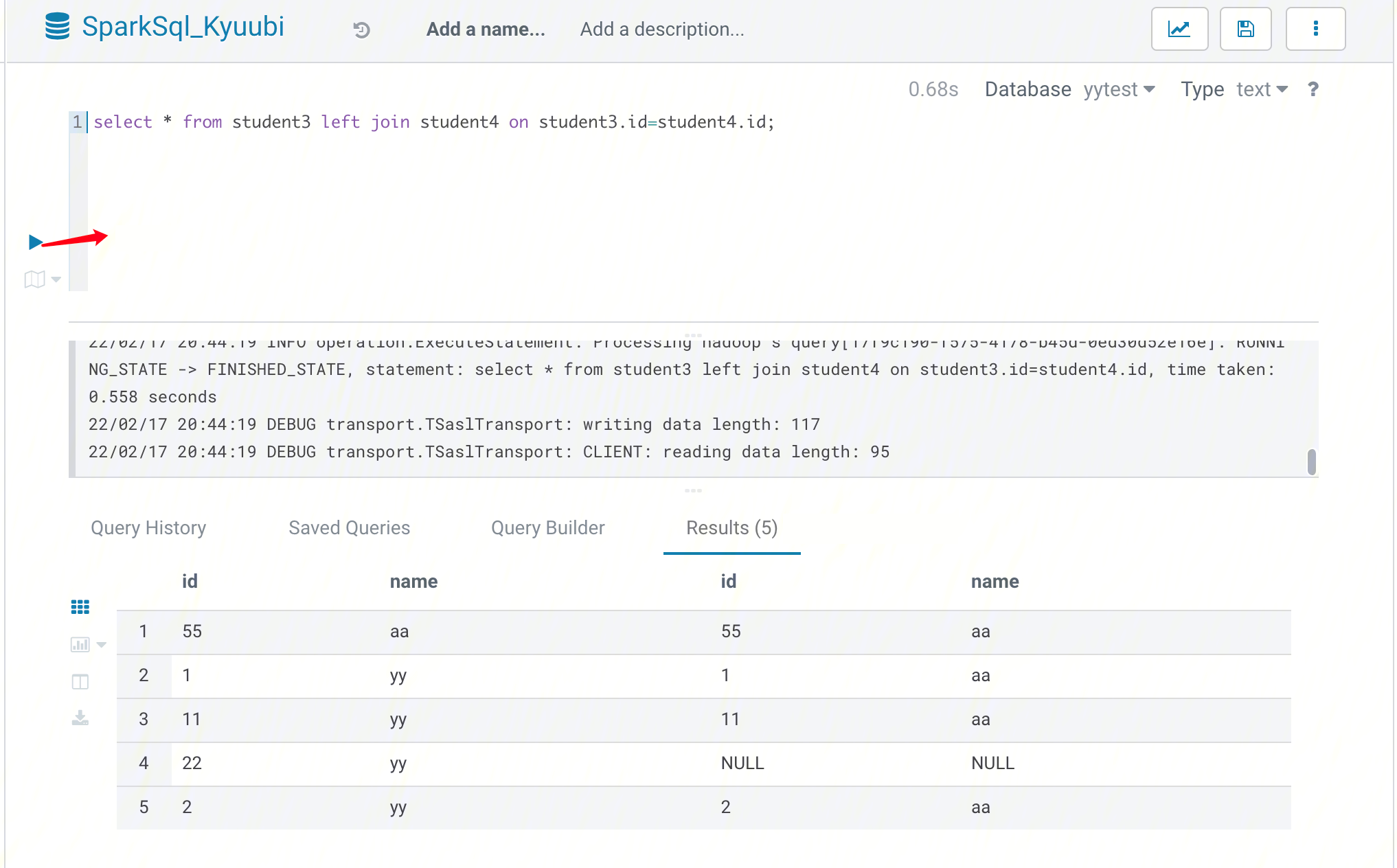
Create a new table in the database you just created and view the table:
If Kyuubi is installed in the existing cluster, you need to perform the following operations before you can use Kyuubi on Hue:
1. Go to the Configuration Management page of HDFS, add the hadoop.proxyuser.hue.groups and hadoop.proxyuser.hue.hosts configuration items to core-site.xml, and set their values to *.
1. At the top of the Hue console, select Query > Editor > SparkSql_Kyuubi.
2. Enter the statement to be executed in the statement input box and click Run to run it.
Connecting to Kyuubi Through Java
KyuubiServer is integrated with the Thrift service. Thrift, created by Facebook, is an interface definition language and binary communication protocol used for defining and creating services for numerous languages. Apache Kyuubi is based on Thrift, allowing many languages such as Java and Python to call Kyuubi's APIs. Additionally, the Hive JDBC driver for Kyuubi enables Java applications to interact with Kyuubi. This section describes how to connect to Kyuubi through Java code.
1. Prepare for development.
Confirm that you have activated EMR and created an EMR cluster. When creating the EMR cluster, select the Kyuubi and Spark components on the software configuration page.
Kyuubi and its dependencies are installed in the EMR cluster directory /usr/local/service/.
2. Use Maven to create a project.
Maven is recommended for project management, as it can help you manage project dependencies with ease. Specifically, it can get JAR packages through the configuration of the pom.xml file, eliminating your need to add them manually. Download and install Maven locally first and then configure its environment variables. If you are using the IDE, set the Maven-related configuration items in the IDE.
In the local shell environment, enter the directory where you want to create the Maven project, such as D://mavenWorkplace, and enter the following command to create it:
Here, $yourgroupID is your package name, $yourartifactID is your project name, and maven-archetype-quickstart indicates to create a Maven Java project. Some files need to be downloaded for creating the project, so stay connected to the internet. After successfully creating the project, you will see a folder named $yourartifactID in the D://mavenWorkplace directory. The files included in the folder have the following structure:
simple
---pom.xml Core configuration, under the project root directory
---src
---main
---java Java source code directory
---resources Java configuration file directory
---test
---java Test source code directory
---resources Test configuration directory
Among the above files, pay extra attention to the pom.xml file and the Java folder under the main directory. The pom.xml file is primarily used to create dependencies and package configurations; the Java folder is used to store your source code. First, add the Maven dependencies to pom.xml:
<dependencies>
<dependency>
<groupId>org.apache.kyuubi</groupId>
<artifactId>kyuubi-hive-jdbc-shaded</artifactId>
<version>1.4.1-incubating</version>
</dependency>
<dependency>
<groupId>org.apache.hadoop</groupId>
<artifactId>hadoop-common</artifactId>
<!-- keep consistent with the build hadoop version -->
<version>2.8.5</version>
</dependency>
</dependencies>
Then, add the packaging and compiling plugins to pom.xml:
The $kyuubiserverhost and $kyuubiserverport parameters in the program should be replaced with the values of the IP and port number of the KyuubiServer you queried.
If your Maven is configured correctly and its dependencies are imported successfully, the project can be compiled directly. Enter the project directory in the local shell and run the following command to package the entire project:
mvn package
3. Upload and run the program.
First, use the SCP or SFTP tool to upload the compressed JAR package to the EMR cluster. Run the following command in your local shell:
scp$localfile root@public IP address:/usr/local/service/kyuubi
Be sure to upload a JAR package that contains the dependencies. Log in to the EMR cluster, switch to the Hadoop user, and go to the /usr/local/service/kyuubi directory. Then, you can run the following program:
[hadoop@172 kyuubi]$ yarn jar $package.jar KyuubiJDBCTest
Here, $package.jar is the path plus name of your JAR package, and KyuubiJDBCTest is the name of the previously created Java Class. The result is as follows: