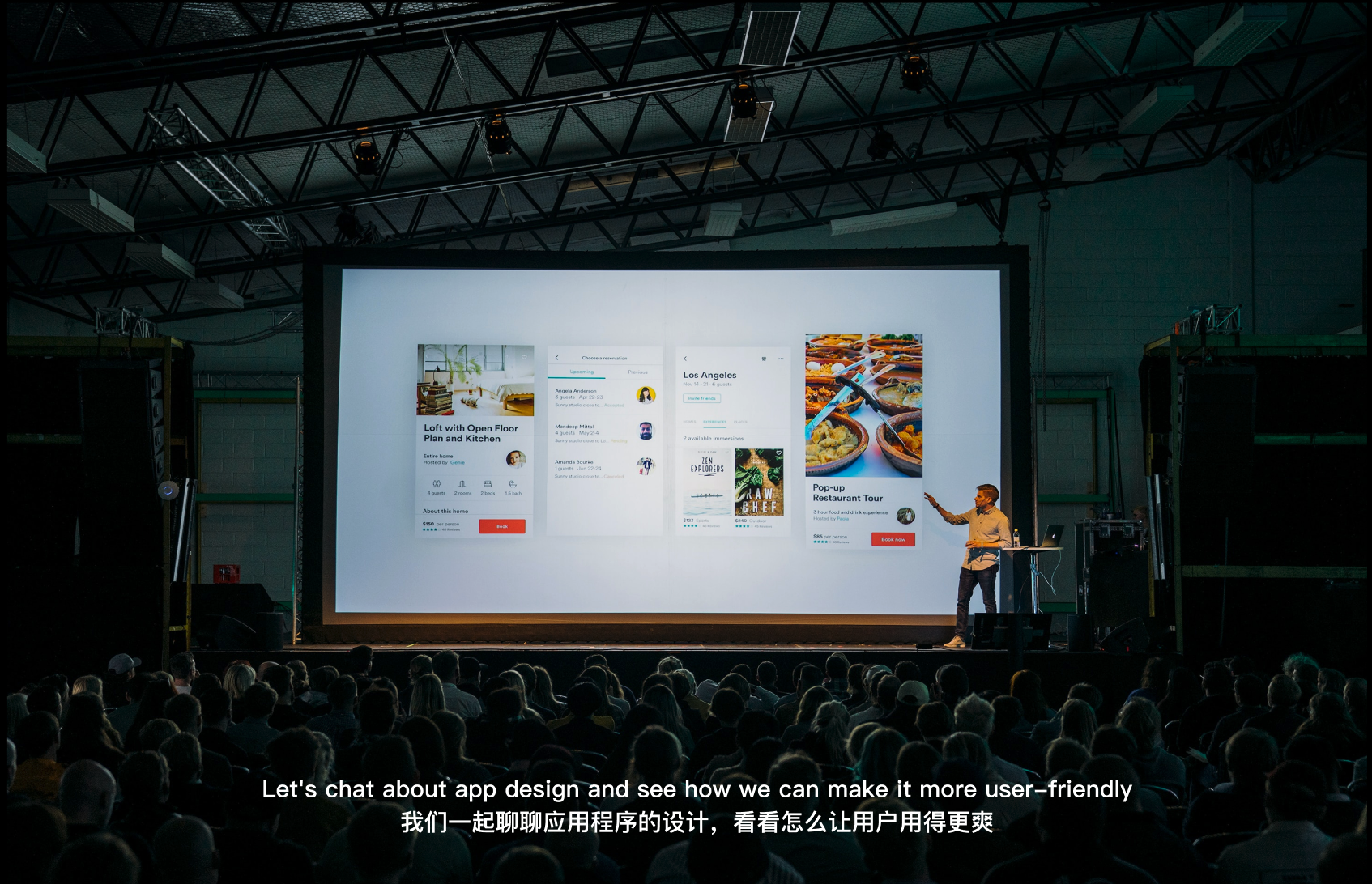
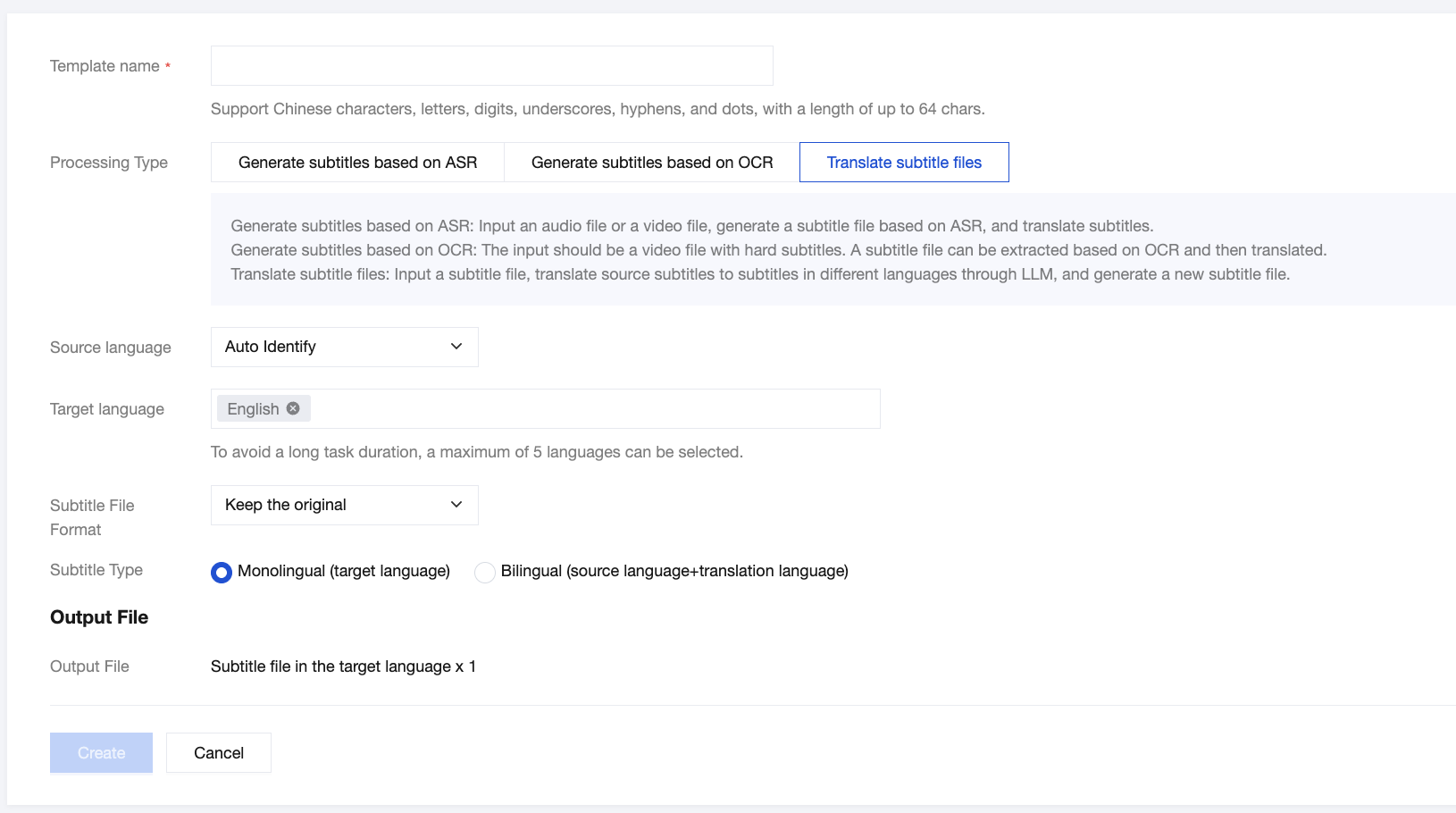
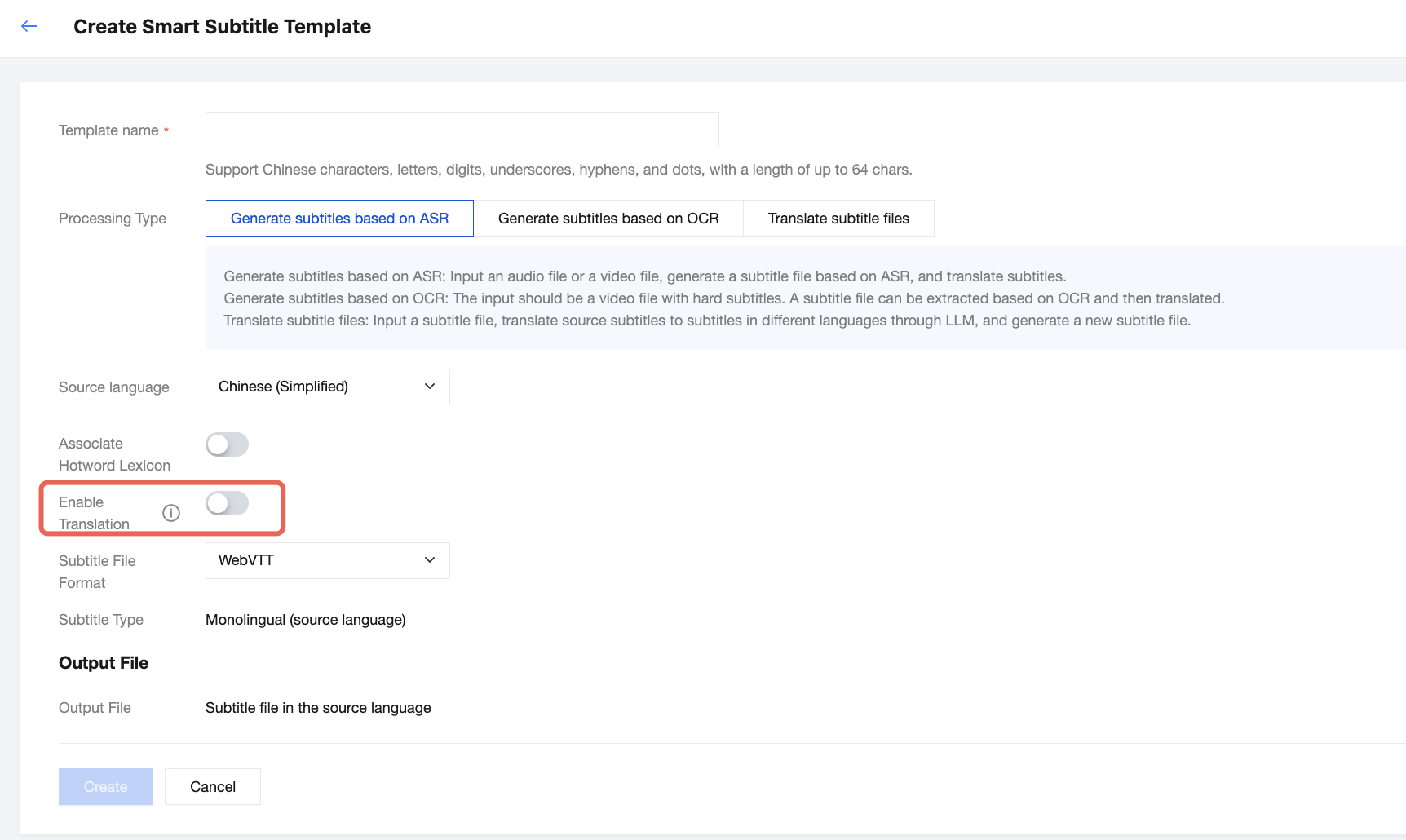
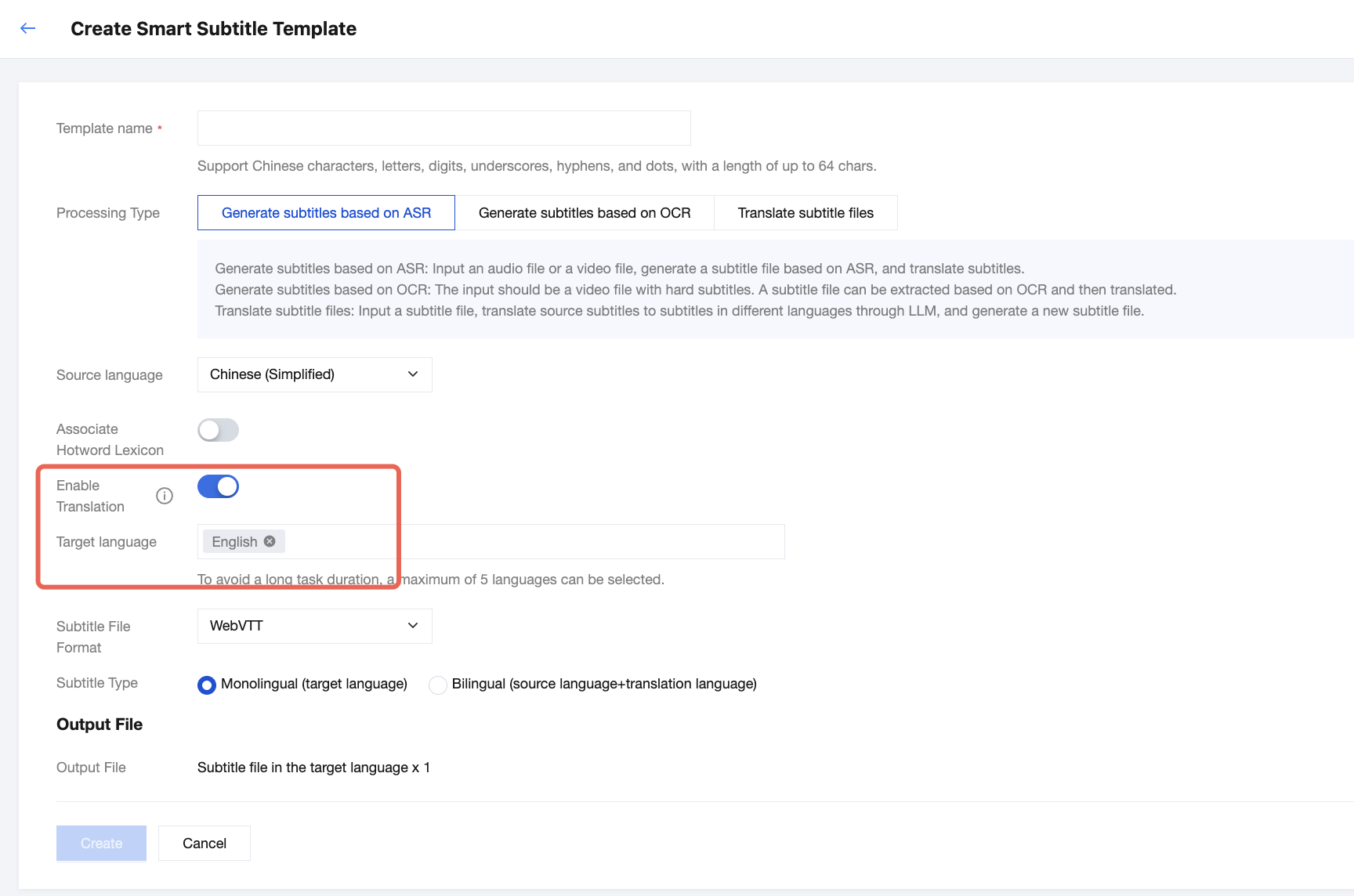
The smart subtitle feature can perform Automatic Speech Recognition (ASR) on the voice information in on-demand video files or live streams, convert it into subtitles, and translate it into multiple languages. It is suitable for scenarios such as live subtitles for streaming and video translation for overseas distribution. You can create custom smart subtitle templates and preset different process parameters for different use cases, to facilitate subsequent reuse.
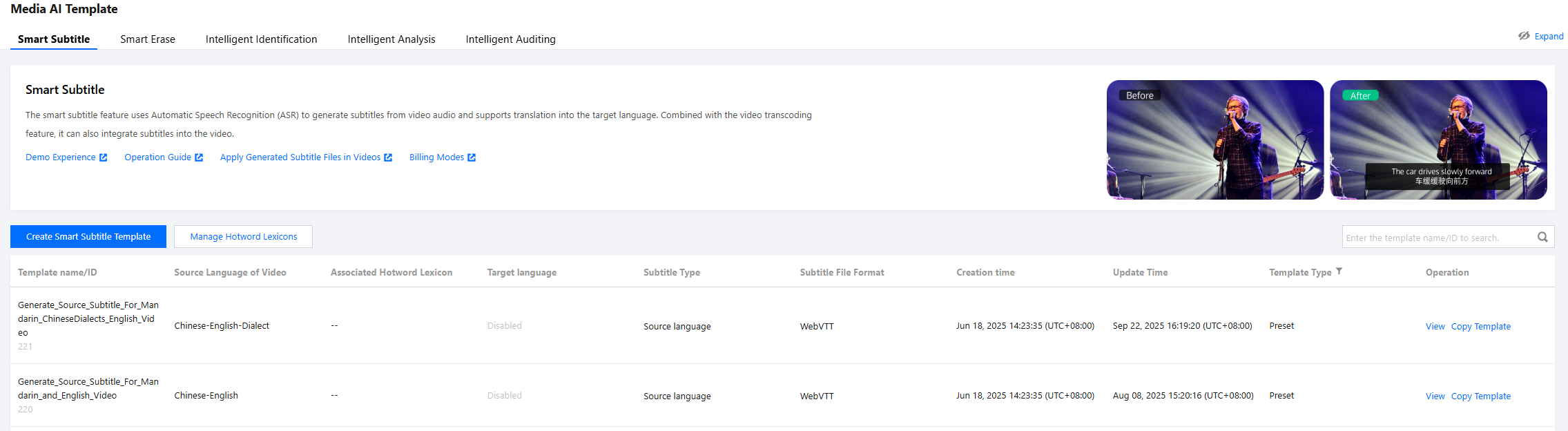
1. Go to Templates > Media AI Template > Smart Subtitle. The system provides several preset templates that you can use directly, or you can click Create Smart Subtitle Template to create a custom template.
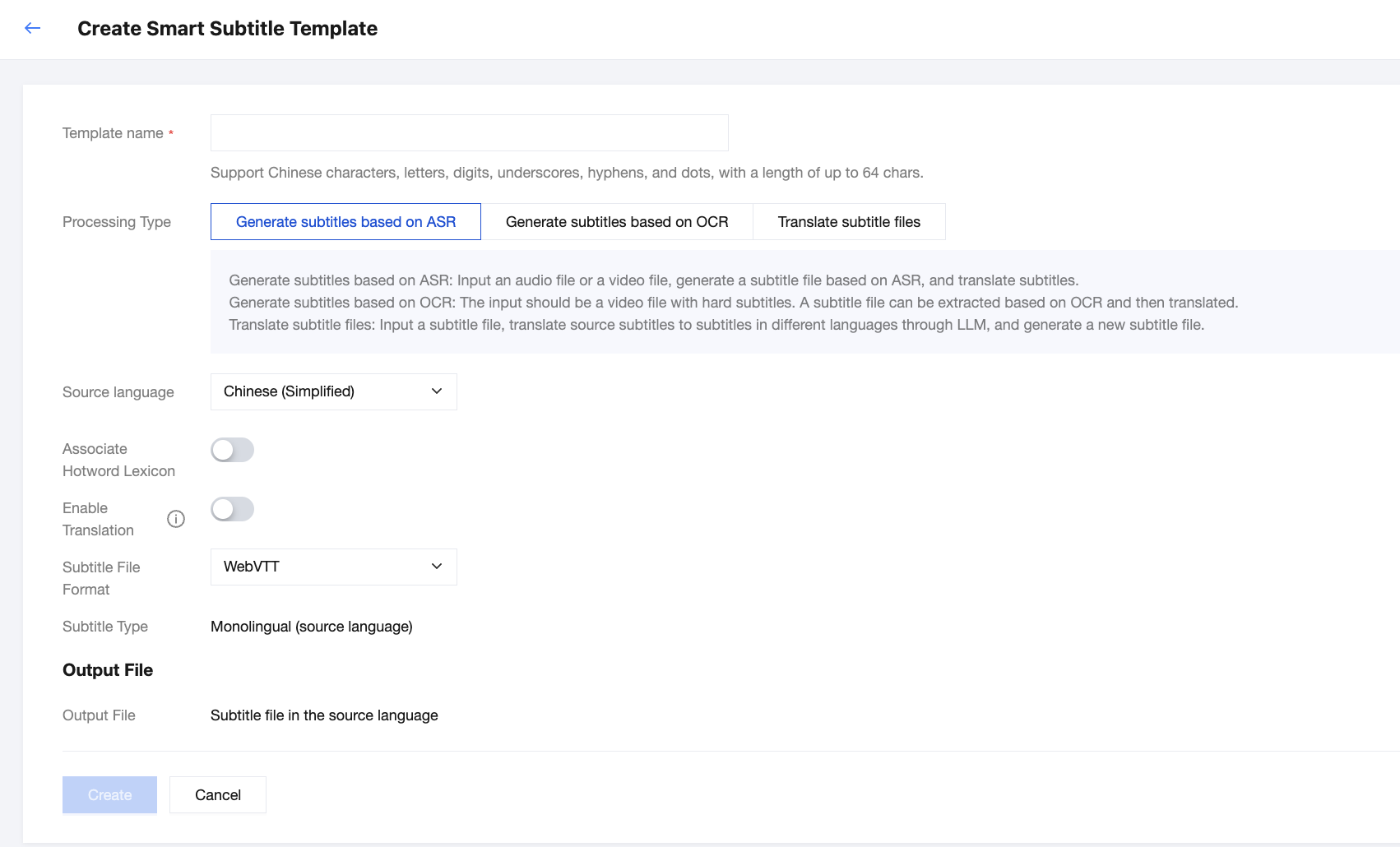
2. Enter the smart subtitle template creation page. The following configuration parameters are supported.
Processing Type of "Generate Subtitles based on ASR"
The following configuration items are supported:
Configuration Item
Description
Template Name
Only Chinese characters, English letters, digits, underscores (_), hyphens (-), and periods (.) are supported, and the length should not exceed 64 characters.
Processing Type
Automatic speech recognition (ASR)-based subtitle generation: Input an audio file or a video file, generate a subtitle file based on ASR, and translate subtitles.
Translation of subtitle files: Input a subtitle file, translate source subtitles to subtitles in different languages through LLM, and generate a new subtitle file.
Processing Type of "ASR-based Subtitle Generation"
Commonly used words in speech are generally accurately recognized. However, for specific names (such as personal names, product names, and company names) and industry-specific terms (such as the brand name Zhiling, the building name Binhai Dasha, Hebao in the insurance field, or Cunchutong in cloud storage), the recognition accuracy may decrease. To address this issue, we provide a custom hotword lexicon feature. You can add specialized terms through manual input or file import, significantly improving the accuracy of ASR. For detailed configuration guidance, see Custom Hotword Lexicons.
Note:
Currently, the hotword lexicon only supports Mandarin and English. Therefore, the hotword lexicon can only be associated when the source language of the audio content of the video is Simplified Chinese or English.
Enable Translation
After it is enabled, the subtitles in the source language can be translated into the specified language, making it suitable for scenarios such as video translation for global distribution.
Certain languages are not available for selection currently. If you need to use them, contact us for support.
Target Language for Translation
Subtitle Type
If the translation feature is not enabled, the output subtitles will only contain content in the source language.
When the translation feature is enabled, the following subtitle output types are supported:
Monolingual (target language)
Bilingual (source language + target language)
Subtitle File Format
Currently, the WebVTT and SRT formats are supported. If you only need a subtitle content callback and do not need the output of a subtitle file, you can select Do Not Generate Subtitle Files.
Supported Languages
Source Languages
Number
Language (Source Language)
Code
1
Afrikaans (South Africa)
af-ZA
2
Albanian (Albania)
sq-AL
3
Amharic (Ethiopia)
am-ET
4
Arabic (Algeria)
ar-DZ
5
Arabic (Bahrain)
ar-BH
6
Arabic (Egypt)
ar-EG
7
Arabic (Iraq)
ar-IQ
8
Arabic (Israel)
ar-IL
9
Arabic (Jordan)
ar-JO
10
Arabic (Kuwait)
ar-KW
11
Arabic (Lebanon)
ar-LB
12
Arabic (Mauritania)
ar-MR
13
Arabic (Morocco)
ar-MA
14
Arabic (Oman)
ar-OM
15
Arabic (Qatar)
ar-QA
16
Arabic (Saudi Arabia)
ar-SA
17
Arabic (State of Palestine)
ar-PS
18
Arabic (Syria)
ar-SY
19
Arabic (Tunisia)
ar-TN
20
Arabic (United Arab Emirates)
ar-AE
21
Arabic (Yemen)
ar-YE
22
Armenian (Armenia)
hy-AM
23
Azerbaijani (Azerbaijan)
az-AZ
24
Basque (Spain)
eu-ES
25
Bengali (Bangladesh)
bn-BD
26
Bengali (India)
bn-IN
27
Bosnian (Bosnia and Herzegovina)
bs-BA
28
Bulgarian (Bulgaria)
bg-BG
29
Burmese (Myanmar)
my-MM
30
Catalan (Spain)
ca-ES
31
Simplified Chinese (China)
zh-CN
32
Chinese (Hong Kong (China) Simplified)
zh-HK
33
Traditional Chinese (Taiwan (China))
zh-TW
34
Cantonese (Hong Kong (China) Traditional Chinese)
yue
35
Croatian (Croatia)
hr-HR
36
Czech (Czech Republic)
cs-CZ
37
Danish (Denmark)
da-DK
38
Dutch (Belgium)
nl-BE
39
Dutch (Netherlands)
nl-NL
40
English (Australia)
en-AU
41
English (Canada)
en-CA
42
English (Ghana)
en-GH
43
English (Hong Kong (China))
en-HK
44
English (India)
en-IN
45
English (Ireland)
en-IE
46
English (Kenya)
en-KE
47
English (New Zealand)
en-NZ
48
English (Nigeria)
en-NG
49
English (Pakistan)
en-PK
50
English (Philippines)
en-PH
51
English (Singapore)
en-SG
52
English (South Africa)
en-ZA
53
English (Tanzania)
en-TZ
54
English (UK)
en-GB
55
English (US)
en-US
56
Estonian (Estonia)
et-EE
57
Filipino (Philippines)
fil-PH
58
Finnish (Finland)
fi-FI
59
French (Belgium)
fr-BE
60
French (Canada)
fr-CA
61
French (France)
fr-FR
62
French (Switzerland)
fr-CH
63
Galician (Spain)
gl-ES
64
Georgian (Georgia)
ka-GE
65
German (Austria)
de-AT
66
German (Germany)
de-DE
67
German (Switzerland)
de-CH
68
Greek (Greece)
el-GR
69
Gujarati (India)
gu-IN
70
Hebrew (Israel)
iw-IL
71
Hindi (India)
hi-IN
72
Hungarian (Hungary)
hu-HU
73
Icelandic (Iceland)
is-IS
74
Indonesian (Indonesia)
id-ID
75
Italian (Italy)
it-IT
76
Italian (Switzerland)
it-CH
77
Japanese (Japan)
ja-JP
78
Javanese (Indonesia)
jv-ID
79
Kannada (India)
kn-IN
80
Kazakh (Kazakhstan)
kk-KZ
81
Khmer (Cambodia)
km-KH
82
Kinyarwanda (Rwanda)
rw-RW
83
Korean (South Korea)
ko-KR
84
Lao (Laos)
lo-LA
85
Latvian (Latvia)
lv-LV
86
Lithuanian (Lithuania)
lt-LT
87
Macedonian (North Macedonia)
mk-MK
88
Malay (Malaysia)
ms-MY
89
Malayalam (India)
ml-IN
90
Marathi (India)
mr-IN
91
Mongolian (Mongolia)
mn-MN
92
Nepali (Nepal)
ne-NP
93
Bokmål Norwegian (Norway)
no-NO
94
Persian (Iran)
fa-IR
95
Polish (Poland)
pl-PL
96
Portuguese (Brazil)
pt-BR
97
Portuguese (Portugal)
pt-PT
98
Punjabi (Gurmukhi, India)
pa-Guru-IN
99
Romanian (Romania)
ro-RO
100
Russian (Russia)
ru-RU
101
Serbian (Serbia)
sr-RS
102
Sinhalese (Sri Lanka)
si-LK
103
Slovak (Slovakia)
sk-SK
104
Slovene (Slovenia)
sl-SI
105
Sesotho (South Africa)
st-ZA
106
Spanish (Argentina)
es-AR
107
Spanish (Bolivia)
es-BO
108
Spanish (Chile)
es-CL
109
Spanish (Colombia)
es-CO
110
Spanish (Costa Rica)
es-CR
111
Spanish (Dominican Republic)
es-DO
112
Spanish (Ecuador)
es-EC
113
Spanish (El Salvador)
es-SV
114
Spanish (Guatemala)
es-GT
115
Spanish (Honduras)
es-HN
116
Spanish (Mexico)
es-MX
117
Spanish (Nicaragua)
es-NI
118
Spanish (Panama)
es-PA
119
Spanish (Paraguay)
es-PY
120
Spanish (Peru)
es-PE
121
Spanish (Puerto Rico)
es-PR
122
Spanish (Spain)
es-ES
123
Spanish (US)
es-US
124
Spanish (Uruguay)
es-UY
125
Spanish (Venezuela)
es-VE
126
Sundanese (Indonesia)
su-ID
127
Swahili (Kenya)
sw-KE
128
Swahili (Tanzania)
sw-TZ
129
Swazi (Latin script, South Africa)
ss-Latn-ZA
130
Swedish (Sweden)
sv-SE
131
Tamil (India)
ta-IN
132
Tamil (Malaysia)
ta-MY
133
Tamil (Singapore)
ta-SG
134
Tamil (Sri Lanka)
ta-LK
135
Telugu (India)
te-IN
136
Thai (Thailand)
th-TH
137
Tsonga (South Africa)
ts-ZA
138
Tswana (Latin script, South Africa)
tn-Latn-ZA
139
Turkish (Türkiye)
tr-TR
140
Ukrainian (Ukraine)
uk-UA
141
Urdu (India)
ur-IN
142
Urdu (Pakistan)
ur-PK
143
Uzbek (Uzbekistan)
uz-UZ
144
Venda (South Africa)
ve-ZA
145
Vietnamese (Vietnam)
vi-VN
146
Xhosa (South Africa)
xh-ZA
147
Zulu (South Africa)
zu-ZA
Target Languages for Translation
Number
Language (Target Language)
Code
1
Abkhaz language
ab
2
Acehnese
ace
3
Acholi
ach
4
Afrikaans
af
5
Albanian
sq
6
Alur
alz
7
Amharic
am
8
Arabic
ar
9
Armenian
hy
10
Assamese
as
11
Awadhi
awa
12
Aymara
ay
13
Azerbaijani
az
14
Balinese
ban
15
Bambara
bm
16
Bashkir
ba
17
Basque
eu
18
Batak Karo
btx
19
Batak Simalungun
bts
20
Batak Toba
bbc
21
Belarusian
be
22
Bemba
bem
23
Bengali
bn
24
Betawi
bew
25
Bhojpuri
bho
26
Bikol
bik
27
Bosnian
bs
28
Breton
br
29
Bulgarian
bg
30
Buryat
bua
31
Cantonese
yue
32
Catalan
ca
33
Cebuano
ceb
34
Chichewa (Nyanja)
ny
35
Simplified Chinese
zh-CN or zh
36
Chinese (Traditional)
zh-TW
37
Chuvash
cv
38
Corsican
co
39
Crimean Tatar
crh
40
Croatian
hr
41
Czech
cs
42
Danish
da
43
Dinka
din
44
Divehi
dv
45
Dogri
doi
46
Dombe
dov
47
Dutch
nl
48
Dzongkha
dz
49
English
en
50
Esperanto
eo
51
Estonian
et
52
Ewe
ee
53
Fijian
fj
54
Filipino (Tagalog)
fil or tl
55
Finnish
fi
56
French
fr
57
French (France)
fr-FR
58
French (Canada)
fr-CA
59
Frisian
fy
60
Fula
ff
61
Ga
gaa
62
Galician
gl
63
Ganda (Luganda)
lg
64
Georgian
ka
65
German
de
66
Greek
el
67
Guarani
gn
68
Gujarati
gu
69
Haitian Creole
ht
70
Hakha Chin
cnh
71
Hausa
ha
72
Hawaiian
haw
73
Hebrew
iw or he
74
Hiligaynon
hil
75
Hindi
hi
76
Hmong
hmn
77
Hungarian
hu
78
Hunsrik
hrx
79
Icelandic
is
80
Igbo
ig
81
Iloko
ilo
82
Indonesian
id
83
Irish
ga
84
Italian
it
85
Japanese
ja
86
Javanese
jw
or
jv
87
Kannada
kn
88
Kapampangan
pam
89
Kazakh
kk
90
Khmer
km
91
Kiga
cgg
92
Kinyarwanda
rw
93
Kituba
ktu
94
Goan Konkani
gom
95
Korean
ko
96
Krio
kri
97
Kurdish (Kurmanji)
ku
98
Kurdish (Sorani)
ckb
99
Kirghiz
ky
100
Lao
lo
101
Latgalian
ltg
102
Latin
la
103
Latvian
lv
104
Ligurian
lij
105
Limburgish
li
106
Lingala
ln
107
Lithuanian
lt
108
Lombard
lmo
109
Luo
luo
110
Luxembourgish
lb
111
Macedonian
mk
112
Maithili
mai
113
Makassar
mak
114
Malagasy
mg
115
Malay
ms
116
Malay (Jawi script)
ms-Arab
117
Malayalam
ml
118
Maltese
mt
119
Maori
mi
120
Marathi
mr
121
Meadow Mari language
chm
122
Meitei (Manipuri)
mni-Mtei
123
Minangkabau
min
124
Mizo
lus
125
Mongolian
mn
126
Burmese
my
127
Ndebele (southern)
nr
128
Nepali (Newar)
new
129
Nepali
ne
130
Northern Sotho (Sepedi)
nso
131
Norwegian
no
132
Nuer
nus
133
Occitan
oc
134
Odia (Oria)
or
135
Oromo
om
136
Pangasinan
pag
137
Papiamento
pap
138
Pashto
ps
139
Persian
fa
140
Polish
pl
141
Portuguese
pt
142
Portuguese (Portugal)
pt-PT
143
Portuguese (Brazil)
pt-BR
144
Punjabi
pa
145
Punjabi (Shahmukhi)
pa-Arab
146
Quechuan
qu
147
Romani
rom
148
Romanian
ro
149
Rundi
rn
150
Russian
ru
151
Samoan
sm
152
Sango
sg
153
Sanskrit
sa
154
Scottish Gaelic
gd
155
Serbian
sr
156
Sesotho
st
157
Seychellois Creole
crs
158
Shan
shn
159
Shona
sn
160
Sicilian
scn
161
Silesian
szl
162
Sindhi
sd
163
Sinhalese
si
164
Slovak
sk
165
Slovene
sl
166
Somali
so
167
Spanish
es
168
Sundanese
su
169
Swahili
sw
170
Swati
ss
171
Swedish
sv
172
Tajik
tg
173
Tamil
ta
174
Tatar
tt
175
Telugu
te
176
Tetum
tet
177
Thai
th
178
Tigrinya
ti
179
Tsonga
ts
180
Tswana
tn
181
Turkish
tr
182
Turkmen
tk
183
Twi (Akan)
ak
184
Ukrainian
uk
185
Urdu
ur
186
Uyghur
ug
187
Uzbek
uz
188
Vietnamese
vi
189
Welsh
cy
190
Xhosa
xh
191
Yiddish
yi
192
Yoruba
yo
193
Yucatec Maya
yua
194
Zulu
zu
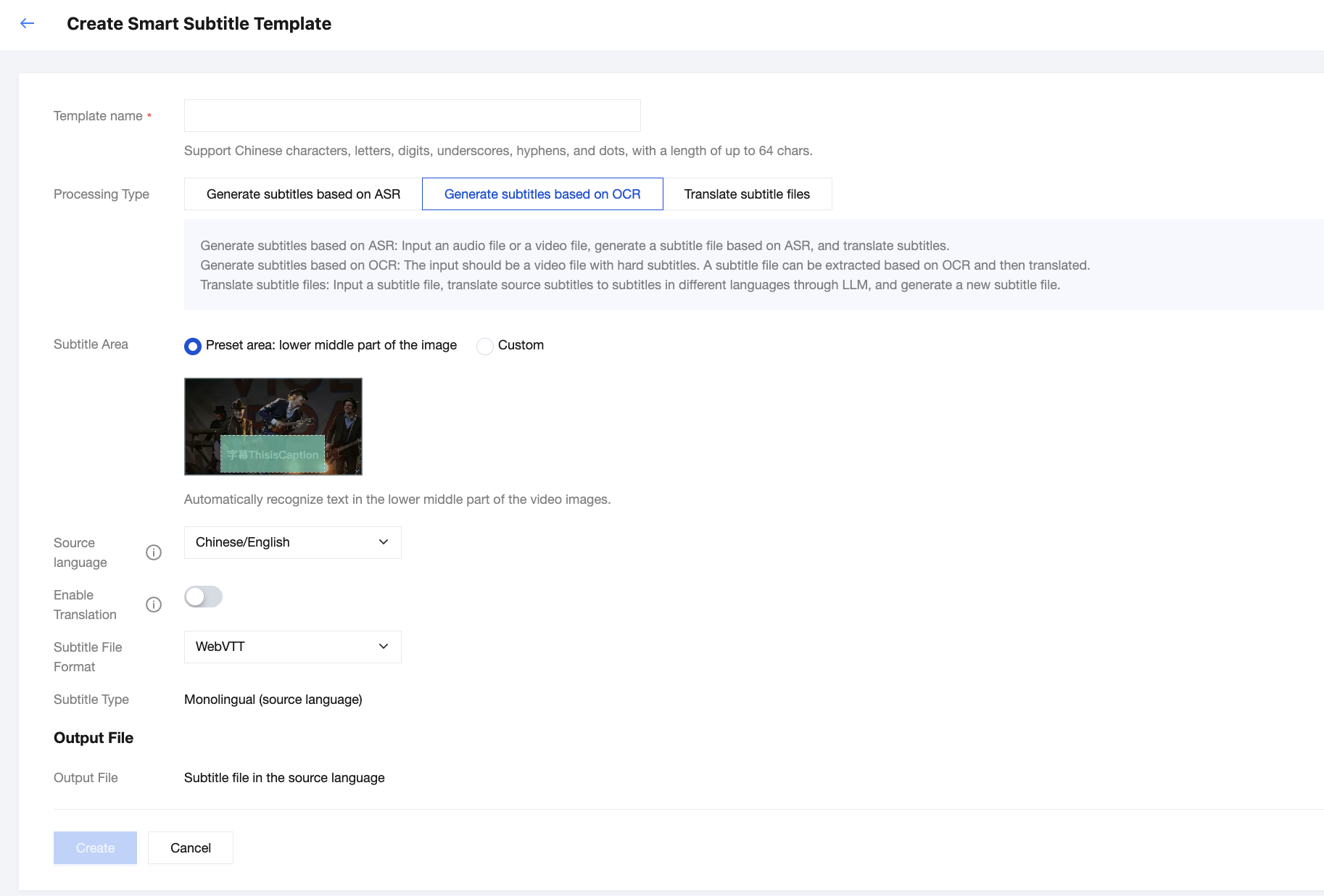
Processing Type as "OCR-based Subtitle Generation"
The following configuration items are supported:
Configuration Item
Description
Template Name
Only Chinese characters, English letters, digits, underscores (_), hyphens (-), and periods (.) are supported. The name cannot exceed 64 characters.
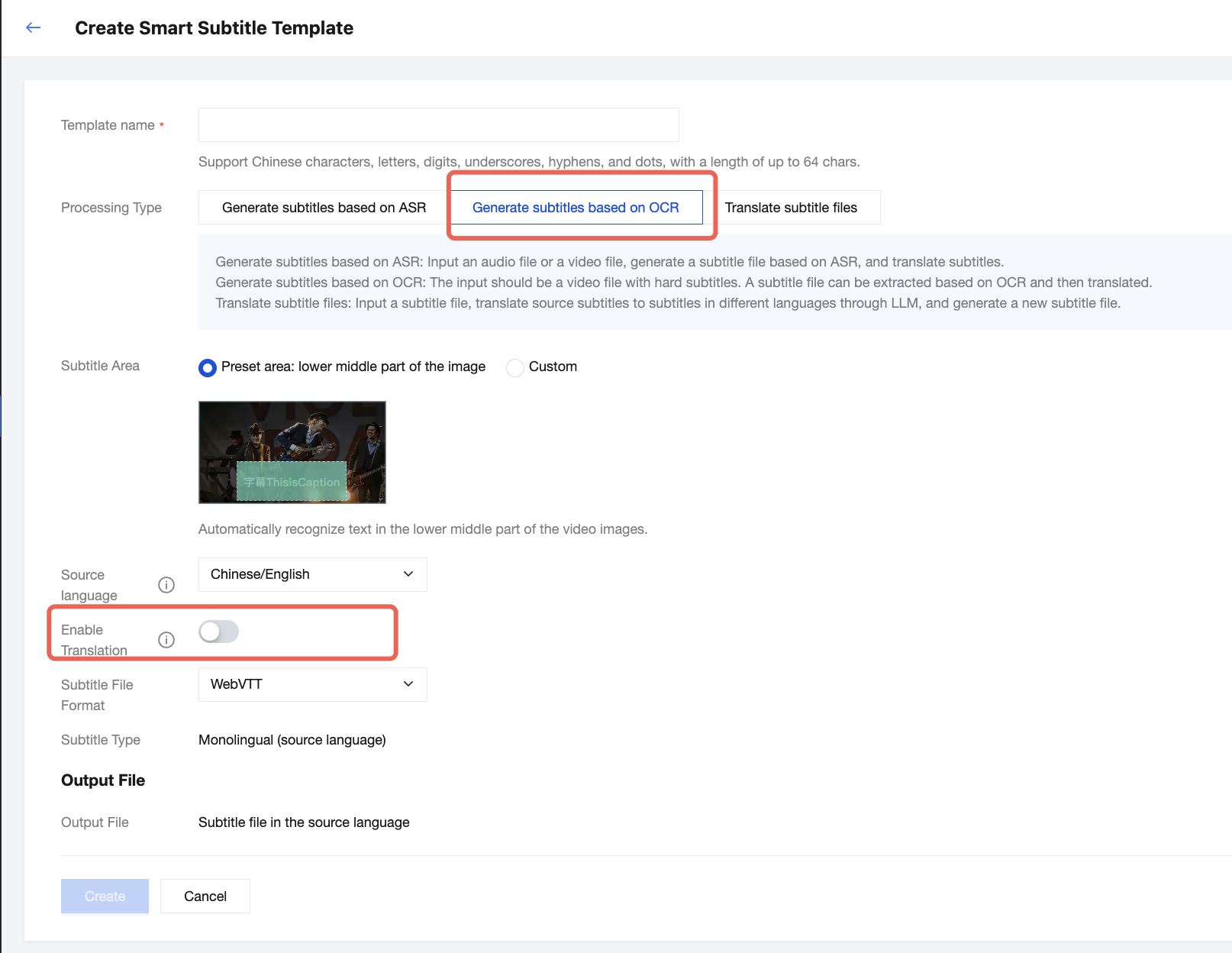
When the Processing Type Is "OCR-based Subtitle Generation"
Subtitle region
Select the area where subtitles are to be extracted. The preset region is the lower center of the video by default. To avoid missing subtitles, we recommend switching to Custom, uploading a preview video or image, and manually selecting the subtitle region.
Source language
Chinese/English: The source language is Chinese, English, or a mix of both.
Other: languages other than Chinese and English.
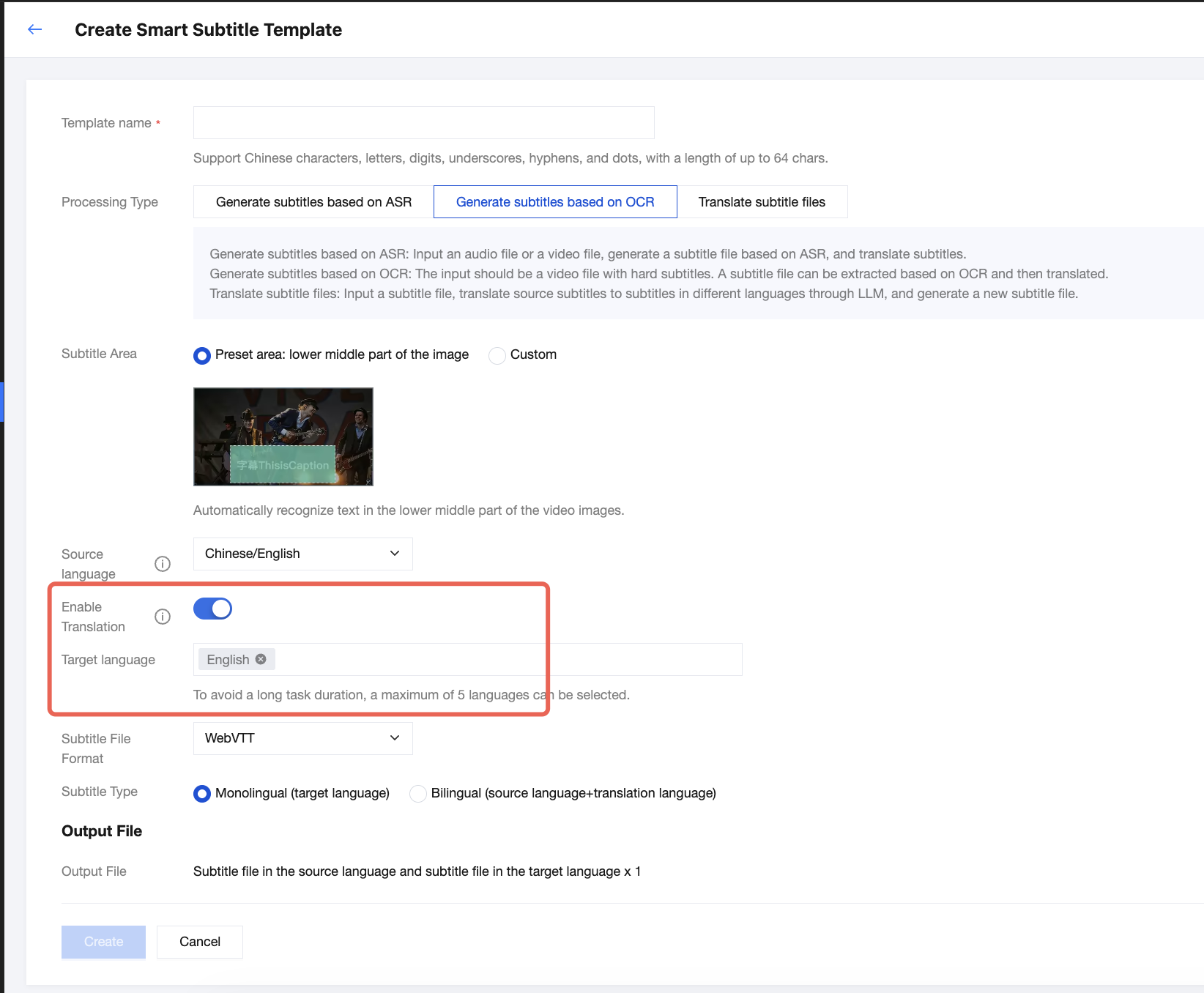
Enable translation
When enabled, source language subtitles can be translated into a specified target language, making it suitable for scenarios such as video translation for global distribution.
Some languages are not yet available for selection. If you need to use them, please contact us for support.
Target language
Subtitle file format
WebVTT and SRT are supported.
Subtitle type
If translation is disabled, the subtitle content is monolingual (source language).
If translation is enabled, the subtitle content supports monolingual (target language) or bilingual (two lines: source language + target language).
Supported Languages
Source Language
If "Chinese/English" is selected as the source language, the following video source languages are supported:
No.
Language (Source Language)
1
Chinese
2
English
If "Other" is selected as the source language, the following video source languages are supported:
No.
Language (Source Language)
1
Japanese
2
Korean
3
Spanish
4
French
5
German
6
Portuguese
7
Vietnamese
8
Malay
9
Russian
10
Italian
11
Dutch
12
Swedish
13
Finnish
14
Danish
15
Norwegian
16
Hungarian
17
Thai
18
Hindi
19
Arabic
20
India-Bengali
21
India-Gujarati
22
India-Kannada
23
India-Malayalam
24
India-Tamil
25
India-Telugu
26
Slovene
27
Polish
28
Catalan
29
Bosnian
30
Czech
31
Estonian
32
Croatian
33
Punjabi
34
Marathi
35
Azerbaijani
36
Indonesian
37
Luxembourgish
38
Lithuanian
39
Latvian
40
Maltese
41
Slovak
42
Turkish
43
Kazakh
44
Greek
45
Irish
46
Belarusian
47
Khmer
48
Tagalog
49
Pashto
50
Persian
51
Tajik
Target Language
No.
Language (Target Language)
Code
1
Abkhaz
ab
2
Acehnese
ace
3
Acholi
ach
4
Afrikaans
af
5
Albanian
sq
6
Alur
alz
7
Amharic
am
8
Arabic
ar
9
Armenian
hy
10
Assamese
as
11
Awadhi
awa
12
Aymara
ay
13
Azerbaijani
az
14
Balinese
ban
15
Bambara
bm
16
Bashkir
ba
17
Basque
eu
18
Batak Karo
btx
19
Batak Simalungun
bts
20
Batak Toba
bbc
21
Belarusian
be
22
Bemba
bem
23
Bengali
bn
24
Betawi
bew
25
Bhojpuri
bho
26
Bikol
bik
27
Bosnian
bs
28
Breton
br
29
Bulgarian
bg
30
Buryat
bua
31
Cantonese
yue
32
Catalan
ca
33
Cebuano
ceb
34
Chichewa (Nyanja)
ny
35
Simplified Chinese
zh-CN or zh
36
Traditional Chinese
zh-TW
37
Chuvash
cv
38
Corsican
co
39
Crimean Tatar
crh
40
Croatian
hr
41
Czech
cs
42
Danish
da
43
Dinka
din
44
Divehi
dv
45
Dogri
doi
46
Dombe
dov
47
Dutch
nl
48
Dzongkha
dz
49
English
en
50
Esperanto
eo
51
Estonian
et
52
Ewe
ee
53
Fijian
fj
54
Filipino (Tagalog)
fil or tl
55
Finnish
fi
56
French
fr
57
French (France)
fr-FR
58
French (Canada)
fr-CA
59
Frisian
fy
60
Fula
ff
61
Ga
gaa
62
Galician
gl
63
Ganda (Luganda)
lg
64
Georgian
ka
65
German
de
66
Greek
el
67
Guarani
gn
68
Gujarati
gu
69
Haitian Creole
ht
70
Hakha Chin
cnh
71
Hausa
ha
72
Hawaiian
haw
73
Hebrew
iw or he
74
Hiligaynon
hil
75
Hindi
hi
76
Hmong
hmn
77
Hungarian
hu
78
Hunsrik
hrx
79
Icelandic
is
80
Igbo
ig
81
Iloko
ilo
82
Indonesian
id
83
Irish
ga
84
Italian
it
85
Japanese
ja
86
Javanese
jw or jv
87
Kannada
kn
88
Kapampangan
pam
89
Kazakh
kk
90
Khmer
km
91
Kiga
cgg
92
Kinyarwanda
rw
93
Kituba
ktu
94
Goan Konkani
gom
95
Korean
ko
96
Krio
kri
97
Kurdish (Kurmanji)
ku
98
Kurdish (Sorani)
ckb
99
Kirghiz
ky
100
Lao
lo
101
Latgalian
ltg
102
Latin
la
103
Latvian
lv
104
Ligurian
lij
105
Limburgish
li
106
Lingala
ln
107
Lithuanian
lt
108
Lombard
lmo
109
Luo
luo
110
Luxembourgish
lb
111
Macedonian
mk
112
Maithili
mai
113
Makassar
mak
114
Malagasy
mg
115
Malay
ms
116
Malay (Jawi script)
ms-Arab
117
Malayalam
ml
118
Maltese
mt
119
Maori
mi
120
Marathi
mr
121
Meadow Mari
chm
122
Meitei (Manipuri)
mni-Mtei
123
Minangkabau
min
124
Mizo
lus
125
Mongolian
mn
126
Burmese
my
127
Ndebele (Southern)
nr
128
Nepali (Newar)
new
129
Nepali
ne
130
Northern Sotho (Sepedi)
nso
131
Norwegian
no
132
Nuer
nus
133
Occitan
oc
134
Odia (Oria)
or
135
Oromo
om
136
Pangasinan
pag
137
Papiamento
pap
138
Pashto
ps
139
Persian
fa
140
Polish
pl
141
Portuguese
pt
142
Portuguese (Portugal)
pt-PT
143
Portuguese (Brazil)
pt-BR
144
Punjabi
pa
145
Punjabi (Shahmukhi)
pa-Arab
146
Quechuan
qu
147
Romani
rom
148
Romanian
ro
149
Rundi
rn
150
Russian
ru
151
Samoan
sm
152
Sango
sg
153
Sanskrit
sa
154
Scottish Gaelic
gd
155
Serbian
sr
156
Sesotho
st
157
Seychellois Creole
crs
158
Shan
shn
159
Shona
sn
160
Sicilian
scn
161
Silesian
szl
162
Sindhi
sd
163
Sinhalese
si
164
Slovak
sk
165
Slovene
sl
166
Somali
so
167
Spanish
es
168
Sundanese
su
169
Swahili
sw
170
Swati
ss
171
Swedish
sv
172
Tajik
tg
173
Tamil
ta
174
Tatar
tt
175
Telugu
te
176
Tetum
tet
177
Thai
th
178
Tigrinya
ti
179
Tsonga
ts
180
Tswana
tn
181
Turkish
tr
182
Turkmen
tk
183
Twi (Akan)
ak
184
Ukrainian
uk
185
Urdu
ur
186
Uyghur
ug
187
Uzbek
uz
188
Vietnamese
vi
189
Welsh
cy
190
Xhosa
xh
191
Yiddish
yi
192
Yoruba
yo
193
Yucatec Maya
yua
194
Zulu
zu
Processing Type of "Translate Subtitle Files"
Configuration Item
Description
Template Name
Only Chinese characters, English letters, digits, underscores (_), hyphens (-), and periods (.) are supported, and the length should not exceed 64 characters.
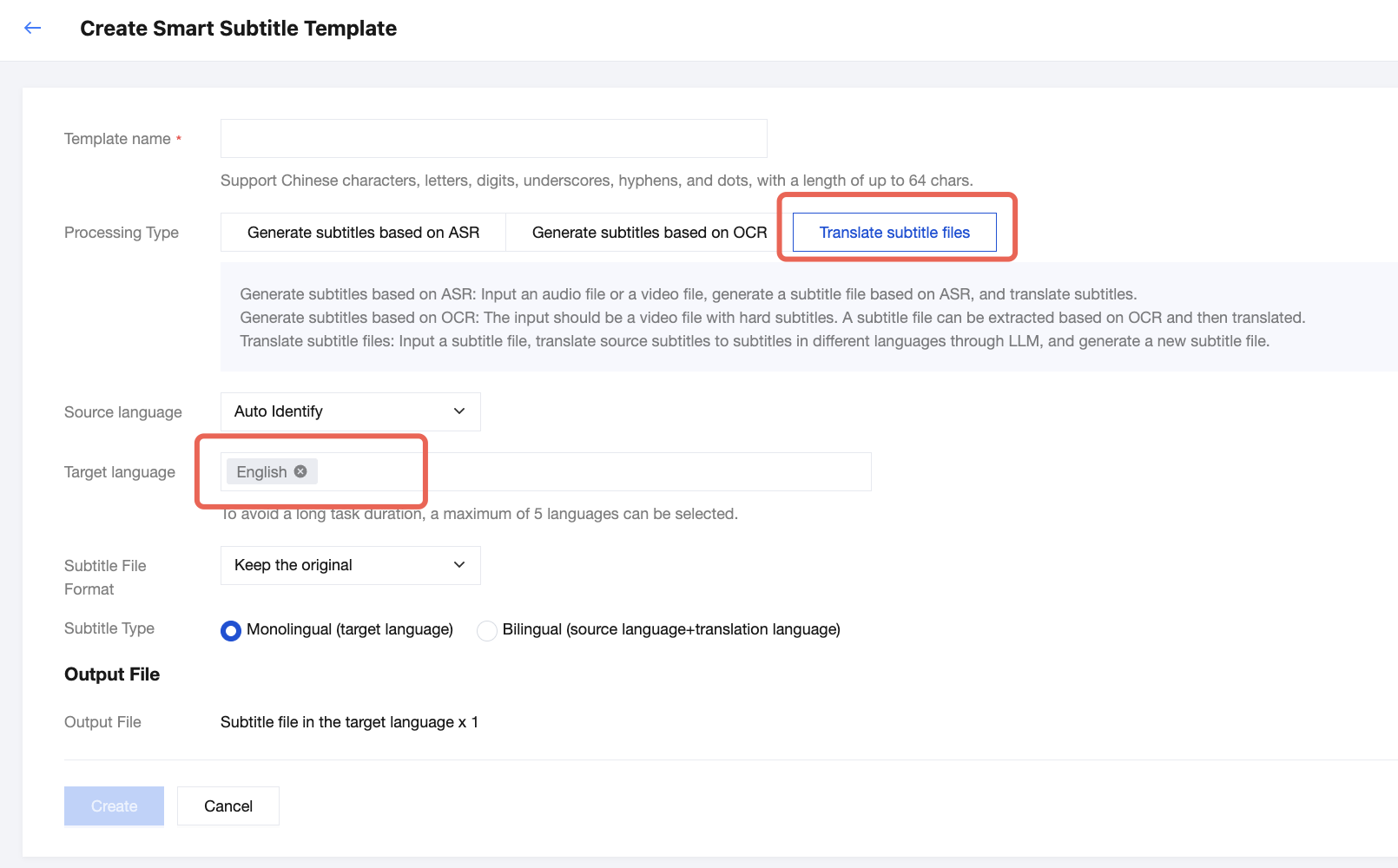
Processing Type of "Translation of Subtitle Files"
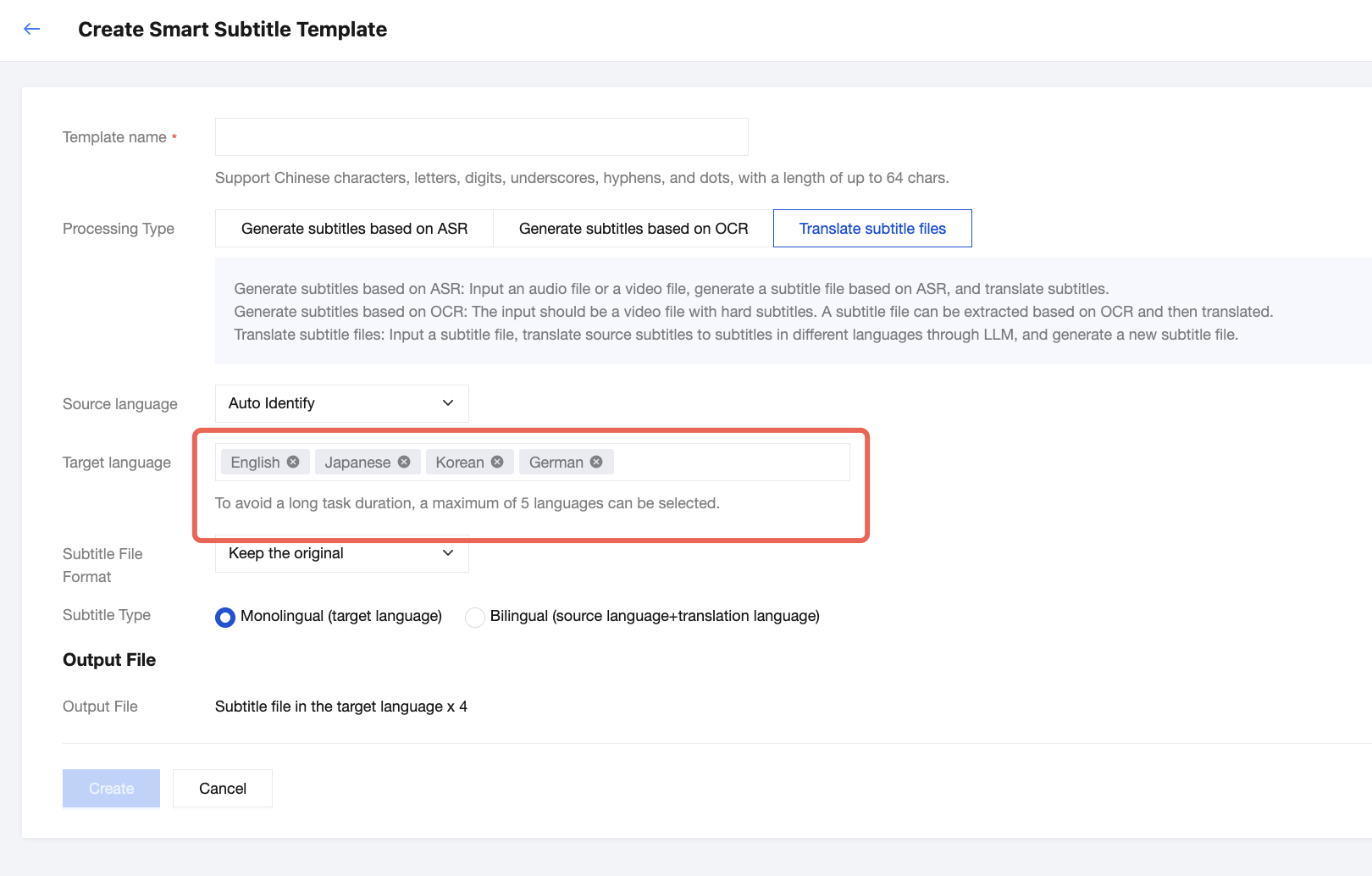
After it is enabled, the subtitles in the source language can be translated into the specified language, making it suitable for scenarios such as video translation for global distribution. The following is a list of the supported target languages for translation.
Note:
Certain languages are not available for selection currently. If you need to use them, contact us for support.
Subtitle File Format
It is supported to select WebVTT, SRT, or consistent with the source file.
Subtitle Type
The following options are supported:
Monolingual (target language): The generated target language subtitle file contains single-line monolingual subtitles.
Bilingual (source language + target language): The generated target language subtitle file contains dual-line bilingual subtitles.
Supported Languages
Source Languages
Number
Language (Source Language)
Code
1
Afrikaans (South Africa)
af-ZA
2
Albanian (Albania)
sq-AL
3
Amharic (Ethiopia)
am-ET
4
Arabic (Algeria)
ar-DZ
5
Arabic (Bahrain)
ar-BH
6
Arabic (Egypt)
ar-EG
7
Arabic (Iraq)
ar-IQ
8
Arabic (Israel)
ar-IL
9
Arabic (Jordan)
ar-JO
10
Arabic (Kuwait)
ar-KW
11
Arabic (Lebanon)
ar-LB
12
Arabic (Mauritania)
ar-MR
13
Arabic (Morocco)
ar-MA
14
Arabic (Oman)
ar-OM
15
Arabic (Qatar)
ar-QA
16
Arabic (Saudi Arabia)
ar-SA
17
Arabic (State of Palestine)
ar-PS
18
Arabic (Syria)
ar-SY
19
Arabic (Tunisia)
ar-TN
20
Arabic (United Arab Emirates)
ar-AE
21
Arabic (Yemen)
ar-YE
22
Armenian (Armenia)
hy-AM
23
Azerbaijani (Azerbaijan)
az-AZ
24
Basque (Spain)
eu-ES
25
Bengali (Bangladesh)
bn-BD
26
Bengali (India)
bn-IN
27
Bosnian (Bosnia and Herzegovina)
bs-BA
28
Bulgarian (Bulgaria)
bg-BG
29
Burmese (Myanmar)
my-MM
30
Catalan (Spain)
ca-ES
31
Simplified Chinese (China)
zh-CN
32
Chinese (Hong Kong (China) Simplified)
zh-HK
33
Traditional Chinese (Taiwan (China))
zh-TW
34
Cantonese (Hong Kong (China) Traditional Chinese)
yue
35
Croatian (Croatia)
hr-HR
36
Czech (Czech Republic)
cs-CZ
37
Danish (Denmark)
da-DK
38
Dutch (Belgium)
nl-BE
39
Dutch (Netherlands)
nl-NL
40
English (Australia)
en-AU
41
English (Canada)
en-CA
42
English (Ghana)
en-GH
43
English (Hong Kong (China))
en-HK
44
English (India)
en-IN
45
English (Ireland)
en-IE
46
English (Kenya)
en-KE
47
English (New Zealand)
en-NZ
48
English (Nigeria)
en-NG
49
English (Pakistan)
en-PK
50
English (Philippines)
en-PH
51
English (Singapore)
en-SG
52
English (South Africa)
en-ZA
53
English (Tanzania)
en-TZ
54
English (UK)
en-GB
55
English (US)
en-US
56
Estonian (Estonia)
et-EE
57
Filipino (Philippines)
fil-PH
58
Finnish (Finland)
fi-FI
59
French (Belgium)
fr-BE
60
French (Canada)
fr-CA
61
French (France)
fr-FR
62
French (Switzerland)
fr-CH
63
Galician (Spain)
gl-ES
64
Georgian (Georgia)
ka-GE
65
German (Austria)
de-AT
66
German (Germany)
de-DE
67
German (Switzerland)
de-CH
68
Greek (Greece)
el-GR
69
Gujarati (India)
gu-IN
70
Hebrew (Israel)
iw-IL
71
Hindi (India)
hi-IN
72
Hungarian (Hungary)
hu-HU
73
Icelandic (Iceland)
is-IS
74
Indonesian (Indonesia)
id-ID
75
Italian (Italy)
it-IT
76
Italian (Switzerland)
it-CH
77
Japanese (Japan)
ja-JP
78
Javanese (Indonesia)
jv-ID
79
Kannada (India)
kn-IN
80
Kazakh (Kazakhstan)
kk-KZ
81
Khmer (Cambodia)
km-KH
82
Kinyarwanda (Rwanda)
rw-RW
83
Korean (South Korea)
ko-KR
84
Lao (Laos)
lo-LA
85
Latvian (Latvia)
lv-LV
86
Lithuanian (Lithuania)
lt-LT
87
Macedonian (North Macedonia)
mk-MK
88
Malay (Malaysia)
ms-MY
89
Malayalam (India)
ml-IN
90
Marathi (India)
mr-IN
91
Mongolian (Mongolia)
mn-MN
92
Nepali (Nepal)
ne-NP
93
Bokmål Norwegian (Norway)
no-NO
94
Persian (Iran)
fa-IR
95
Polish (Poland)
pl-PL
96
Portuguese (Brazil)
pt-BR
97
Portuguese (Portugal)
pt-PT
98
Punjabi (Gurmukhi, India)
pa-Guru-IN
99
Romanian (Romania)
ro-RO
100
Russian (Russia)
ru-RU
101
Serbian (Serbia)
sr-RS
102
Sinhalese (Sri Lanka)
si-LK
103
Slovak (Slovakia)
sk-SK
104
Slovene (Slovenia)
sl-SI
105
Sesotho (South Africa)
st-ZA
106
Spanish (Argentina)
es-AR
107
Spanish (Bolivia)
es-BO
108
Spanish (Chile)
es-CL
109
Spanish (Colombia)
es-CO
110
Spanish (Costa Rica)
es-CR
111
Spanish (Dominican Republic)
es-DO
112
Spanish (Ecuador)
es-EC
113
Spanish (El Salvador)
es-SV
114
Spanish (Guatemala)
es-GT
115
Spanish (Honduras)
es-HN
116
Spanish (Mexico)
es-MX
117
Spanish (Nicaragua)
es-NI
118
Spanish (Panama)
es-PA
119
Spanish (Paraguay)
es-PY
120
Spanish (Peru)
es-PE
121
Spanish (Puerto Rico)
es-PR
122
Spanish (Spain)
es-ES
123
Spanish (US)
es-US
124
Spanish (Uruguay)
es-UY
125
Spanish (Venezuela)
es-VE
126
Sundanese (Indonesia)
su-ID
127
Swahili (Kenya)
sw-KE
128
Swahili (Tanzania)
sw-TZ
129
Swazi (Latin script, South Africa)
ss-Latn-ZA
130
Swedish (Sweden)
sv-SE
131
Tamil (India)
ta-IN
132
Tamil (Malaysia)
ta-MY
133
Tamil (Singapore)
ta-SG
134
Tamil (Sri Lanka)
ta-LK
135
Telugu (India)
te-IN
136
Thai (Thailand)
th-TH
137
Tsonga (South Africa)
ts-ZA
138
Tswana (Latin script, South Africa)
tn-Latn-ZA
139
Turkish (Türkiye)
tr-TR
140
Ukrainian (Ukraine)
uk-UA
141
Urdu (India)
ur-IN
142
Urdu (Pakistan)
ur-PK
143
Uzbek (Uzbekistan)
uz-UZ
144
Venda (South Africa)
ve-ZA
145
Vietnamese (Vietnam)
vi-VN
146
Xhosa (South Africa)
xh-ZA
147
Zulu (South Africa)
zu-ZA
Target Language for Translation
Number
Language (Target Language)
Code
1
Abkhaz language
ab
2
Acehnese
ace
3
Acholi
ach
4
Afrikaans
af
5
Albanian
sq
6
Alur
alz
7
Amharic
am
8
Arabic
ar
9
Armenian
hy
10
Assamese
as
11
Awadhi
awa
12
Aymara
ay
13
Azerbaijani
az
14
Balinese
ban
15
Bambara
bm
16
Bashkir
ba
17
Basque
eu
18
Batak Karo
btx
19
Batak Simalungun
bts
20
Batak Toba
bbc
21
Belarusian
be
22
Bemba
bem
23
Bengali
bn
24
Betawi
bew
25
Bhojpuri
bho
26
Bikol
bik
27
Bosnian
bs
28
Breton
br
29
Bulgarian
bg
30
Buryat
bua
31
Cantonese
yue
32
Catalan
ca
33
Cebuano
ceb
34
Chichewa (Nyanja)
ny
35
Simplified Chinese
zh-CN or zh
36
Chinese (Traditional)
zh-TW
37
Chuvash
cv
38
Corsican
co
39
Crimean Tatar
crh
40
Croatian
hr
41
Czech
cs
42
Danish
da
43
Dinka
din
44
Divehi
dv
45
Dogri
doi
46
Dombe
dov
47
Dutch
nl
48
Dzongkha
dz
49
English
en
50
Esperanto
eo
51
Estonian
et
52
Ewe
ee
53
Fijian
fj
54
Filipino (Tagalog)
fil or tl
55
Finnish
fi
56
French
fr
57
French (France)
fr-FR
58
French (Canada)
fr-CA
59
Frisian
fy
60
Fula
ff
61
Ga
gaa
62
Galician
gl
63
Ganda (Luganda)
lg
64
Georgian
ka
65
German
de
66
Greek
el
67
Guarani
gn
68
Gujarati
gu
69
Haitian Creole
ht
70
Hakha Chin
cnh
71
Hausa
ha
72
Hawaiian
haw
73
Hebrew
iw or he
74
Hiligaynon
hil
75
Hindi
hi
76
Hmong
hmn
77
Hungarian
hu
78
Hunsrik
hrx
79
Icelandic
is
80
Igbo
ig
81
Iloko
ilo
82
Indonesian
id
83
Irish
ga
84
Italian
it
85
Japanese
ja
86
Javanese
jw or jv
87
Kannada
kn
88
Kapampangan
pam
89
Kazakh
kk
90
Khmer
km
91
Kiga
cgg
92
Kinyarwanda
rw
93
Kituba
ktu
94
Goan Konkani
gom
95
Korean
ko
96
Krio
kri
97
Kurdish (Kurmanji)
ku
98
Kurdish (Sorani)
ckb
99
Kirghiz
ky
100
Lao
lo
101
Latgalian
ltg
102
Latin
la
103
Latvian
lv
104
Ligurian
lij
105
Limburgish
li
106
Lingala
ln
107
Lithuanian
lt
108
Lombard
lmo
109
Luo
luo
110
Luxembourgish
lb
111
Macedonian
mk
112
Maithili
mai
113
Makassar
mak
114
Malagasy
mg
115
Malay
ms
116
Malay (Jawi script)
ms-Arab
117
Malayalam
ml
118
Maltese
mt
119
Maori
mi
120
Marathi
mr
121
Meadow Mari language
chm
122
Meitei (Manipuri)
mni-Mtei
123
Minangkabau
min
124
Mizo
lus
125
Mongolian
mn
126
Burmese
my
127
Ndebele (southern)
nr
128
Nepali (Newar)
new
129
Nepali
ne
130
Northern Sotho (Sepedi)
nso
131
Norwegian
no
132
Nuer
nus
133
Occitan
oc
134
Odia (Oria)
or
135
Oromo
om
136
Pangasinan
pag
137
Papiamento
pap
138
Pashto
ps
139
Persian
fa
140
Polish
pl
141
Portuguese
pt
142
Portuguese (Portugal)
pt-PT
143
Portuguese (Brazil)
pt-BR
144
Punjabi
pa
145
Punjabi (Shahmukhi)
pa-Arab
146
Quechuan
qu
147
Romani
rom
148
Romanian
ro
149
Rundi
rn
150
Russian
ru
151
Samoan
sm
152
Sango
sg
153
Sanskrit
sa
154
Scottish Gaelic
gd
155
Serbian
sr
156
Sesotho
st
157
Seychellois Creole
crs
158
Shan
shn
159
Shona
sn
160
Sicilian
scn
161
Silesian
szl
162
Sindhi
sd
163
Sinhalese
si
164
Slovak
sk
165
Slovene
sl
166
Somali
so
167
Spanish
es
168
Sundanese
su
169
Swahili
sw
170
Swati
ss
171
Swedish
sv
172
Tajik
tg
173
Tamil
ta
174
Tatar
tt
175
Telugu
te
176
Tetum
tet
177
Thai
th
178
Tigrinya
ti
179
Tsonga
ts
180
Tswana
tn
181
Turkish
tr
182
Turkmen
tk
183
Twi (Akan)
ak
184
Ukrainian
uk
185
Urdu
ur
186
Uyghur
ug
187
Uzbek
uz
188
Vietnamese
vi
189
Welsh
cy
190
Xhosa
xh
191
Yiddish
yi
192
Yoruba
yo
193
Yucatec Maya
yua
194
Zulu
zu
Billing Instructions
ASR-based Subtitle Generation
Identifying the Source Language Only and "ASR" Fees Are Charged
If you set the processing type to "ASR-based subtitle generation" without enabling translation, ASR fees will be charged. For pricing details, see Billing Instructions.
Translating into One Target Language: "Speech Translation" Fee Is Charged
If you set the processing type to "ASR-based subtitle generation" with translation enabled, and select a target language for translation, "speech translation" fees will be charged. For pricing details, see Billing Instructions.
If There Are More Than 1 Target Language for Translation, "Subtitle Translation (Additional Languages)" Fees Will Be Charged for Each Extra Language
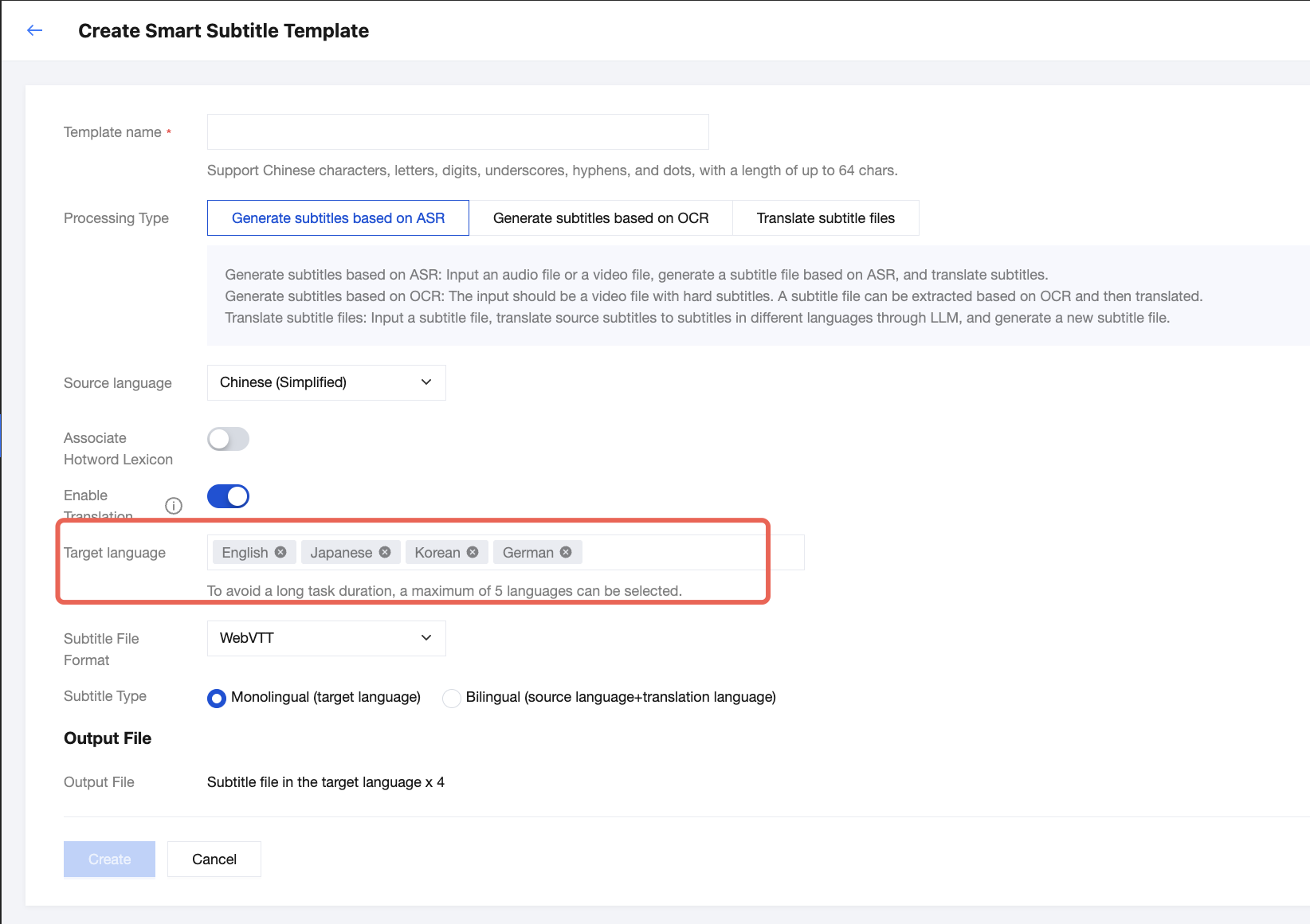
If you set the processing type to "ASR-based subtitle generation" with translation enabled, and select n target languages for translation, the fees to be charged are calculated as follows: Speech translation fees × 1 + Subtitle translation (additional languages) fees × (n-1).
Take the following configuration as an example. The fees are calculated as follows: Speech translation fees × 1 + Subtitle translation (additional languages) fees × 3. For pricing details, see Billing Instructions.
OCR-based Subtitle Generation
Extracting the Source Language Only: "OCR-based Subtitle Extraction" Fee Is Charged
If "OCR-based subtitle generation" is selected as the processing type and translation is disabled, "OCR-based subtitle extraction" fee will be charged. For pricing details, see relevant Billing Overview documentation.
Translating into One Target Language: "OCR-based Subtitle Extraction and Translation" Fee Is Charged
If "OCR-based subtitle generation" is selected as the processing type, translation is enabled, and one target language is selected, "OCR-based subtitle extraction and translation" fee will be charged. For pricing details, see relevant Billing Overview documentation.
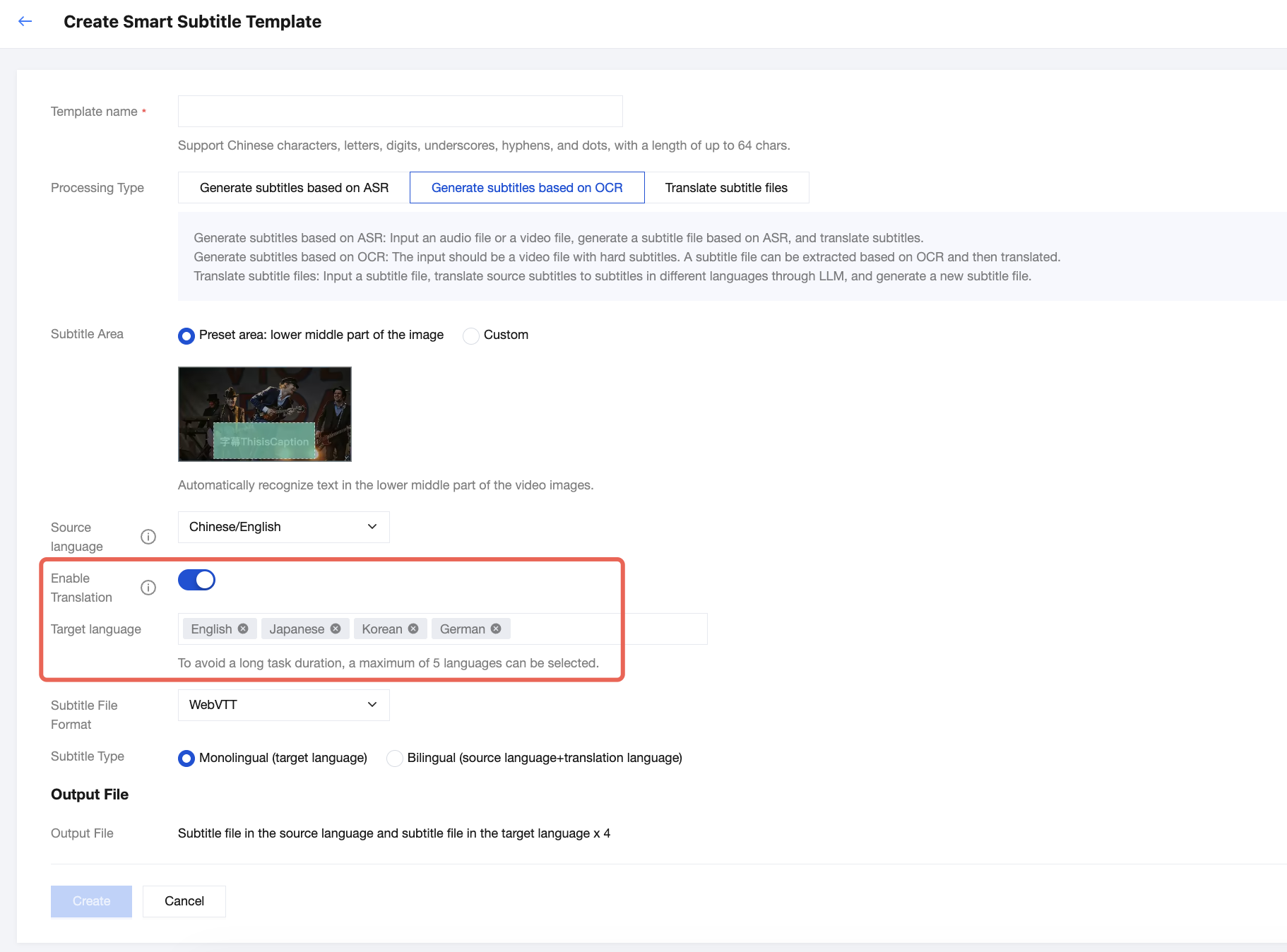
Translating into More than One Target Language: "Subtitle Translation (Additional Languages)" Fee Is Charged for Each Additional Language
If "OCR-based subtitle generation" is selected as the processing type, translation is enabled, and n target languages are selected, the fees will be calculated as follows: "OCR-based subtitle extraction and translation" fee x 1 + "subtitle translation (additional languages)" fee x (n-1).
For example, with the configuration below, the fees will be calculated as follows: "OCR-based subtitle extraction and translation" fee x 1 + "subtitle translation (additional languages)" fee x 3. For pricing details, see relevant Billing Overview documentation.
Subtitle File Translation
Translating into One Target Language: "Subtitle Translation" Fee Is Charged
If "Subtitle file translation" is selected as the processing type and one target language is selected, "subtitle translation" fee will be charged. For pricing details, see relevant Billing Overview documentation.
Translating into More than One Target Language: "Subtitle Translation (Additional Languages)" Fee Is Charged for Each Additional Language
If "Subtitle file translation" is selected as the processing type and n target languages are selected, the fees will be calculated as follows: "subtitle translation" fee x 1 + "subtitle translation (additional languages)" fee x (n-1).
For example, with the configuration below, the fees will be calculated as follows: "subtitle translation" fee x 1 + "subtitle translation (additional languages)" fee x 3. For pricing details, see relevant Billing Overview documentation.