tencent cloud

Tencent Real-Time Communication

소식 및 공지 사항
제품 업데이트
Tencent Cloud 오디오/비디오 단말 SDK 재생 업그레이드 및 권한 부여 인증 추가
TRTC 월간 구독 패키지 출시 관련 안내
제품 소개
제품 개요
기본 개념
제품 기능
제품 장점
응용 시나리오
성능 데이터
구매 가이드
Billing Overview
무료 시간 안내
Monthly subscription
Pay-as-you-go
TRTC Overdue and Suspension Policy
과금 FAQ
Refund Instructions
신규 사용자 가이드
Demo 체험
Call
개요(TUICallKit)
Activate the Service
Run Demo
빠른 통합(TUICallKit)
오프라인 푸시
Conversational Chat
온클라우드 녹화(TUICallKit)
AI Noise Reduction
UI 사용자 정의
Calls integration to Chat
Additional Features
No UI Integration
Server APIs
Client APIs
Solution
ErrorCode
릴리스 노트
FAQs
라이브 스트리밍
Billing of Video Live Component
Overview
Activating the Service (TUILiveKit)
Demo 실행
No UI Integration
UI Customization
Live Broadcast Monitoring
Video Live Streaming
Voice Chat Room
Advanced Features
Client APIs
Server APIs
Error Codes
Release Notes
FAQs
RTC Engine
Activate Service
SDK 다운로드
API 코드 예시
Usage Guidelines
API 클라이언트 API
고급 기능
RTC RESTFUL API
History
Introduction
API Category
Room Management APIs
Stream mixing and relay APIs
On-cloud recording APIs
Data Monitoring APIs
Pull stream Relay Related interface
Web Record APIs
AI Service APIs
Cloud Slicing APIs
Cloud Moderation APIs
Making API Requests
Call Quality Monitoring APIs
Usage Statistics APIs
Data Types
Appendix
Error Codes
콘솔 가이드
애플리케이션 관리
사용량 통계
모니터링 대시보드
개발 보조
Solution
Real-Time Chorus
FAQs
과금 개요
기능 관련
UserSig 관련
방화벽 제한 처리
설치 패키지 용량 축소 관련 질문
Andriod 및 iOS 관련
Web 관련
Flutter 관련
Electron 관련
TRTCCalling Web 관련
멀티미디어 품질 관련
기타 질문
Protocols and Policies
컴플라이언스 인증
보안 백서
정보 보안에 관한 참고 사항
Service Level Agreement
Apple Privacy Policy: PrivacyInfo.xcprivacy
TRTC 정책
개인 정보 보호 정책
데이터 처리 및 보안 계약
용어집

SDK Integration Guide (Flutter)

PDF
聚焦模式
字号
最后更新时间: 2025-04-10 11:38:07

Step 1: Seamless Integration of Tencent Special Effect Resources

2. Migrate Tencent special effect resources
Android
iOS
1. Find the src/main/assets folder in the android/app module of your project. Copy the lut and MotionRes folders from demo/android/app/src/main/assets in the demo project to android/app/src/main/assets in your project. If your project does not have an assets folder, you can manually create one.
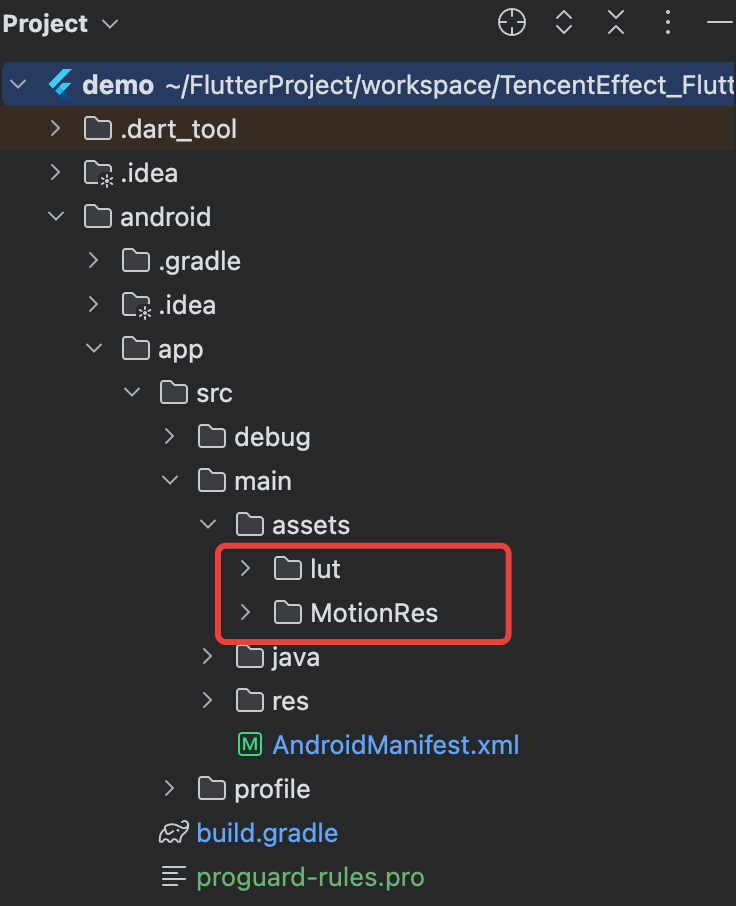
2. In the android/app/build.gradle file of your project, add the dependency of the Beauty SDK for the Android side. The specific dependency depends on the package you selected. For example, if you selected the S1-04 package, add the following:
dependencies {
implementation 'com.tencent.mediacloud:TencentEffect_S1-04:latest.release'
}
Note:
The maven urls corresponding to each package, please see Documentation. The latest version number of the SDK can be viewed in Version History.
3. If you use an Android version of beauty SDK less than 3.9, you need to find the AndroidManifest.xml file under the app module and add the following tags in the application table:
<uses-native-library
android:name="libOpenCL.so"
android:required="false" />
//true indicates that libOpenCL is necessary for the current app. If there is no such library, the system will not allow the app to install.
//false indicates that libOpenCL is not necessary for the current app. The app can be properly installed regardless of whether this library is present. If the device has this library, the GAN type effects in the beauty effect SDK (for example, Fairy Tale Face, Chinese Cartoon face) will take effect normally. If the device does not have this library, the GAN type will not take effect, but it does not affect the usage of other functions in the SDK.
//For the description of uses-native-library, please refer to the Android official website introduction: https://developer.android.com/guide/topics/manifest/uses-native-library-element
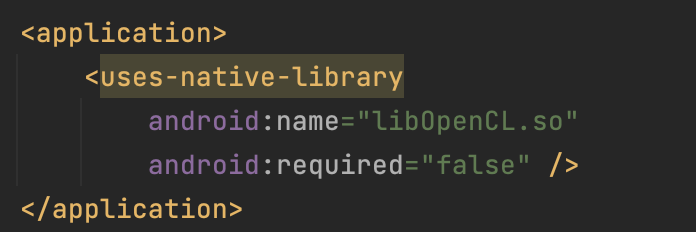
As shown below after addition:

4. Obfuscation configuration.
When building a release package with code optimization and obfuscation features enabled (minifyEnabled = true), the compilation tool may remove code that is not explicitly called at the Java/Kotlin layer. If this code is dynamically called by the native layer, a NoSuchMethodError exception (such as no xxx method) will be triggered.
It is recommended to proactively retain the necessary code of the Xmagic module through ProGuard rules in proguard-rules.pro:
-keep class com.tencent.xmagic.** { *;}
-keep class org.light.** { *;}
-keep class org.libpag.** { *;}
-keep class org.extra.** { *;}
-keep class com.gyailib.**{ *;}
-keep class com.tencent.cloud.iai.lib.** { *;}
-keep class com.tencent.beacon.** { *;}
-keep class com.tencent.qimei.** { *;}
-keep class androidx.exifinterface.** { *;}
-keep class com.tencent.effect.** { *;}
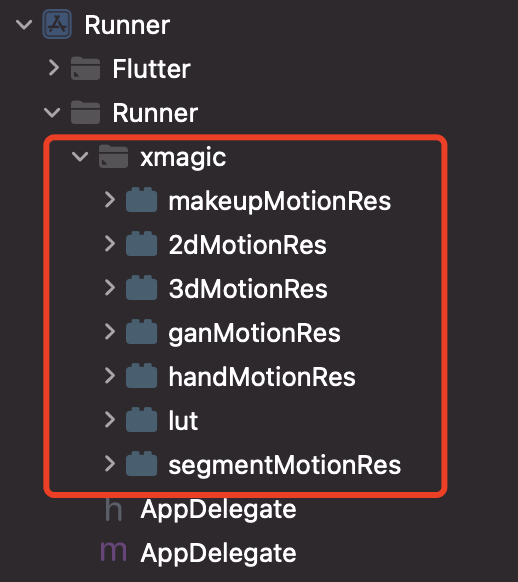
Copy the xmagic folder under the ios/Runner directory in the demo project to the ios/Runner directory in your project. After addition, it is as shown in the figure below:

Note:
The above materials copied from the demo project are test materials. For official materials, you need to contact the staff of Tencent Special Effect Beauty after purchasing a package to obtain and re-add them.

Step Two: Integration of tencent_effect_flutter

You can depend on tencent_effect_flutter in your Flutter project in the following ways.
1. Remote dependency
Add the following reference in your pubspec.yaml file:
tencent_effect_flutter:
git:
url: https://github.com/Tencent-RTC/TencentEffect_Flutter
2. Local dependency
Download the latest version of tencent_effect_flutter from github, and then add the following reference in the pubspec.yaml file:
tencent_effect_flutter:
path: path to tencent_effect_flutter

Step 3: Beauty Effect and TRTC Association

Android
iOS
Add the following code in the onCreate method of the application class (or the onCreate method of the FlutterActivity):
TRTCPlugin.setBeautyProcesserFactory(new XmagicProcesserFactory());
Add the following code in the didFinishLaunchingWithOptions method in the AppDelegate file under the ios/Runner directory:
Swift
Object-C
let instance = XmagicProcesserFactory()
TencentRTCCloud.setBeautyProcesserFactory(factory: instance)
XmagicProcesserFactory *instance = [[XmagicProcesserFactory alloc] init];
[TencentRTCCloud setBeautyProcesserFactoryWithFactory:instance];

Step 4: Beauty Effect Resource Initialization and Authorization

1. Resource initialization
V0.3.5.0 and Later
V0.3.1.1 and Earlier Versions
TencentEffectApi.getApi()?.setResourcePath(resourceDir);

TencentEffectApi.getApi()?.initXmagic((result) {
// TODO
});
TencentEffectApi.getApi()?.initXmagic(dir,(reslut) {
//TODO
});
2. Beauty authorization
TencentEffectApi.getApi()?.setLicense(licenseKey, licenseUrl, (errorCode, msg) {
if (errorCode == 0) {
// Success
}
});

Step 5: Enable/Disable Beauty Effects

After completing the above operations, you can enable/disable beauty effects through TRTC's hidden interface:
_enableCustomBeautyByNative(bool open) {
trtcCloud.callExperimentalAPI("{\\"api\\": \\"enableVideoProcessByNative\\", \\"params\\": {\\"enable\\": $open}}");
}
Note:
Enable beauty effects on the page. When closing the camera, you need to disable beauty effects first. Enable and disable are used in pairs.

Document Reference

You have completed the association between TRTC and Special Effect Beauty Enhancement. You can learn more about how to use Special Effect Beauty Enhancement through the following document:

帮助和支持

本页内容是否解决了您的问题?

填写满意度调查问卷,共创更好文档体验。

文档反馈