





Migrate to the cloud and enjoy COS offers now!
50GB standard storage free trial for 6 months, only for new customers, automatically issued when COS is enabled, cannot be repeated, pay-as-you-go billing after free quota is used up








Frequently Asked
Questions
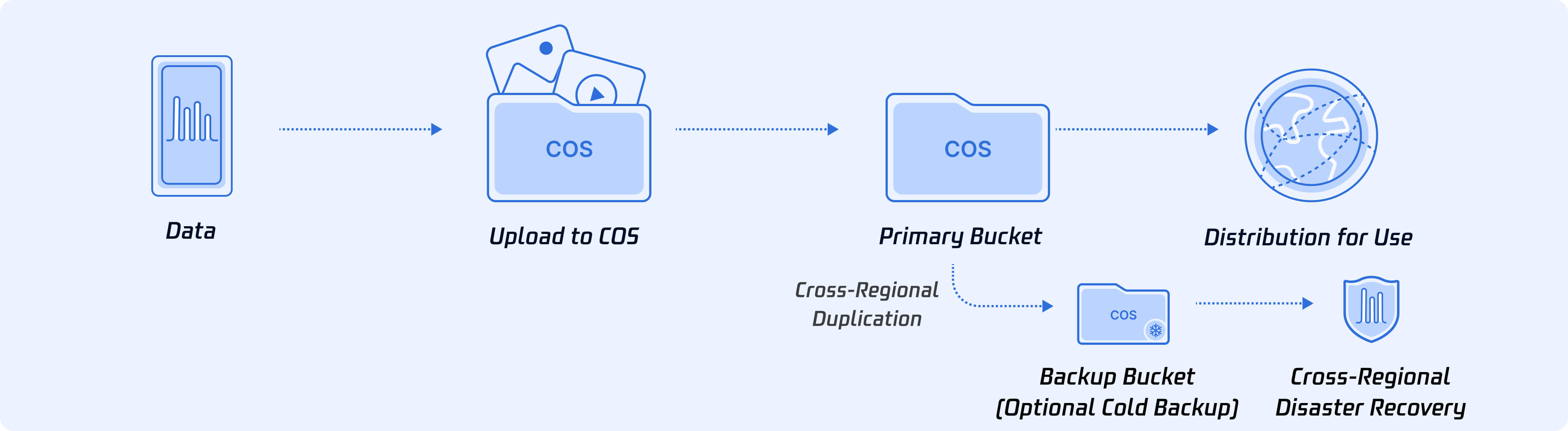
Tencent Cloud COS is a non-hierarchical distributed storage product that provides users with cost-effective, fast, and reliable data storage solutions. COS redundantly stores user data across multiple AZs, allowing multiple clients or application threads to concurrently read or write data.
Users can store and retrieve data via CVM instances or the internet using Web API interfaces. For data in COS, users employ URL addresses with specified domain names to store and retrieve each independent data object via HTTP/HTTPS protocols.
For more information about Tencent Cloud Object Storage, please refer to the COS product documentation.
COS can be used to store and retrieve data in any form and any amount. Users can perform these operations from anywhere on the network at any time. Users can use COS to easily build applications that leverage internet-based storage.
To use COS, you need to first register a Tencent Cloud account. If you don't have a Tencent Cloud account yet, please go to the Tencent Cloud registration page and follow the prompts to register. After registration is completed, you can refer to the COS quick start guide to start using COS.
COS can store any type of data in any format.
COS imposes no limitations on the total data capacity or the number of objects stored. Under the same APPID, the number of buckets is limited to 200, but there are no restrictions on the number of objects or directories within a bucket.
Based on the access frequency of objects, COS provides multiple storage types suitable for different scenarios, including MAZ_STANDARD, MAZ_STANDARD_IA, MAZ_ARCHIVE, MAZ_INTELLIGENT_TIERING, INTELLIGENT_TIERING, STANDARD, STANDARD_IA, ARCHIVE, and DEEP_ARCHIVE. For detailed information about storage types, see Object Storage Types.
When creating a COS bucket, you can specify a region. Once specified, the region cannot be modified. Within this region, your objects (data) are stored across multiple facilities and devices. For details, see Available Regions .
The region for data storage should be selected based on multiple factors specific to your application scenario. The following considerations are provided for your reference when choosing a storage region:
- Proximity to your customers, data centers, or other Tencent Cloud resources to reduce data access latency.
- Potential to lower storage costs.
- Compliance with specific legal and regulatory requirements.
COS supports two billing methods: the postpaid pay-as-you-go method (i.e., pay-as-you-go) and the prepaid resource pack method (i.e., resource pack). For details, see Billing Overview . For COS pricing information, refer to Pricing .
COS fees are composed of five parts: storage fees, request fees, data retrieval fees, traffic fees, and management feature fees.
For details on COS billing items, billing rules, etc., refer to Billing Overview .
The billing mode for COS does not require manual modification. If there are resource packs under your account, they will be prioritized for deduction. If no applicable resource packs are available, pay-as-you-go billing is used by default. For details, see Billing Overview .
- If active COS resource packs exist under your account: The system prioritizes using resource packs for deduction, i.e., the resource pack (prepaid) method.
- If no available COS resource packs exist under your account: The system will automatically use your account balance for deduction, i.e., the pay-as-you-go (postpaid) method.
You can view the free tier status of your account on the COS console's Resource Package Management page . The COS free tier is provided in the form of resource packs, and the complimentary resource packs shown indicate your current free tier usage. If no complimentary resource packs appear on your Resource Package Management page, your free tier has been exhausted. You may confirm whether the free tier has expired via the Expired Resource Packs page.
COS buckets are storage spaces for data, while resource packs are a prepaid method that deducts costs based on billing items and regions. There is no direct correspondence between resource packs and buckets. For details, see the Resource Pack (Prepaid) documentation .
For example, if you have a "Mainland China, 50GB, 3-month validity" Standard Storage Capacity Pack under your account, the standard storage capacity fees incurred by all buckets in the "Mainland China" region under your account (up to 50GB) can be deducted using this resource pack within 3 months.
Resource packs are solely used to offset usage costs and do not store data. After a resource pack is exhausted or expires, the system automatically switches to postpaid mode, deducting fees from your account balance. Therefore, data will not be lost, and no data migration is required. Data will only be destroyed if your account remains overdue for 15 consecutive days. For details, refer to the Overdue Payment Policy documentation.
After the resource pack expires, fees will be charged on a pay-as-you-go basis. If your account becomes overdue, COS will suspend services after 24 hours. Your data will be retained for 15 days. If the account balance is not replenished to ≥0 during this period, your data will be destroyed. For detailed information, refer to the Overdue Payment Policy documentation.
Resource packs that meet the refund conditions support self-service refunds. For details, refer to the Self-service Refund documentation.
Frequently Asked
Questions
Tencent Cloud COS is a non-hierarchical distributed storage product that provides users with cost-effective, fast, and reliable data storage solutions. COS redundantly stores user data across multiple AZs, allowing multiple clients or application threads to concurrently read or write data.
Users can store and retrieve data via CVM instances or the internet using Web API interfaces. For data in COS, users employ URL addresses with specified domain names to store and retrieve each independent data object via HTTP/HTTPS protocols.
For more information about Tencent Cloud Object Storage, please refer to the COS product documentation.
COS can be used to store and retrieve data in any form and any amount. Users can perform these operations from anywhere on the network at any time. Users can use COS to easily build applications that leverage internet-based storage.
To use COS, you need to first register a Tencent Cloud account. If you don't have a Tencent Cloud account yet, please go to the Tencent Cloud registration page and follow the prompts to register. After registration is completed, you can refer to the COS quick start guide to start using COS.
COS can store any type of data in any format.
COS imposes no limitations on the total data capacity or the number of objects stored. Under the same APPID, the number of buckets is limited to 200, but there are no restrictions on the number of objects or directories within a bucket.
Based on the access frequency of objects, COS provides multiple storage types suitable for different scenarios, including MAZ_STANDARD, MAZ_STANDARD_IA, MAZ_ARCHIVE, MAZ_INTELLIGENT_TIERING, INTELLIGENT_TIERING, STANDARD, STANDARD_IA, ARCHIVE, and DEEP_ARCHIVE. For detailed information about storage types, see Object Storage Types.
When creating a COS bucket, you can specify a region. Once specified, the region cannot be modified. Within this region, your objects (data) are stored across multiple facilities and devices. For details, see Available Regions .
The region for data storage should be selected based on multiple factors specific to your application scenario. The following considerations are provided for your reference when choosing a storage region:
- Proximity to your customers, data centers, or other Tencent Cloud resources to reduce data access latency.
- Potential to lower storage costs.
- Compliance with specific legal and regulatory requirements.
COS supports two billing methods: the postpaid pay-as-you-go method (i.e., pay-as-you-go) and the prepaid resource pack method (i.e., resource pack). For details, see Billing Overview . For COS pricing information, refer to Pricing .
COS fees are composed of five parts: storage fees, request fees, data retrieval fees, traffic fees, and management feature fees.
For details on COS billing items, billing rules, etc., refer to Billing Overview .
The billing mode for COS does not require manual modification. If there are resource packs under your account, they will be prioritized for deduction. If no applicable resource packs are available, pay-as-you-go billing is used by default. For details, see Billing Overview .
- If active COS resource packs exist under your account: The system prioritizes using resource packs for deduction, i.e., the resource pack (prepaid) method.
- If no available COS resource packs exist under your account: The system will automatically use your account balance for deduction, i.e., the pay-as-you-go (postpaid) method.
You can view the free tier status of your account on the COS console's Resource Package Management page . The COS free tier is provided in the form of resource packs, and the complimentary resource packs shown indicate your current free tier usage. If no complimentary resource packs appear on your Resource Package Management page, your free tier has been exhausted. You may confirm whether the free tier has expired via the Expired Resource Packs page.
COS buckets are storage spaces for data, while resource packs are a prepaid method that deducts costs based on billing items and regions. There is no direct correspondence between resource packs and buckets. For details, see the Resource Pack (Prepaid) documentation .
For example, if you have a "Mainland China, 50GB, 3-month validity" Standard Storage Capacity Pack under your account, the standard storage capacity fees incurred by all buckets in the "Mainland China" region under your account (up to 50GB) can be deducted using this resource pack within 3 months.
Resource packs are solely used to offset usage costs and do not store data. After a resource pack is exhausted or expires, the system automatically switches to postpaid mode, deducting fees from your account balance. Therefore, data will not be lost, and no data migration is required. Data will only be destroyed if your account remains overdue for 15 consecutive days. For details, refer to the Overdue Payment Policy documentation.
After the resource pack expires, fees will be charged on a pay-as-you-go basis. If your account becomes overdue, COS will suspend services after 24 hours. Your data will be retained for 15 days. If the account balance is not replenished to ≥0 during this period, your data will be destroyed. For detailed information, refer to the Overdue Payment Policy documentation.
Resource packs that meet the refund conditions support self-service refunds. For details, refer to the Self-service Refund documentation.