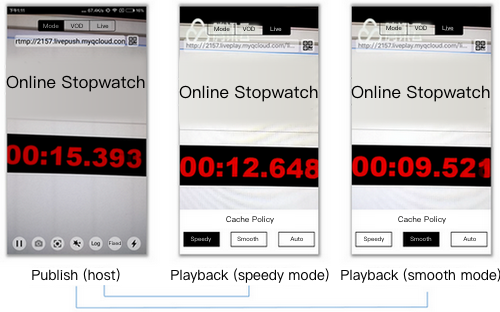
If you publish streams via RTMP and play streams via HTTP-FLV, the latency is generally about 2-3 seconds. If you experience high latency, follow the steps below to troubleshoot the problem.
Step 1. Check your playback protocol
The latency tends to be high if you use HLS (M3U8) for playback. HLS is a streaming protocol developed by Apple. It works by breaking streams into (usually 3 or 4) TS segments of 5 seconds or longer, which results in an overall latency of 10-30 seconds.
Therefore, if you have to use HLS (M3U8) for playback, you can reduce latency by cutting the number of segments or the length of each segment, but this may increase stuttering. You can submit a ticket or contact our technical support engineers for help.
Step 2. Check player settings
The player of the MLVB SDK supports three latency control modes: Speedy, Smooth, and Auto. For more information about their settings, please see Latency Control.
Speedy: This mode keeps latency at 2-3 seconds or lower in most application scenarios and is suitable for live showrooms.
Smooth: This mode keeps latency at 5 seconds or lower in most application scenarios and is suitable for application scenarios that require smooth playback but are not sensitive to latency, such as game streaming.
Step 3. Watermark videos on the client side
Tencent Cloud allows you to watermark videos in the cloud, but this will increase latency by 1-2 seconds. Therefore, if you use the MLVB SDK, we recommend you watermark videos at the host end instead of in the cloud to reduce latency.
Step 4. Check third-party publishers
We guarantee superior streaming experience via our integrated solution, but if you use third-party software to publish streams, we recommend that you compare your publisher with Tencent Cloud’s using the trial demo of the MLVB SDK to see if your publisher is the cause of high latency. Many third-party publishers tend to keep increasing the buffer size to mitigate the problem of low upstream bandwidth.
Step 5. Check OBS settings
If you use OBS to publish streams and experience high latency, check your configuration against Push via OBS. Make sure you set the keyframe interval to 1 or 2 seconds.
Step 6. Use LEB
If none of the above solves your problem, you can try using Tencent Cloud’s LEB service, which features lower latency than LVB and offers streaming with millisecond latency. For details, please see Live Event Broadcasting (LEB).