Allocate and Reclaim Credit
Download
Modo Foco
Tamanho da Fonte
Scenarios
A distributor can query all resellers that belong to it, as well as view their basic info and available credit limit.
After a distributor allocates a credit limit to a second-level reseller, the second-level reseller can allocate the credit to end customers for enabling or purchasing cloud products.
If a second-level reseller fails to make repayment for a long time, the distributorcan reclaim its allocable credit pool. Note that the credit limit already assigned to end customers cannot be directly reclaimed by the distributor. The second-level reseller must first reclaim it to its own allocable credit pool before the distributor can reclaim it.
Prerequisites
The distributor identity is already available.
Allocate Credit
1. Contact your sales manager offline to apply for the credit limit assigned to the reseller.
Note:
Note: This credit limit is different from the internal usage limit of distributors. When submitting a request, please inform the sales manager that you are applying for reseller credit limit allocation.
2. Log in to Tencent Cloud Official Website using a primary distributor account and enter the Partner Center console.
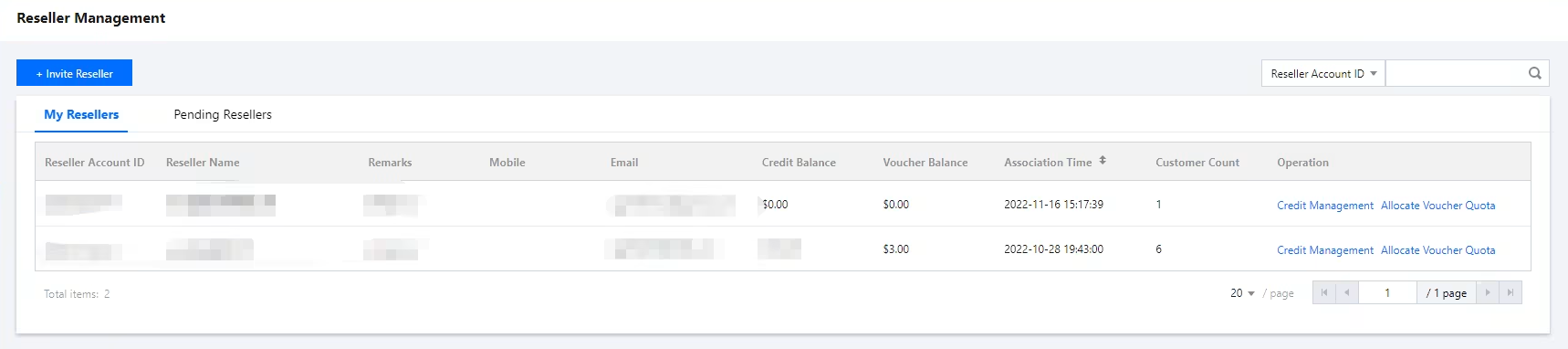
3. Select Reseller > Reseller Management in the left sidebar and enter the My Resellers webpage.
4. In the reseller list, click Credit Management in the Operation column of the target reseller to enter the credit allocation page.
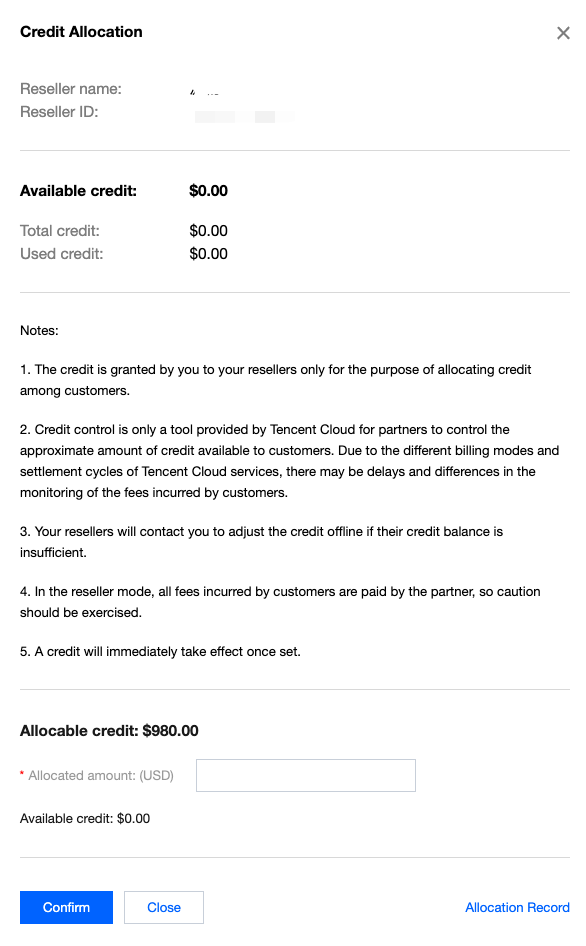
5. Enter the allocated amount and click Confirm. The system prompts allocation successful, indicating the allocation is completed.
Note:
Credit is a credit limit granted by a partner to its reseller, only for the reseller to allocate sub-customer credit usage.
Credit control is merely a tool provided by Tencent Cloud for partners, used to control customers' approximate credit limits. Since Tencent Cloud service billing modes and settlement cycles vary, monitoring of incurred fees may experience delays and discrepancies.
When the reseller's credit limit is insufficient, the reseller contacts you offline to perform a limit adjustment.
In the distribution mode, all expenses generated by sub-customers under the reseller are paid by the partner, so exercise caution.
Note: The credit limit takes effect immediately once set.
Reclaim Credit
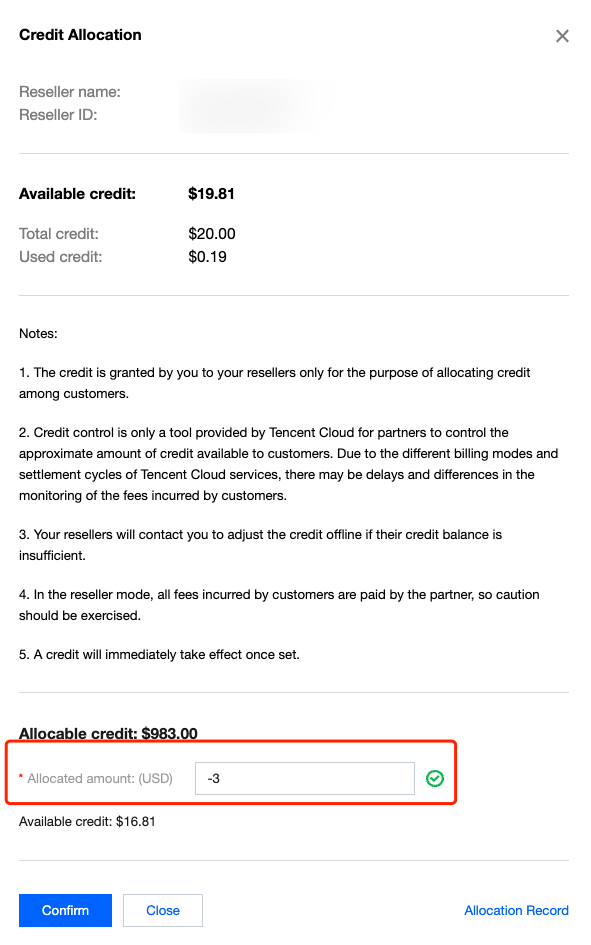
If the allocated credit limit for the reseller is high, you can enter a negative value to reclaim the reseller's available credit limit. The maximum reclaimable credit limit cannot exceed the reseller's available credit limit.
Operation Steps
1. On the Reseller Management > My Resellers webpage, click credit management in the Operation column of the reseller list.
2. Enter the credit allocation page, fill in the allocated amount (negative value), then click Confirm.
Note:
Note: When a reseller's credit limit is 0 or negative, it will avoid triggering service suspension for sub-accounts and will not affect their new purchases.
View Allocation Record
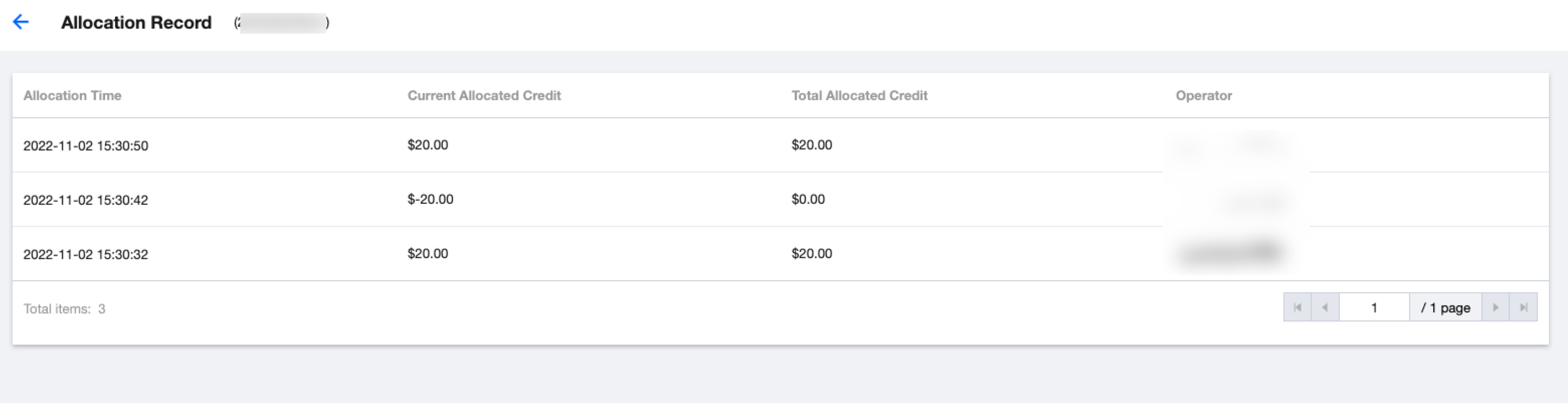
Enter the Reseller Management > My Resellers webpage, click Credit Management in the Operation column of the target reseller, then click Allocation Record in the bottom-right corner of the pop-up to query the credit allocation records from the first-level reseller to the second-level reseller.
Ajuda e Suporte
Esta página foi útil?
Você também pode entrar em contato com a Equipe de vendas ou Enviar um tíquete em caso de ajuda.
comentários