Resellers can manage organization employee information, including addition of personnel and role setting, on the Partner Center Console > Employee Management page. By creating employee accounts with different permissions, resellers can achieve decentralized management of accounts. Note:
Only in the Partner Center console > Employee Management page can you add employees and assign roles for decentralized management. Do not directly add or delete users in the Cloud Access Management (CAM) service, otherwise lead to permission conflict with Partner Center employee management.
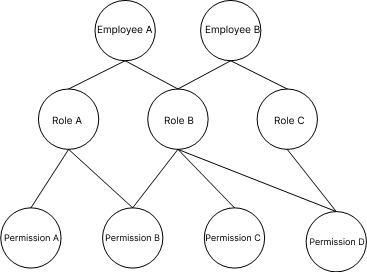
Relationship among Employee, Roles and Permissions
A role is a collection of permissions and can be customized. Each employee can possess up to three roles, with each role containing multiple permissions.
Example: If Employee A is assigned the role of Customer Manager (Role B), Customer Manager (Role B) has permission to view customer basic information (Customer Query Permission B), indicating that Employee A possesses Customer Query Permission B.