The ASP.NET application image provides an open-source server-side web application framework for building dynamic webpages, applications, and services.
Note:
The underlying layer of the sample ASP.NET application image in this document is based on Windows Server 2019. Application images are subject to updates from time to time, and the actual image information on the purchase page shall prevail.
This image requires an SSD system disk of at least 50 GB.
Directions
1. Log in to the Lighthouse console and configure the following parameters:
Region and Availability zone: Select the region and AZ near your target users to reduce the network latency and improve their access speed.
Image: Select the ASP.NET application image.
Instance bundle: Select an instance bundle according to the required instance configuration (including CPU, memory, system disk, bandwidth, and monthly traffic).
Instance name: Enter a custom instance name. If it is left empty, the selected image name will be used as the name by default. When multiple instances are created in a batch, their names will be consecutive with auto-incrementing suffixes. For example, if you enter "LH" as the name and create three instances, the three instances are named "LH1", "LH2", and "LH3".
Purchase period: Default to 1 month.
Quantity: Default to 1.
2. Click Buy now to submit your order and make the payment as prompted.
2. In the instance list, select the target instance created with the ASP.NET application image to enter its details page.
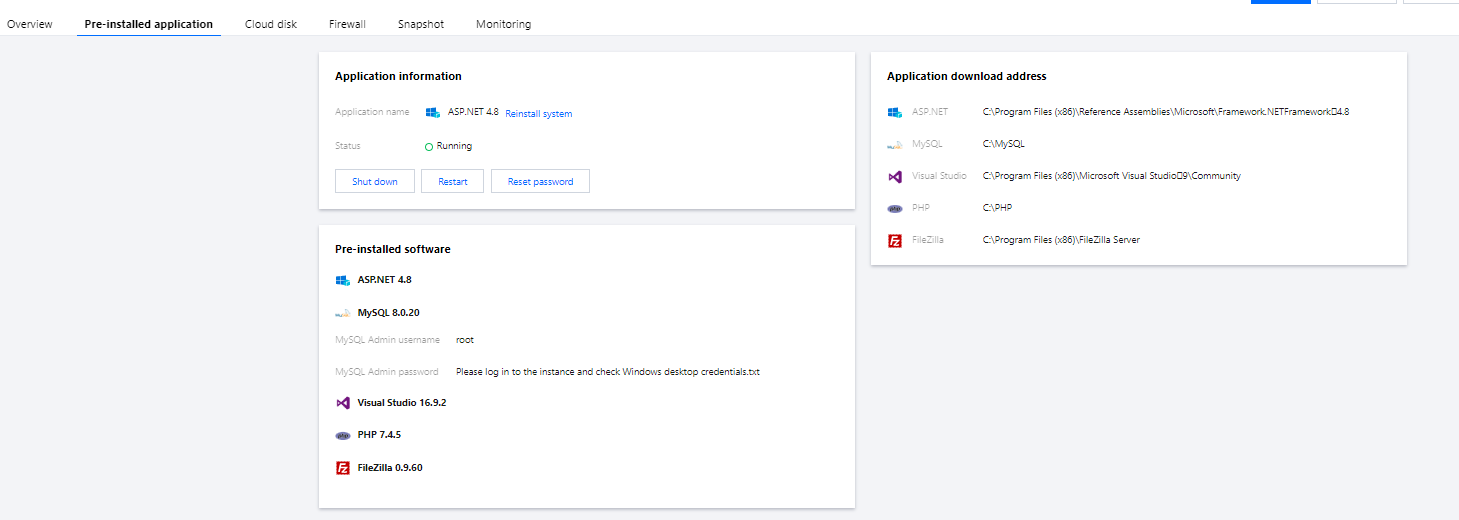
3. Select the Pre-installed application tab to enter the application details page.
You can view the configuration items of pre-installed applications.
ASP.NET, MySQL, and Visual Studio software installation paths.
MySQL admin account and login password.
Using FTP tool to upload code and debug
The ASP.NET application image contains FileZilla, which allows you to connect to your local computer, upload your website code, and perform testing and debugging.