Política de privacidade
Contrato de segurança e processamento de dados
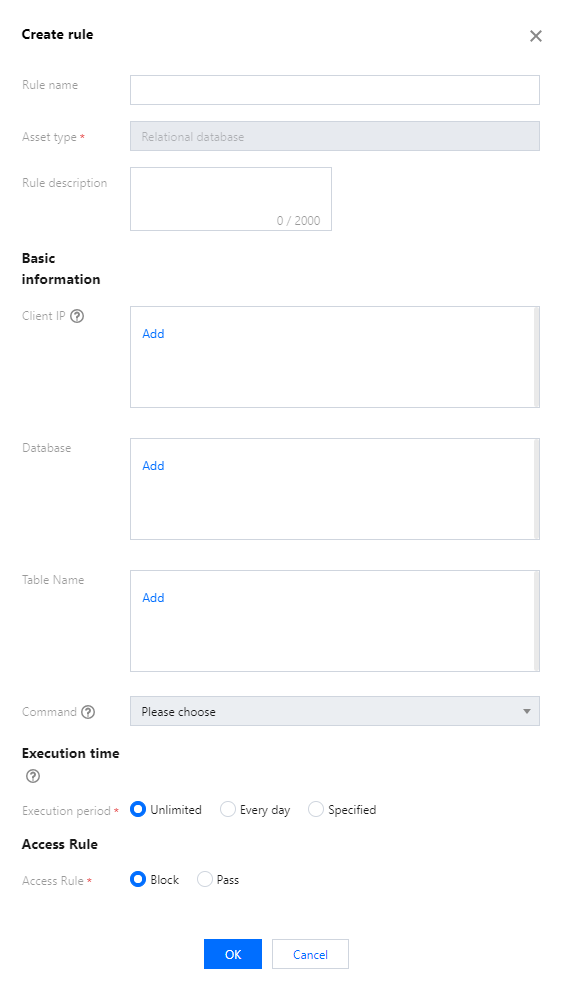
Parameter Name | Parameter Description |
Rule name | 1�60 characters; It should start with a letter, Chinese character, or number; only letters, Chinese characters, digits, '-', and '_' are allowed. |
Asset type | Only relational databases are supported. |
Rule description | Supports 0�100 characters. |
Client IP | Supports IPv4 addresses and CIDR. |
Database name | The name of the database subject to access control. |
Table name | The name of the table subject to access control. |
Command | Block/allow applies only to the selected commands in the list. If no command is selected, the rule applies to all commands in the list. |
Execution time | The rule effective time or SQL statement execution time. Options include unlimited, Every day, or a specified. |
Access rule | Block/Pass. |
Esta página foi útil?
Você também pode entrar em contato com a Equipe de vendas ou Enviar um tíquete em caso de ajuda.
comentários