tencent cloud

Cloud Application Rendering

Release Notes
Product Introduction
Overview
Basic Concepts
Strengths
Use Cases
Purchase Guide
Billing Overview
Billing
Purchase Process
Overdue Payment
Refunds
Auto-Renewal Rules
Getting Started
Basic Technical Concepts
User Guides
Technical Integration
Integration Demo
Console Guide
Application Management
Project Management
Stream Push Service
Concurrency Management
Multiplayer Interaction
Session Status
Practical Tutorial
How to Implement Cloud-Native Recording
How to Implement Application Upload and Version Update via CAR-CLI
How to Implement Concurrency Sharing
How to Implement Mobile Chinese Input
How ‍to ‍Push ‍‍Cloud ‍Video Streams to CSS
How to Implement Multi-Person Interaction
How to Implement Live Room Interaction ‍with On-Screen Comments
Configuring and Using Cloud Browser
SDK Documentation
JavaScript SDK
SDK for Android
SDK for iOS
API Documentation
History
Introduction
API Category
Making API Requests
User APIs
Application Management APIs
Project Management APIs
Concurrency Management APIs
Stream Push Service APIs
Data Types
Error Codes
FAQs
CAR Basics
CAR Integration
Cloud Application
Service Level Agreement
CAR Policy
Privacy Policy
Data Processing And Security Agreement
Contact Us

Starting an Application

PDF
Modo Foco
Tamanho da Fonte
Última atualização: 2026-02-04 15:42:15
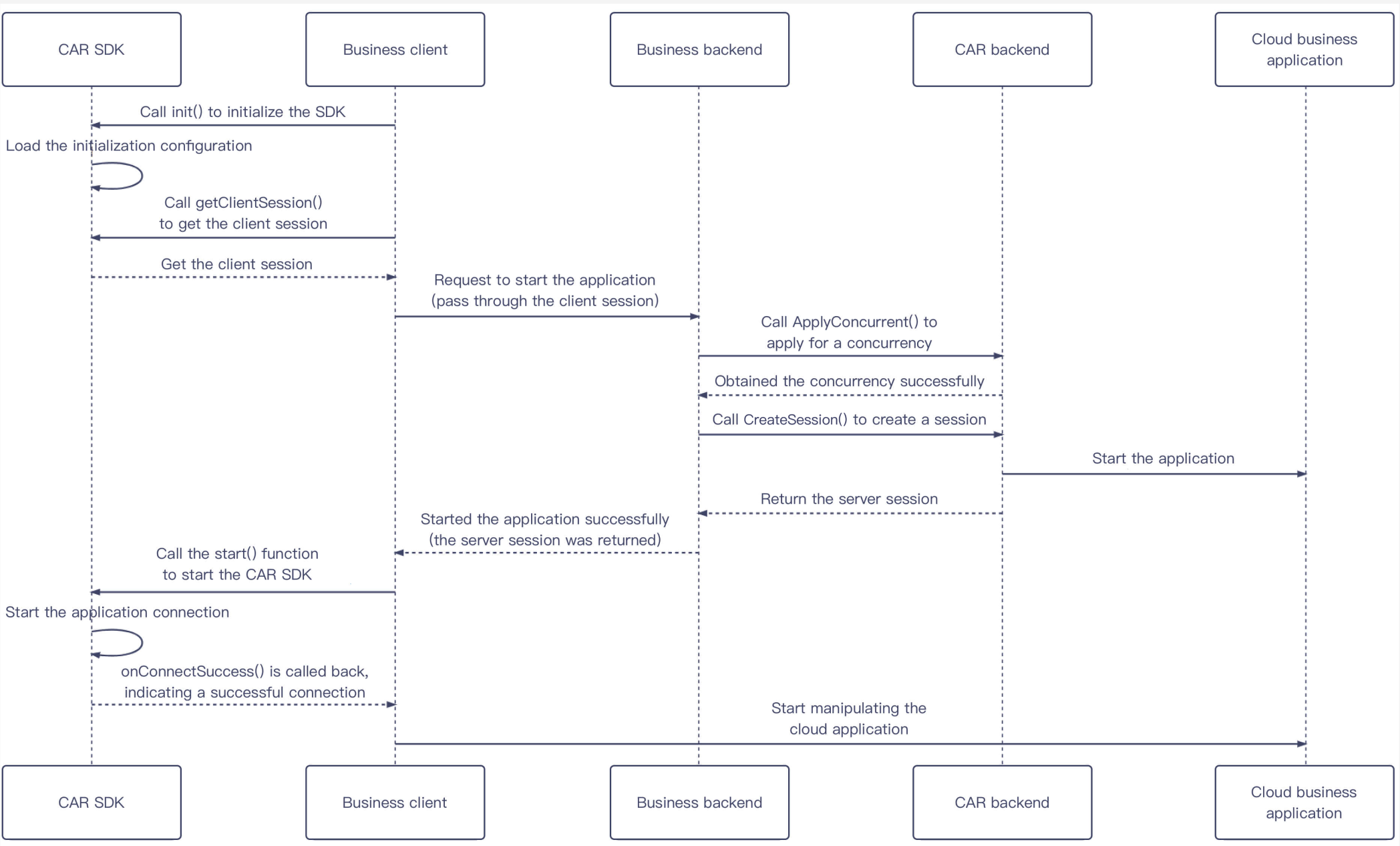
This section describes how to start a cloud application.

Sequence diagram


Parameter description
Role
Description
CAR SDK
CAR client SDKs include SDK for JavaScript, SDK for Android, and SDK for iOS. This section takes the JavaScript SDK as an example.
Business client
The platform you provide for your users. You can see Integration Demo and for reference when setting up your business client.
Business backend
Your backend service that can be deployed on any server. You can see Integration Demo for reference when setting up your backend.
CAR backend
Tencent Cloud APIs provided by CAR.
Cloud application
The application you uploaded.

Directions

1. The business client calls the TCGSDK.init() API to perform initialization. After initialization, the client calls the TCGSDK.getClientSession() API to get its ClientSession.
2. The business client requests the business backend to start the application based on parameters passed in such as UserId and ClientSession. Here, UserId is the unique user identifier customized by the business and should remain unchanged during user queuing and application reconnection.
Note:
A concurrency can be used by only one UserId at a time. If you use the same UserId to send requests, concurrency contention may occur. The CAR backend sends the currently connected concurrency to the device sending the latest request, and the previous device will be disconnected and display a black screen.
3. The business backend calls the [ApplyConcurrent()](https://www.tencentcloud.com/document/product/1547/72827?from_cn_redirect=1) API through the Real-Time Cloud Rendering API to apply to reserve a concurrency. If there are no available concurrencies or an error is returned, go back to Step 2 to send a request again.
4. The business backend calls the CreateSession() API to create a session and returns ServerSession to the business client.
5. The business client calls the TCGSDK.start() API to start the cloud application. After the application connection, the SDK will trigger the onConnectSuccess() callback. We recommend you call the data channel creation API and APIs for other features after this callback.

Ajuda e Suporte

Esta página foi útil?

comentários