tencent cloud

Cloud Application Rendering

Release Notes
Product Introduction
Overview
Basic Concepts
Strengths
Use Cases
Purchase Guide
Billing Overview
Billing
Purchase Process
Overdue Payment
Refunds
Auto-Renewal Rules
Getting Started
Basic Technical Concepts
User Guides
Technical Integration
Integration Demo
Console Guide
Application Management
Project Management
Stream Push Service
Concurrency Management
Multiplayer Interaction
Session Status
Practical Tutorial
How to Implement Cloud-Native Recording
How to Implement Application Upload and Version Update via CAR-CLI
How to Implement Concurrency Sharing
How to Implement Mobile Chinese Input
How ‍to ‍Push ‍‍Cloud ‍Video Streams to CSS
How to Implement Multi-Person Interaction
How to Implement Live Room Interaction ‍with On-Screen Comments
Configuring and Using Cloud Browser
SDK Documentation
JavaScript SDK
SDK for Android
SDK for iOS
API Documentation
History
Introduction
API Category
Making API Requests
User APIs
Application Management APIs
Project Management APIs
Concurrency Management APIs
Stream Push Service APIs
Data Types
Error Codes
FAQs
CAR Basics
CAR Integration
Cloud Application
Service Level Agreement
CAR Policy
Privacy Policy
Data Processing And Security Agreement
Contact Us

Application Reconnection

PDF
Modo Foco
Tamanho da Fonte
Última atualização: 2024-01-26 11:54:09

Application Reconnection

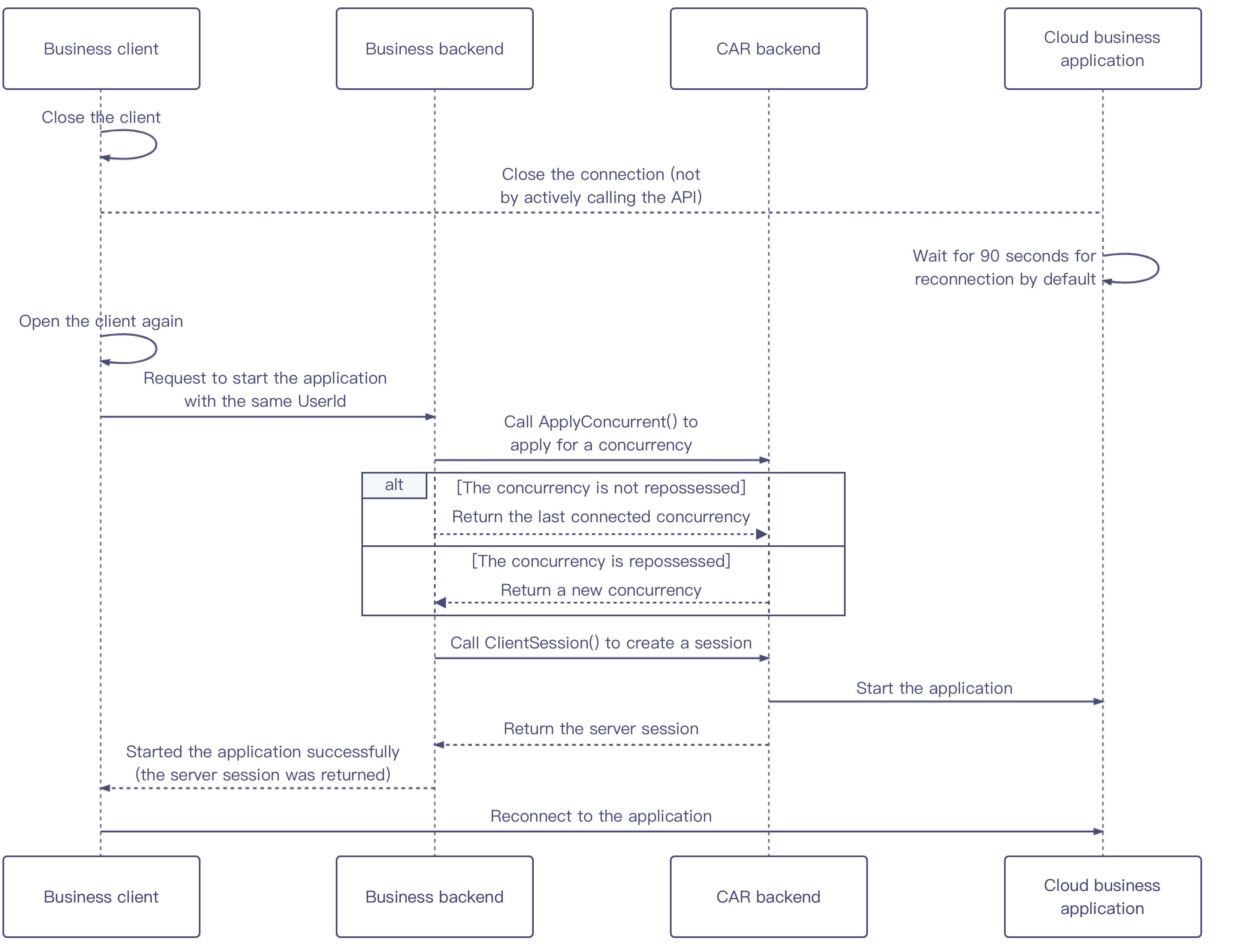
This section describes how to reconnect to an application. If a user directly closes the client but doesn't actively call the application close feature, APIs for applying for a concurrency and creating a session can be called again to reconnect to the application.

Sequence diagram


Directions

1. After the client is closed, it will disconnect from the cloud application. If the backend doesn't actively call the API to close the application, the concurrency will wait for 90 seconds by default, so that there is time to reconnect.
2. After the client is opened again, it will pass in the same UserId to request the backend to start the application. If the UserId values are different, it cannot reconnect the user to the application.
3. The backend calls the ApplyConcurrent() API to apply to reserve the concurrent and perform the following steps based on the concurrency’s status:
If the user's last connected concurrency hasn't been repossessed, the last concurrency will be returned.
If the user's last connected concurrency has already been repossessed, a new concurrency will be returned.
4. The backend calls the CreateSession() API to create a session and returns ServerSession to the client to restart the application.
Ajuda e Suporte

Esta página foi útil?

comentários