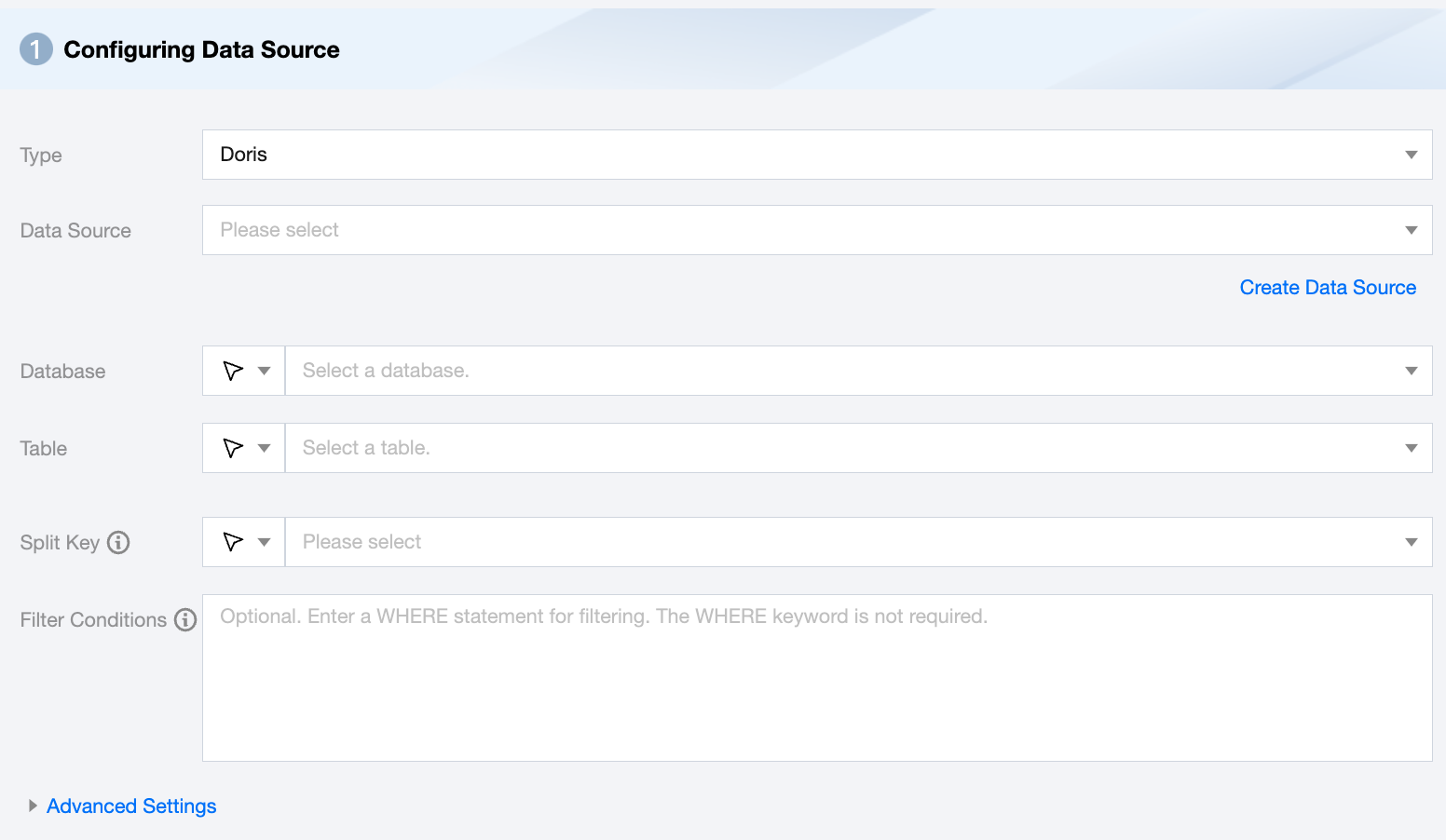
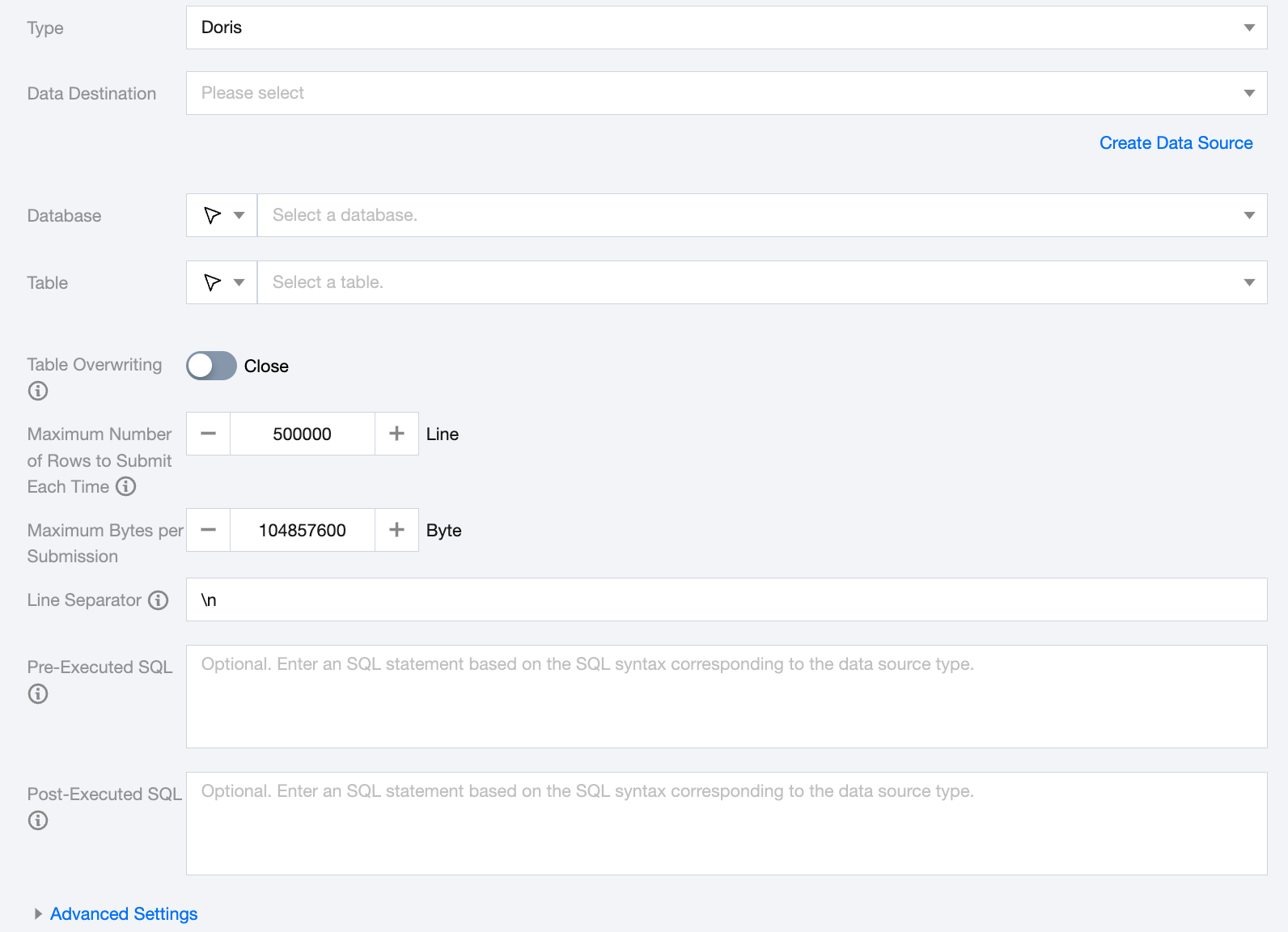
The configuration of the TCHouse-D data source is the same as that of Doris. Here, Doris data source is used as an example for the following explanation:
Supported Versions
Supports Doris versions 0.x, 1.1.x, 1.2.x, and 2.x.
Use Limits
1. Doris writes use the Stream load HTTP interface. It is necessary to ensure that the IP or port of FE or BE in the data source is correctly filled in.
2. Since the principle of Stream load is that BE initiates the import and distributes data, the recommended import data volume is between 1G and 10G. The default maximum Stream load import data volume is 10G.
To import files larger than 10G, you need to modify the BE configuration streaming_load_max_mb.
For example: if the file size to be imported is 15G, modify the BE configuration streaming_load_max_mb to 16000.
3. The default timeout for Stream load is 600 seconds. According to the current maximum import speed limit of Doris, it is necessary to modify the default timeout of the import task for files that exceed about 3G.
The timeout for an import task is equal to the import data volume divided by 10M/s (the specific average import speed needs to be calculated by the user based on their own cluster situation).
For example: to import a 10G file, the timeout equals 1000s, or 10G/10M/s
Doris Offline Single Table Read Node Configuration
Parameter
Description
Data Source
Available Doris data source to be synchronized.
Database
Supports selection or manual input of the library name to read from.
By default, the database bound to the data source is used as the default database. Other databases need to be manually entered.
If the data source network is not connected and the database information cannot be fetched directly, you can manually enter the database name. Data synchronization can still be performed when the Data Integration network is connected.
Table
Supports selecting or manually entering the table name to be read.
Split Key
Specify the field for data sharding. After specifying, concurrent tasks will be launched for data synchronization. You can use a column in the source data table as the partition key. It is recommended to use the primary key or indexed column as the partition key.
Filter Conditions (Optional)
In actual business scenarios, it is common to select the data of the current day for synchronization, setting the WHERE condition to gmt_create>$bizdate. WHERE condition can effectively perform business incremental synchronization. If the WHERE statement is not filled, including not providing the key or value of WHERE, data synchronization will be regarded as synchronizing full data.
Advanced Settings (Optional)
You can configure parameters according to business needs.
Doris Offline Single Table Write Node Configuration
Parameter
Description
Data Destination
Doris data source to be written into.
Database
Support selection or manual entry of the library name to be written to.
By default, the database bound to the data source is used as the default database. Other databases need to be manually entered.
If the data source network is not connected and the database information cannot be fetched directly, you can manually enter the database name. Data synchronization can still be performed when the Data Integration network is connected.
Table
Support selection or manual entry of the table name to be written to.
If the data source network is not connected and the table information cannot be fetched directly, you can manually enter the table name. Data synchronization can still be performed when the Data Integration network is connected.
Table Overwriting
When enabled, Doris will support atomic overwrite operations at the table level. Before writing data, a new table with the same structure will be created using the CREATE TABLE LIKE statement. The new data will be imported into the new table and the old table will be atomically replaced via swap, achieving table overwrite.
Maximum Number of Rows to Submit Each Time
Record size for one-time batch submission.
Maximum Bytes per Submission
Maximum data volume for one-time batch submission.
Line Separator(Optional)
The key delimiter for Doris write operations, default is '\\n'. Supports manual input. You must ensure it is consistent with the field delimiter of the created Doris table, otherwise data cannot be found in the Doris table.
Pre-Executed SQL
The SQL statement executed before the synchronization task. Fill in the correct SQL syntax according to the data source type, such as clearing the old data in the table before execution (truncate table tablename).
Post-Executed SQL
The SQL statement executed after the synchronization task. Fill in the correct SQL syntax according to the data source type, such as adding a timestamp (alter table tablename add colname timestamp DEFAULT CURRENT_TIMESTAMP ON UPDATE CURRENT_TIMESTAMP).
Advanced Settings
You can configure parameters according to business needs.
Data type conversion support
Read
Doris data type
Internal Types
TINYINT,SMALLINT,INT,BIGINT
Long
FLOAT,DOUBULE,DECIMAL
Double
VARCHAR,CHAR,ARRAY,STRUCT,STRING
String
DATE,DATETIME
Date
BOOLEAN
Boolean
Write
Internal Types
Doris data type
Long
TINYINT,SMALLINT,INT,BIGINT
Double
DOUBLE,FLOAT,DECIMAL
String
STRING,VARCHAR,CHAR,ARRAY,STRUCT
Date
DATETIME,DATE
Boolean
BOOLEAN
FAQs
1. Partition not found error: "no partition for this tuple"
Cause: Doris lacks the corresponding partition.
Solution: If using time partitioning, it is recommended to enable dynamic partitioning.
The table 'tbl1' has a partition column'k1' of type DATE. Create a dynamic partition rule to partition by day, keeping only the last 7 days of partitions and pre-creating partitions for the next 3 days.
CREATE TABLE tbl1
(
k1 DATE,
...
)
PARTITION BY RANGE(k1)()
DISTRIBUTED BY HASH(k1)
PROPERTIES
(
"dynamic_partition.enable"="true",
"dynamic_partition.time_unit"="DAY",
"dynamic_partition.start"="-7",
"dynamic_partition.end"="3",
"dynamic_partition.prefix"="p",
"dynamic_partition.buckets"="32"
);
Assuming the current date is 2020-05-29, according to the above rule, 'tbl1' will have the following partitions:
p20200529: ["2020-05-29", "2020-05-30")
p20200530: ["2020-05-30", "2020-05-31")
p20200531: ["2020-05-31", "2020-06-01")
p20200601: ["2020-06-01", "2020-06-02")
On the next day, 2020-05-30, a new partition 'p20200602' will be created: ["2020-06-02", "2020-06-03")
On 2020-06-06, because dynamic_partition.start is set to 7, the partition from 7 days prior will be deleted, i.e., partition 'p20200529' will be deleted.
2. Data synchronization too large results in: "The size of this batch exceed the max size of JSON type data"
Cause: The batch submission size is too large. It is recommended to ignore the JSON data size check.
3. Import frequency too fast results in: "tablet writer write failed, err=-235"
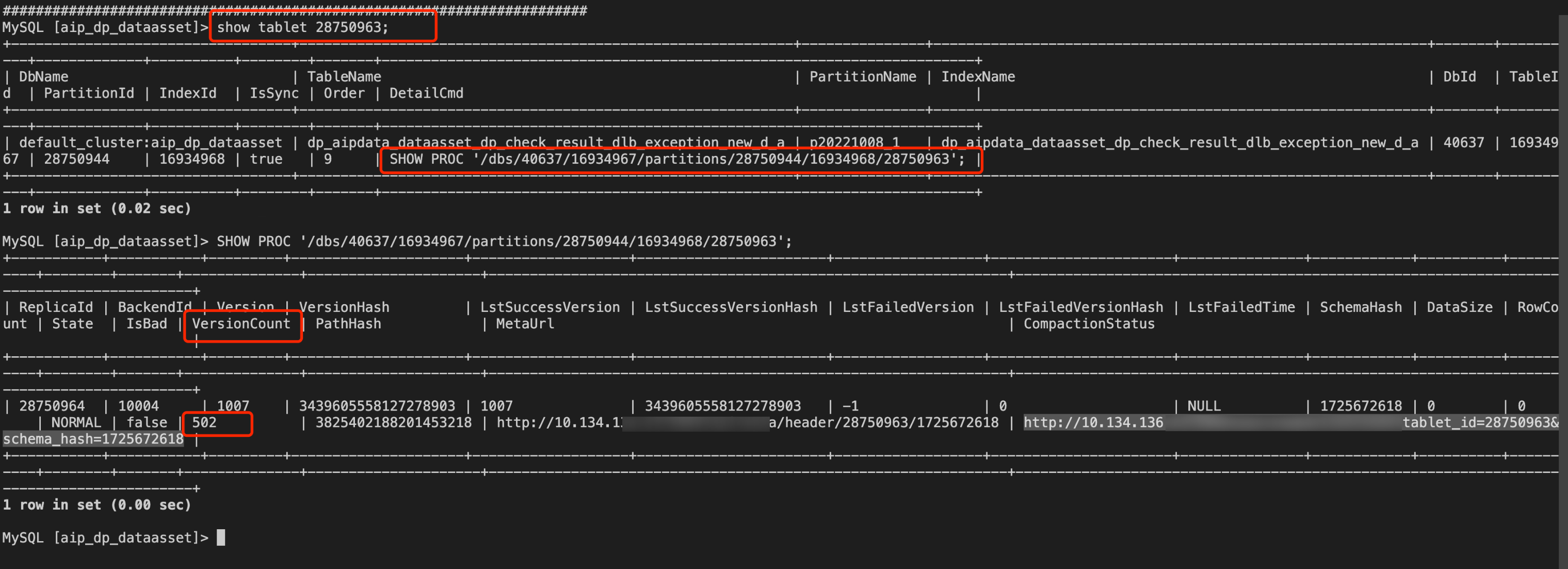
Cause: Import frequency too fast, causing VersionCount to exceed the set size (default is 500, controlled by the BE parameter max_tablet_version_num). It is recommended to adjust the VersionCount.
3. The versionCount in the result represents the number of versions. If a replica has too many versions, reduce the import frequency or stop importing. If the version count does not decrease after stopping the import, check the be.INFO log on the corresponding BE node by searching for the tablet id and compaction keywords to ensure compaction is running normally.
4. By increasing max_tablet_version_num or optimizing the compaction of the tablet, you can improve compression efficiency to reduce the number of versions.
Cause: The temporary_partition is too large; reduce the number of temporary_partition.
5. When synchronizing Doris with DLC, Doris reports an error: the field exceeds the schema length
Problem information:
The length of uuid is set to 200, but the uuid length in the synchronization record is 232.
Reason: column_name[uuid], the length of input is too long than schema. first 32 bytes of input str: [0000000000000BB4E595527BE******] schema length: 200; actual length: 232;. src line [];
Cause:
When calculating the character length, the Spark engine of DLC treats each Chinese character as one character length, whereas when Doris calculates the length, it treats Chinese characters as UTF-8 encoding, occupying 3 character lengths. The inconsistency in length calculation between the two ends may cause strings with critical lengths to trigger warnings.