Access Policy Evaluation Process
Download
Modo Foco
Tamanho da Fonte
COS buckets and resources are accessible only to users who have permission. In Tencent Cloud, a root account, by default, holds all management permissions for COS buckets and resources it owns. Any CAM users (other root accounts, collaborators and sub-accounts), anonymous or other type of users should get permission from the root account first before access.
Access policies in COS include user group policies, user policies, bucket access control lists (ACLs), and bucket policies. As shown below, the evaluation of access policies depends on three key factors:
1. User authentication: when a user tries to access a resource in COS, either of the following two procedures applies:
If it is a signed request, COS parses the user account information out of it, and forwards the request to CAM for identity verification;
If it is an unsigned request, the user enters the next step of authentication as anonymous user.
2. Policy type: access policies in COS include user group policies, user policies, bucket policies and bucket ACLs. The policy type determines the policy priority.
3. Policy context: whether a resource access request will succeed is finally determined based on the permission details recorded across the access policies of all types.
Access Policy Evaluation Process
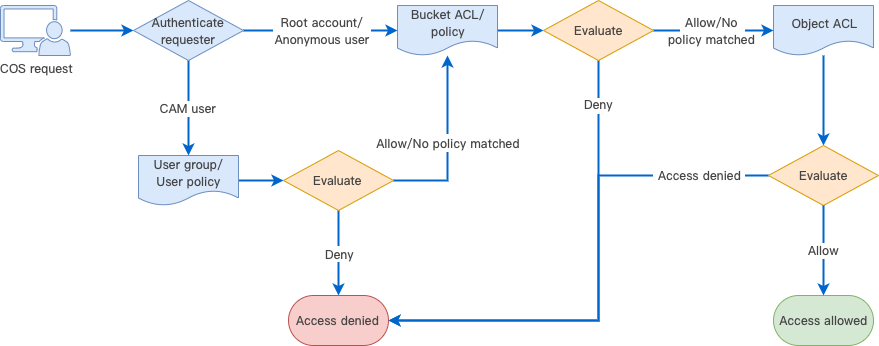
When Tencent Cloud COS receives a request, it first confirms the identity of the requester and verifies that it has necessary permissions, including checking the user policy, bucket access policy, and resource-based ACL, and authenticating the request.
When COS receives a request, it first performs identity verification, the result of which determines the requester type. Different types may result in different actions:
1. Verified Tencent Cloud root account: a root account holds all operation permissions for the resources that it owns. For resources beyond those, the resource permissions should be evaluated, and the resource access will be permitted only upon successful authentication.
2. Verified CAM user (sub-account or collaborator): needs evaluation of user policies. A CAM user must be authorized by its parent root account to be allowed to initiate an access. To access a resource in another root account, the CAM user should be evaluated for the resource permissions of its root account, and the resource access will be granted only upon successful authentication.
3. Unidentified anonymous user: needs evaluation of resource permissions, including permissions to access the policies or ACLs of buckets and objects in a bucket. The resource access will be granted upon successful authentication.
4. Access will be denied for any requesters other than the above types of users.
How Access Policy Evaluation Works
In the Tencent Cloud permissions system, the access policy evaluation always occurs based on the policy context in the following basic principles:
1. By default, all requests are implicitly denied while a root account enjoys access permissions for all resources that it owns.
2. If an explicit allow exists in the user group/user/bucket policy, or bucket/object ACL, the above default is overridden.
3. An explicit deny overrides any allows in any policy.
4. The validity scope of permissions depends on the union of identity-based policies (user group/user policy) and resource-based policies (bucket policy or bucket/object ACL).
Note:
Explicit deny: is specified for certain users in the user/user group/bucket policy. For example, if a root account configures an explicit deny in its user policy targeted at a sub-user UIN 100000000011 who attempts to
GET Object, this sub-user will be unable to download any resources in the root account.Explicit allow: is specified for certain users in the user/user group/bucket policy or bucket ACL via
grant-\\*.Deny anyone: is specified in the bucket policy. Once it is configured, any unsigned request will be denied while any signed request will be authenticated with identity-based policies.
Allow anyone: is specified in the bucket policy, or
public-\\* is specified instead in the bucket ACL.The validity scope of permissions depends on the union of identity-based and resource-based policies. In a complete authentication, COS first parses the user identity, and then uses it to verify the resources the user has permissions to access. Besides, COS verifies the permissions of the user as anonymous user based on resource-based policies. Either verification is successful and the user will be allowed to access.
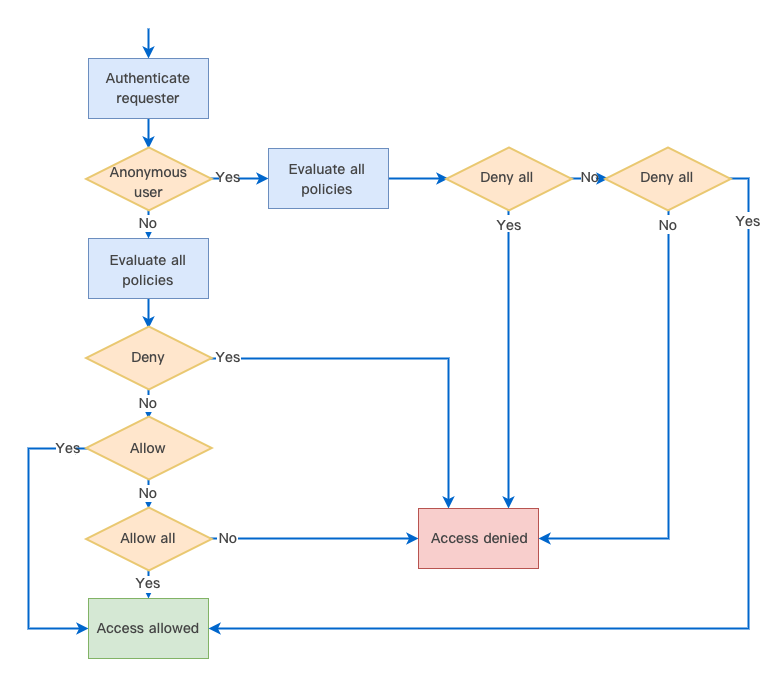
The following is a graphical illustration of access policy evaluation. First, evaluate if the requester is an anonymous user based on if the request includes a signature. For an anonymous user, continue to evaluate if “Deny all” or “Allow all” is specified in the policies and determine whether to allow or deny access based on the evaluation result. For a legitimate CAM user or a root account that owns the resource, evaluate if “Deny”, “Allow”, or “Allow all” is specified in the policies, and determine whether to allow or deny access based on the evaluation result.
Policy Context
Policy context provides permission details recorded in your policies. Under the principle of least privilege, you should specify the following in your policies:
principal: you should specify to which sub-account (user ID required), collaborator (user ID required), anonymous user, or user group to grant permission. This is not needed if you use a temporary key for access.
statement: enter the corresponding parameters.
effect: you must explicitly state whether the policy is to "allow" or "deny".
action: you must specify the action to allow or deny. It can be one API operation or a set of API operations.
resource: you must specify the resource for which permission is granted. A resource is described in a six-segment format. You can set the resource as a specific file, e.g.,
exampleobject.jpg or a directory, e.g., examplePrefix/*. Unless needed, please do not grant any user the access to all of your resources using the * wildcard.condition: it describes the condition for the policy to take effect. A condition consists of operator, action key, and action value. A condition value may contain information such as time and IP address.
You should write your policies following a certain policy syntax (See Access Policy Language Overview) according to your business needs. For examples of writing user and bucket policies, see Syntax Structure and Examples of Bucket Policies.
Example Access Policy Evaluation
Suppose that a root account UIN 100000000001 associates a preset user policy as detailed below with a sub-account UIN 100000000011 for it to only read resources in the root account. This policy allows the sub-account to perform all
List, Get, Head, and OptionsObject operations.{"version": "2.0","statement": [{"action": ["cos:List*","cos:Get*","cos:Head*","cos:OptionsObject"],"resource": "*","effect": "allow"}]}
Also, the root account adds the following bucket policy to a private read/write bucket
examplebucket-1250000000:{"Statement": [{"Principal": {"qcs": ["qcs::cam::anyone:anyone"]},"Effect": "Deny","Action": ["name/cos:GetObject"],"Resource": ["qcs::cos:ap-guangzhou:uid/100000000011:examplebucket-1250000000/*"]}],"version": "2.0"}
This bucket policy denies any users the ability to download objects (
GetObject). Therefore, during the access policy evaluation:1. If the sub-account requests to
GetObject with a signature, a user policy will be matched based on the requester identity indicated by the request, which will then be granted upon successful access policy evaluation and verification.2. If the sub-account requests to
GetObject without a signature, it will be determined automatically as an anonymous requester, and denied access by the bucket policy.Ajuda e Suporte
Esta página foi útil?
Você também pode entrar em contato com a Equipe de vendas ou Enviar um tíquete em caso de ajuda.
comentários