tencent cloud

Cloud Object Storage

Release Notes and Announcements
Release Notes
Announcements
Product Introduction
Overview
Features
Use Cases
Strengths
Concepts
Regions and Access Endpoints
Specifications and Limits
Service Regions and Service Providers
Billing
Billing Overview
Billing Method
Billable Items
Free Tier
Billing Examples
Viewing and Downloading Bill
Payment Overdue
FAQs
Getting Started
Console
Getting Started with COSBrowser
User Guide
Creating Request
Bucket
Object
Data Management
Batch Operation
Global Acceleration
Monitoring and Alarms
Operations Center
Data Processing
Content Moderation
Smart Toolbox
Data Processing Workflow
Application Integration
User Tools
Tool Overview
Installation and Configuration of Environment
COSBrowser
COSCLI (Beta)
COSCMD
COS Migration
FTP Server
Hadoop
COSDistCp
HDFS TO COS
GooseFS-Lite
Online Tools
Diagnostic Tool
Use Cases
Overview
Access Control and Permission Management
Performance Optimization
Accessing COS with AWS S3 SDK
Data Disaster Recovery and Backup
Domain Name Management Practice
Image Processing
Audio/Video Practices
Workflow
Direct Data Upload
Content Moderation
Data Security
Data Verification
Big Data Practice
COS Cost Optimization Solutions
Using COS in the Third-party Applications
Migration Guide
Migrating Local Data to COS
Migrating Data from Third-Party Cloud Storage Service to COS
Migrating Data from URL to COS
Migrating Data Within COS
Migrating Data Between HDFS and COS
Data Lake Storage
Cloud Native Datalake Storage
Metadata Accelerator
GooseFS
Data Processing
Data Processing Overview
Image Processing
Media Processing
Content Moderation
File Processing Service
File Preview
Troubleshooting
Obtaining RequestId
Slow Upload over Public Network
403 Error for COS Access
Resource Access Error
POST Object Common Exceptions
API Documentation
Introduction
Common Request Headers
Common Response Headers
Error Codes
Request Signature
Action List
Service APIs
Bucket APIs
Object APIs
Batch Operation APIs
Data Processing APIs
Job and Workflow
Content Moderation APIs
Cloud Antivirus API
SDK Documentation
SDK Overview
Preparations
Android SDK
C SDK
C++ SDK
.NET(C#) SDK
Flutter SDK
Go SDK
iOS SDK
Java SDK
JavaScript SDK
Node.js SDK
PHP SDK
Python SDK
React Native SDK
Mini Program SDK
Error Codes
Harmony SDK
Endpoint SDK Quality Optimization
Security and Compliance
Data Disaster Recovery
Data Security
Cloud Access Management
FAQs
Popular Questions
General
Billing
Domain Name Compliance Issues
Bucket Configuration
Domain Names and CDN
Object Operations
Logging and Monitoring
Permission Management
Data Processing
Data Security
Pre-signed URL Issues
SDKs
Tools
APIs
Agreements
Service Level Agreement
Privacy Policy
Data Processing And Security Agreement
Contact Us
Glossary

DEEP ARCHIVE Overview

PDF
Modo Foco
Tamanho da Fonte
Última atualização: 2024-03-25 15:28:24

Overview

DEEP ARCHIVE is a storage class provided by COS that enables long-term archiving of massive amounts of data. Its unit storage price is comparable to that of tape storage, making it an ideal low-cost solution for long-term data storage. You can manage data easily at low costs through various interaction means provided by COS, such as API, SDK, tools, and console. This eliminates your needs to maintain complex tape library configuration locally and care about the evolution of underlying storage media.
DEEP ARCHIVE is suitable for data that is accessed infrequently but needs to be retained for a long time. In log cold backup scenarios, enterprises need to back up and store the log data generated every day for tracking and analysis according to applicable laws and regulations. In view data and autonomous driving businesses, enterprises accumulate a high number of media files such as images and videos, which need to be archived and stored persistently after use. DEEP ARCHIVE allows enterprises to store such data in the cloud and restore it only when needed, which reduces the storage costs and simplifies Ops management.
DEEP ARCHIVE is designed for 99.999999999% durability and 99.95% availability. You can also use the versioning and cross-region replication features provided by COS to further guarantee the data security.

How to Use

1. Upload using the console.
1. Log in to the COS console.
2. Click Bucket List and create a bucket in a supported region (such as Beijing).
3. After creating the bucket, click Upload File in File List.
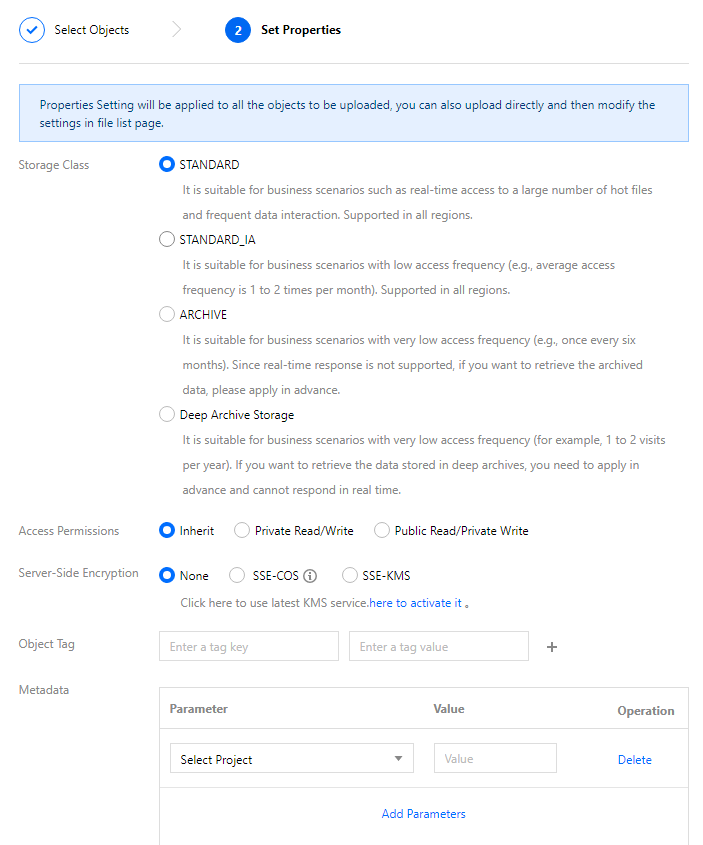
4. Select a local file for upload and select DEEP ARCHIVE for Storage Class in Set Properties. For more information, see Uploading Objects.

5. Upload using APIs. Set x-cos-storage-class to DEEP_ARCHIVE in the PUT Object, POST Object, or Initiate Multipart Upload API for direct upload to the DEEP ARCHIVE storage class.
Note:
Append Object does not support direct upload to DEEP ARCHIVE.
6. Upload using SDKs. Currently, all the SDKs released by COS support direct upload to DEEP ARCHIVE. You need to set the StorageClass parameter to DEEP_ARCHIVE when uploading a file.
7. Upload using a tool. COSBrowser and COSCMD support direct upload to DEEP ARCHIVE. You need to add the header field x-cos-storage-class and set it to DEEP_ARCHIVE when uploading a file.

Use Limits

DEEP ARCHIVE is subject to the following limits. When using it, you need to pay attention to their impact on the storage costs and performance:
Minimum storage unit: The minimum storage unit is 64 KB, and objects smaller than 64 KB will be counted as 64 KB during the calculation of the storage capacity.
Minimum storage period: The minimum storage period is 180 days, and a shorter period will be counted as 180 days for billing.
Note:
The storage period means logical days (a day is 24 hours) and starts from the time when a file is modified.
Retrieval request QPS limit: 100 request/sec.
Available regions: DEEP ARCHIVE is currently supported only in the Beijing, Nanjing, Shanghai, Guangzhou, Chengdu, Chongqing, Tokyo, and Singapore regions and will be available in more regions.
Use limit: Currently, DEEP ARCHIVE is not supported for multi-AZ buckets.
Operation limit: Objects cannot be appended to other objects in the DEEP ARCHIVE storage class.
Retrieval request limit: Only one retrieval request can be executed at a time for an object, and multiple repeated requests will be merged and processed according to the fastest retrieval mode. If the retrieval mode of the (N+1)th request is faster than that of the Nth request, the (N+1)th request will be executed as a new request; otherwise, it will fail.
Data retrieval: Standard retrieval (12–24 hours) and bulk retrieval (24–48 hours) are supported for files in the DEEP ARCHIVE storage class.
Ajuda e Suporte

Esta página foi útil?

comentários