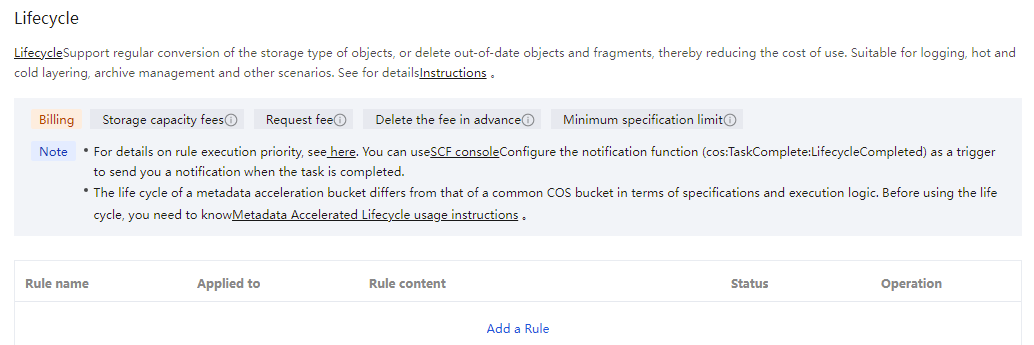
COS metadata-accelerated buckets are compatible with COS lifecycle capabilities and are suitable for scenarios such as data warehousing and cold and hot data tiering.The metadata acceleration bucket supports using the COS console and API to configure lifecycle rules. For specific usage, see: COS Lifecycle Overview.
Differences From COS Lifecycle
Metadata acceleration buckets have the following differences from COS bucket lifecycle. Please note when using:
1. Specification limits: The metadata acceleration bucket has a limit of 1,000 lifecycle rules per single bucket. If a unique scenario requires increasing this limit, please contact us.
2. Update time: The metadata acceleration bucket lifecycle uses the latest file update time as the basis for tiering or deletion. The latest time among the file's MTime, ATime, and CTime in the COS metadata acceleration backend is used as the file update time. Specifying a particular time (MTime, ATime, CTime) as the tiering basis is currently not supported. For example, if you create a file text.txt on June 1 and access it again on June 10, with no subsequent operations on this file, then configure a lifecycle rule on June 11 to tier text.txt to STANDARD_IA 10 days after the update. At this point, the lifecycle scan determines the file's MTime as June 1 and ATime as June 10, making the latest update time June 10. The file will be tiered to STANDARD_IA storage on June 20.
Note:
To ensure the best read/write performance, COS metadata acceleration does not enable ATime tracing by default. If you need to use the ATime feature, contact us.
To avoid lifecycle management being executed earlier than the specified time, please refer to Recycle Bin Clearing Mechanism before using lifecycle settlement or removing files (such as .Trash).
3. File prefix: The metadata acceleration bucket lifecycle supports prefix filtering, which only allows filling in as a directory and does not currently support the prefix exclusion feature. When configuring a prefix, there is no need to include / before and after the path, as the COS backend will default to treating this path as a directory. Additionally, since prefixes only support directories, the path wildcard functionality in ordinary COS buckets is not currently supported. For example, your bucket has the following two paths:
user/hive/warehouse/test.db/test_table/
user/hive/warehouse/test.db/test_table2/
If you configure the file prefix in the lifecycle rule as user/hive/warehouse/test.db/test_table and match this path as a directory, only the first path will be hit, and it will not take effect on test_table2.
4. Currently, metadata acceleration buckets support one-way file settlement in the following sequence:
2. In the left sidebar, click Bucket List to enter.
3. Find the metadata acceleration bucket that requires enabling the lifecycle feature, click its bucket name, and enter the Bucket Details Page.
4. Click on the left Basic Configuration > Lifecycle configuration item.
5. Click Add Rule.
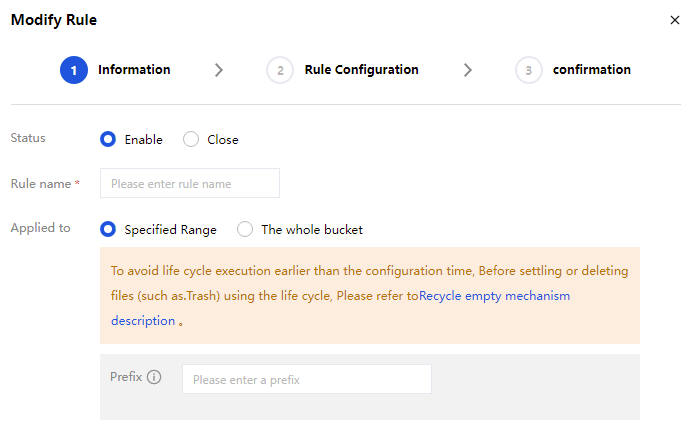
The basic information configuration items are described below.
Rule Name : Enter a name for your lifecycle rule.
Scope: This lifecycle rule can apply to the entire bucket or files within a specified prefix range.
When selecting a specified range:
Object prefix: Metadata acceleration buckets only support directory as the prefix and do not currently support the prefix exclusion feature. When configuring the prefix, there is no need to carry / before and after the path. The COS Backend will default to processing this path as a directory. Regular expressions are not supported.
When selecting the entire bucket: The rule takes effect on all files in the entire bucket.
6. Click Next and enter Rule Configuration.
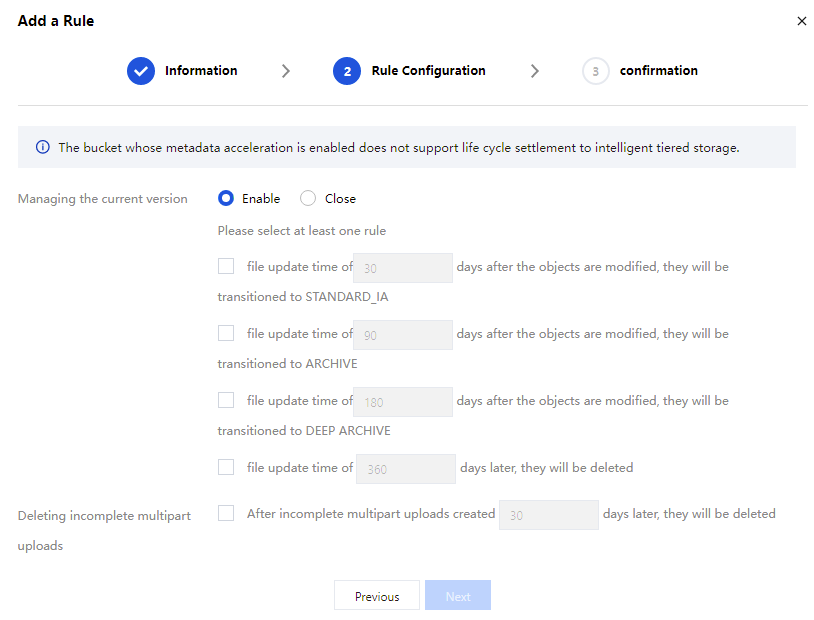
The configuration items are described as follows:
Manage current version files: You can enable the option to transition or delete current version objects. Objects in the bucket can be transitioned from STANDARD (hot data) to STANDARD_IA (cold data) storage classes, and support deletion after expiration.
Storage types from hot to cold are: STANDARD > STANDARD_IA > ARCHIVE > DEEP_ARCHIVE. Storage type conversion can only go from hot to cold, not in reverse. For details on storage types and applicable regions, see Storage Class Overview.
Note:
For buckets with multi-AZ configuration enabled, the lifecycle transition order only supports MAZ_STANDARD > MAZ_STANDARD_IA.
Metadata acceleration buckets determine settlement or deletion based on the most recent file update time. The backend metadata acceleration in COS uses the latest time among MTime, ATime, and CTime as the file update time. Currently, a specified time (MTime, ATime, or CTime) cannot be used as the basis for settlement.
Note:
For example, if you create a file text.txt on June 1 and access it again on June 10 with no subsequent operations, then configure a lifecycle rule on June 11 specifying that text.txt will be tiered to STANDARD_IA 10 days after the update. At this point, the lifecycle scan determines the file's MTime as June 1 and ATime as June 10, making the latest update time June 10. The file will be tiered to STANDARD_IA on June 20.
Delete Incomplete Multipart Uploads: When uploading a file, the upload fails due to various reasons, and only a part of it is transmitted. For such damaged files, you can set periodic deletion.
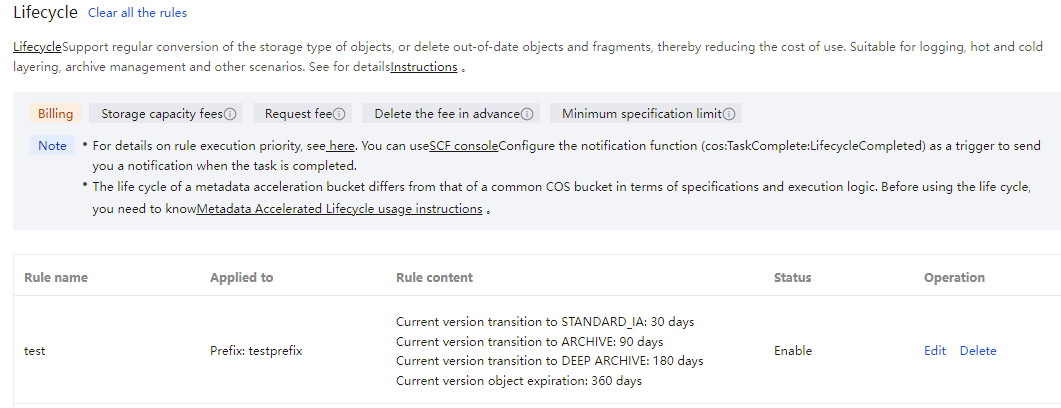
7. Click Next, confirm that everything is correct, then click Confirm to complete the lifecycle rule creation.
2. In the left sidebar, click Bucket List to enter.
3. Find the metadata acceleration bucket that requires enabling the lifecycle feature, click its bucket name, and enter the Bucket Details Page.
4. Click on the left Basic Configuration > Lifecycle configuration item.
5. Locate the rule you expect to delete, click the Delete button to delete the lifecycle rule.
Note:
If you only need a short stop of rule execution with no need to delete the rule, click Edit and change the corresponding rule status to Disabled.
Configuring Via API
Metadata-accelerated buckets reuse COS lifecycle capabilities and support using the COS Lifecycle interface to enable lifecycle configuration. Due to the feature of metadata acceleration buckets, some fields in the API differ from COS APIs. For specific calling methods, see the following API examples:
Due to the characteristics of metadata-accelerated buckets, some fields in the API differ from those in the COS lifecycle interface. The specific details are as follows:
Filter node
Prefix exclusion feature is not supported, so the PrefixNotEquals field is unsupported.
Metadata acceleration bucket does not support file tags, so the tag field is unsupported for filtering.
File size filtering is not supported, so the ObjectSizeGreaterThan and ObjectSizeLessThan fields are unsupported.
AccessFrequency node
Metadata acceleration bucket currently does not support specifying access time settlement, so the AccessFrequency and its child nodes parameters are unsupported.
NoncurrentVersion related node
Metadata acceleration bucket does not support version control, so the parameters NoncurrentVersionExpiration, NoncurrentVersionTransition and their child nodes are unsupported.
StorageClass node
The current metadata acceleration bucket supports the following input parameters: STANDARD_IA, ARCHIVE, DEEP_ARCHIVE.