tencent cloud

Cloud Object Storage

Release Notes and Announcements
Release Notes
Announcements
Product Introduction
Overview
Features
Use Cases
Strengths
Concepts
Regions and Access Endpoints
Specifications and Limits
Service Regions and Service Providers
Billing
Billing Overview
Billing Method
Billable Items
Free Tier
Billing Examples
Viewing and Downloading Bill
Payment Overdue
FAQs
Getting Started
Console
Getting Started with COSBrowser
User Guide
Creating Request
Bucket
Object
Data Management
Batch Operation
Global Acceleration
Monitoring and Alarms
Operations Center
Data Processing
Content Moderation
Smart Toolbox
Data Processing Workflow
Application Integration
User Tools
Tool Overview
Installation and Configuration of Environment
COSBrowser
COSCLI (Beta)
COSCMD
COS Migration
FTP Server
Hadoop
COSDistCp
HDFS TO COS
GooseFS-Lite
Online Tools
Diagnostic Tool
Use Cases
Overview
Access Control and Permission Management
Performance Optimization
Accessing COS with AWS S3 SDK
Data Disaster Recovery and Backup
Domain Name Management Practice
Image Processing
Audio/Video Practices
Workflow
Direct Data Upload
Content Moderation
Data Security
Data Verification
Big Data Practice
COS Cost Optimization Solutions
Using COS in the Third-party Applications
Migration Guide
Migrating Local Data to COS
Migrating Data from Third-Party Cloud Storage Service to COS
Migrating Data from URL to COS
Migrating Data Within COS
Migrating Data Between HDFS and COS
Data Lake Storage
Cloud Native Datalake Storage
Metadata Accelerator
GooseFS
Data Processing
Data Processing Overview
Image Processing
Media Processing
Content Moderation
File Processing Service
File Preview
Troubleshooting
Obtaining RequestId
Slow Upload over Public Network
403 Error for COS Access
Resource Access Error
POST Object Common Exceptions
API Documentation
Introduction
Common Request Headers
Common Response Headers
Error Codes
Request Signature
Action List
Service APIs
Bucket APIs
Object APIs
Batch Operation APIs
Data Processing APIs
Job and Workflow
Content Moderation APIs
Cloud Antivirus API
SDK Documentation
SDK Overview
Preparations
Android SDK
C SDK
C++ SDK
.NET(C#) SDK
Flutter SDK
Go SDK
iOS SDK
Java SDK
JavaScript SDK
Node.js SDK
PHP SDK
Python SDK
React Native SDK
Mini Program SDK
Error Codes
Harmony SDK
Endpoint SDK Quality Optimization
Security and Compliance
Data Disaster Recovery
Data Security
Cloud Access Management
FAQs
Popular Questions
General
Billing
Domain Name Compliance Issues
Bucket Configuration
Domain Names and CDN
Object Operations
Logging and Monitoring
Permission Management
Data Processing
Data Security
Pre-signed URL Issues
SDKs
Tools
APIs
Agreements
Service Level Agreement
Privacy Policy
Data Processing And Security Agreement
Contact Us
Glossary

Creating Templates

PDF
Modo Foco
Tamanho da Fonte
Última atualização: 2026-01-12 18:52:33

Feature Description

Create a visible watermark template.

Authorization Description

When used by a sub-account, the ci:CreateMediaTemplate permission is required. For details, see Cloud Infinite action.

Activating a Service

Using this feature requires enabling Cloud Infinite in advance and binding a bucket. For details, see Bind Bucket.
Use this feature requires enabling Media Processing Service in advance via console or API. For details, see Enable Media Processing Service.

Use Limits

When using this API, please first confirm the relevant restrictions. For details, see Usage Limits.


Request

Request sample:

POST /template HTTP/1.1
Host: <BucketName-APPID>.ci.<Region>.myqcloud.com
Date: <GMT Date>
Authorization: <Auth String>
Content-Length: <length>
Content-Type: application/xml

<body>
Note:
Authorization: Auth String. For details, see Request Signature document.

Request header.

This API only uses common request headers. For details, see Common Request Headers documentation.

Request body.

The implementation of this request operation requires the following request body.
<Request>
<Tag>Watermark</Tag>
<Name>TemplateName</Name>
<Watermark>
<Type>Text</Type>
<LocMode>Absolute</LocMode>
<Dx>128</Dx>
<Dy>128</Dy>
<Pos>TopRight</Pos>
<StartTime>0</StartTime>
<EndTime>100.5</EndTime>
<Text>
<Text>Watermark content</Text>
<FontSize>30</FontSize>
<FontType>simfang.ttf</FontType>
<FontColor>0x000000</FontColor>
<Transparency>30</Transparency>
</Text>
</Watermark>
</Request>

<Request>
<Tag>Watermark</Tag>
<Name>TemplateName</Name>
<Watermark>
<Type>Image</Type>
<LocMode>Absolute</LocMode>
<Dx>128</Dx>
<Dy>128</Dy>
<Pos>TopRight</Pos>
<StartTime>0</StartTime>
<EndTime>100.5</EndTime>
<Image>
<Url>http://test-1234567890.ci.ap-chongqing.myqcloud.com/shuiyin_2.png</Url>
<Mode>Proportion</Mode>
<Width>10</Width>
<Height></Height>
<Transparency>100</Transparency>
</Image>
</Watermark>
</Request>
The data are described as follows:
Node Name (Keyword)
Parent Node
Description
Type
Request
None.
Container for saving requests
Container
Data description for Container type
Request
:
Node Name (Keyword)
Parent Node
Description
Type
Required
Tag
Request
Template type: Watermark
String
Yes
Name
Request
Template name, only supports Chinese, English, digits, _, -, and *, with length not exceeding 64
String
Yes
Watermark
Request
Watermark information
Container
Yes
Data description for Container type
Watermark
:
Node Name (Keyword)
Parent Node
Description
Type
Default Value
Required or Not
Type
Request.Watermark
watermark type
Text: text watermark
Image: image watermark
String
None.
Yes
Pos
Request.Watermark
reference position
TopRight
TopLeft
BottomRight
BottomLeft
Left
Right
Top
Bottom
Center
String
None.
Yes
LocMode
Request.Watermark
offset mode
Relativity: proportion
Absolute: fixed position
String
None.
Yes
Dx
Request.Watermark
horizontal offset
In image watermark, if Background is true: When locMode is Relativity, the unit is %, with a value range of [-300 0]; When locMode is Absolute, the unit is px, with a value range of [-4096 0].
In image watermark, if Background is false: When locMode is Relativity, the unit is %, with a value range of [0 100]; When locMode is Absolute, the unit is px, with a value range of [0 4096].
In text watermark, when locMode is Relativity, the unit is %, with a value range of [0 100]; when locMode is Absolute, the unit is px, with a value range of [0 4096].
When Pos is Top, Bottom, or Center, this parameter is invalid.
String
None.
Yes
Dy
Request.Watermark
vertical offset
In image watermark, if Background is true: When locMode is Relativity, the unit is %, with a value range of [-300 0]; When locMode is Absolute, the unit is px, with a value range of [-4096 0].
In image watermark, if Background is false: When locMode is Relativity, the unit is %, with a value range of [0 100]; When locMode is Absolute, the unit is px, with a value range of [0 4096].
In text watermark, when locMode is Relativity, the unit is %, with a value range of [0 100]; when locMode is Absolute, the unit is px, with a value range of [0 4096].
When Pos is Left, Right, or Center, this parameter is invalid.
String
None.
Yes
StartTime
Request.Watermark
watermark start time
[0, video duration]
Unit: second
Support float format, execution accuracy accurate to milliseconds
String
0
No
EndTime
Request.Watermark
watermark end time
[0, video duration]
Unit: seconds
Support float format, execution accuracy accurate to milliseconds
String
video end time
No
SlideConfig
Request.Watermark
Watermark sliding configuration. After configuring this parameter, the watermark displacement setting does not take effect. Top Speed Codec/H265 transcoding currently does not support this parameter.
Container
None.
No
Image
Request.Watermark
Image watermark node
Container
None.
No
Text
Request.Watermark
Text watermark node
Container
None.
No
The specific data description of the Container type SlideConfig is as follows:
Node Name (Keyword)
Parent Node
Description
Type
Default Value
Required or Not
SlideMode
Request.Watermark.SlideConfig
Sliding mode
Default: not enabled by default
ScrollFromLeft: scroll from left to right
If the ScrollFromLeft mode is set, the Watermark.Pos parameter does not take effect
String
None.
Yes
XSlideSpeed
Request.Watermark.SlideConfig
Horizontal sliding speed, value ranges from 0 to 10 in integer
String
0
No
YSlideSpeed
Request.Watermark.SlideConfig
Vertical sliding speed, value ranges from 0 to 10 in integer
String
0
No
Data description for Container type Image:
Node Name (Keyword)
Parent Node
Description
Type
Default Value
Required or Not
Url
Request.Watermark.Image
Watermark image address
String
None.
Yes
Mode
Request.Watermark.Image

Size mode
Original size
Proportion: proportion
Fixed size
String
None.
Yes
Width
Request.Watermark.Image

Width
When Mode is Original, watermark image width settings are not supported.
When Mode is Proportion, unit is %, background image value range: [100 300]; foreground image value range: [1 100], relative to video width, maximum not exceeding 4096px.
When Mode is Fixed, unit is px, value range: [8, 4096]
If only Width is set, calculate Height based on the watermark image proportion.
String
None.
No
Height
Request.Watermark.Image

High
When Mode is Original, watermark image height settings are not supported.
When Mode is Proportion, unit is %, background image value range: [100 300]; foreground image value range: [1 100], relative to video height, maximum not exceeding 4096px.
When Mode is Fixed, unit is px, value range: [8, 4096]
If only Height is set, calculate Width based on the watermark image proportion.
String
None.
No
Transparency
Request.Watermark.Image

Transparency, value range: [1 100], unit %
String
None.
Yes
Background

Request.Watermark.Image
Whether background image, value: true, false
String
false
No
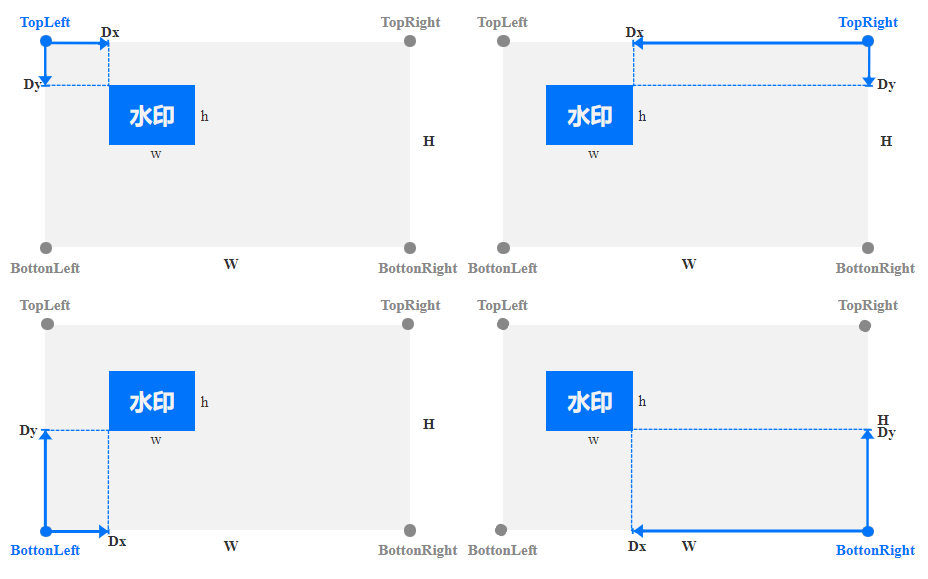
Watermark position description:


Data description for Container type Text:
Node Name (Keyword)
Parent Node
Description
Type
Default Value
Required or Not
FontSize
Request.Watermark.Text
Font size, value range: [5 100], unit px
String
None.
Yes
FontType
Request.Watermark.Text
Font type, refer to the table below
String
None.
Yes
FontColor
Request.Watermark.Text
Text color, format: 0xRRGGBB
String
None.
Yes
Transparency
Request.Watermark.Text
Transparency, value range: [1 100], unit %
String
None.
Yes
Text
Request.Watermark.Text
Watermark content, length not exceeding 64 characters, only supports Chinese, English, digits, _, -, and *
String
None.
Yes
Data description for FontType of Text:
Font Name
Supported Languages
Description
simfang.ttf
Chinese/English
FangSong
simhei.ttf
Chinese/English
Blackbody
simkai.ttf
Chinese/English
KaiTi
simsun.ttc
Chinese/English
Song Typeface
STHeiti-Light.ttc
Chinese/English
STHeiti
STHeiti-Medium.ttc
Chinese/English
STHeiti
youyuan.TTF
Chinese/English
YouYuan
ariblk.ttf
Create and bind a policy Query an instance Reset the access password of an instance
None.
arial.ttf
Create and bind a policy Query an instance Reset the access password of an instance
None.
ahronbd.ttf
Create and bind a policy Query an instance Reset the access password of an instance
None.
Helvetica.dfont
Create and bind a policy Query an instance Reset the access password of an instance
None.
HelveticaNeue.dfont
Create and bind a policy Query an instance Reset the access password of an instance
None.

Response

Response Headers

This API only returns the public response header. For details, see Common Response Headers documentation.

Response Body

The response body is returned as application/xml. An example including the complete node data is shown below:
<Response>
<RequestId>NjQ0NGNlNDZfMThhYTk0MGFfY*********</RequestId>
<Template>
<TemplateId>t1460606b9752148c4ab182f55163ba7cd</TemplateId>
<Tag>Watermark</Tag>
<Name>TemplateName</Name>
<BucketId>test-1234567890</BucketId>
<Category>Custom</Category>
<Watermark>
<Type>Text</Type>
<LocMode>Absolute</LocMode>
<Dx>128</Dx>
<Dy>128</Dy>
<Pos>TopRight</Pos>
<StartTime>0</StartTime>
<EndTime>100.5</EndTime>
<Text>
<Text>Watermark content</Text>
<FontSize>30</FontSize>
<FontType>simfang.ttf</FontType>
<FontColor>0x000000</FontColor>
<Transparency>30</Transparency>
</Text>
</Watermark>
<CreateTime>2020-08-05T11:35:24+0800</CreateTime>
<UpdateTime>2020-08-31T16:15:20+0800</UpdateTime>
</Template>
</Response>
The data are as follows:
Node Name (Keyword)
Parent Node
Description
Type
Response
None.
Container for saving results
Container
Container node
Response
content:
Node Name (Keyword)
Parent Node
Description
Type
Template
Response
Container for saving template details
Container
RequestId
Response
unique request ID
String
Container node
Template
content:
Node Name (Keyword)
Parent Node
Description
Type
TemplateId
Response.Template
template ID
String
Name
Response.Template
Template Name
String
BucketId
Response.Template
Template's bucket
String
Category
Response.Template
Template Properties, Custom or Official
String
Tag
Response.Template
Template type, VideoProcess
String
UpdateTime
Response.Template
Update time
String
CreateTime
Response.Template
Creation time
String
Watermark
Response.Template
Request.Watermark in the request body
Container

Error Codes

This request returns common error responses and error codes. For more information, see Error Codes.

Examples

Request 1: Text Watermark

POST /template HTTP/1.1
Authorization: q-sign-algorithm=sha1&q-ak=**********************************&q-sign-time=1497530202;1497610202&q-key-time=1497530202;1497610202&q-header-list=&q-url-param-list=&q-signature=**************************************
Host: test-1234567890.ci.ap-chongqing.myqcloud.com
Content-Length: 1666
Content-Type: application/xml

<Request>
<Tag>Watermark</Tag>
<Name>TemplateName</Name>
<Watermark>
<Type>Text</Type>
<LocMode>Absolute</LocMode>
<Dx>128</Dx>
<Dy>128</Dy>
<Pos>TopRight</Pos>
<StartTime>0</StartTime>
<EndTime>100.5</EndTime>
<Text>
<Text>Watermark content</Text>
<FontSize>30</FontSize>
<FontType>simfang.ttf</FontType>
<FontColor>0x000000</FontColor>
<Transparency>30</Transparency>
</Text>
</Watermark>
</Request>
Response
HTTP/1.1 200 OK
Content-Type: application/xml
Content-Length: 100
Connection: keep-alive
Date: Thu, 14 Jul 2022 12:37:29 GMT
Server: tencent-ci
x-ci-request-id: NTk0MjdmODlfMjQ4OGY3XzYzYzhf****

<Response>
<RequestId>NjQ0NGNlNDZfMThhYTk0MGFfY*********</RequestId>
<Template>
<TemplateId>t1460606b9752148c4ab182f55163ba7cd</TemplateId>
<Tag>Watermark</Tag>
<Name>TemplateName</Name>
<BucketId>test-1234567890</BucketId>
<Category>Custom</Category>
<Watermark>
<Type>Text</Type>
<LocMode>Absolute</LocMode>
<Dx>128</Dx>
<Dy>128</Dy>
<Pos>TopRight</Pos>
<StartTime>0</StartTime>
<EndTime>100.5</EndTime>
<Text>
<Text>Watermark content</Text>
<FontSize>30</FontSize>
<FontType>simfang.ttf</FontType>
<FontColor>0x000000</FontColor>
<Transparency>30</Transparency>
</Text>
</Watermark>
<CreateTime>2020-08-05T11:35:24+0800</CreateTime>
<UpdateTime>2020-08-31T16:15:20+0800</UpdateTime>
</Template>
</Response>

Request 2: Image Watermark

POST /template HTTP/1.1
Authorization: q-sign-algorithm=sha1&q-ak=**********************************&q-sign-time=1497530202;1497610202&q-key-time=1497530202;1497610202&q-header-list=&q-url-param-list=&q-signature=**************************************
Host: test-1234567890.ci.ap-chongqing.myqcloud.com
Content-Length: 1666
Content-Type: application/xml

<Request>
<Tag>Watermark</Tag>
<Name>TemplateName</Name>
<Watermark>
<Type>Image</Type>
<LocMode>Absolute</LocMode>
<Dx>128</Dx>
<Dy>128</Dy>
<Pos>TopRight</Pos>
<StartTime>0</StartTime>
<EndTime>100.5</EndTime>
<Image>
<Url>http://test-1234567890.ci.ap-chongqing.myqcloud.com/shuiyin_2.png</Url>
<Mode>Proportion</Mode>
<Width>10</Width>
<Height>10</Height>
<Transparency>30</Transparency>
</Image>
</Watermark>
</Request>
Response
HTTP/1.1 200 OK
Content-Type: application/xml
Content-Length: 100
Connection: keep-alive
Date: Thu, 14 Jul 2022 12:37:29 GMT
Server: tencent-ci
x-ci-request-id: NTk0MjdmODlfMjQ4OGY3XzYzYzhf****

<Response>
<RequestId>NjQ0NGNlNDZfMThhYTk0MGFfY*********</RequestId>
<Template>
<TemplateId>t1460606b9752148c4ab182f55163ba7cd</TemplateId>
<Tag>Watermark</Tag>
<Name>TemplateName</Name>
<BucketId>test-1234567890</BucketId>
<Category>Custom</Category>
<Watermark>
<Type>Image</Type>
<LocMode>Absolute</LocMode>
<Dx>128</Dx>
<Dy>128</Dy>
<Pos>TopRight</Pos>
<StartTime>0</StartTime>
<EndTime>100.5</EndTime>
<Image>
<Url>http://test-1234567890.ci.ap-chongqing.myqcloud.com/shuiyin_2.png</Url>
<Mode>Proportion</Mode>
<Width>10</Width>
<Height>10</Height>
<Transparency>30</Transparency>
</Image>
</Watermark>
<CreateTime>2020-08-05T11:35:24+0800</CreateTime>
<UpdateTime>2020-08-31T16:15:20+0800</UpdateTime>
</Template>
</Response>

Ajuda e Suporte

Esta página foi útil?

comentários