Management Parameters
Download
Modo Foco
Tamanho da Fonte
Overview
The Management parameters provide a unified entry for common custom configurations of nodes, which allow you to optimize the underlying kernel parameter KernelArgs for native nodes, and also supports setting Kubelet\\Nameservers\\Hosts to meet the environmental requirements of business deployment.
Management Parameters
Parameter Item | Description |
KubeletArgs | Sets the Kubelet-related custom parameters required for business deployment. |
Nameservers | Sets the DNS server address required for the business deployment environment. |
Hosts | Sets the Hosts required for the business deployment environment. |
The business performance can be optimized by setting kernel parameters (if the parameters currently available for configuration do not meet your needs, you can submit a ticket for support). |
Note:
1. The Kubelet parameters supporting custom configuration are related to the cluster version. If the Kubelet parameters available in the console for the current cluster cannot meet your needs, submit a ticket for support.
2. To ensure the normal installation of system components, native nodes are by default injected with the official documentation library addresses of Tencent Cloud, namely
nameserver = 183.60.83.19, and nameserver = 183.60.82.98.Operation Using the Console
Method 1: Setting Management Parameters for a New Node Pool
1. Log in to the TKE console, and create a native node by reference to the Creating Native Nodes documentation.
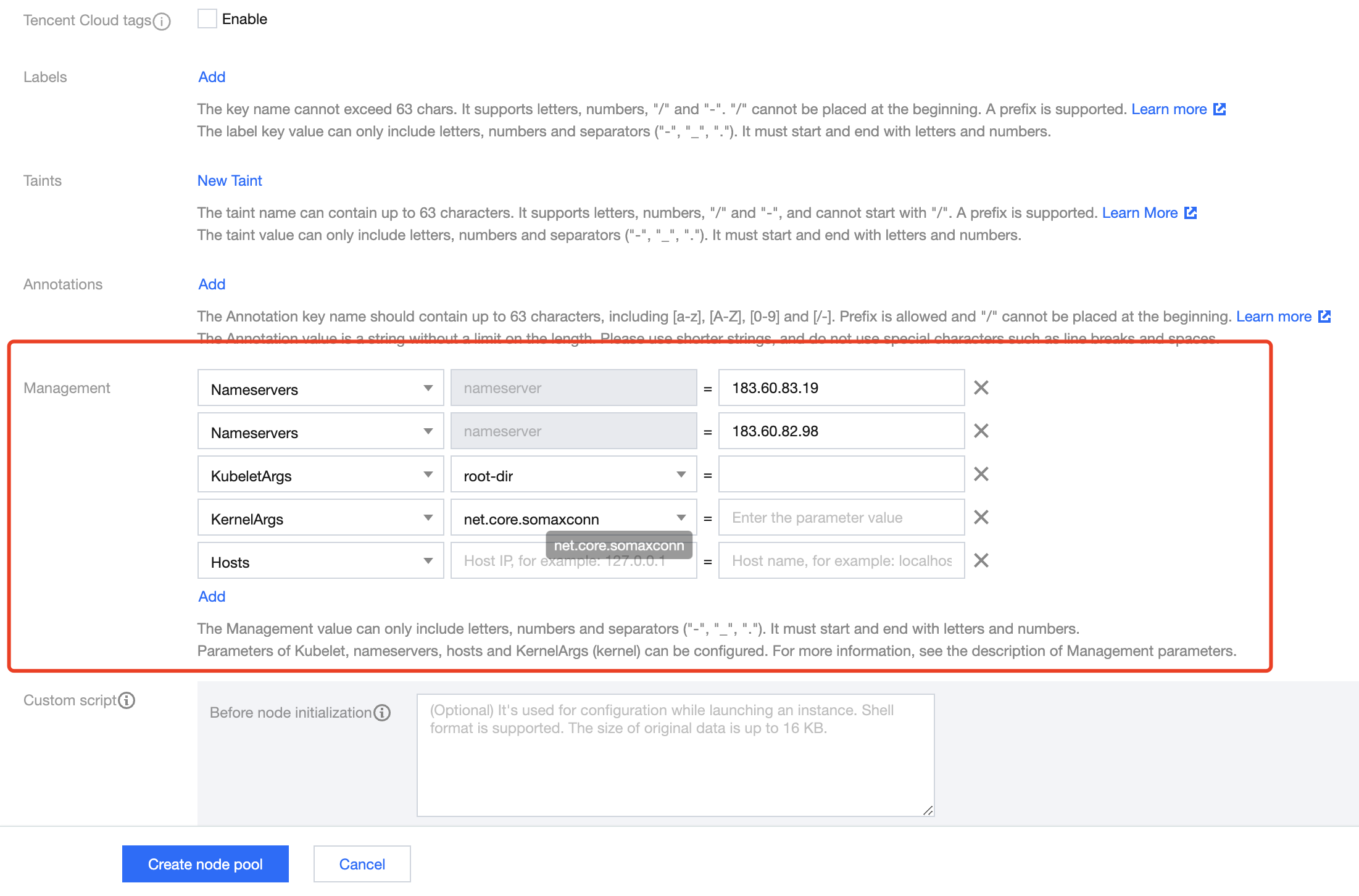
2. On the Create page, click Advanced Settings, to set the Management parameters for the node, as shown in the figure below:
3. Click Create node pool.
Method 2: Setting Management Parameters for an Existing Node Pool
1. Log in to the TKE console, and select Clusters in the left sidebar.
2. On the cluster list page, click on the target cluster ID to enter the cluster details page.
3. Select Node Management > Worker Node in the left sidebar, and click on the node pool ID in the Node Pool to enter the node pool details page.
4. On the node pool details page, click Parameter Settings > Management > Edit to modify the Management parameters, as shown in the figure below:

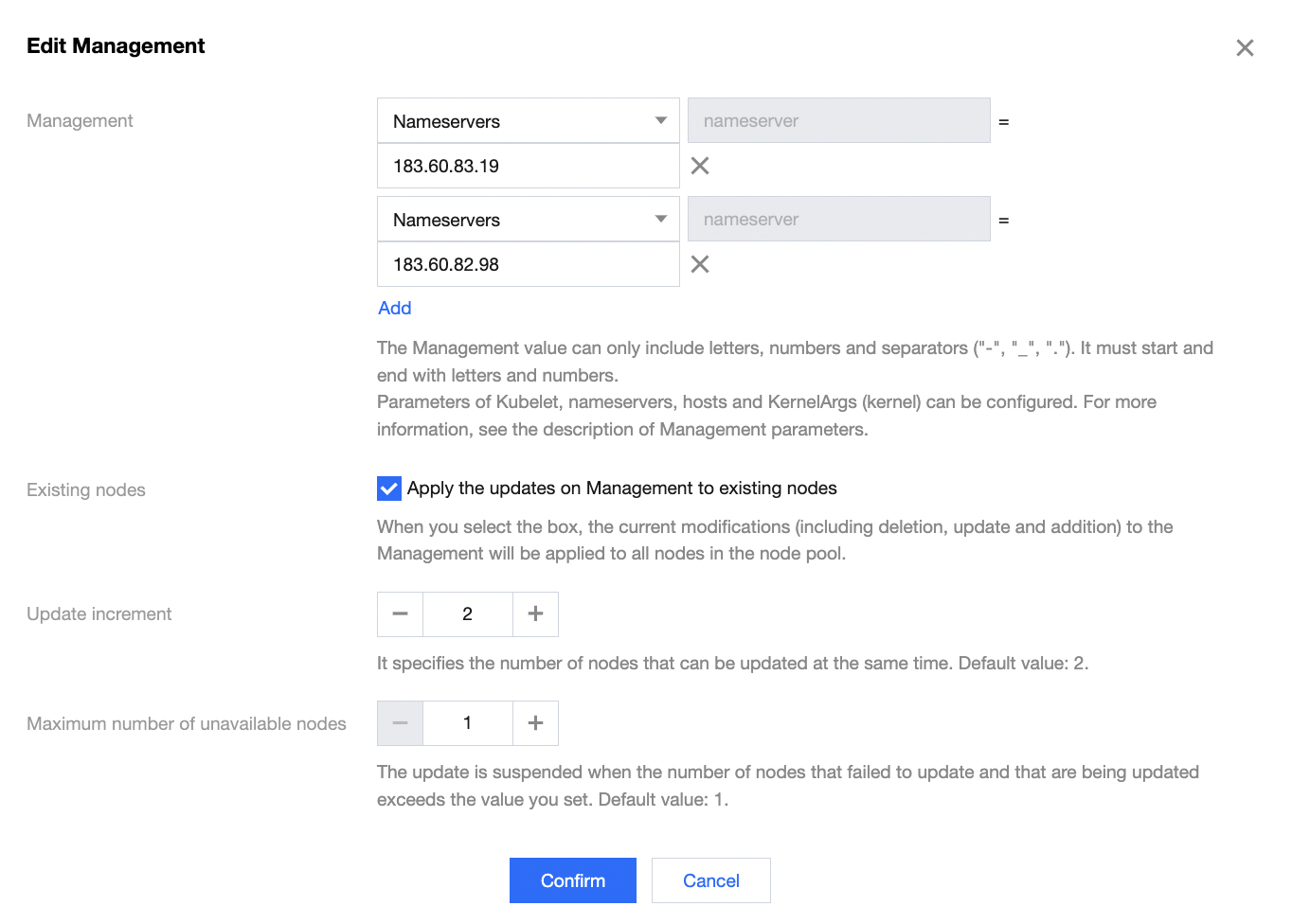
5. You can check Apply the updates on management to existing nodes, to apply the parameter changes to the existing nodes in the node pool. Once checked, the changes (including deletion, update, and addition) on Management will apply to all nodes (including the existing and new nodes) in the node pool, as shown in the figure below:
Update increment: The system will update Ops parameters in batches. This parameter defines the number of nodes that can be updated simultaneously in each batch.
Maximum number of unavailable nodes: If the number of nodes that failed to update (including those being updated) exceeds this set value, the system will pause the update operation.
6. Click Confirm. You can view the update progress and results in the Ops Records of the node pool.
Warning:
Certain Kubelet parameters, when applied to the existing nodes, may trigger the restart of business Pods, such as "feature-gates: EnableInPlacePodResize=true", "kube-reserved: xxx", "eviction-hard: xxx", and "max-pods: xxx". It is recommended to operate with caution after assessing the risks.
Operation Using YAML
apiVersion: node.tke.cloud.tencent.com/v1beta1kind: MachineSetspec:autoRepair: falsedeletePolicy: RandomdisplayName: xxxxxxhealthCheckPolicyName: ""instanceTypes:- SA2.2XLARGE8replicas: 2scaling:createPolicy: ZoneEqualitysubnetIDs:- subnet-xxxxx- subnet-xxxxxtemplate:spec:displayName: tke-np-bqclpywh-workerproviderSpec:type: Nativevalue:instanceChargeType: PostpaidByHourkeyIDs:- skey-xxxxxlifecycle: {}management:kubeletArgs:- feature-gates=EnableInPlacePodResize=true- allowed-unsafe-sysctls=net.core.somaxconn- root-dir=/var/lib/test- registry-qps=1000hosts:- Hostnames:- static.fake.comIP: 192.168.2.42nameservers:- 183.60.83.19- 183.60.82.98kernelArgs:- kernel.pid_max=65535- fs.file-max=400000- net.ipv4.tcp_rmem="4096 12582912 16777216"- vm.max_map_count="65535"metadata:creationTimestamp: nullsecurityGroupIDs:- sg-b3a93lhvsystemDisk:diskSize: 50diskType: CloudPremiumruntimeRootDir: /var/lib/containerdtype: Native
KubeletArgs Parameter Description
1. The kubelet parameters supporting configuration are inconsistent for different accounts and different cluster versions. If the current parameters do not meet your needs, you can submit a ticket to contact us.
2. The following parameters are not recommended for modification, for they will highly probably affect the normal operation of business on the node:
container-runtime
container-runtime-endpoint
hostname-override
kubeconfig
root-dir
KernelArgs Parameters
OS parameters supporting adjustment and their allowable values are listed below.
Sockets and Network Optimization
For proxy nodes expected to process a large amount of concurrent sessions, you can use the following TCP and network options for adjustment.
No. | Parameter | Default Value | Allowable Values/Range | Parameter Type | Description |
1 | "net.core.somaxconn" | 32768 | 4096 - 3240000 | int | The maximum length of the listening queue for each port in the system. |
2 | "net.ipv4.tcp_max_syn_backlog" | 8096 | 1000 - 3240000 | int | The maximum length of the TCP SYN queue. |
3 | "net.core.rps_sock_flow_entries" | 8192 | 1024 - 536870912 | int | The maximum size of the hash table for RPS. |
4 | "net.core.rmem_max" | 16777216 | 212992 - 134217728 | int | The maximum size, in bytes, of the socket receiving buffer. |
5 | "net.core.wmem_max" | 16777216 | 212992 - 134217728 | int | The maximum size, in bytes, of the socket sending buffer. |
6 | "net.ipv4.tcp_rmem" | "4096 12582912 16777216" | 1024 - 2147483647 | string | The minimum/default/maximum size of TCP socket receiving buffer. |
7 | "net.ipv4.tcp_wmem" | "4096 12582912 16777216" | 1024 - 2147483647 | string | The minimum/default/maximum size of TCP socket sending buffer. |
8 | "net.ipv4.neigh.default.gc_thresh1" | 2048 | 128 - 80000 | int | The minimum number of entries that can be retained. If the number of entries is less than this value, the entries will not be recycled. |
9 | "net.ipv4.neigh.default.gc_thresh2" | 4096 | 512 - 90000 | int | When the number of entries exceeds this value, the GC will clear the entries longer than 5 seconds. |
10 | "net.ipv4.neigh.default.gc_thresh3" | 8192 | 1024 - 100000 | int | The maximum allowable number of non-permanent entries. |
11 | "net.ipv4.tcp_max_orphans" | 32768 | 4096 - 2147483647 | int | The maximum number of TCP sockets not attached to any user file handle or held by the system. Increase this parameter value properly to avoid the "Out of socket memory" error when the load is high. |
12 | "net.ipv4.tcp_max_tw_buckets" | 32768 | 4096 - 2147483647 | int | The maximum number of timewait sockets held by the system simultaneously. Increase this parameter value properly to avoid the "TCP: time wait bucket table overflow" error. |
File Descriptor Limits
Large amounts of traffic in service usually come from a large number of local files. You can slightly adjust the following kernel settings and built-in limits so that only a part of the system memory is used to handle larger traffic.
No. | Parameter | Default Value | Allowable Values/Range | Parameter Type | Description |
1 | "fs.file-max" | 3237991 | 8192 - 12000500 | int | The limit on the total number of file descriptors (FDs), including sockets, in the entire system. |
2 | "fs.inotify.max_user_instances" | 8192 | 1024 - 2147483647 | int | The limit on the total number of inotify instances. |
3 | "fs.inotify.max_user_watches" | 524288 | 781250 - 2097152 | int | The limit on the total number of inotify watches. Increase this parameter value to avoid the "Too many open files" error. |
Virtual Memory
The following setting can be used to adjust the operations of the Linux kernel virtual memory (VM) subsystem and the writeout of dirty data on disks.
No. | Parameter | Default Value | Allowable Values/Range | Parameter Type | Description |
1 | "vm.max_map_count" | 262144 | 65530 - 262144 | int | The maximum number of memory map areas a process can have. |
Worker Thread Limits
No. | Parameter | Default Value | Allowable Values/Range | Parameter Type | Description |
1 | "kernel.threads-max" | 4194304 | 4096 - 4194304 | int | The system-wide limit on the number of threads (tasks) that can be created on the system. |
2 | "kernel.pid_max" | 4194304 | 4096 - 4194304 | int | The system-wide limit on the total number of processes and threads. PIDs greater than this value are not allocated. |
Ajuda e Suporte
Esta página foi útil?
Você também pode entrar em contato com a Equipe de vendas ou Enviar um tíquete em caso de ajuda.
comentários