2. Choose IP and ENI > ENI in the left sidebar to go to the ENI list page.
3. Select a region and a VPC, and click + New.
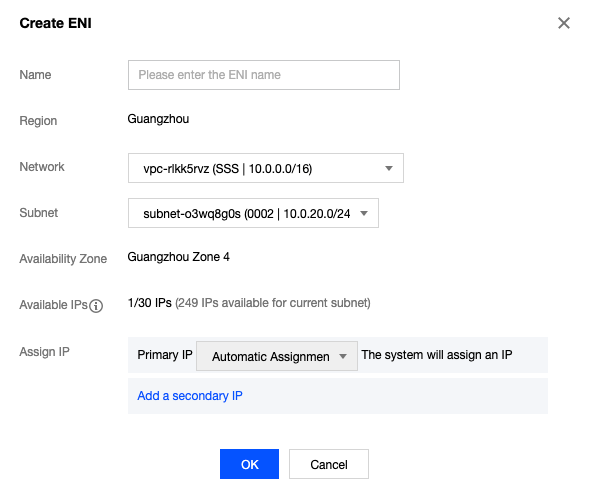
4. In the pop-up window, enter an ENI name, select the VPC and subnet to which the secondary ENI belongs, and assign a private IP to the ENI. To add a tag, click Advanced options.
Note:
You need to configure the security group for the secondary ENI separately. After creating the secondary ENI, please determine the security policy of the ENI based on your business situation and bind the security group to it. For details, see binding security groups. "Automatic" and "Manual" are supported for IP assignment:
Automatic: The system will automatically assign a private IP available in the subnet CIDR block to the ENI.
Manual: You need to enter a private IP available in the subnet CIDR block.
A secondary ENI is configured with a primary IP by default. If you need multiple IPs, click Add a secondary IP to configure them.
5. Click OK.