Use Cases
Tencent Cloud Log Service (CLS) Global Accelerator solution is designed to address the challenge of ensuring stable log uploads in poor network environments. This solution accelerates log upload to CLS via any network. For multinational corporations and mobile Internet enterprises, this solution provides a secure and reliable way to quickly connect websites, mobile applications, and application services, enabling global proximity access and cross-region deployment of network services.
Business Pain Points
High network latency and severe packet loss during log uploads across regions over the public network.
Poor support for mobile application customers, leading to inefficient log upload services.
Global Accelerator Solution
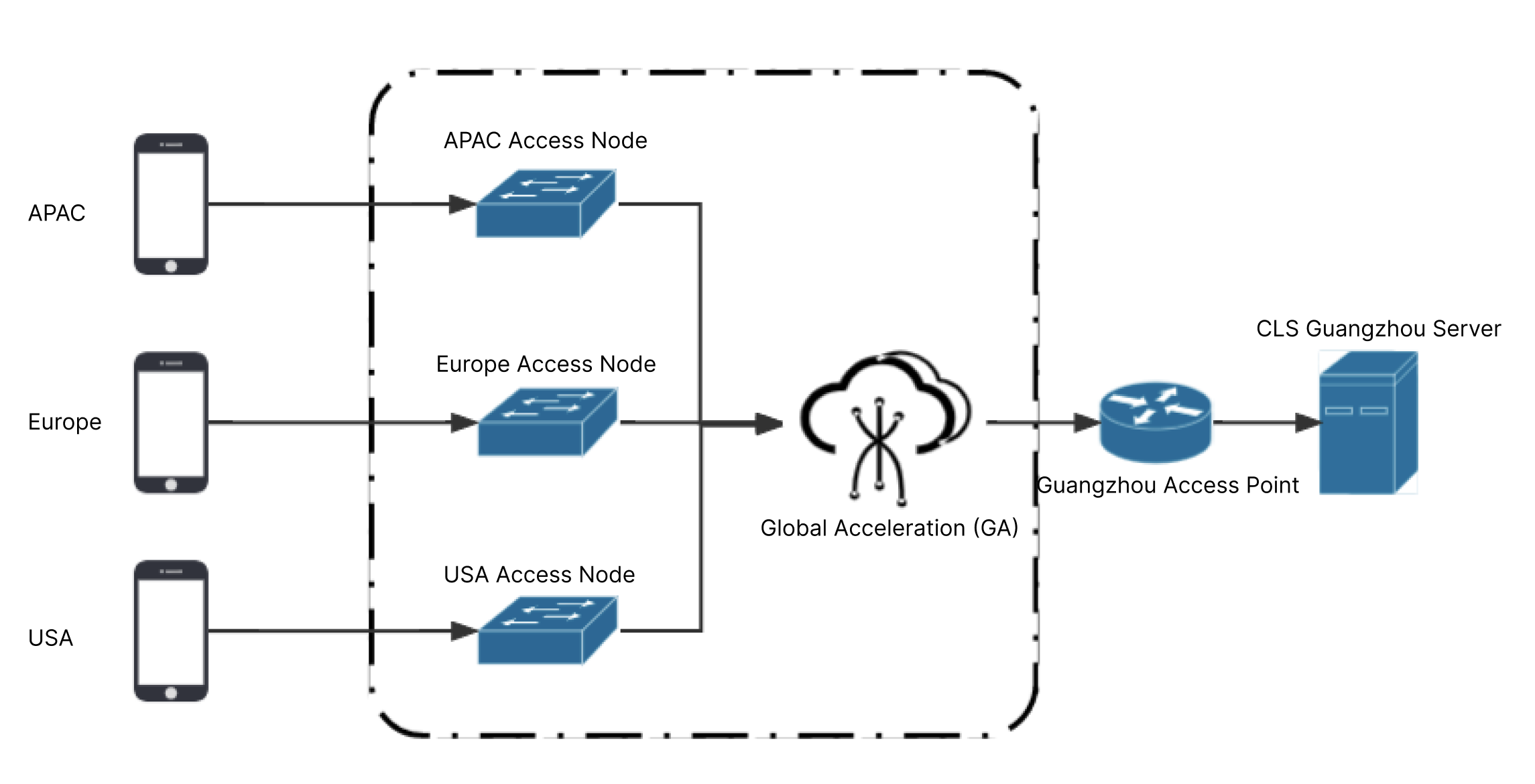
The global cross-region access solution is as shown in the following figure (outside the Chinese mainland -> Guangzhou).
How it works: Proximity access -> Tencent Cloud private network -> Access node in the destination region - CLS server in the destination region.
Solution Highlights
Provides acceleration for latency-sensitive customers.
Provides enterprise-level stable network access.
Provides a secure network environment.
Easy to access and maintain.
Access Method
The feature may involve cross-border data transfer. You need to submit a ticket to apply for using the feature. In the ticket, describe the following information: Log source region
Log destination region
Estimated maximum required bandwidth
Account information (AppID)
Once the ticket is approved, we will provide a dedicated log upload acceleration domain name for your account. Using this domain name, you can accelerate cross-region log uploads through the following method.
Collecting Logs with LogListener for Upload Acceleration
First-Time Installation of LogListener
See LogListener Installation Guide to download and install LogListener. For the LogListener initialization steps, take the installation path /usr/local/ as an example. In the /usr/local/loglistener/tools path, run the LogListener initialization command with root permissions. The initialization command is as follows: ./loglistener.sh init -secretid AKID******************************** -secretkey whHwQfjdLnzzCE1jIf09xxxxxxxxxxxx -domain asccelerate-xxxxx-ap-xxxxx -IP xxx.xxx.xxx.xxx
Note:
In the initialization command, -secretid, -secretkey, and -domain are required parameters. For more parameters, see the Parameter Description section below. Parameter Description
|
secretid | Yes | Part of the cloud API key. SecretId is used to identify the API caller's identity. |
secretkey | Yes | Part of the cloud API key. SecretKey is the key used to encrypt the signature string and verify the signature string on the server side. |
domain | Yes | Specify the domain name for log upload acceleration. |
IP | No | IP address of the machine. If this parameter is not specified, LogListener will automatically obtain the IP address of the local machine. |
label | No | Machine label. If this parameter is specified, the machine will be associated with a group of machines that share the same label. Separate multiple labels with commas. If a machine label is configured, the machine will only be associated with a machine group through the label, not through its IP address. If this parameter is not configured, the machine group can only be associated with the machine through its IP address. |
Enabling Global Accelerator for Existing LogListener
1. Log in to your machine.
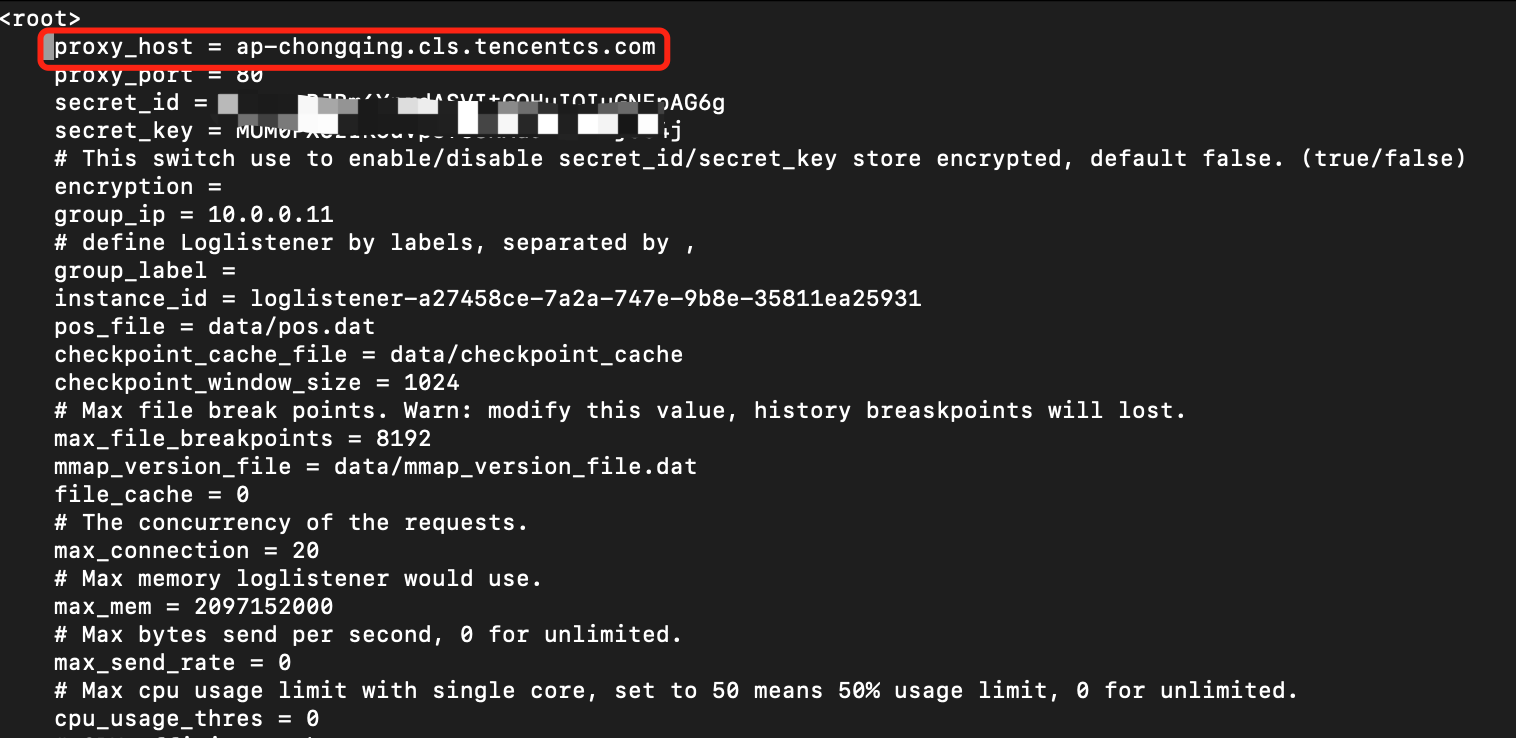
2. Take the LogListener installation path /usr/local/ as an example. In the /usr/local/loglistener/etc path, run the following command to open the LogListener configuration file loglistener.conf.
3. Locate the proxy-host configuration item and change its value to your Global Accelerator domain name.
4. Run the following command to restart LogListener.
systemctl restart loglistenerd
Upload Acceleration via the API/SDK
Simply replace the host input parameter in the API/SDK with your acceleration domain name to achieve accelerated upload via the API/SDK.
Billing Rule
When using Global Accelerator to upload logs, you are charged based on the write traffic generated after log compression. For billing details, see Product Pricing. Note:
Using the Global Accelerator feature generates this traffic, while regular public network access does not.
When the Global Accelerator feature is used, log write traffic is not generated repeatedly.