产品动态
产品公告
ci:CreateMediaTemplate permission is required. For details, see Cloud Infinite actions.POST /template HTTP/1.1Host: <BucketName-APPID>.ci.<Region>.myqcloud.comDate: <GMT Date>Authorization: <Auth String>Content-Length: <length>Content-Type: application/xml<body>
<Request><Tag>HighSpeedHd</Tag><Name>TemplateName</Name><Container><Format>mp4</Format></Container><Video><Codec>H.264</Codec><Bitrate>1000</Bitrate><Width>1280</Width><Fps>30</Fps><Bufsize>1000</Bufsize><Maxrate>10</Maxrate></Video><Audio><Codec>aac</Codec><Samplerate>44100</Samplerate><Bitrate>128</Bitrate><Channels>4</Channels></Audio><TransConfig><IsCheckReso>false</IsCheckReso><ResoAdjMethod>1</ResoAdjMethod></TransConfig><TimeInterval><Start>0</Start><Duration>60</Duration></TimeInterval></Request>
Node Name (Keyword) | Parent Node | Description | Type | Required or Not |
Request | None. | Container for saving requests | Container | Yes |
Node Name (Keyword) | Parent Node | Description | Type | Required or Not |
Tag | Request | Template type: HighSpeedHd | String | Yes |
Name | Request | Template name. Only supports Chinese, English, numbers, _, -, and *, with length not exceeding 64. | String | Yes |
Container | Request | container format | Container | Yes |
Video | Request | video information | Container | Yes |
TimeInterval | Request | time interval | Container | No |
Audio | Request | audio content | Container | No |
TransConfig | Request | transcoding configuration | Container | No |
Node Name (Keyword) | Parent Node | Description | Type | Required or Not |
Format | Request.Container | Muxing formats: mp4, flv, hls, mkv | String | Yes |
ClipConfig | Request.Container | Sharding configuration, valid when Format is hls | Container | No |
Node Name (Keyword) | Parent Node | Description | Type | Required or Not |
Duration | Request.Container.ClipConfig | Segment duration, default 5s | String | No |
Container | Audio Codecs | Video Codecs |
mp4/hls/mkv | AAC,MP3 | H.264,H.265 |
flv | AAC,MP3 | H.264 |
Node Name (Keyword) | Parent Node | Description | Type | Default Value | Required or Not |
Codec | Request.Video | encoding/decoding format H.264 H.265 | String | H.264 | No |
Width | Request.Video | width Value range: [128, 4096] unit: px If only Width is set, calculate Height according to the original aspect ratio of the video. Must be even | String | original width of video | No |
Height | Request.Video | High Value range: [128, 4096] unit: px If only Height is set, calculate according to the original aspect ratio of the video. Width Must be even | String | Original height of video | No |
Fps | Request.Video | Frame Rate Value range: (0, 60] Unit: fps | String | None. | No |
Profile | Request.Video | Encoding level Support baseline, main, high baseline: suitable for mobile devices; main: suitable for standard resolution devices; high: suitable for high-resolution devices; Only H.264 supports this parameter. | String | high | No |
Bitrate | Request.Video | Bitrate of the video output file Value range: [10, 50000], unit: Kbps auto means adaptive bitrate | String | None. | No |
Crf | Request.Video | Bitrate - Quality Control Factor Value range: (0, 51] If Crf is set, the setting of Bitrate becomes invalid. When Bitrate is empty, the default is 25. | String | None. | No |
Gop | Request.Video | Maximum frames between key frames, range: [0, 100000] | String | None. | No |
Preset | Request.Video | Video algorithm preset Only H.264 supports this parameter. veryfast, fast, medium, slow, slower | String | medium | No |
Bufsize | Request.Video | buffer size Value range: [1000, 128000] Unit: Kb | String | None. | No |
Maxrate | Request.Video | peak video bitrate Value range: [10, 50000] unit: Kbps | String | None. | No |
Pixfmt | Request.Video | video color format H.264 support: yuv420p, auto H.265 support: yuv420p, yuv420p10le, auto | String | None. | No |
Rotate | Request.Video | rotation angle Value range: [0, 360) unit: degree | String | None. | No |
Roi | Request.Video | Roi intensity, parameter values: none, low, medium, high | String | none | No |
Node Name (Keyword) | Parent Node | Description | Type | Default Value | Required or Not |
Start | Request.TimeInterval | Start Time video duration Unit: second Support float format, execution accuracy accurate to milliseconds | String | None. | No |
Duration | Request.TimeInterval | Duration video duration Unit: second Support float format, execution accuracy accurate to milliseconds | String | None. | No |
Node Name (Keyword) | Parent Node | Description | Type | Default Value | Required or Not |
Codec | Request.Audio | Encoding/decoding format, parameter values: aac, mp3 | String | aac | No |
Samplerate | Request.Audio | sampling rate unit: Hz Option 11025, 22050, 32000, 44100, 48000, 96000 Different encapsulations, MP3 supports different sampling rates, as shown in the table below | String | 44100 | No |
Bitrate | Request.Audio | raw audio bitrate unit: Kbps Value range: [8, 1000] | String | None. | No |
Channels | Request.Audio | number of sound channels When Codec is set to aac, it supports 1, 2, 4, 5, 6, 8 When Codec is set to mp3, it supports 1, 2 | String | None. | No |
Remove | Request.Audio | Delete source audio stream or not Parameter value: true, false | String | false | No |
Muxing Format / Audio Sample Rate | 11025 | 22050 | 32000 | 44100 | 48000 | 96000 |
flv | N | Y | N | Y | N | N |
mp4 | N | Y | Y | Y | Y | N |
hls/mkv | Y | Y | Y | Y | Y | N |
Node Name (Keyword) | Parent Node | Description | Type | Default Value | Required or Not |
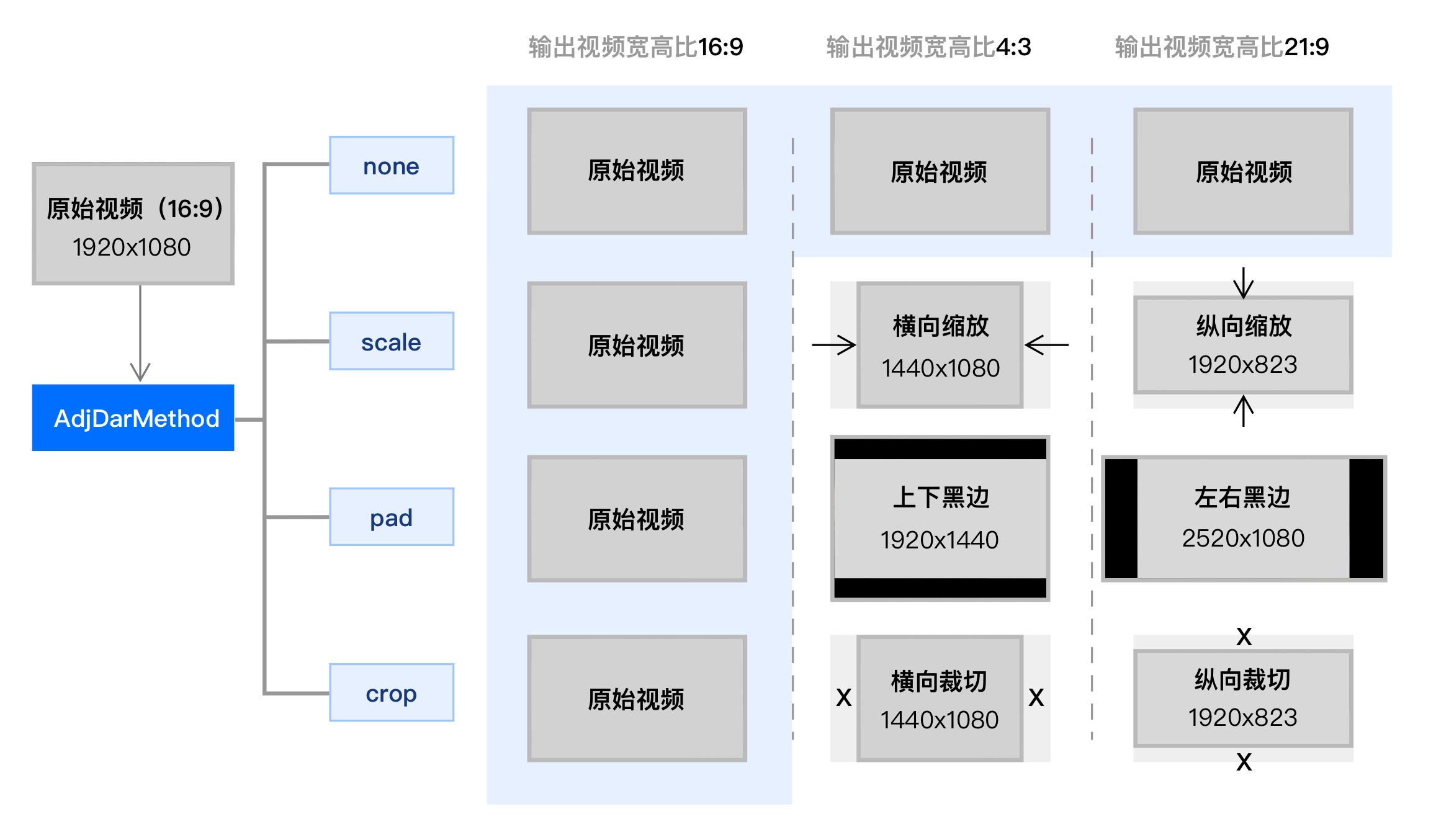
AdjDarMethod | Request.TransConfig | Resolution adjustment method scale crop pad none When the aspect ratio of the output video differs from that of the original video, adjust the resolution according to this parameter. | String | none | No |
IsCheckReso | Request.TransConfig | Check resolution or not Parameter value: true, false When it is false, transcode according to the configuration parameters. | String | false | No |
ResoAdjMethod | Request.TransConfig | Resolution adjustment method This parameter is valid only when IsCheckReso is true; parameter values are 0, 1. 0 indicates using the original video resolution; 1 indicates a transcoding failure. | String | 0 | No |
IsCheckVideoBitrate | Request.TransConfig | Check video bitrate or not Parameter value: true, false When it is false, transcode according to the configuration parameters. | String | false | No |
VideoBitrateAdjMethod | Request.TransConfig | Video bitrate adjustment method This parameter is valid only when IsCheckVideoBitrate is true; parameter values are 0, 1. When the output video bitrate is greater than the original video bitrate, 0 indicates using the original video bitrate; 1 indicates returning a transcoding failure. | String | 0 | No |
IsCheckAudioBitrate | Request.TransConfig | Check audio bitrate, parameter value: true, false When it is false, transcode according to the configuration parameters. | String | false | No |
AudioBitrateAdjMethod | Request.TransConfig | Audio bitrate adjustment method When IsCheckAudioBitrate is true, this parameter is valid only when taking value 0, 1; When the output audio bitrate is greater than the original audio bitrate, 0 indicates using the original audio bitrate; 1 indicates returning a transcoding failure. | String | 0 | No |
IsCheckVideoFps | Request.TransConfig | Check video frame rate or not Parameter value: true, false When it is false, transcode according to the configuration parameters. | String | false | No |
VideoFpsAdjMethod | Request.TransConfig | Video frame rate adjustment method This parameter is valid only when IsCheckVideoFps is true; parameter values are 0, 1; When the output video frame rate is greater than the original video frame rate, 0 indicates using the original video frame rate; 1 indicates returning a transcoding failure. | String | 0 | No |
DeleteMetadata | Request.TransConfig | Delete MetaData information in the file or not, Parameter value: true, false | String | false | No |
IsHdr2Sdr | Request.TransConfig | Enable HDR to SDR conversion or not, Parameter value: true, false | String | false | No |
HlsEncrypt | Request.TransConfig | hls encryption configuration | Container | None. | None. |
Node Name (Keyword) | Parent Node | Description | Type | Required or Not | Default Value |
IsHlsEncrypt | Request.TransConfig.HlsEncrypt | Enable HLS encryption or not, parameter value: true/false | String | No | false |
UriKey | Request.TransConfig.HlsEncrypt | HLS encryption key. This parameter is meaningful only when IsHlsEncrypt is true. | String | No | None. |
<Response><RequestId>NjQ0NGNlNDZfMThhYTk0MGFfY*********</RequestId><Template><Tag>HighSpeedHd</Tag><TemplateId>t1460606b9752148c4ab182f55163ba7cd</TemplateId><Name>TemplateName</Name><BucketId>test-1234567890</BucketId><Category>Custom</Category><HighSpeedHd><Container><Format>mp4</Format></Container><Video><Codec>H.264</Codec><Bitrate>1000</Bitrate><Width>1280</Width><Fps>30</Fps><Bufsize>1000</Bufsize><Maxrate>10</Maxrate></Video><Audio><Codec>aac</Codec><Samplerate>44100</Samplerate><Bitrate>128</Bitrate><Channels>4</Channels></Audio><TransConfig><IsCheckReso>false</IsCheckReso><ResoAdjMethod>1</ResoAdjMethod></TransConfig><TimeInterval><Start>0</Start><Duration>60</Duration></TimeInterval></HighSpeedHd><CreateTime>2020-08-05T11:35:24+0800</CreateTime><UpdateTime>2020-08-31T16:15:20+0800</UpdateTime></Template></Response>
Node Name (Keyword) | Parent Node | Description | Type |
Response | None. | Container for saving results | Container |
Node Name (Keyword) | Parent Node | Description | Type |
Template | Response | Container for saving template details | Container |
RequestId | Response | unique request ID | String |
Node Name (Keyword) | Parent Node | Description | Type |
TemplateId | Response.Template | template ID | String |
Name | Response.Template | Template Name | String |
BucketId | Response.Template | Template's bucket | String |
Category | Response.Template | Template Property, Custom or Official | String |
Tag | Response.Template | Template type: HighSpeedHd | String |
UpdateTime | Response.Template | Update time | String |
CreateTime | Response.Template | Creation time | String |
HighSpeedHd | Response.Template | Detailed template parameters | Container |
Node Name (Keyword) | Parent Node | Description | Type |
TimeInterval | Response.Template.HighSpeedHd | The same as Request.TimeInterval in the request body | Container |
Container | Response.Template.HighSpeedHd | The same as Request.Container in the request body | Container |
Video | Response.Template.HighSpeedHd | Request.Video in the request body | Container |
Audio | Response.Template.HighSpeedHd | The same as Request.Audio in the request body | Container |
TransConfig | Response.Template.HighSpeedHd | The same as Request.TransConfig in the request body | Container |
POST /template HTTP/1.1Authorization: q-sign-algorithm=sha1&q-ak=**********************************&q-sign-time=1497530202;1497610202&q-key-time=1497530202;1497610202&q-header-list=&q-url-param-list=&q-signature=**************************************Host: test-1234567890.ci.ap-beijing.myqcloud.comContent-Length: 1666Content-Type: application/xml<Request><Tag>HighSpeedHd</Tag><Name>TemplateName</Name><Container><Format>mp4</Format></Container><Video><Codec>H.264</Codec><Bitrate>1000</Bitrate><Width>1280</Width><Fps>30</Fps><Bufsize>1000</Bufsize><Maxrate>10</Maxrate></Video><Audio><Codec>aac</Codec><Samplerate>44100</Samplerate><Bitrate>128</Bitrate><Channels>4</Channels></Audio><TransConfig><IsCheckReso>false</IsCheckReso><ResoAdjMethod>1</ResoAdjMethod></TransConfig><TimeInterval><Start>0</Start><Duration>60</Duration></TimeInterval></Request>
HTTP/1.1 200 OKContent-Type: application/xmlContent-Length: 100Connection: keep-aliveDate: Thu, 14 Jul 2022 12:37:29 GMTServer: tencent-cix-ci-request-id: NTk0MjdmODlfMjQ4OGY3XzYzYzhf****<Response><RequestId>NjQ0NGNlNDZfMThhYTk0MGFfY*********</RequestId><Template><Tag>HighSpeedHd</Tag><TemplateId>t1460606b9752148c4ab182f55163ba7cd</TemplateId><Name>TemplateName</Name><BucketId>test-1234567890</BucketId><Category>Custom</Category><HighSpeedHd><Container><Format>mp4</Format></Container><Video><Codec>H.264</Codec><Bitrate>1000</Bitrate><Width>1280</Width><Fps>30</Fps><Bufsize>1000</Bufsize><Maxrate>10</Maxrate></Video><Audio><Codec>aac</Codec><Samplerate>44100</Samplerate><Bitrate>128</Bitrate><Channels>4</Channels></Audio><TransConfig><IsCheckReso>false</IsCheckReso><ResoAdjMethod>1</ResoAdjMethod></TransConfig><TimeInterval><Start>0</Start><Duration>60</Duration></TimeInterval></HighSpeedHd><CreateTime>2020-08-05T11:35:24+0800</CreateTime><UpdateTime>2020-08-31T16:15:20+0800</UpdateTime></Template></Response>
文档反馈