自建集群
Download
聚焦模式
字号
本文介绍接入自建集群的步骤,您可以将自建集群接入容器安全服务进行统一管理,对自建集群开展集群风险检查和管理。
说明
K8s 集群支持1.13以上版本。
操作步骤
1. 登录 容器安全服务控制台,在左侧导航中,单击集群安全管理 > 集群检查。
2. 在集群检查页面,单击接入集群。

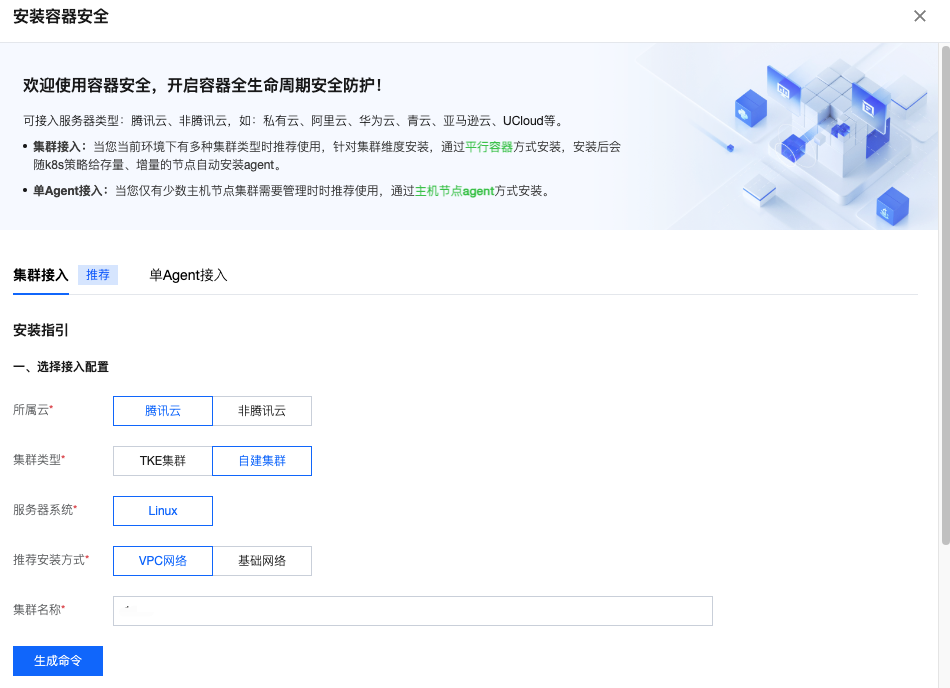
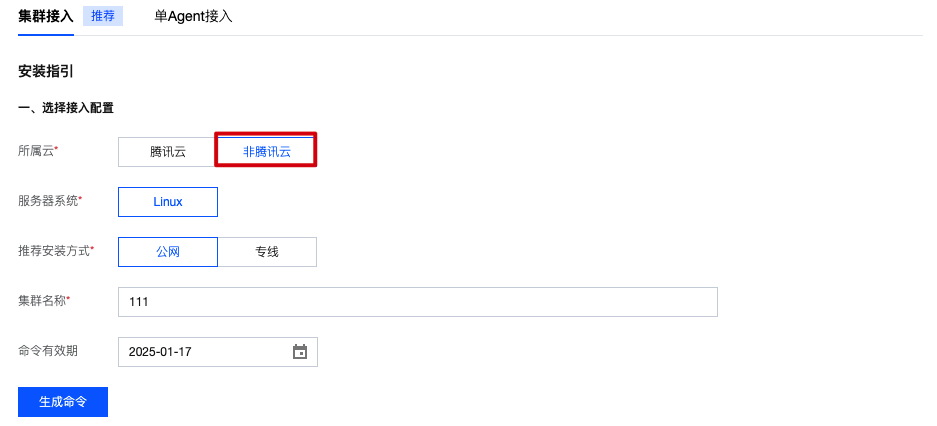
3. 在集群接入页面,选择所属云为腾讯云或非腾讯云。
腾讯云:自建集群的云服务器资源来源于腾讯云,需按页面提示选择推荐安装方式和集群名称。
非腾讯云:选择非腾讯云,按页面提示配置推荐方案方式、集群名称、命令有效期。
说明:
接入集群的云服务器资源来源于其他云,包括其他云的自建集群、独立集群、托管集群等。
4. 单击生成命令,可复制并执行相关命令。可以在下方下载或复制 Yaml 文件内容,并通过以下两种方式安装。
说明:
建议您针对单个集群生成单个接入命令,以避免集群名称重复。
方式一:单击复制命令链接,拷贝到可以执行k8s命令的机器执行。您也可以先下载下方Yaml文件,拷贝到机器上并执行
kubectl apply -f tcss.yaml。方式二:前往 容器服务控制台-集群详情页面,通过“使用 Yaml 文件创建资源”复制命令内容。
---
apiVersion: v1
kind: Namespace
metadata:
name: tcss

---
apiVersion: rbac.authorization.k8s.io/v1
kind: Role
metadata:
namespace: tcss
name: tcss-admin
rules:
- apiGroups: ["extensions", "apps", ""]
resources: ["*"]
verbs: ["get", "list", "watch", "create", "update", "patch", "delete"]

---
apiVersion: rbac.authorization.k8s.io/v1
kind: RoleBinding
metadata:
name: tcss-admin-rb
namespace: tcss
subjects:
- kind: ServiceAccount
name: tcss-agent
namespace: tcss
apiGroup: ""
roleRef:
kind: Role
name: tcss-admin
apiGroup: rbac.authorization.k8s.io


---
apiVersion: v1
kind: ServiceAccount
metadata:
name: tcss-agent
namespace: tcss

---
apiVersion: rbac.authorization.k8s.io/v1
kind: ClusterRole
metadata:
name: security-clusterrole
rules:
- apiGroups: ["", "v1"]
resources: ["namespaces", "pods", "nodes", "services", "serviceaccounts", "configmaps", "componentstatuses"]
verbs: ["get", "list", "watch"]
- apiGroups: ["apps","batch","extensions","rbac.authorization.k8s.io","networking.k8s.io","cilium.io"]
resources: ["*"]
verbs: ["get", "list","watch"]
- apiGroups: ["networking.k8s.io"]
resources: ["networkpolicies"]
verbs: ["get", "list", "watch", "create", "update", "patch", "delete"]
- apiGroups: ["apiextensions.k8s.io"]
resources: ["customresourcedefinitions"]
verbs: ["list", "get","create"]
- apiGroups: ["apiextensions.k8s.io"]
resourceNames: ["tracingpolicies.cilium.io", "tracingpoliciesnamespaced.cilium.io"]
resources: ["customresourcedefinitions"]
verbs: ["list", "get", "update"]

---
apiVersion: rbac.authorization.k8s.io/v1
kind: ClusterRoleBinding
metadata:
name: security-clusterrolebinding
roleRef:
apiGroup: rbac.authorization.k8s.io
kind: ClusterRole
name: security-clusterrole
subjects:
- kind: ServiceAccount
name: tcss-agent
namespace: tcss
- kind: User
name: tcss
apiGroup: rbac.authorization.k8s.io


---
apiVersion: v1
kind: Secret
metadata:
name: tcss-agent-secret
namespace: tcss
annotations:
kubernetes.io/service-account.name: tcss-agent
type: kubernetes.io/service-account-token


---
apiVersion: batch/v1
kind: Job
metadata:
name: init-tcss-agent
namespace: tcss
spec:
template:
spec:
serviceAccountName: tcss-agent
containers:
- image: ccr.ccs.tencentyun.com/yunjing_agent/agent:latest
imagePullPolicy: Always
name: init-tcss-agent
command: ["/home/work/yunjing-agent"]
args: ["-token",'',"-vip",'','-cc']
resources:
limits:
cpu: 100m
memory: 512Mi
requests:
cpu: 100m
memory: 128Mi
env:
- name: user_tags
value: "default"
- name: k8s_name
value: "11"
- name: appid
value: "1256299843"
securityContext:
privileged: true
volumeMounts:
- mountPath: /run/secrets/kubernetes.io/tcss-agent
name: token-projection
securityContext: {}
hostPID: true
restartPolicy: Never
volumes:
- name: token-projection
secret:
secretName: tcss-agent-secret
backoffLimit: 5

---
apiVersion: apps/v1
kind: DaemonSet
metadata:
labels:
k8s-app: yunjing-agent
name: yunjing-agent
namespace: kube-system
annotations:
config.kubernetes.io/depends-on: batch/v1/namespaces/tcss/jobs/init-tcss-secrets
spec:
selector:
matchLabels:
k8s-app: yunjing-agent
template:
metadata:
annotations:
eks.tke.cloud.tencent.com/ds-injection: "true"
labels:
k8s-app: yunjing-agent
spec:
tolerations:
- operator: Exists
containers:
- image: ccr.ccs.tencentyun.com/yunjing_agent/agent:latest
imagePullPolicy: Always
name: yunjing-agent
command: ["/home/work/yunjing-agent"]
args: ["-d","-token",'',"-vip",'']
resources:
limits:
cpu: 250m
memory: 512Mi
requests:
cpu: 100m
memory: 128Mi
securityContext:
privileged: true
terminationMessagePath: /dev/termination-log
terminationMessagePolicy: File
dnsPolicy: ClusterFirst
restartPolicy: Always
schedulerName: default-scheduler
securityContext: {}
terminationGracePeriodSeconds: 30
hostNetwork: true
hostPID: true


---
apiVersion: apps/v1
kind: Deployment
metadata:
labels:
k8s-app: tcss-asset
name: tcss-asset
namespace: tcss
spec:
selector:
matchLabels:
k8s-app: tcss-asset
replicas: 1
template:
metadata:
labels:
k8s-app: tcss-asset
annotations:
eks.tke.cloud.tencent.com/ds-injection: "true"
spec:
serviceAccountName: tcss-agent
tolerations:
- operator: Exists
containers:
- image: ccr.ccs.tencentyun.com/yunjing_agent/agent:latest
imagePullPolicy: Always
name: tcss-asset
command: ["/home/work/yunjing-agent"]
args: ["-asset"]
resources:
limits:
cpu: 100m
memory: 256Mi
requests:
cpu: 50m
memory: 64Mi
securityContext:
privileged: true
terminationMessagePath: /dev/termination-log
terminationMessagePolicy: File
dnsPolicy: ClusterFirst
restartPolicy: Always
schedulerName: default-scheduler
securityContext: {}
terminationGracePeriodSeconds: 30
hostPID: true
5. 安装后,检查是否安装成功。集群接入后,将会在该集群创建“tcss 命名空间”,并创建如下工作负载资源,需确保以下3个工作负载正常运行:
tcss 命名空间下安装名称为“init-tcss-agent”的 Job 类型工作负载。
tcss 命名空间下安装名称为“tcss-asset”的 Deployment 类型工作负载。
kube-system 命名空间下安装名称为“yunjing-agent” 的 DaemonSet 类型工作负载。
5.1 检测 Job 工作负载是否部署成功。
查看 Job 是否创建成功,执行命令:
kubectl get jobs -n tcss。
查看 Job 是否部署成功,执行命令:
kubectl get pods -n tcss | grep init-tcss-agent。
5.2 查看 DaemonSet 是否部署成功。
查看 DaemonSet 是否创建成功,执行命令:
kubectl get daemonset -A -l k8s-app=yunjing-agent。
查看 DaemonSet 是否部署成功,执行命令:
kubectl get pods -A -l k8s-app=yunjing-agent。
5.3 检测 Deployment 工作负载是否部署成功。
查看 Deployment 是否创建成功,执行命令:
kubectl get deployment -n tcss。
查看 Deployment 是否部署成功,执行命令:
kubectl get pods -n tcss | grep tcss-asset。
文档反馈