Spring Cloud 接入
操作场景
本文通过一个 demo 进行 Spring Cloud 应用接入微服务引擎托管的 PolarisMesh 治理中心的全流程操作演示,帮助您快速了解如何使用北极星网格。
前提条件
已创建 Polaris 北极星实例,请参见 创建 PolarisMesh 治理中心。
下载 Github 的 demo 源码 到本地并解压。
本地编译构建打包机器环境已安装了Java JDK、Maven,并且能够访问 Maven 中央库。
根据您自身的业务,已准备好业务部署的资源,
虚拟机部署、容器化部署选择其中一种方式即可。虚拟机部署已创建 CVM 虚拟机,请参见 创建 CVM 虚拟机。
容器化部署已创建 TKE 容器集群,请参见 创建 TKE 集群。
操作步骤
1. 登录 TSF 控制台。
2. 在左侧导航栏选择 Polaris(北极星),进入北极星实例引擎列表页后单击目标实例进入实例信息页。
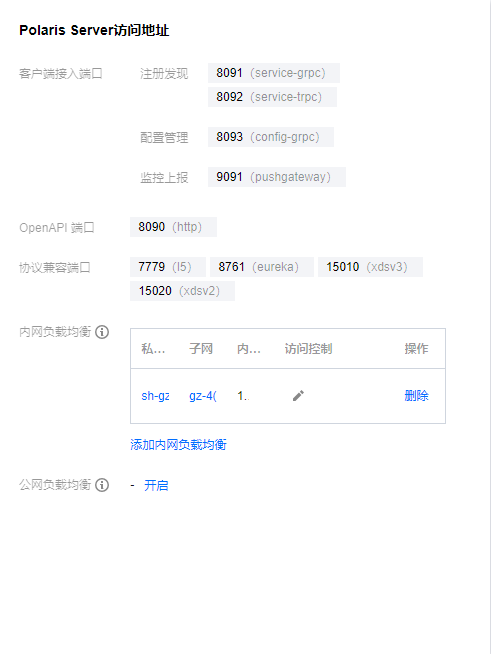
3. 在引擎管理-实例信息页查看访问地址,Spring Cloud 应用访问使用 gRPC 端口(8091):
4. 修改 demo 中的注册中心地址。
4.1 在下载到本地的 demo 源码目录 下,分别找到
spring-cloud-tencent-examples/polaris-discovery-example/discovery-callee-service/src/main/resources/bootstrap.yml 和 spring-cloud-tencent-examples/polaris-discovery-example/discovery-caller-service/src/main/resources/bootstrap.yml两个文件。4.2 添加微服务引擎北极星网格地址到项目配置文件中(以
spring-cloud-tencent-examples/polaris-discovery-example/discovery-callee-service/src/main/resources/bootstrap.yml为例)。server:port: 0spring:application:name: DiscoveryCallerServicecloud:polaris:enabled: trueaddress: grpc://{北极星引擎内网地址 IP}:8091
5. 打包 demo 源码成 Jar 包。
5.1 在
polaris-discovery-example 源码根目录下,打开 cmd 命令,执行 mvn clean package 命令,对项目进行打包编译。5.2 编译成功后,生成如下表所示的2个 Jar 包。
软件包所在目录 | 软件包名称 | 说明 |
polaris-discovery-example/discovery-callee-service/target | discovery-callee-service-${version}-SNAPSHOT.jar | 服务生产者 |
polaris-discovery-example/discovery-caller-service/target | discovery-caller-service-${version}-SNAPSHOT.jar | 服务消费者 |
6. 部署 provider 和 consumer 微服务应用,根据您业务实际选择虚拟机部署、容器化部署以及 TEM 部署中的一种部署方式即可。
6.1 虚拟机部署
上传 Jar 包至 CVM 实例。
执行启动命令进行启动:
nohup java -Djava.security.egd=file:/dev/./urandom -jar [jar包名称] &
6.2 容器化部署
编写 dockerfile 生成镜像,参考:
FROM java:8ADD ddiscovery-caller-service-${version}-SNAPSHOT.jar /root/app.jarENTRYPOINT ["java","-Djava.security.egd=file:/dev/./urandom","-jar","/root/app.jar"]
通过 TKE 部署并运行镜像
7. 确认部署结果。
7.1 进入前面提到的北极星实例页面。
选择服务管理 > 服务列表,查看微服务 DiscoveryCallerService 和 DiscoveryCalleeService 的实例数量:
若实例数量值不为0,则表示已经成功接入微服务引擎。
若实例数量为0,或者找不到 DiscoveryCallerService 和 DiscoveryCalleeService 服务名,则表示微服务应用接入微服务引擎失败。

7.2 调用 consumer 的 HTTP 接口。执行 HTTP 调用,其中${app.port}替换为 consumer 的监听端口,${add.address}则替换为 consumer 暴露的地址:
curl -L -X GET 'http://${add.address}:${app.port}/echo?value="hello-world'预期返回值:hello-world
文档反馈