就近访问
操作场景
本文通过一个 demo 进行 Java 应用接入微服务引擎托管的 PolarisMesh 治理中心的全流程操作演示,帮助您快速了解如何使用北极星网格的就近路由能力。
前提条件
已创建 PolarisMesh 北极星网格,请参见 创建 PolarisMesh 治理中心。
下载 Github 的 demo 源码 到本地并解压。
本地编译构建打包机器环境已安装了 Java 环境,并且能够访问 Github。
根据您自身的业务,已准备好业务部署的资源,虚拟机部署和容器化部署选择其中一种方式即可。
虚拟机部署已创建 CVM 虚拟机,请参见 创建 CVM 虚拟机。
容器化部署已创建 TKE 容器集群,请参见 创建 TKE 集群。
操作步骤
1. 登录 TSE 控制台。
2. 在北极星网格下的 polarismesh 页面,单击页面左上方下拉列表,选择目标地域。
3. 单击目标引擎的“ID”,进入基本信息页面。
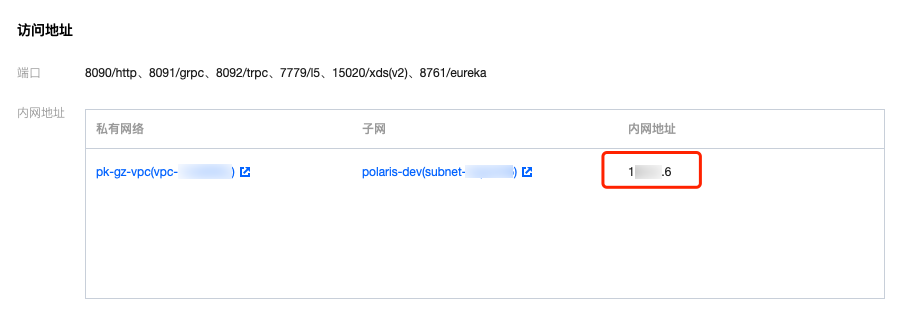
4. 查看访问地址,Java 应用访问使用 gRPC 端口(8091):
5. 修改 demo 中的注册中心地址:
在下载到本地的 demo 源码 目录下,分别找到
quickstart-example-provider/src/main/resources/polaris.yml以及quickstart-example-consumer/src/main/resources/polaris.yml文件。添加微服务引擎北极星网格地址以及就近路由相关配置到项目配置文件中(这里以
quickstart-example-provider/src/main/resources/polaris.yml为例)。通过腾讯云 API 获取当前 CVM /容器 POD 的地域信息
export ZONE=$(curl http://metadata.tencentyun.com/latest/meta-data/placement/region)export CAMPUS=$(curl http://metadata.tencentyun.com/latest/meta-data/placement/zone)
修改 polaris.yaml 文件
global:serverConnector:addresses:# 设置北极星服务端接入地址- 10.0.4.6:8091# 设置服务调用相关参数consumer:serviceRouter:plugin:# 设置就近路由插件配置nearbyBasedRouter:# 描述:就近路由的最小匹配级别,需要显示设置# 范围: zone(腾讯云地域信息,eg: ap-guangzhou)、campus(腾讯云可用区, eg: ap-guangzhou-3)matchLevel: campus
global:serverConnector:addresses:# 设置北极星服务端接入地址- 10.0.4.6:8091# 设置 SDK 获取自身地理位置信息的方式location:providers:# 设置 SDK 通过调用 http 接口获取地域信息数据- type: remoteHttpoptions:zone: http://metadata.tencentyun.com/latest/meta-data/placement/regioncampus: http://metadata.tencentyun.com/latest/meta-data/placement/zone# 设置服务调用相关参数consumer:serviceRouter:plugin:# 设置就近路由插件配置nearbyBasedRouter:# 描述:就近路由的最小匹配级别,需要显示设置# 范围: zone(腾讯云地域信息,eg: ap-guangzhou)、campus(腾讯云可用区, eg: ap-guangzhou-3)matchLevel: campus
6. 部署 provider 和 consumer 微服务应用。详情请参见 Polaris-Java Demo 部署。
7. 确认部署结果。
进入前面提到的微服务引擎北极星网格实例页面。
选择注册中心 > 服务列表,查看微服务 EchoServerJava 的实例数量。
若实例数量值不为0,则表示已经成功接入微服务引擎。同时确认实例所处的腾讯云地址位置信息。
若实例数量为0,或者找不到 EchoServerJava 服务名,则表示微服务应用接入微服务引擎失败。

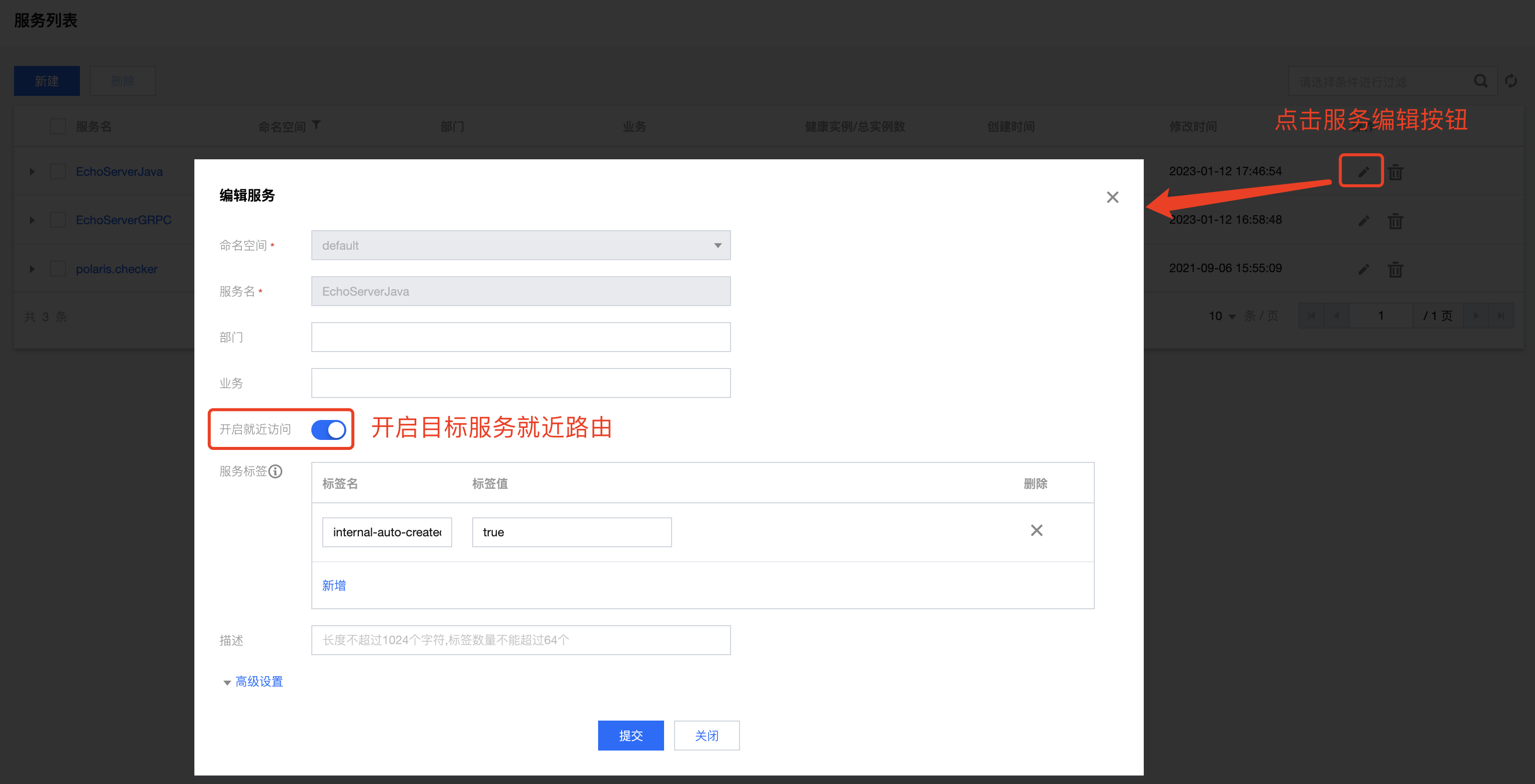
开启 EchoServerJava 的就近路由。
调用 consumer 的 HTTP 接口,执行 http 调用,其中
${app.port}替换为 consumer 的监听端口(默认为16011),${add.address}则替换为 consumer 暴露的地址。curl -L -X GET 'http://${add.address}:${app.port}/echo?value=hello_world'# 预期返回与 consumer 同腾讯云可用区的服务提供者实例信息预期返回值:"echo: hello_world, from: ${目标实例端口}, location: ${实例地理位置信息}";
文档反馈