索引优化解决读写性能瓶颈
下载
聚焦模式
字号
索引对 MongoDB 数据库查询性能起着至关重要的作用,用最少索引满足用户查询需求,可极大提升数据库性能,减少存储成本。本文介绍一系列索引优化分析过程,助力您解决数据库读写性能瓶颈问题。
异常现象
选择系统监控页签,检查实例的监控数据。
发现集群 Mongod 节点 CPU 消耗过高,CPU 使用率经常接近90%,甚至100%。
磁盘每秒读写次数持续偏高,IO 消耗过高,单节点 IO 资源消耗占整个服务器60%。
选择数据库管理页签,再选择慢日志查询页签,查看慢日志。
实例存在大量慢日志,且慢日志中包含大量不同类型 find 和 update 请求,高峰期每秒可达数千条。
慢日志类型各不相同,查询条件众多,所有慢查询都有匹配索引。其内容如下所示。
Mon Aug 2 10:34:24.928 I COMMAND [conn10480929] command xxx.xxx command: find { find: "xxx", filter: { $and: [ { alxxxId: "xxx" }, { state: 0 }, { itemTagList: { $in: [ xx ] } }, { persxxal: 0 } ] }, limit: 3, maxTimeMS: 10000 } planSummary: IXSCAN { alxxxId: 1.0, itemTagList: 1.0 } keysExamined:1650 docsExamined:1650 hasSortStage:0 cursorExhausted:1 keyUpdates:0 writeConflicts:0 numYields:15 nreturned:3 reslen:8129 locks:{ Global: { acquireCount: { r: 32 } }, Database: { acquireCount: { r: 16 } }, Collection: { acquireCount: { r: 16 } } } protocol:op_command 227msMon Aug 2 10:34:22.965 I COMMAND [conn10301893] command xx.txxx command: find { find: "txxitem", filter: { $and: [ { itxxxId: "xxxx" }, { state: 0 }, { itemTagList: { $in: [ xxx ] } }, { persxxal: 0 } ] }, limit: 3, maxTimeMS: 10000 } planSummary: IXSCAN { alxxxId: 1.0, itemTagList: 1.0 } keysExamined:1498 docsExamined:1498 hasSortStage:0 cursorExhausted:1 keyUpdates:0 writeConflicts:0 numYields:12 nreturned:3 reslen:8039 locks:{ Global: { acquireCount: { r: 26 } }, Database: { acquireCount: { r: 13 } }, Collection: { acquireCount: { r: 13 } } } protocol:op_command 158ms
原因分析
分析慢日志,发现查询请求均有使用 { alxxxId: 1.0, itemTagList: 1.0 } 索引。该索引扫描的 keysExamined 为1498行,扫描的 docsExamined 为1498行,但是返回的 doc 文档数却只有 nreturned =3 行。即满足条件的数据只有3条,但是却扫描了1498行数据和索引。可见,影响读写性能的关键原因在于索引设置不合理性。
说明:
keysExamined 指明索引扫描条目。docsExamined 代表文档扫描条目。keysExamined 和 docsExamined 越大,说明没有建索引或者索引的区分度不高。
索引优化过程
步骤1:收集用户数据模式
业务常用查询、更新类 SQL,如下所示:
基于 AlxxxId(用户ID) + itxxxId(单个或多个)基于 AlxxxId 查询 count基于 AlxxxId 通过时间范围(createTime)进行分页查询,部分查询会拼接 state 及其他字段基于 AlxxxId,ParentAlxxxId,parentItxxxId,state 组合查询基于 ItxxxId(单个或多个) 查询数据基于 AlxxxId, state, updateTime 组合查询基于 AlxxxId, state,createTime, totalStock(库存数量) 组合查询基于 AlxxxId(用户ID) + itxxxId(单个或多个) + 任意其他字段组合基于 AlxxxId,digitalxxxrmarkId(水印ID),state 进行查询基于 AlxxxId,itemTagList(标签ID),state 等进行查询基于 AlxxxId + itxxxId(单个或多个) + 其他任意字段进行查询其他查询
业务常用统计类 count 查询 SQL,如下所示:
AlxxxId,state, persxxal 组合AlxxxId, state,itemType 组合AlxxxId(用户ID) + itxxxId(单个或多个) + 任意其他字段组合
步骤2:获取集群已有索引
通过 db.xxx.getindex() 获取到该表索引信息,查询复杂,索引众多,总计30个索引,如下所示。
{ "alxxxId" : 1, "state" : -1, "updateTime" : -1, "itxxxId" : -1, "persxxal" : 1, "srcItxxxId" : -1 }{ "alxxxId" : 1, "image" : 1 }{ "itexxxList.vidxxCheck" : 1, "itemType" : 1, "state" : 1 }{ "alxxxId" : 1, "state" : -1, "newsendTime" : -1, "itxxxId" : 1, "persxxal" : 1 }{ "_id" : 1 }{ "alxxxId" : 1, "createTime" : -1, "checkStatus" : 1 }{ "alxxxId" : 1, "parentItxxxId" : -1, "state" : -1, "updateTime" : -1, "persxxal" : 1, "srcItxxxId" : -1 }{ "alxxxId" : 1, "state" : -1, "parentItxxxId" : 1, "updateTime" : -1, "persxxal" : -1 }{ "srcItxxxId" : 1 }{ "createTime" : 1 }{ "itexxxList.boyunState" : -1, "itexxxList.wozhituUploadServerId": -1, "itexxxList.photoQiniuUrl" : 1, "itexxxList.sourceType" : 1 }{ "alxxxId" : 1, "state" : 1, "digitalxxxrmarkId" : 1, "updateTime" : -1 }{ "itxxxId" : -1 }{ "alxxxId" : 1, "parentItxxxId" : 1, "parentAlxxxId" : 1, "state" : 1 }{ "alxxxId" : 1, "videoCover" : 1 }{ "alxxxId" : 1, "itemType" : 1 }{ "alxxxId" : 1, "state" : -1, "itemType" : 1, "persxxal" : 1, "updateTime" : 1 }{ "alxxxId" : 1, "itxxxId" : 1 }{ "itxxxId" : 1, "alxxxId" : 1 }{ "alxxxId" : 1, "parentAlxxxId" : 1, "state" : 1 }{ "alxxxId" : 1, "itemTagList" : 1 }{ "itexxxList.photoQiniuUrl" : 1, "itexxxList.boyunState" : -1, "itexxxList.sourceType" : 1, "itexxxList.wozhituUploadServerId" : -1 }{ "alxxxId" : 1, "parentItxxxId" : 1, "state" : 1 }{ "alxxxId" : 1, "parentItxxxId" : 1, "updateTime" : 1 }{ "updateTime" : 1 }{ "itemPhoxxIdList" : -1 }{ "alxxxId" : 1, "state" : -1, "isTop" : 1 }{ "alxxxId" : 1, "state" : 1, "itemResxxxIdList" : 1, "updateTime" : -1 }{ "alxxxId" : 1, "state" : -1, "itexxxList.photoQiniuUrl" : 1 }{ "itexxxList.qiniuStatus" : 1, "itexxxList.photoNetUrl" : 1, "itexxxList.photoQiniuUrl" : 1 }{ "itemResxxxIdList" : 1 }
步骤3:索引优化
删除无用索引
MongoDB 支持通过索引统计命令获取各个索引命中的次数,该命令如下:
> db.xxxxx.aggregate({"$indexStats":{}}){ "name" : "alxxxId_1_parentItxxxId_1_parentAlxxxId_1", "key" : { "alxxxId" : 1, "parentItxxxId" : 1, "parentAlxxxId" : 1 },"host" : "TENCENT64.site:7014", "accesses" : { "ops" : NumberLong(11236765),"since" : ISODate("2020-08-17T06:39:43.840Z") } }
字段含义解释如下。
name: 索引名,针对该索引名进行统计。
ops: 索引命中次数,即所有查询中,使用本索引作为查询请求命中的次数。 如果命中次数为0或者很小,说明该索引很少被选为最优索引,可认为其为无用索引。
使用该索引统计命令获取所有索引命中的次数,如下所示。命中次数为0或者很小,直接删除。同时,业务已运行一段时间,ops 小于10000也删除。总计可删除11个无用索引,剩余有用索引30 - 11 = 19个。
db.xxx.aggregate({"$indexStats":{}}){ "alxxxId" : 1, "state" : -1, "updateTime" : -1, "itxxxId" : -1, "persxxal" : 1, "srcItxxxId" : -1 } "ops" : NumberLong(88518502){ "alxxxId" : 1, "image" : 1 } "ops" : NumberLong(293104){ "itexxxList.vidxxCheck" : 1, "itemType" : 1, "state" : 1 } "ops" : NumberLong(0){ "alxxxId" : 1, "state" : -1, "newsendTime" : -1, "itxxxId" : -1, "persxxal" : 1 } "ops" : NumberLong(33361216){ "_id" : 1 } "ops" : NumberLong(3987){ "alxxxId" : 1, "createTime" : 1, "checkStatus" : 1 } "ops" : NumberLong(20042796){ "alxxxId" : 1, "parentItxxxId" : -1, "state" : -1, "updateTime" : -1, "persxxal" : 1, "srcItxxxId" : -1 } "ops" : NumberLong(43042796){ "alxxxId" : 1, "state" : -1, "parentItxxxId" : 1, "updateTime" : -1, "persxxal" : -1 } "ops" : NumberLong(3042796){ "itxxxId" : -1 } "ops" : NumberLong(38854593){ "srcItxxxId" : -1 } "ops" : NumberLong(0){ "createTime" : 1 } "ops" : NumberLong(62){ "itexxxList.boyunState" : -1, "itexxxList.wozhituUploadServerId" : -1, "itexxxList.photoQiniuUrl" : 1, "itexxxList.sourceType" : 1 } "ops" : NumberLong(0){ "alxxxId" : 1, "state" : 1, "digitalxxxrmarkId" : 1, "updateTime" : -1 } "ops" : NumberLong(140238342){ "itxxxId" : -1 } "ops" : NumberLong(38854593){ "alxxxId" : 1, "parentItxxxId" : 1, "parentAlxxxId" : 1, "state" : 1 } "ops" : NumberLong(132237254){ "alxxxId" : 1, "videoCover" : 1 } { "ops" : NumberLong(2921857){ "alxxxId" : 1, "itemType" : 1 } { "ops" : NumberLong(457){ "alxxxId" : 1, "state" : -1, "itemType" : 1, "persxxal" : 1, " itxxxId " : 1 } "ops" : NumberLong(68730734){ "alxxxId" : 1, "itxxxId" : 1 } "ops" : NumberLong(232360252){ "itxxxId" : 1, "alxxxId" : 1 } "ops" : NumberLong(145640252){ "alxxxId" : 1, "parentAlxxxId" : 1, "state" : 1 } "ops" : NumberLong(689891){ "alxxxId" : 1, "itemTagList" : 1 } "ops" : NumberLong(2898693682){ "itexxxList.photoQiniuUrl" : 1, "itexxxList.boyunState" : 1, "itexxxList.sourceType" : 1, "itexxxList.wozhituUploadServerId" : 1 } "ops" : NumberLong(511303207){ "alxxxId" : 1, "parentItxxxId" : 1, "state" : 1 } "ops" : NumberLong(0){ "alxxxId" : 1, "parentItxxxId" : 1, "updateTime" : 1 } "ops" : NumberLong(0){ "updateTime" : 1 } "ops" : NumberLong(1397){ "itemPhoxxIdList" : -1 } "ops" : NumberLong(0){ "alxxxId" : 1, "state" : -1, "isTop" : 1 } "ops" : NumberLong(213305){ "alxxxId" : 1, "state" : 1, "itemResxxxIdList" : 1, "updateTime" : 1 } "ops" : NumberLong(2591780){ "alxxxId" : 1, "state" : 1, "itexxxList.photoQiniuUrl" : 1} "ops" : NumberLong(23505){ "itexxxList.qiniuStatus" : 1, "itexxxList.photoNetUrl" : 1, "itexxxList.photoQiniuUrl" : 1 } "ops" : NumberLong(0){ "itemResxxxIdList" : 1 } "ops" : NumberLong(7)
删除重复索引
查询顺序引起的索引重复。
该业务不同开发写了两个索引,如下所示。 通过分析,这两个 SQL 索引的目的是一致的,创建其中任何一个索引即可。
db.xxxx.find({{ "alxxxId" : xxx, "itxxxId" : xxx }})db.xxxx.find({{ " itxxxId " : xxx, " alxxxId " : xxx }})
最左原则匹配引起的索引重复。
{ itxxxId:1, alxxxId:1 } 和 { itxxxId :1} 这两个索引,{ itxxxId :1} 即为重复索引。
包含关系引起的索引重复。
{ "alxxxId" : 1, "parentItxxxId" : 1, "parentAlxxxId" : 1, "state" : 1 }{ "alxxxId" : 1, "parentAlxxxId" : 1, "state" : 1 }{ "alxxxId" : 1, " state " : 1 }
这三个索引,存在如下三个查询:
Db.xxx.find({ "alxxxId" : xxx, "parentItxxxId" : xx, "parentAlxxxId" : xxx, "state" : xxx })Db.xxx.find({ "alxxxId" : xxx, " parentAlxxxId " : xx, " state " : xxx })Db.xxx.find({ "alxxxId" : xxx, " state " : xxx })
这几个查询都包含公共字段,因此可以合并为一个索引来满足这两类 SQL 的查询,合并后的索引如下:
{ "alxxxId" : 1, " state " : 1, " parentAlxxxId " : 1, parentItxxxId :1}
重复索引,经合并清理,可保留如下2个索引。
{ itxxxId:1, alxxxId:1 }{ "alxxxId" : 1, "parentItxxxId" : 1, "parentAlxxxId" : 1, "state" : 1 }
分析索引唯一性,去除重合索引
分析表中数据各个字段模块组合,可发现 alxxxId 和 itxxxId 字段为高频字段。分析 Schema 信息,随机抽取一部分数据,发现这两个字段组合是唯一的。
经确认,这两个字段的任意组合都代表一条唯一的数据。那么,这两个字段和任何字段的组合都是唯一的。因此,下面的几个索引可以合并为一个索引:{ itxxxId:1, alxxxId:1 }。
{ "alxxxId" : 1, "state" : -1, "updateTime" : -1, "itxxxId" : 1, "persxxal" : 1, "srcItxxxId" : -1 }{ "alxxxId" : 1, "state" : -1, "itemType" : 1, "persxxal" : 1, " itxxxId " : 1 }{ "alxxxId" : 1, "state" : -1, "newsendTime" : -1, "itxxxId" : 1, "persxxal" : 1 }{ "alxxxId" : 1, "state" : 1, "itxxxId" : 1, "updateTime" : -1 }{ itxxxId:1, alxxxId:1 }
非等值查询引起的无用索引优化
从前面的30个索引可以看出,索引中有部分为时间类型字段,如 createTime、updateTime,经确认,这些字段用于各种范围查询。范围查询属于非等值查询,如果范围查询字段出现在索引字段前面,则后面字段无法走索引,如下所示。
db.collection.find({{ "alxxxId" : xx, "parentItxxxId" : xx, "state" : xx, "updateTime" : {$gt: xxxxx}, "persxxal" : xxx, "srcItxxxId" : xxx } })db.collection.find({{ "alxxxId" : xx, "state" : xx, "parentItxxxId" : xx, "updateTime" : {$lt: xxxxx}, "persxxal" : xxx} })
这两个查询都包含 updateTime 字段,并进行范围查询。除了 updateTime 字段以外的字段都是等值查询,updateTime 右边的字段无法使用索引,也第一个索引 persxxal 和 srcItxxxId 字段无法匹配索引,第二个索引 persxxal 字段无法匹配索引。
用户为这两个查询设置以下两个索引。
{ "alxxxId" : 1, "parentItxxxId" : -1, "state" : -1, "updateTime" : -1, "persxxal" : 1, "srcItxxxId" : -1 }{ "alxxxId" : 1, "state" : -1, "parentItxxxId" : 1, "updateTime" : -1, "persxxal" : -1 }
这两个索引字段基本相同,可优化为如下一个索引,确保更多字段能够匹配到索引。
{ "alxxxId" : 1, "state" : -1, "parentItxxxId" : 1, "persxxal" : -1, "updateTime" : -1 }
去除查询频率较低字段对应的索引
删除无用索引时,清理掉命中率低于10000次以下的索引。但是,还有一部分索引相比高频命中次数(数十亿次)命中次数,也相对较低(命中次数只有几十万)。这部分较低频命中次数的索引如下所示,分别包含 image 与 videoCover 字段。
{ "alxxxId" : 1, "image" : 1 } "ops" : NumberLong(293104){ "alxxxId" : 1, "videoCover" : 1 } "ops" : NumberLong(292857)
Mon Aug 2 10:56:46.533 I COMMAND [conn5491176] command xxxx.tbxxxxx command: count { count: "xxxxx", query: { alxxxId: "xxxxxx", itxxxId: "xxxxx", image: "http:/xxxxxxxxxxx/xxxxx.jpg" }, limit: 1 } planSummary: IXSCAN { itxxxId: 1.0,alxxxId:1.0 } keyUpdates:0 writeConflicts:0 numYields:1 reslen:62 locks:{ Global: { acquireCount: { r: 4 } }, Database: { acquireCount: { r: 2 } }, Collection: { acquireCount: { r: 2 } } } protocol:op_query 4msMon Aug 2 10:47:53.262 I COMMAND [conn10428265] command xxxx.tbxxxxx command: find { find: "xxxxx", filter: { $and: [ { alxxxId: "xxxxxxx" }, { state: 0 }, { itemTagList: { $size: 0 } } ] }, limit: 1, singleBatch: true } planSummary: IXSCAN { alxxxId: 1, videoCover: 1 } keysExamined:128 docsExamined:128 cursorExhausted:1 keyUpdates:0 writeConflicts:0 numYields:22 nreturned:0 reslen:108 locks:{ Global:{ acquireCount: { r: 46 } }, Database: { acquireCount: { r: 23 } }, Collection: { acquireCount: { r: 23 } } } protocol:op_command 148ms
Image 字段:分析日志,可发现用户请求中的 image 都是和 alxxxId,itxxxId 进行组合查询,而 alxxxId,itxxxId 组合是唯一的,image 字段完全没有被索引,则 { "alxxxId" : 1, "ixxxge" : 1 } 索引可以删除。
videoCover 字段:分析日志,发现查询条件中没有携带 videoCover,只是部分查询匹配 { alxxxId: 1, videoCover: 1 } 索引,并且 keysExamined、docsExamined 与 nreturned 不相同,可确认,实际只匹配了 alxxxId 索引字段。因此,该索引 { alxxxId: 1, videoCover: 1 } 也可以删除。
分析日志高频查询,添加高频查询最优索引
登录 MongoDB 控制台,在慢日志查询页签,将慢日志时延阈值调低,通过 mtools 工具分析一段时间的查询,获取到如下热点查询信息:
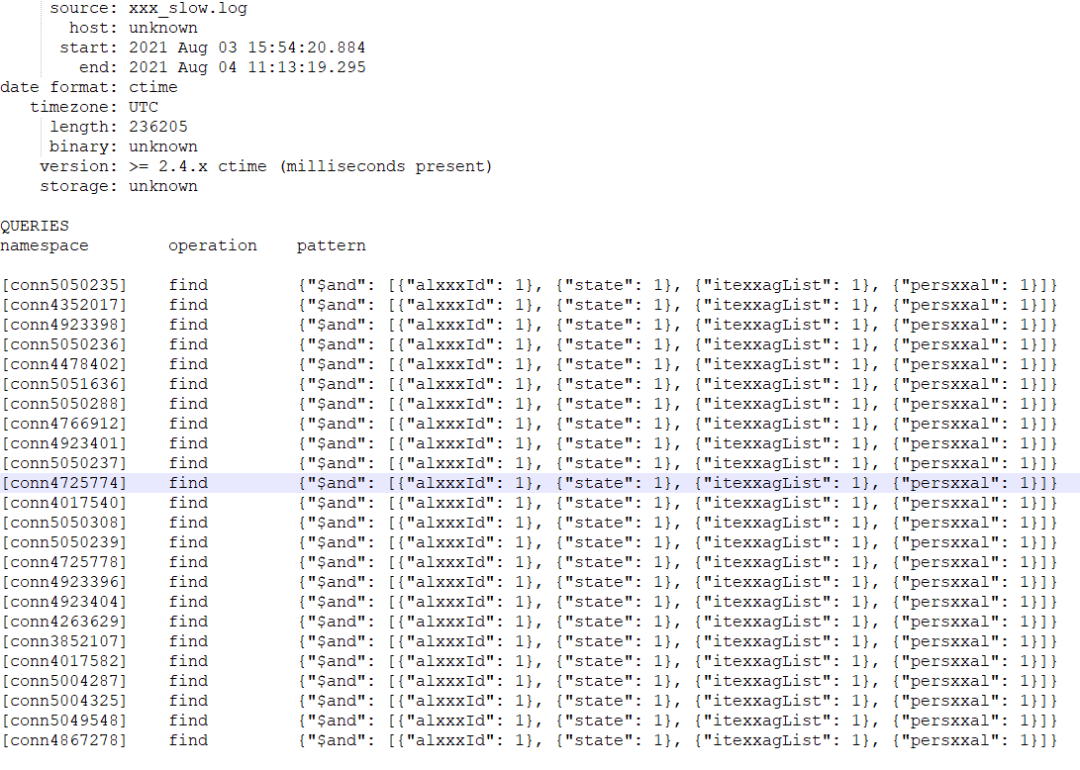
Mon Aug 2 10:47:58.015 I COMMAND [conn4352017] command xxxx.xxx command: find { find: "xxxxx", filter: { $and: [ { alxxxId:"xxxxx" }, { state: 0 }, { itemTagList: { $in: [ xxxxx ] } }, { persxxal: 0 } ] }, projection: { $sortKey: { $meta: "sortKey" } }, sort: { updateTime: 1 }, limit: 3, maxTimeMS: 10000 } planSummary: IXSCAN { alxxxId: 1.0, itexxagList: 1.0 } keysExamined:1327 docsExamined:1327 hasSortStage:1 cursorExhausted:1 keyUpdates:0 writeConflicts:0 numYields:23 nreturned:3 reslen:12036 locks:{ Global: { acquireCount: { r: 48 } }, Database: { acquireCount: { r: 24 } }, Collection: { acquireCount: { r: 24 } } } protocol:op_command 151ms
分析日志可以看出,该高频查询匹配 { alxxxId: 1.0, itexxagList: 1.0 } 索引,扫描数据行数和最终返回的数据行数差距很大,扫描了1327行,最终只获取到了3条数据。
该索引不是最优索引,该高频查询是四字段的等值查询,只有两个字段走了索引,可以把该索引优化为如下索引 { alxxxId: 1.0, itexxagList: 1.0 , persxxal:1.0, stat:1.0}。
此外,从日志可以看出,该高频查询实际上还有个 sort 排序和 limit 限制,整个查询原始 SQL 如下:
db.xxx.find({ $and: [ { alxxxId:"xxxx" }, { state: 0 }, { itexxagList: { $in: [ xxxx ] } },{ persxxal: 0 } ] }).sort({updateTime:1}).limit(3)
该查询模型为普通多字段等值查询 + sort 排序类查询 + limit 限制。该类查询最优索引可能是下面两个索引中的一个:
索引1:普通多字段等值查询对应索引
分析其查询条件:
{ $and: [ { alxxxId:"xxx" }, { state: 0 }, { itexxagList: { $in: [ xxxx ] } }, { persxxal: 0 } ] }
该 SQL 四个字段都为等值查询,按照散列度创建最优索引,取值越散列的字段放最左边,可以得到如下最优索引:
{ alxxxId: 1.0, itexxagList: 1.0 , persxxal:1.0, stat:1.0}
如果选择该索引作为最优索引,则整个普通多字段等值查询 + sort 排序类查询 + limit 限制查询,执行流程如下:
通过 { alxxxId: 1.0, itexxagList: 1.0 , persxxal:1.0, stat:1.0} 索引找出满足 { $and: [ { alxxxId:"xxxx" }, { state: 0 }, { itexxagList: { $in: [ xxxx ] } }, { persxxal: 0 } ] } 条件的所有数据。
对这些满足条件的数据进行内存排序。
取排序好的前三条数据。
索引2:等值查询 + sort 排序对应最优索引
sort 排序查询中带有 limit,找出该高频排序 SQL,如下:
{ $and: [ { alxxxId:"xxxx" }, { state: 0 }, { itexxagList: { $in: [ xxxx ] } }, { persxxal: 0 } ] }.sort({updateTime :1}).limit(10)
该查询为超高频查询,建议这类 SQL 添加如下索引:
{ alxxxId: 1.0, itexxagList: 1.0 , persxxal:1.0, stat:1.0,updateTime :1}
步骤4:梳理最终保留的索引
通过以上优化,保留如下索引。
{ "itxxxId" : 1, "alxxxId" : 1 }{ "alxxxId" : 1, "state" : 1, "digitalxxxrmarkId" : 1, "updateTime" : 1 }{ "alxxxId" : 1, "state" : -1, "parentItxxxId" : 1, "persxxal" : -1, "updateTime" : 1 } { "alxxxId" : 1, "itexxxList.photoQiniuUrl" : 1, }{ "alxxxId" : 1, "parentAlxxxId" : 1, "state" : 1"parentItxxxId" : 1}{ alxxxId: 1.0, itexxagList: 1.0 , persxxal:1.0, stat:1.0, updateTime:1}{ "alxxxId" : 1,"createTime" : -1}
索引优化后收益
CPU 资源节省90%以上。
CPU 峰值消耗从之前的90%多降到优化后的10%以内。
磁盘 IO 资源节省85%。
磁盘 IO 消耗从之前的60% - 70%降低到10%以内。
盘存储成本节省20%。
每个索引都对应一个磁盘索引文件,索引从30个减少到8个,数据 + 索引最终真实磁盘消耗减少20%左右。
慢日志减少99%。
索引优化前慢日志每秒数千条,优化后慢日志条数降低到数十条。
文档反馈