弱网优化
Download
聚焦模式
字号
简介
本文介绍如何通过 COS SDK 使用 QUIC 协议访问 COS。
功能说明
针对弱网环境,COS SDK 已支持 QUIC 协议。QUIC 协议是一种基于 UDP 实现的低延迟高可靠通信协议,目前标准的 HTTP3 协议正是基于 QUIC 实现的。QUIC 支持 0-RTT 建立连接和无队头阻塞的多路复用,可以比较容易的在端侧实现用户态拥塞控制,更大限度地利用网络带宽进行实际的数据传输,在丢包率和网络延迟较高的弱网环境也可提供高质量的数据通信。同时,QUIC 还支持连接迁移,在移动端频繁切换网络的场景中,也可平滑过渡,保证网络不中断。
因此,如果您对上传下载等 COS 操作在弱网环境中的成功率、延迟较为敏感,您可以使用 QUIC 协议访问 COS。
前提条件
在开始执行操作前,您需要开通 EdgeOne 服务以及 QUIC 功能,并添加对应的 COS 域名。详细操作步骤如下:
1. 前往 EdgeOne 控制台 开通,具体操作请参见 开通 EdgeOne。
2. 在 EdgeOne 控制台单击添加站点,添加业务方的加速域名。进入站点后进行域名管理 , 添加域名时请选择对象存储源站。
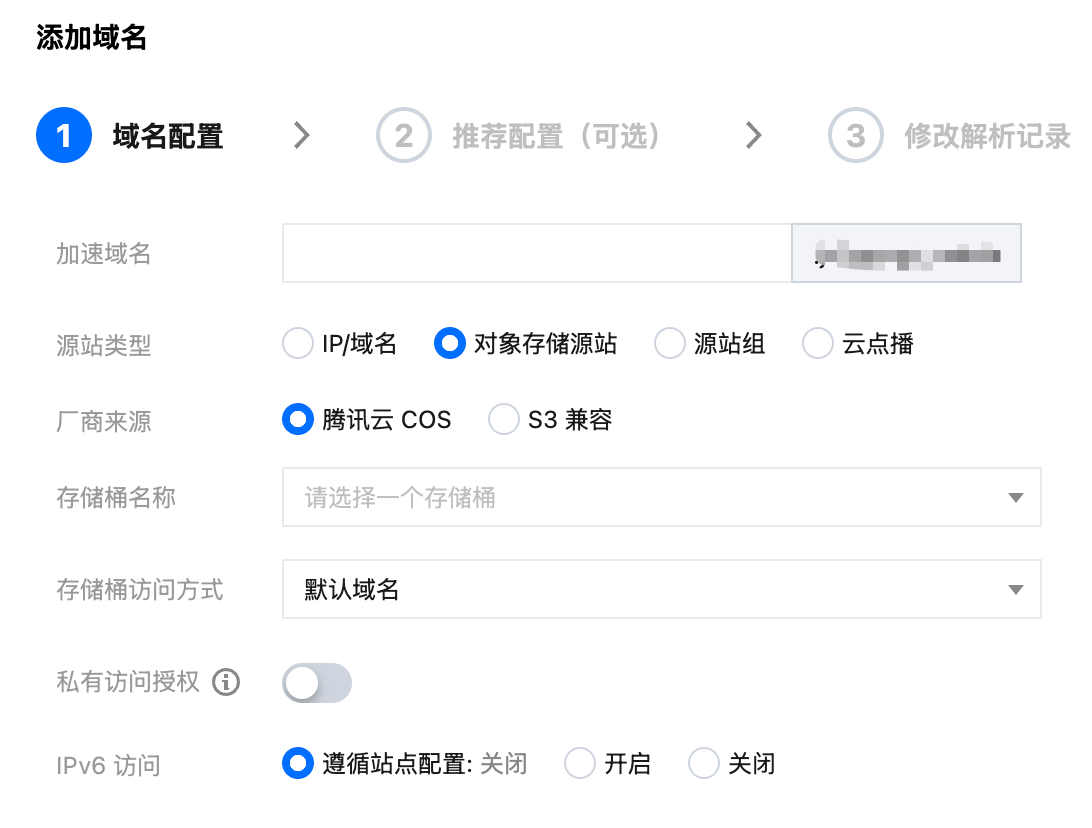
3. 开启 EdgeOne 的 QUIC 功能,请参见 开启HTTP/3(QUIC)。
4. 记录步骤2中的加速域名,该域名后续需要配置到 COS SDK 中。
注意:
操作步骤
步骤1:配置 QUIC 协议
1. 在应用级别(通常是 App 模块下)的 build.gradle 中添加 QUIC 库依赖。
dependencies {...// 增加此行implementation 'com.qcloud.cos:quic:1.5.46'}
2. 通过 COS SDK 中 CosXmlServiceConfig 进行自定义域名和开启 QUIC。
String region = "ap-beijing"; // 您的存储桶地域String eoDomain = "exampledomain.com"; // eo 加速域名CosXmlServiceConfig cosXmlServiceConfig = new CosXmlServiceConfig.Builder().setRegion(region).setHost(eoDomain) // 配置加速域名.addNoSignHeaders("Host") // EO 转发请求时 host 会变化,此处需要避免 host 签名.enableQuic(true) // 开启 QUIC.builder();CosXmlService cosXmlService = new CosXmlService(context, cosXmlServiceConfig,credentialProvider);
1. 在 podfile 文件中添加 QUIC 库依赖。
pod 'QCloudQuic'
2. 通过 COS SDK 中 QCloudServiceConfiguration 进行自定义域名和开启 QUIC。
NSString * eoDomain = @"exampledomain.com";QCloudServiceConfiguration* configuration = [QCloudServiceConfiguration new];configuration.enableQuic = YES; // 开启 Quicconfiguration.appID = @"appId"; // 设置 APPIdconfiguration.signatureProvider = self;QCloudCOSXMLEndPoint* endpoint = [[QCloudCOSXMLEndPoint alloc] initWithLiteralURL:[NSURL URLWithString:eoDomain]]; // 配置加速域名endpoint.useHTTPS = YES; // 使用 HTTPSconfiguration.endpoint = endpoint;
步骤2:SDK 内配置协议切换
为了提高 SDK 请求的成功率以及节省成本,SDK 提供了协议切换策略的配置方法:
保守策略:先使用默认的 HTTPS 协议进行请求,网络失败后自动使用 QUIC 协议进行重试。
激进策略:先使用 QUIC 协议进行请求,网络失败后自动使用默认的 HTTPS 协议进行重试。
自定义策略:SDK 提供了配置请求网络协议的方法,可以灵活的在业务层控制请求和切换的逻辑(例如根据网络质量自动切换)。
不配置切换策略,则直接使用步骤一中的 QUIC 协议进行请求。
通过 COS SDK 中 CosXmlServiceConfig 的 setNetworkSwitchStrategy 方法进行保守和激进策略的配置。
String region = "ap-beijing"; // 您的存储桶地域String eoDomain = "exampledomain.com"; // eo 加速域名// 激进策略CosXmlServiceConfig.RequestNetworkStrategy aggressiveStrategy = CosXmlServiceConfig.RequestNetworkStrategy.Aggressive;// 保守策略CosXmlServiceConfig.RequestNetworkStrategy conservativeStrategy = CosXmlServiceConfig.RequestNetworkStrategy.Conservative;CosXmlServiceConfig cosXmlServiceConfig = new CosXmlServiceConfig.Builder().setRegion(region).setHost(eoDomain) // 配置加速域名.addNoSignHeaders("Host") // EO 转发请求时 host 会变化,此处需要避免 host 签名.enableQuic(true) // 开启 QUIC.setNetworkSwitchStrategy(aggressiveStrategy) // 配置切换策略为激进策略//.setNetworkSwitchStrategy(conservativeStrategy) // 配置切换策略为保守策略.builder();CosXmlService cosXmlService = new CosXmlService(context, cosXmlServiceConfig,credentialProvider);
通过请求基类 CosXmlRequest 的 setNetworkType 进行自定义策略的配置。
// 任何 CosXmlRequest 都支持这种方式,例如上传 PutObjectRequest、下载 GetObjectRequest、删除 DeleteObjectRequest 等// 以下用上传进行示例PutObjectRequest putRequest = new PutObjectRequest("examplebucket-1250000000", "exampleobject.txt", "本地文件路径");// 自定义配置 QUIC 协议putRequest.setNetworkType(CosXmlRequest.RequestNetworkType.QUIC);// 自定义配置默认的 HTTPS 协议// putRequest.setNetworkType(CosXmlRequest.RequestNetworkType.OKHTTP);// 初始化 TransferConfig,这里使用默认配置,如果需要定制,请参考 SDK 接口文档TransferConfig transferConfig = new TransferConfig.Builder().build();// 初始化 TransferManagerTransferManager transferManager = new TransferManager(cosXmlService, transferConfig);COSXMLUploadTask uploadTask = transferManager.upload(putRequest, null);
通过 COS SDK 中 QCloudServiceConfiguration 的 networkStrategy 方法进行保守和激进策略的配置。
NSString * eoDomain = @"exampledomain.com";QCloudServiceConfiguration* configuration = [QCloudServiceConfiguration new];configuration.appID = @"appId"; // 设置 APPIDconfiguration.signatureProvider = self;QCloudCOSXMLEndPoint* endpoint = [[QCloudCOSXMLEndPoint alloc] initWithLiteralURL:[NSURL URLWithString:eoDomain]]; // 设置加速域名endpoint.useHTTPS = YES; // 使用 https// 配置加速域名configuration.endpoint = endpoint;// 配置切换策略为激进策略configuration.networkStrategy = QCloudRequestNetworkStrategyAggressive;// 配置切换策略为保守策略// configuration.networkStrategy = QCloudRequestNetworkStrategyConservative;// 开启 QUICconfiguration.enableQuic = YES;[QCloudCOSXMLService registerDefaultCOSXMLWithConfiguration:configuration];[QCloudCOSTransferMangerService registerDefaultCOSTransferMangerWithConfiguration:configuration];
注意:
EO 转发请求时 host 会变化,生成签名时需要指定Host不参与签名。如下所示:
- (void) signatureWithFields:(QCloudSignatureFields*)filedsrequest:(QCloudBizHTTPRequest*)requesturlRequest:(NSMutableURLRequest*)urlRequstcompelete:(QCloudHTTPAuthentationContinueBlock)continueBlock{//这里同步从后台服务器获取临时密钥,强烈建议将获取临时密钥的逻辑放在这里,最大程度上保证密钥的可用性//...QCloudCredential* credential = [QCloudCredential new];// 临时密钥 SecretId// sercret_id 替换为用户的 SecretId,登录访问管理控制台查看密钥,https://console.tencentcloud.com/cam/capicredential.secretID = @"SECRETID";// 临时密钥 SecretKey// sercret_key替换为用户的 SecretKey,登录访问管理控制台查看密钥,https://console.tencentcloud.com/cam/capicredential.secretKey = @"SECRETKEY";// 临时密钥 Token// 如果使用永久密钥不需要填入 token,如果使用临时密钥需要填入,临时密钥生成和使用指引参见 https://www.tencentcloud.com/document/product/436/14048?from_cn_redirect=1credential.token = @"TOKEN";/** 强烈建议返回服务器时间作为签名的开始时间, 用来避免由于用户手机本地时间偏差过大导致的签名不正确(参数 startTime 和 expiredTime 单位为秒)*/credential.startDate = [NSDate dateWithTimeIntervalSince1970:startTime]; // 单位是秒credential.expirationDate = [NSDate dateWithTimeIntervalSince1970:expiredTime]];// 单位是秒QCloudAuthentationV5Creator* creator = [[QCloudAuthentationV5Creator alloc]initWithCredential:credential];// 设置需要参与签名的 Header,不包含 Host 即可。creator.shouldSignedList = @[@"Cache-Control", @"Content-Disposition", @"Content-Encoding", @"Content-Length", @"Content-MD5", @"Content-Type", @"Expect", @"Expires", @"If-Match" , @"If-Modified-Since" , @"If-None-Match" , @"If-Unmodified-Since" , @"Origin" , @"Range" , @"transfer-encoding",@"Pic-Operations",@"ci-process"];// 注意 这里不要对 urlRequst 进行 copy 以及 mutableCopy 操作QCloudSignature *signature = [creator signatureForData:urlRequst];continueBlock(signature, nil);}
通过设置基类 QCloudAbstractRequest 的 endpoint 进行自定义域名的配置。
QCloudPutObjectRequest* put = [QCloudPutObjectRequest new];// 存储桶名称,由BucketName-Appid 组成,可以在 COS 控制台查看 https://console.tencentcloud.com/cos5/bucketput.bucket = @"examplebucket-1250000000";// 对象键,是对象在 COS 上的完整路径,如果带目录的话,格式为 "video/xxx/movie.mp4"put.object = @"exampleobject";// 文件内容,可以传入NSData*或者NSURL*类型的变量put.body = [@"testFileContent" dataUsingEncoding:NSUTF8StringEncoding];// 自定义配置 QUIC 协议put.networkType = QCloudRequestNetworkQuic;[put setFinishBlock:^(id result, NSError *error) {// result 包含响应的 header 信息// 获取文件 crc64NSString * crc64 = [[result __originHTTPURLResponse__].allHeaderFields valueForKey:@"x-cos-hash-crc64ecma"];}];[[QCloudCOSXMLService defaultCOSXML] PutObject:put];
示例工程
Android 示例 Demo 请参见 COS SDK 网络优化 Demo 下的 CosServiceFactory。
iOS 示例 Demo 请参见 COS SDK 网络优化 Demo 下的 AppDelegate。
文档反馈