兼容 Promethues 接口
Download
聚焦模式
字号
指标主题兼容 Prometheus 指标数据模型及如下接口:
指标查询接口
Prometheus HTTP API
兼容如下 HTTP API,常用于对接 Grafana。
Instant queries : /api/v1/query
Range queries : /api/v1/query_range
Finding series by label matchers : /api/v1/series
Getting label names : /api/v1/labels
Querying label values : /api/v1/label/<label_name>/values
Querying exemplars : /api/v1/query_exemplars
不兼容用于原生 Prometheus 采集配置、告警规则和集群管理等功能的 API,例如: Targets、Rules、Alerts、Querying target metadata、Querying metric metadata、Alertmanagers、Status、TSDB Admin APIs 等。
对接 Grafana 操作步骤:
1. 在 Grafana Data Sources 页面,单击 Add data source。
2. 选择 Prometheus,在表单中配置如下信息:
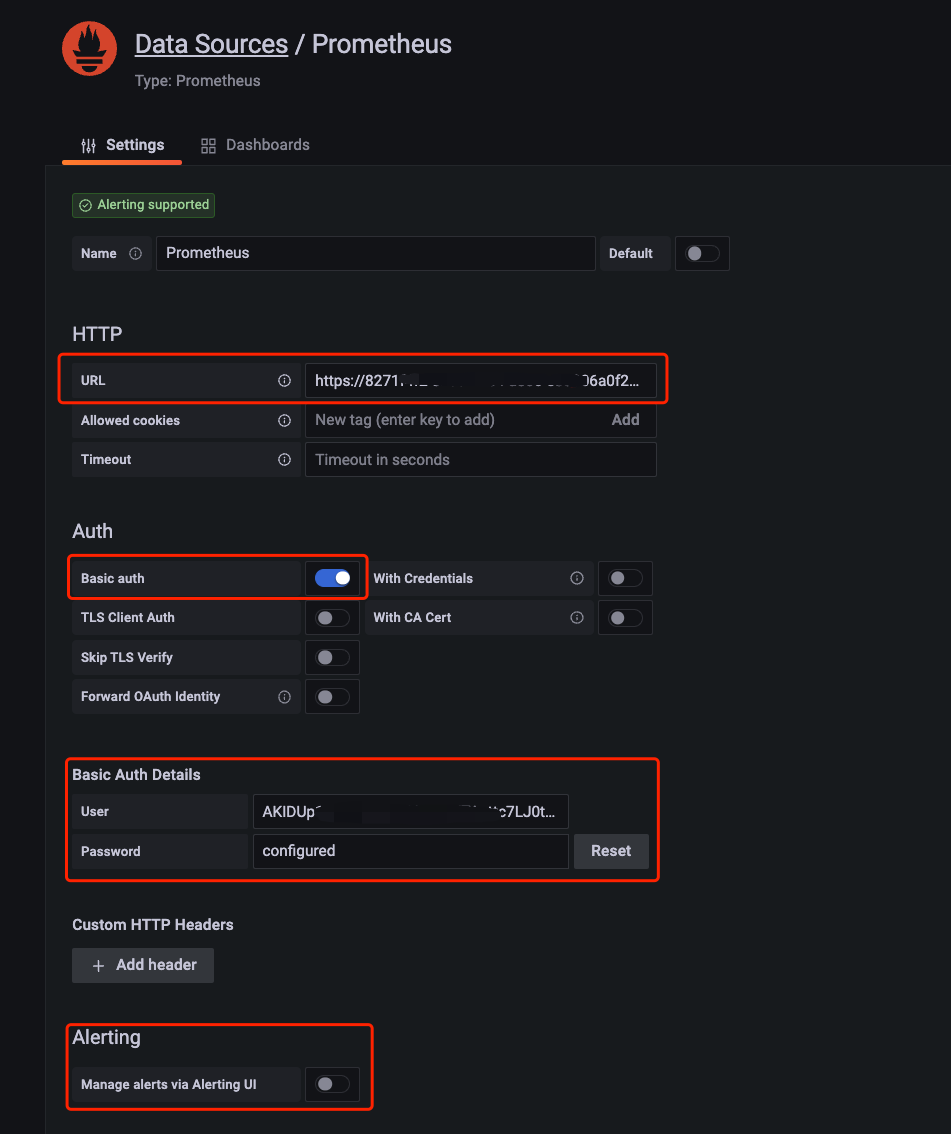
URL:请替换其中的 ${region} 及 ${topicId} ,${region} 为 地域简称,${topicId} 为指标主题 ID。
外网地址:https://${region}.cls.tencentcs.com/prometheus/${topicId}
内网地址:https://${region}.cls.tencentyun.com/prometheus/${topicId}
Basic auth:打开该开关
Basic Auth Details:接口采用 Basic Auth 进行鉴权,将 API 密钥 中的 SecretId 及 SecretKey 分别作为 username 及 password。
username:
${SecretId}password:
${SecretKey}说明:
{"version": "2.0","statement": [{"effect": "allow","action": ["cls:MetricsSeries","cls:MetricsQueryExemplars","cls:MetricsLabelValues","cls:MetricsQueryRange","cls:MetricsLabels","cls:MetricsQuery"],"resource": ["*"]}]}
Manage alerts via Alerting UI:关闭该开关,CLS 不兼容 Prometheus Alerts 相关接口,不支持该功能。
3. 单击底部 Save & Test 测试配置信息是否正确并保存配置。
Prometheus Remote Read API
# 读取地址,请替换其中的${region}及${topicId},本示例采用外网地址,如果网络条件允许建议使用内网地址# 内网地址 url: https://${region}.cls.tencentyun.com/prometheus/${topicId}/api/v1/readurl: https://${region}.cls.tencentcs.com/prometheus/${topicId}/api/v1/read# 鉴权信息,请替换其中的${SecretId}及${SecretKey}basic_auth:username: ${SecretId}password: ${SecretKey}
username:
${SecretId}password:
${SecretKey}说明:
{"version": "2.0","statement": [{"effect": "allow","action": ["cls:MetricsRemoteRead"],"resource": ["*"]}]}
指标上报接口
Prometheus Remote Write API
常用于使用兼容 Prometheus Remote Write 协议的各类采集器采集指标并上报至指标主题,例如 vmagent 及 telegraf。也可将本地 Prometheus 中的指标通过该接口上报至指标主题。使用说明详见 指标上报 。
文档反馈