
Audio/Video Enhancement Template

Last updated:2026-01-23 14:29:37
Leveraging the industry-leading AI processing models within MPS, alongside a plethora of applications in various business scenarios, the enhancement feature significantly elevates audio and video quality. It finds extensive application across OTT, e-commerce, and sporting events, delivering substantial business benefits through improvements in Quality of Experience (QoE) and Quality of Service (QoS).

Overview
The system offers a selection of preset enhancement templates for your convenience. Additionally, you can create custom templates tailored to your specific business needs. By setting different processing parameters for various application scenarios, these templates facilitate easy reuse in future projects. The following provides a detailed explanation on how to create custom audio/video enhancement templates using the console and API.
Creating an Enhancement Template through the Console
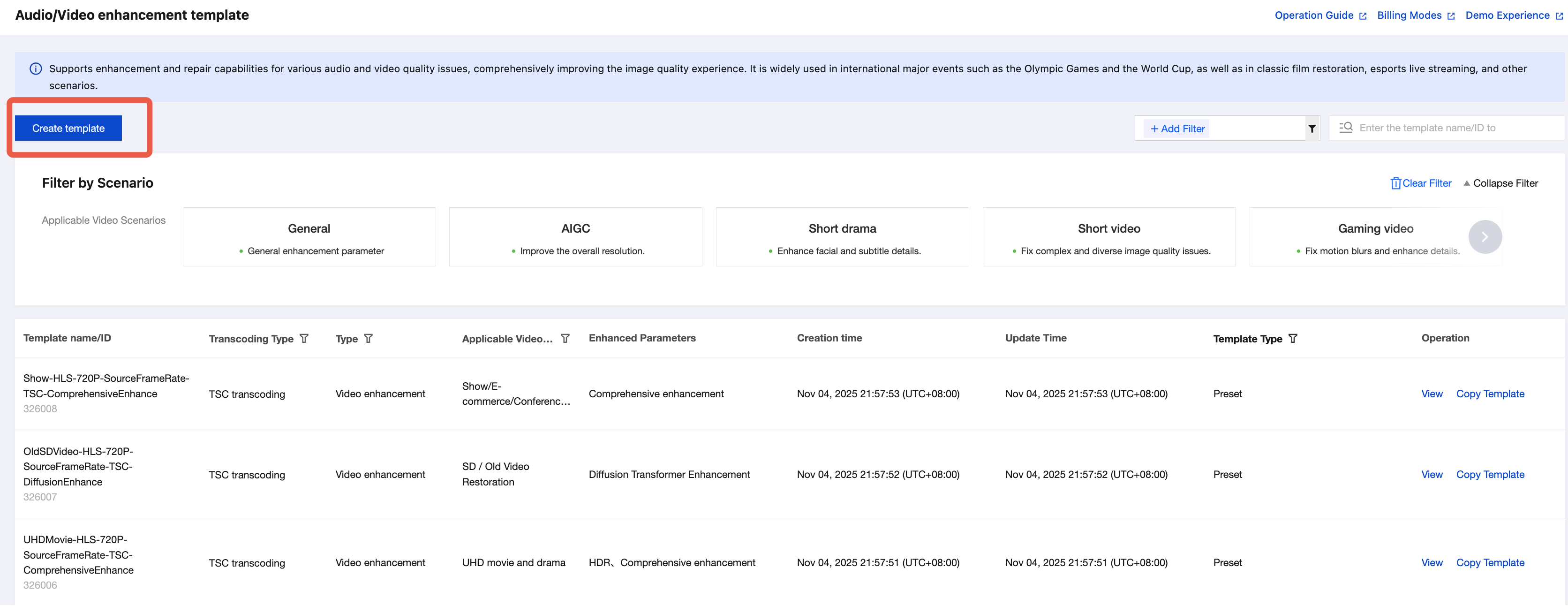
1. Go to the Template Management > Audio/Video Enhancement Template page in the Media Processing Console, and click Create Audio/Video Enhancement Template.
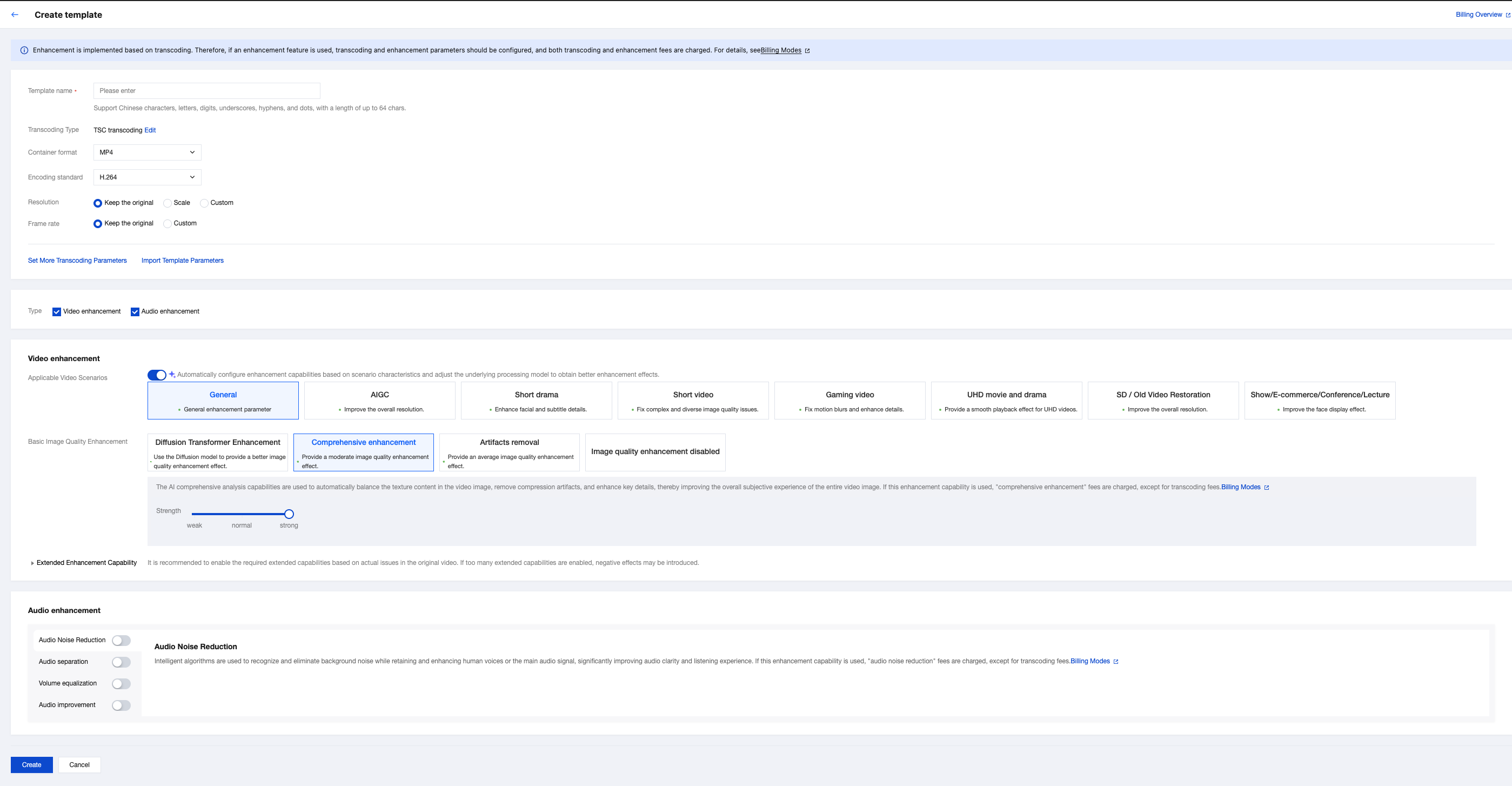
2. Upon entering the Audio/Video Enhancement Template Creation page, the following parameters can be configured. For detailed parameter instructions, see Configuration Description section below.
Transcode Related Parameters Configuration
The MPS enhanced feature is based on transcoding, meaning enhanced processing overlays enhancement parameters on the basis of the transcoding process. Therefore, when using the enhanced feature, you can configure transcoding parameters and enhancement parameters concurrently.
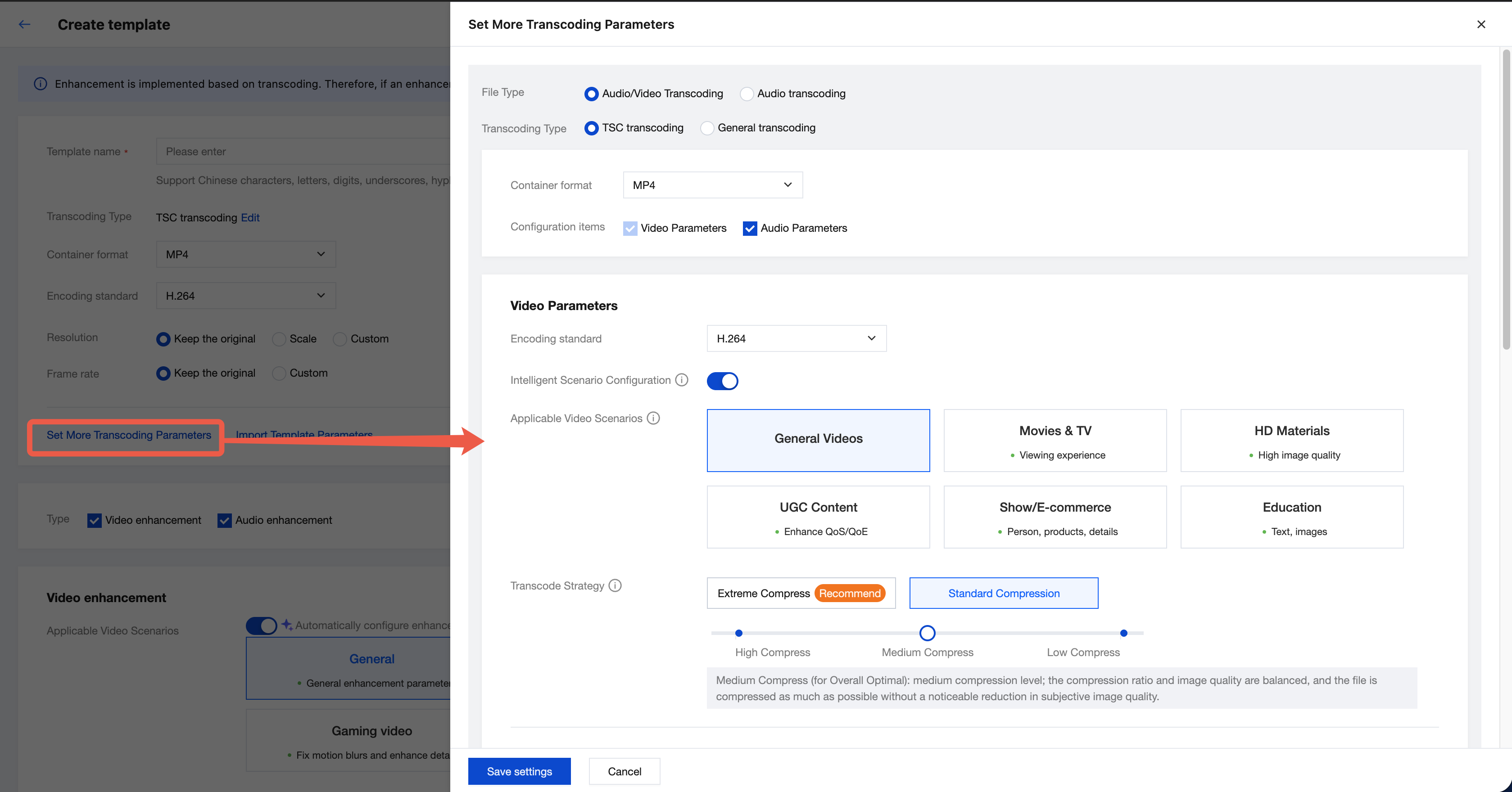
Common transcoding parameters include transcoding type, output muxing format, encoding standard, resolution, frame rate and bitrate.
Click More Transcoding Parameter Settings to configure complete transcoding parameters in the pop-up interface on the right. For detailed transcoding parameter explanations, refer to Audio/Video Transcoding Template.
Note:
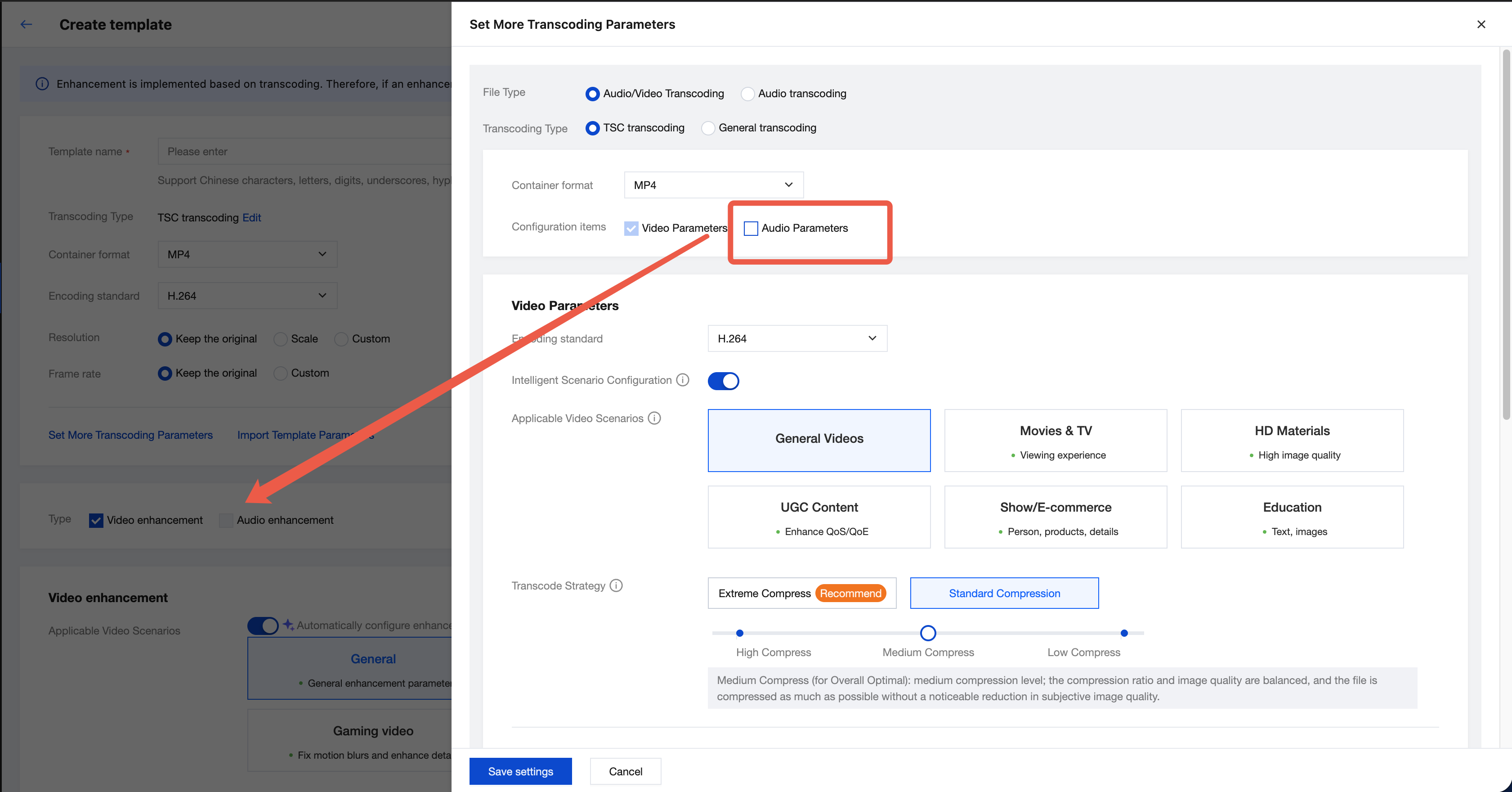
When selecting the "audio and video transcoding" data type, video enhancement and audio enhancement features can be enabled.
If you cancel "audio parameters" (output video only) in the transcoding configuration or disable "audio transcoding" (use original audio) in the audio parameters, you can only enable the video enhancement feature and cannot enable audio enhancement.
When selecting the "audio-only transcoding" data type (output audio file), only the audio enhancement feature can be enabled.
Video Enhancement Parameters Configuration
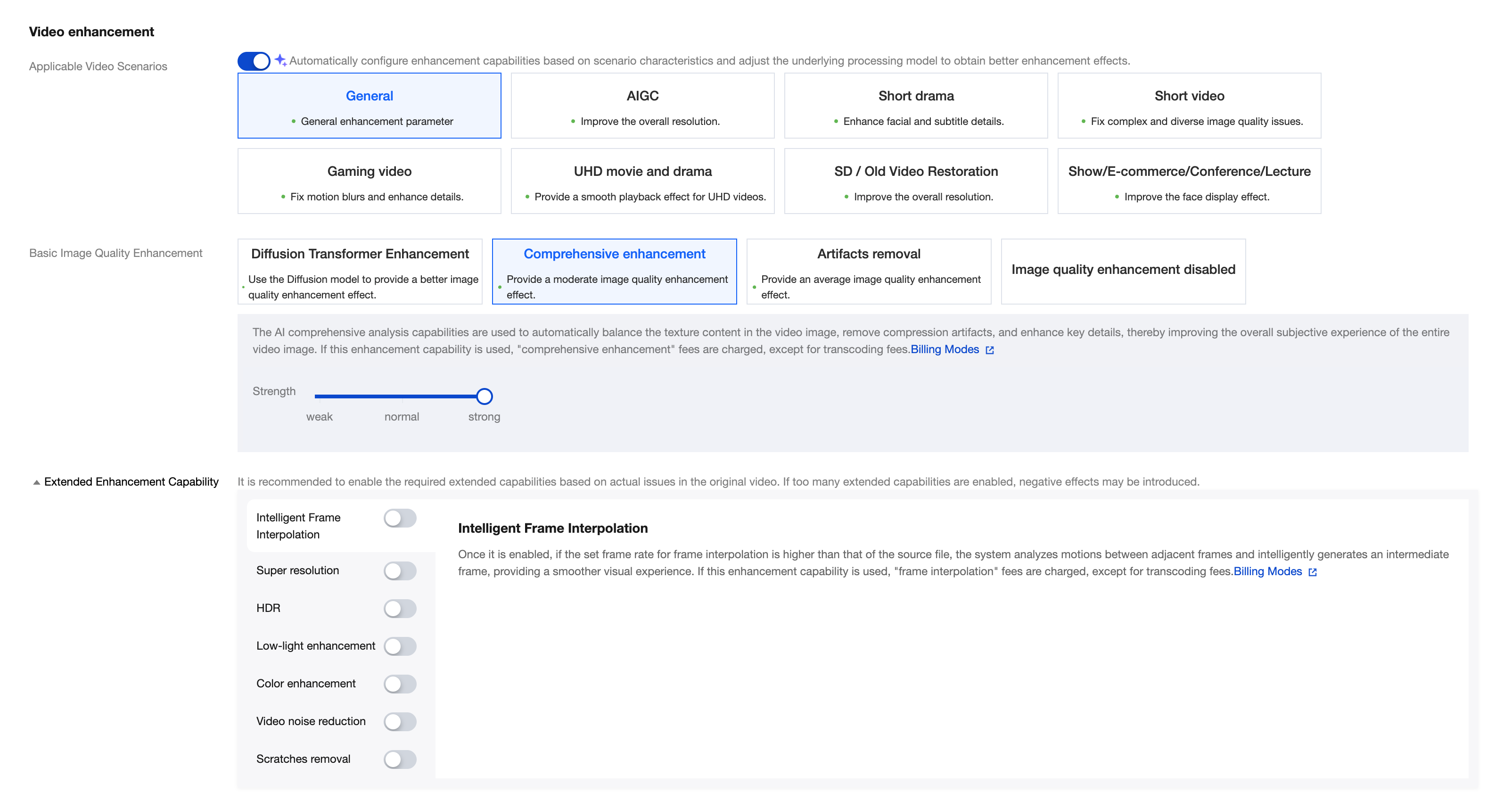
Configuration Item | Description | Billing Overview | |
Applicable Video Scenarios | | We have preset recommended parameters for scenarios such as AIGC, mini-drama, short video, gaming video, and HD TV shows and movies. Click different scenarios, and MPS will automatically configure enhanced capabilities for you, adjust the underlying processing model, to obtain better enhancement effects. You can also fine-tune on the basis of recommended parameters. | - |
Basic Image Quality Enhancement | Large model enhancement | Based on the Diffusion large model, it leverages its powerful AI generation capability to significantly improve video image quality restoration, far surpassing standard methods, especially suitable for old video repair. | When using this enhanced capability, in addition to the transcoding fee, you will also be charged for "comprehensive enhancement" + "super resolution" + "video noise reduction". |
Comprehensive enhancement | Using AI's comprehensive analysis capabilities, it automatically balances texture content in the screen, removes compression artifacts and burrs while enhancing key details, thereby improving the overall subjective perception of the entire screen. | When using this enhanced capability, in addition to the transcoding fee, you will also be charged for "comprehensive enhancement". | |
Deburring enhancement | The deburring technology intelligently removes artifacts by analyzing encoding information, repairing jagged edges, blurriness, or unnatural colors in the image, restoring clarity and naturalness, thereby improving the overall video quality. | When using this enhanced capability, in addition to the transcoding fee, you will also be charged for "deburring". | |
Note: The above three capabilities belong to the most commonly used basic image quality enhancement features. The order of image quality improvement effect is: large model enhancement > comprehensive enhancement > deburring enhancement. You can choose one or disable them. | | | |
Enhanced Capability Expansion | Intelligent frame interpolation | When enabled, if the set frame interpolation frame rate is higher than the source file frame rate, it will intelligently generate intermediate frames by analyzing motion between adjacent frames, providing users with a smoother visual experience. The frame interpolation frame rate is limited to [1, 120]. | When using this enhanced capability, in addition to the transcoding fee, you will also be charged for "frame interpolation". |
Super-Resolution | Super-Resolution can recognize video content and contour, reconstruct details and local features of high-definition video, and convert low-resolution video to high-resolution video, suitable for classic film restoration scenarios. Support selecting: low resolution model, high definition model (default). Low-resolution model: The low-resolution model focuses on processing low-resolution video frames, with the main goal of restoring details and information from these frames. This faster model is suitable for quick video processing. High-definition model (default): The high-definition model aims to generate higher-quality high-resolution video frames by learning the mapping from low resolution to high resolution. This more complex model requires more computing resources but can usually generate clearer and more realistic video frames. | When using this enhanced capability, in addition to the transcoding fee, you will also be charged for "super-resolution". | |
HDR | Supports HDR10 and HLG, enabling a wider color gamut and displaying more color details to provide higher quality video content. HDR10: A static HDR standard that provides a wider range of colors and brightness. HLG (Hybrid Log-Gamma): Combines the advantages of SDR and HDR, allowing the same video stream to contain both SDR and HDR information, suitable for broadcasting and streaming applications. Note: HDR requires the encoding standard to be H.264/H.265. | When using this enhanced capability, in addition to the transcoding fee, you will also be charged for "SDR to HDR". | |
low-light enhancement | Due to environmental conditions and hardware limits of the shooting camera, some scenarios may result in frames with low brightness and lack of contrast, causing dark areas or missing details. Enabling low-light enhancement can significantly enhance details and contrast in dark areas, improving subjective human eye quality. | When using this enhanced capability, in addition to the transcoding fee, you will also be charged for "low-light enhancement". | |
color enhancement | It aims to improve the color performance of videos, making the image closer to real colors while moderately enhancing it to meet the preferences of human eyes. By adjusting color saturation, contrast, and brightness, it fixes color distortion caused by capture devices or storage issues, thereby improving the overall visual effect of the video. | When using this enhanced capability, in addition to the transcoding fee, you will also be charged for "color enhancement". | |
video noise reduction | Film shooting may introduce random noise due to camera and environment. The video noise reduction service can eliminate random noise in the image without losing details. | When using this enhanced capability, in addition to the transcoding fee, you will also be charged for "noise reduction". | |
scratch removal | Scratch removal can repair damaged content such as scratches in the video and snowflakes. | When using this enhanced capability, in addition to the transcoding fee, you will also be charged for "scratch removal". | |
Note: According to the practical problem of the original video, enable the required enhanced feature. Do not enable all functions or overlay video with unnecessary capacity to avoid having an adverse impact. | | | |
Audio Enhancement Parameters Configuration

Configuration Item | Description | Billing Overview |
Audio Noise Reduction | Smart algorithms identify and eliminate background noise while retaining and enhancing voice or main signals, significantly improving audio clarity and auditory experience. | When using this enhanced capability, in addition to the transcoding fee, you will also be charged for "audio noise reduction". |
Audio Separation | Separate the human voice from background sound in audio and video files, or vocal and accompaniment sounds, making it easy to implement other subsequent processing. | When using this enhanced capability, in addition to the transcoding fee, you will also be charged for "audio separation". |
Volume Equalization | Intelligent Identification adjusts the volume to avoid issues of being too loud, too quiet, or abrupt changes, providing a better auditory experience. | When using this enhanced capability, in addition to the transcoding fee, you will also be charged for "volume equalization". |
Audio Beautification | Intelligent audio beautification removes noise, suppresses unnatural sibilant sounds, and improves audio quality. | When using this enhanced capability, in addition to the transcoding fee, you will also be charged for "audio beautification". |
Creating an Enhancement Template Via API
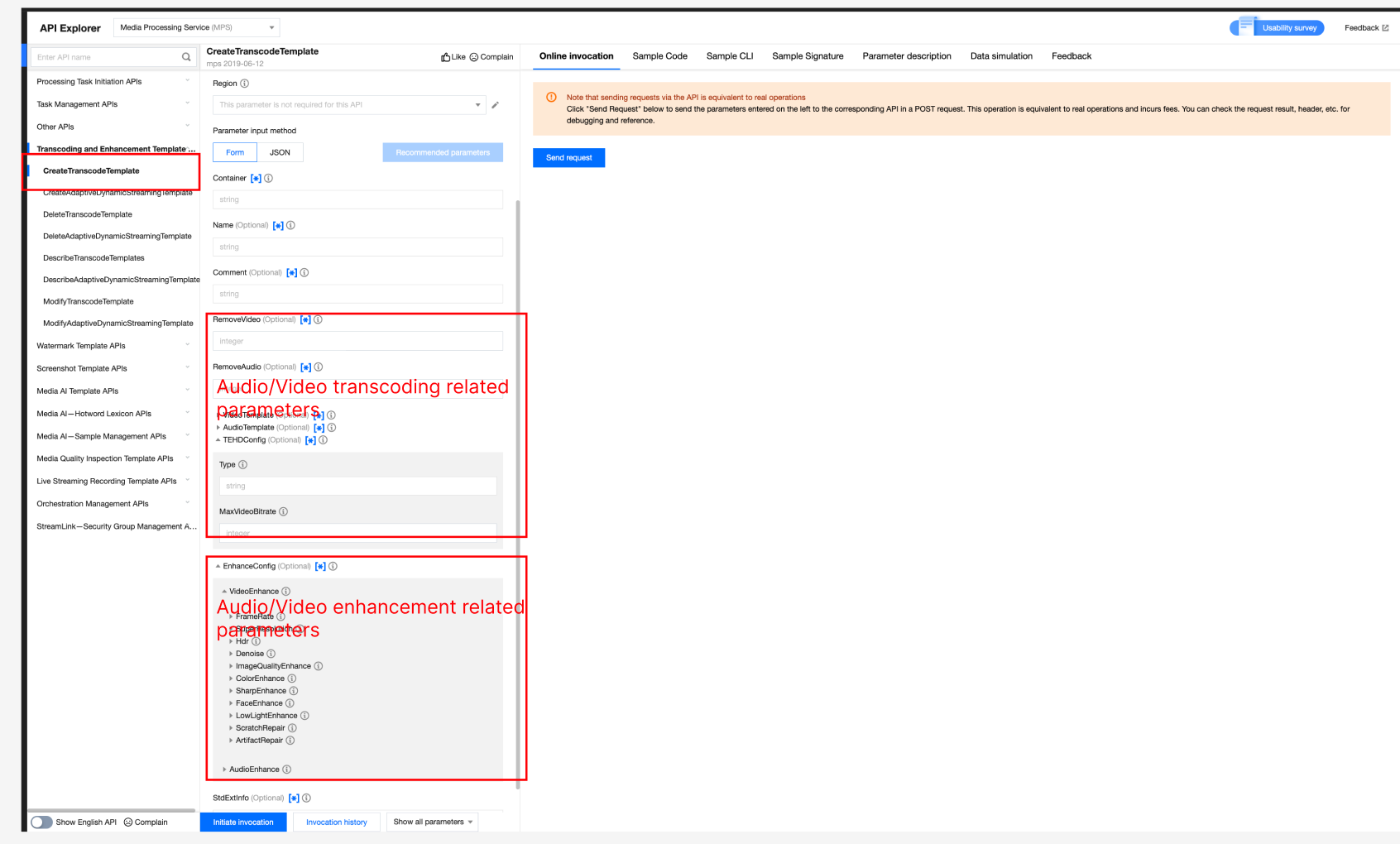
The MPS enhanced feature is based on transcoding, meaning enhanced processing overlays enhancement parameters on the basis of the transcoding process. You can use the MPS create transcoding template API to create transcoding and enhanced custom templates, for example:
{"Container": "mp4","Name": "test","VideoTemplate": { //Video transcoding parameter configuration."Codec": "h264","Fps": 50,"Bitrate": 5000,"Width": 0,"Height": 0,"Gop": 0},"AudioTemplate": { //Audio transcoding parameter configuration."Codec": "aac","Bitrate": 60},"EnhanceConfig": { //Enhancement parameter configuration."VideoEnhance": { //Video enhancement configuration."FrameRate": { //Frame interpolation."Switch": "ON","Fps": 50},"SuperResolution": { //Super resolution."Switch": "ON","Type": "lq"}},"AudioEnhance": { //Audio enhancement configuration."Denoise": { //Audio denoising."Switch": "ON"}}}}
Note:
API Explorer supports quick verification. Enter the page and fill in relevant parameters, and then you can initiate an online API call.
Was this page helpful?
You can also Contact Sales or Submit a Ticket for help.
Yes
No
Feedback