
Spring Cloud Stream 使用

最后更新时间:2025-07-15 18:32:07
操作场景
本文以调用 Spring Cloud Stream 接入为例介绍实现消息收发的操作过程,帮助您更好地理解消息收发的完整过程。
前提条件
操作步骤
步骤1:引入依赖
在 pom.xml 中引入 spring-cloud-starter-stream-rocketmq 相关依赖。当前建议版本 2021.0.4.0。
<dependency><groupId>com.alibaba.cloud</groupId><artifactId>spring-cloud-starter-stream-rocketmq</artifactId><version>2021.0.4.0</version></dependency>
步骤2:添加配置
在配置文件中增加 RocketMQ 相关配置。
spring:cloud:stream:rocketmq:binder:# 服务地址全称name-server: rmq-xxx.rocketmq.ap-bj.public.tencenttdmq.com:8080# 角色名称secret-key: admin# 角色密钥access-key: eyJrZXlJZ...# producer groupgroup: producerGroupbindings:# channel名称, 与spring.cloud.stream.bindings下的channel名称对应Topic-TAG1-Input:consumer:# 订阅的tag类型,根据消费者实际情况进行配置(默认是订阅所有消息)subscription: TAG1# channel名称Topic-TAG2-Input:consumer:subscription: TAG2bindings:# channel名称Topic-send-Output:# 指定topic, 对应创建的topic名称destination: TopicTestcontent-type: application/json# channel名称Topic-TAG1-Input:destination: TopicTestcontent-type: application/jsongroup: consumer-group1# channel名称Topic-TAG2-Input:destination: TopicTestcontent-type: application/jsongroup: consumer-group2
注意:
1. 目前只有
2.2.5-RocketMQ-RC1与 2.2.5.RocketMQ.RC2 及以上版本支持 namespace 配置,如使用别的版本需要对 topic 和 group 名称进行拼接。格式如下:
rocketmq-pngrpmk94d5o|stream%topic (格式为:namespace全称%topic名称)
rocketmq-pngrpmk94d5o|stream%group (格式为:namespace全称%group名称)
新的虚拟集群与专享集群格式如下:
MQ_INST_rocketmqpj79obd2ew7v_test%topic (格式为:namespace全称%topic名称)
MQ_INST_rocketmqpj79obd2ew7v_test%group (格式为:namespace全称%group名称)
2. 配置方面
2.2.5-RocketMQ-RC1与 2.2.5.RocketMQ.RC2 的订阅配置项为 subscription , 其他低版本订阅配置项为 tags。其他版本完整配置项参考如下:
spring:cloud:stream:rocketmq:bindings:# channel名称, 与spring.cloud.stream.bindings下的channel名称对应Topic-test1:consumer:# 订阅的tag类型,根据消费者实际情况进行配置(默认是订阅所有消息)tags: TAG1# channel名称Topic-test2:consumer:tags: TAG2binder:# 服务地址全称name-server: rocketmq-xxx.rocketmq.ap-bj.public.tencenttdmq.com:8080# 角色名称secret-key: admin# 角色密钥access-key: eyJrZXlJZ...bindings:# channel名称Topic-send:# 指定topic,destination: topic1content-type: application/json# 要使用group全称group: group1# channel名称Topic-test1:destination: topic1content-type: application/jsongroup: group1# channel名称Topic-test2:destination: topic1content-type: application/jsongroup: group2
参数 | 说明 |
name-server | 集群接入地址,在控制台集群管理页面的集群列表操作栏的接入地址处获取。新版共享集群与专享集群命名接入点地址在命名空间列表获取。 |
secret-key | 角色名称,在控制台的角色管理页面 SecretKey 列复制。 |
access-key | 角色密钥,在控制台的角色管理页面 AccessKey 列复制。 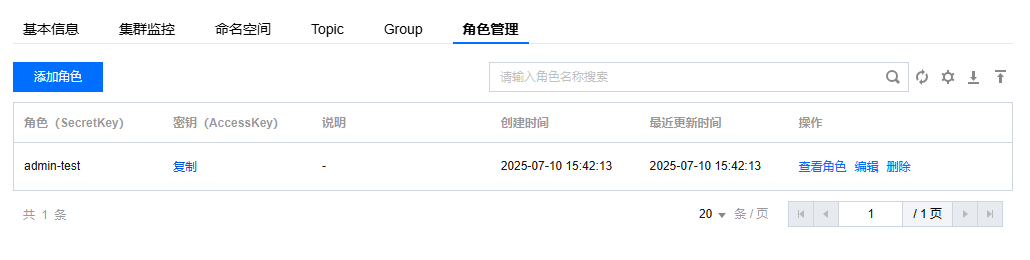 |
namespace | 命名空间的名称,在控制台命名空间页面复制。如果您使用的是4.x通用集群或者5.x集群,此处可填写集群的 ID。 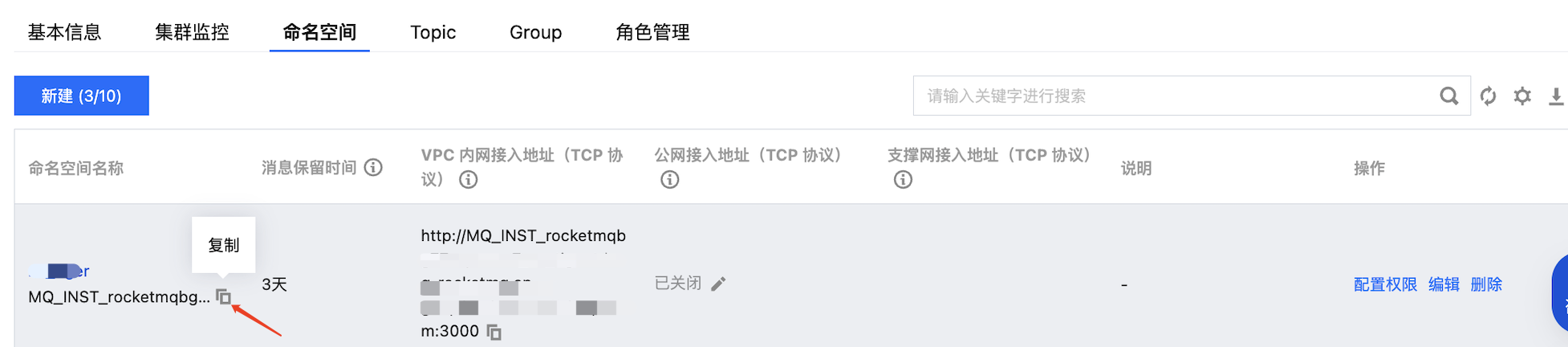 |
group | 生产者组名称,在控制台 Group 管理页面复制。  |
destination | Topic 的名称,在控制台 Topic 管理页面复制。  |
步骤3:配置 channel
channel 分为输入和输出,可根据自己的业务进行单独配置。
/*** 自定义通道 Binder*/public interface CustomChannelBinder {/*** 发送消息(消息生产者)* 绑定配置中的channel名称*/@Output("Topic-send-Output")MessageChannel sendChannel();/*** 接收消息1(消费者1)* 绑定配置中的channel名称*/@Input("Topic-TAG1-Input")MessageChannel testInputChannel1();/*** 接收消息2(消费者2)* 绑定配置中的channel名称*/@Input("Topic-TAG2-Input")MessageChannel testInputChannel2();}
步骤4:添加注解
在配置类或启动类上添加相应注解,如果有多个 binder 配置,都要在此注解中进行指定。
@EnableBinding({CustomChannelBinder.class})
步骤5:发送消息
1. 在要发送消息的类中,注入
CustomChannelBinder。@Autowiredprivate CustomChannelBinder channelBinder;
2. 发送消息,调用对应的输出流 channel 进行消息发送。
Message<String> message = MessageBuilder.withPayload("This is a new message.").build();channelBinder.sendChannel().send(message);
步骤6:消费消息
@Servicepublic class StreamConsumer {private final Logger logger = LoggerFactory.getLogger(StreamDemoApplication.class);/*** 监听channel (配置中的channel 名称)** @param messageBody 消息内容*/@StreamListener("Topic-TAG1-Input")public void receive(String messageBody) {logger.info("Receive1: 通过stream收到消息,messageBody = {}", messageBody);}/*** 监听channel (配置中的channel 名称)** @param messageBody 消息内容*/@StreamListener("Topic-TAG2-Input")public void receive2(String messageBody) {logger.info("Receive2: 通过stream收到消息,messageBody = {}", messageBody);}}
步骤7:本地测试
本地启动项目之后,可以从控制台看到启动成功。
浏览器访问
http://localhost:8080/test-simple可以看到发送成功。观察开发 IDE 的输出日志。2023-02-23 19:19:00.441 INFO 21958 --- [nio-8080-exec-1] c.t.d.s.controller.StreamController : Send: 通过stream发送消息,messageBody = GenericMessage [payload={"key":"value"}, headers={id=3f28bc70-da07-b966-a922-14a17642c9c4, timestamp=1677151140353}]2023-02-23 19:19:01.138 INFO 21958 --- [nsumer-group1_1] c.t.d.s.StreamDemoApplication : Receive1: 通过stream收到消息,messageBody = {"headers":{"id":"3f28bc70-da07-b966-a922-14a17642c9c4","timestamp":1677151140353},"payload":{"key":"value"}}
可以看到。发送了一条 TAG1 的消息,同时也只有 TAG1 的订阅者收到了消息。
说明:
文档反馈