You can export a list of GWLB instances of a certain region from the console and customize the fields to export for analyzing the resource configuration and usage of instances.
Directions
1. Log in to the GWLB console and select a region in the upper left corner of the Instance Management page.
2. Select the target instance in the instance list and click the
icon in the upper right corner.
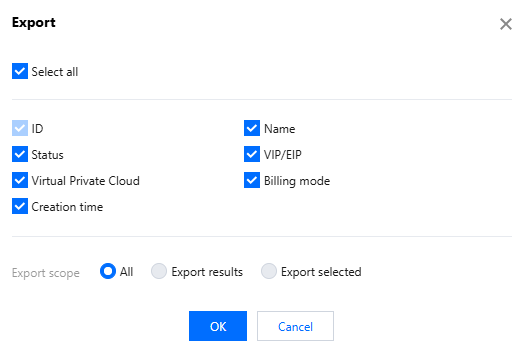
3. In the pop-up Export dialog box, select the fields and range for export and click Confirm to download the instance list locally.
Parameters
Description
Exported field
The fields that can be exported include ID, name, status, VIP/EIP, VPC, billing mode, and creation time.
Exported range
The exported range includes the following options:
All instances
Only search results
Only selected instances
The option "Only selected instances" will be grayed out and unavailable if no instance is selected.