Batch Domain Adding
Download
Focus Mode
Font Size
Overview
The bulk domain adding feature provided by DNSPod enables you to add multiple domains at a time.
Prerequisites
1. Log in to the DNSPod Console.
2. On the left sidebar, select Batch Operation to enter the Batch Operation page.
Directions
Adding domains
1. On the Add Domain page, select Enter domain names as shown below:
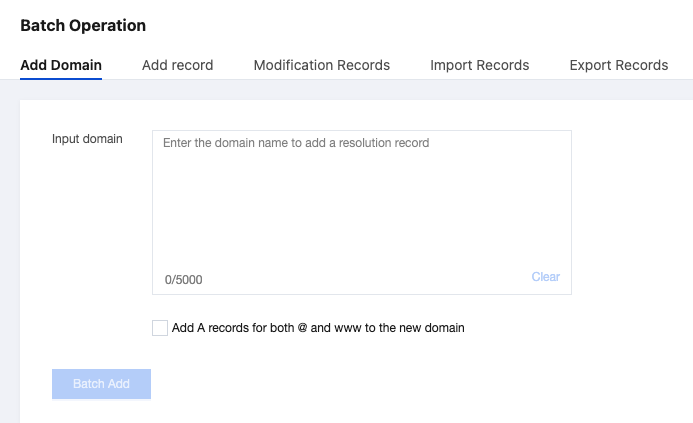
2. Enter or paste up to 500 domains that you want to register in the text box.
Note:
If you enter more than 500 domains, you will be unable to proceed.
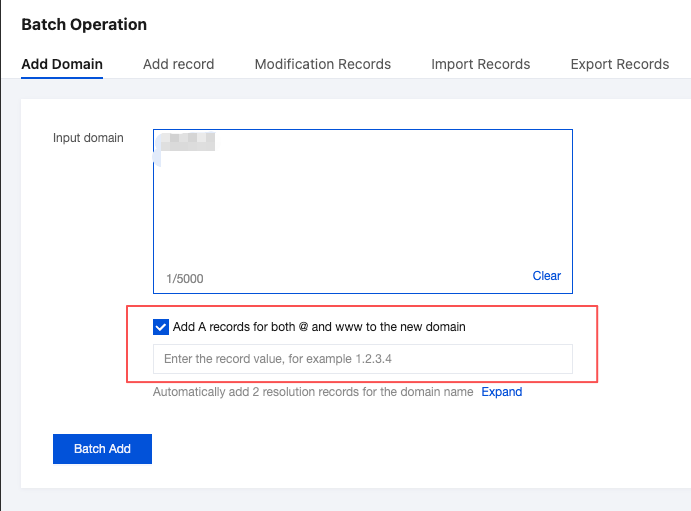
3. You can select Add A records of @ and www for the new domain names at the same time. and enter values in the input box as shown below:
4. Click Batch Add.
Viewing operation logs
On the Batch Operation page, select the Operation Log tab to view the operation result as shown below:

Help and Support
Was this page helpful?
You can also Contact sales or Submit a Ticket for help.
Help us improve! Rate your documentation experience in 5 mins.
Feedback