LNMP 환경 수동 구축 (CentOS 7)
마지막 업데이트 시간:2024-02-02 10:56:28
LNMP 환경 수동 구축 (CentOS 7)
마지막 업데이트 시간: 2024-02-02 10:56:28
작업 시나리오
LNMP 환경이란 Linux 시스템에서 Nginx + MySQL/MariaDB + PHP로 구성된 웹 사이트 서버 아키텍처입니다. 본문은 Tencent Cloud Cloud Virtual Machine(CVM)에서 LNMP 환경을 수동 구축하는 방법을 소개합니다.
LNMP 환경을 수동으로 구축하는 경우, CentOS 환경에서 YUM을 통해 소프트웨어 설치와 같은 상용 명령어인 Linux 명령어를 숙지해야 하며 설치된 소프트웨어의 사용 및 버전 호환성에 대한 이해가 필요합니다.
주의사항:
Tencent Cloud는 클라우드 마켓의 미러링 이미지 환경을 통해 LNMP 환경을 구축할 것을 권장합니다. LNMP 환경 수동 구축은 시간이 오래 걸릴 수 있습니다.
소프트웨어
LNMP 환경 구축 소프트웨어 버전 및 설명은 다음과 같습니다.
Linux: Linux 운영 체제의 경우, 본 문서는 CentOS 7.6을 예시로 사용합니다.
Nginx: Web 서버로, 본 문서는 Nginx 1.17.7을 예시로 사용합니다.
MariaDB: 데이터베이스의 경우, 본 문서는 MariaDB 10.4.8을 예시로 사용합니다.
PHP: 스크립트 언어의 경우, 본 문서는 PHP 7.2.22를 예시로 사용합니다.
전제 조건
구매한 Linux CVM이 있어야 합니다.
작업 단계
1단계: Linux 인스턴스 로그인
Linux 인스턴스에 로그인합니다. 실제 작업 스타일에 따라 다른 로그인 방식을 선택할 수도 있습니다.
2단계: Nginx 설치
1. 다음 명령어를 실행하여
/etc/yum.repos.d/에서 nginx.repo 파일을 생성합니다.vi /etc/yum.repos.d/nginx.repo
2. i를 눌러 편집 모드로 전환하고 다음 내용을 입력합니다.
[nginx]name = nginx repobaseurl = https://nginx.org/packages/mainline/centos/7/$basearch/gpgcheck = 0enabled = 1
3. Esc를 누르고 :wq를 입력하여 파일을 저장하고 뒤로 돌아갑니다.
4. 다음 명령어를 실행하여 nginx를 설치합니다.
yum install -y nginx
5. 다음 명령어를 실행하여
default.conf 파일을 엽니다.vim /etc/nginx/conf.d/default.conf
6. i를 클릭해 편집 모드로 전환한 후
default.conf 파일을 편집합니다.7.
server{...}를 찾고 server 대괄호 안의 상응하는 구성 정보를 아래의 내용으로 대체합니다. IPv6 주소에 대한 리슨을 취소함과 동시에 Nginx를 구성하고 PHP와 연동합니다.server {listen 80;root /usr/share/nginx/html;server_name localhost;#charset koi8-r;#access_log /var/log/nginx/log/host.access.log main;#location / {index index.php index.html index.htm;}#error_page 404 /404.html;#redirect server error pages to the static page /50x.html#error_page 500 502 503 504 /50x.html;location = /50x.html {root /usr/share/nginx/html;}#pass the PHP scripts to FastCGI server listening on 127.0.0.1:9000#location ~ .php$ {fastcgi_pass 127.0.0.1:9000;fastcgi_index index.php;fastcgi_param SCRIPT_FILENAME $document_root$fastcgi_script_name;include fastcgi_params;}}
8. Esc를 누르고 :wq를 입력하여 파일을 저장하고 뒤로 돌아갑니다.
9. 다음 명령어를 실행하여 Nginx를 실행합니다.
systemctl start nginx
10. 다음 명령어를 실행하여 시작 시 Nginx 자동 실행으로 설정합니다.
systemctl enable nginx
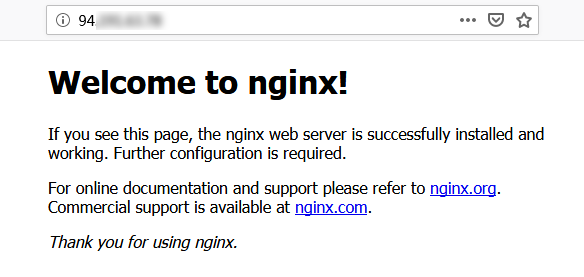
11. 로컬 브라우저에서 아래 주소에 액세스하고 Nginx 서비스가 정상적으로 실행되고 있는지 조회합니다.
http://CVM 인스턴스의 공용 IP
결과가 아래와 같으면 Nginx의 설치 구성이 완료된 것입니다.
3단계: 데이터베이스 설치
1. 다음 명령어를 실행하여 시스템에 MariaDB가 설치되었는지 조회합니다.
rpm -qa | grep -i mariadb
반환 결과가 아래 내용과 같으면 MariaDB가 이미 존재한다는 의미입니다.

yum -y remove 패키지 이름
반환 결과가 없다면 사전에 설치된 내용이 없다는 뜻이므로 다음 단계를 실행합니다.
2. 다음 명령어를 실행하여
/etc/yum.repos.d/에서 MariaDB.repo 파일을 생성합니다.vi /etc/yum.repos.d/MariaDB.repo
3. i를 눌러 편집 모드로 전환한 후, 아래 내용을 입력하고 MariaDB를 추가합니다.
설명:
다음 설정에는 Tencent Cloud 미러 이미지 소스가 사용되었습니다. Tencent Cloud 미러 이미지 소스는 MariaDB 공식 웹사이트 소스와 동시 업데이트 되었습니다. MariaDB 10.4 버전 소스가 유효하지 않은 문제가 있을 수 있습니다(본문은 CentOS 7.6에 MariaDB 10.4.22 버전 설치를 예시로 설명). MariaDB 공식 웹사이트에서 다른 버전 및 운영 체제의 MariaDB 설치 정보를 얻을 수 있습니다.
CVM이 내부 네트워크 서비스를 사용하는 경우,
mirrors.cloud.tencent.com을 mirrors.tencentyun.com 내부 네트워크 주소로 바꿀 수 있습니다. 내부 네트워크 트래픽은 공용 네트워크 트래픽을 차지하지 않으며, 속도도 더 빠릅니다.# MariaDB 10.4 CentOS repository list - created 2019-11-05 11:56 UTC# http://downloads.mariadb.org/mariadb/repositories/[mariadb]name = MariaDBbaseurl = https://mirrors.cloud.tencent.com/mariadb/yum/10.4/centos7-amd64gpgkey=https://mirrors.cloud.tencent.com/mariadb/yum/RPM-GPG-KEY-MariaDBgpgcheck=1
4. Esc를 누르고 :wq를 입력하여 파일을 저장하고 뒤로 돌아갑니다.
5. 다음 명령어를 실행하여 MariaDB를 설치합니다. 이 단계는 시간이 많이 소요되므로 설치 진행 상황을 확인하시고 설치가 완료될 때까지 기다려 주십시오.
yum -y install MariaDB-client MariaDB-server
6. 다음 명령어를 실행하여 MariaDB 서비스를 실행합니다.
systemctl start mariadb
7. 다음 명령어를 실행하여 시작 시 MariaDB 자동 실행으로 설정합니다.
systemctl enable mariadb
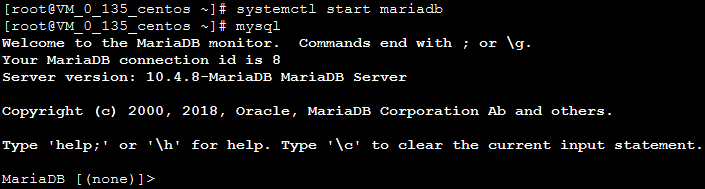
8. 다음 명령어를 실행하여 MariaDB가 성공적으로 설치되었는지 확인합니다.
mysql
아래와 같은 결과가 표시되면 성공적으로 설치되었음을 의미합니다.
9. 아래의 명령어를 실행하여 MariaDB를 종료합니다.
\\q
4단계: PHP 구성 설치
1. 다음 명령어를 차례대로 실행하여 yum 내 PHP의 소프트웨어 보관소를 업데이트합니다.
rpm -Uvh https://mirrors.cloud.tencent.com/epel/epel-release-latest-7.noarch.rpm
rpm -Uvh https://mirror.webtatic.com/yum/el7/webtatic-release.rpm
2. 다음 명령어를 실행하여 PHP 7.2에 필요한 패키지를 설치합니다.
yum -y install mod_php72w.x86_64 php72w-cli.x86_64 php72w-common.x86_64 php72w-mysqlnd php72w-fpm.x86_64
3. 다음 명령어를 실행하여 PHP-FPM 서비스를 실행합니다.
systemctl start php-fpm
4. 다음 명령어를 실행하여 시작 시 PHP-FPM 서비스 자동 실행으로 설정합니다.
systemctl enable php-fpm
환경 구성 검증
환경 구성을 완료한 후 다음 검증을 통해 LNMP 환경이 성공적으로 구축되었는지 확인합니다.
1. 다음 명령어를 실행하여 테스트 파일을 생성합니다.
echo "<?php phpinfo(); ?>" >> /usr/share/nginx/html/index.php
2. 다음 커맨드를 실행하여 Nginx 서비스를 재시작합니다.
systemctl restart nginx
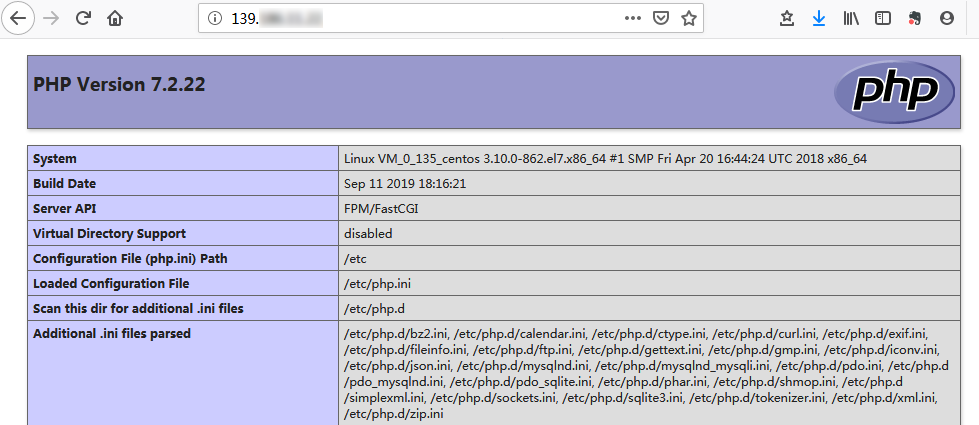
3. 로컬 브라우저에서 아래 주소에 액세스하고 성공적으로 환경이 구성되었는지 조회합니다.
http://CVM 인스턴스의 공용 IP
아래와 같은 결과가 표시되면 성공적으로 환경이 구성되었음을 의미합니다.
관련 작업
FAQ
CVM 사용 도중 문제가 생겼을 경우, 아래의 문서를 참고하여 실제 상황에 따라 문제를 분석 및 해결할 수 있습니다.
CVM 로그인 문제는 키 관련 문제, 로그인 및 원격 연결을 참고하십시오.
CVM 디스크 문제는 시스템 디스크와 데이터 디스크를 참고하십시오.
피드백