What Is a Hint
Typically, the optimizer selects the optimal execution plan for a user's SQL query. However, in certain scenarios - such as estimation errors in statistics or fitting bias in the cost model - the execution plan generated by the optimizer may not be the most optimal. At this time, users can guide the optimizer to generate a better execution plan through the hint mechanism.
Hints are case-insensitive and follow the SELECT keyword as comments in the form of /*+...*/. Multiple hints are separated by spaces or commas. Here is an example of using a hint.
SELECT /*+ [hint_text] [hin_text]... */ * FROM ....
Effective Scope of Hints
Hints take effect on a per query block basis. In a query statement, each query block has a QB_NAME (Query Block Name). The read-only analysis engine generates a QB_NAME for each query block from left to right in the format of @sel_1, @sel_2, and so on. Take the following SQL statement as an example.
SELECT * FROM (SELECT * FROM t) t1, (SELECT * FROM t) t2;
This SQL statement contains three query blocks. The name of the query block where the outermost SELECT query is located is sel_1, and the names of the two SELECT sub-queries are sel_2 and sel_3, with the numbers increasing in sequence. QB_NAME can be used in the hint to control the scope and target of the hint. If QB_NAME is not explicitly specified in the hint, the scope of the hint is the query block where the current hint is located. The following is an example.
SELECT /*+ HASH_JOIN_PROBE(@sel_2 t1) */ * FROM (SELECT t1.a, t1.b FROM t t1, t t2 WHERE t1.a = t2.a) t1, t t3 WHERE t1.b = t3.b;
SELECT /*+ HASH_JOIN_PROBE(t1@sel_2) */ * FROM (SELECT t1.a, t1.b FROM t t1, t t2 WHERE t1.a = t2.a) t1, t t3 WHERE t1.b = t3.b;
The above two SQL statements use two different methods to specify QB_NAME in the hint. The first SQL statement specifies QB_NAME in the first parameter of the hint and separates it from other parameters with a space. The second SQL specifies the effective scope of the hint by adding QB_NAME after the parameter.
Overview of Supported Hints
The parameter name, semantics and syntax related to the hint of the read-only analysis engine are shown in the following table.
|
SHUFFLE_JOIN | SHUFFLE_JOIN([QB_NAME] tbl1_name,tbl2_name …) | Specifies that the JOIN operation uses the shuffle method to distribute data. |
BROADCAST_JOIN | BROADCAST_JOIN([QB_NAME] tbl1_name,tbl2_name …) | Specifies that the JOIN operation uses the broadcast method to distribute data. |
HASH_JOIN_BUILD | HASH_JOIN_BUILD([QB_NAME] tbl1_name,tbl2_name …) | Specifies the Build table in the HASH JOIN operation. |
HASH_JOIN_PROBE | HASH_JOIN_PROBE([QB_NAME] tbl1_name,tbl2_name …) | Specifies the Probe table in the HASH JOIN operation. |
LEADING | LEADING([QB_NAME] tbl1_name,tbl2_name …) | Specifies the join order for the JOIN operation. |
SET_VAR | SET_VAR(setting_name = value) | Sets system parameters at the SQL level. |
NO_PX_JOIN_FILTER_ID/PX_JOIN_FILTER_ID | NO_PX_JOIN_FILTER_ID(rf_id1,rf_id2…)/ PX_JOIN_FILTER_ID(rf_id1,rf_id2…) | Controls the enabling/disabling of the runtime filter. |
Detailed Explanation of the Read-Only Analysis Engine Hint Syntax
SHUFFLE_JOIN(t1_name, t2_name ...)
Usage instructions
SHUFFLE_JOIN(t1_name, t2_name...) is used to instruct the read-only analysis engine optimizer to use the shuffle join algorithm, during JOIN operations, to scatter and redistribute the data from the left and right tables before performing JOIN operations to return results.
Reference examples
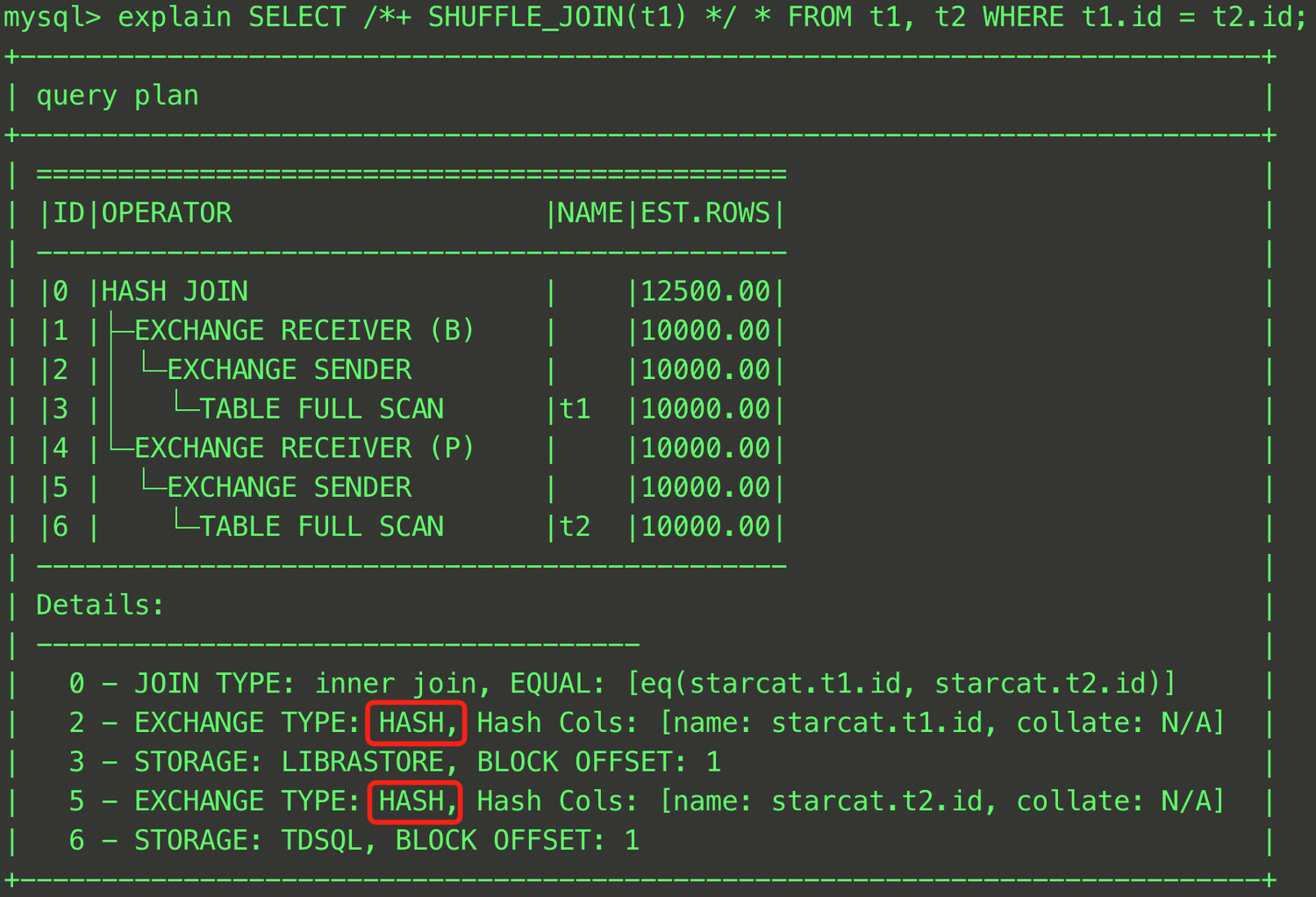
EXPLAIN SELECT /*+ SHUFFLE_JOIN(t1) */ * FROM t1, t2 WHERE t1.id = t2.id;
In this SQL statement, the t1 and t2 tables perform a JOIN operation, and the join data distribution method is specified as the shuffle join through the SHUFFLE_JOIN hint. The final plan is shown in the figure below. It can be seen that the EXCHANGE TYPE in Rows 2 and 5 of Details has become HASH, indicating that the hash shuffle is used.
Besides a single table, you can also specify the intermediate result in a JOIN operation for data redistribution.
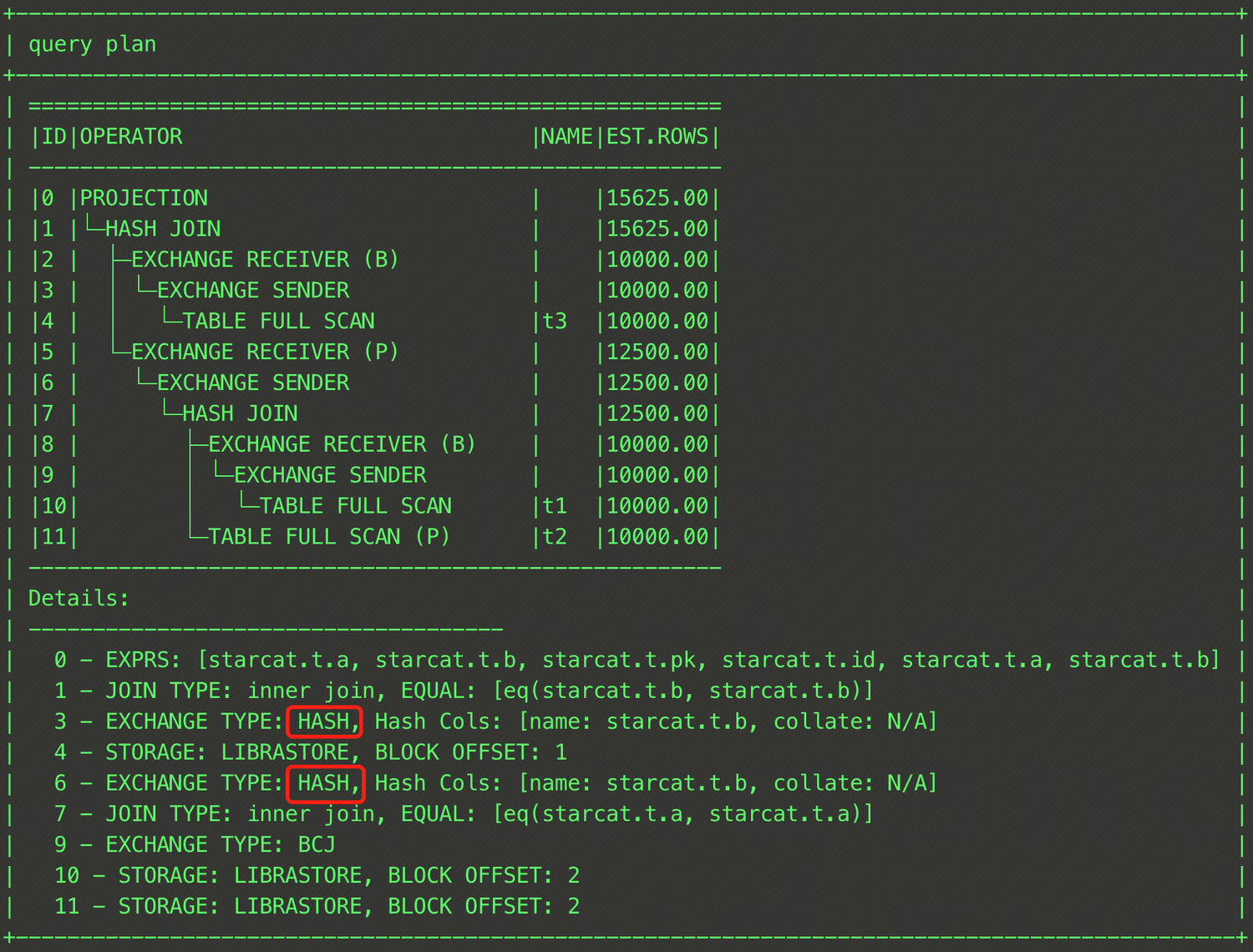
EXPLAIN SELECT /*+ SHUFFLE_JOIN((t1@sel_2,t2@sel_2)) */ * FROM (SELECT t1.a, t1.b FROM t t1, t t2 WHERE t1.a = t2.a) t1, t t3 WHERE t1.b = t3.b;
As shown above, you can specify that the shuffle join is used to join the intermediate result of the JOIN operation between tables t1 and t3 with table t2 by enclosing tables t1 and t3 in parentheses and specifying the QB_NAME of each table.
Note:
This hint is effective only when a distributed plan is generated and is not effective for a standalone plan.
BROADCAST_JOIN(t1_name [, tl_name ...])
Usage instructions
BROADCAST_JOIN(t1_name,t2_name...) is used to instruct the read-only analysis engine optimizer to use the broadcast join algorithm, during JOIN operations, to broadcast the specified table data to all nodes, perform JOIN operations, and return results.
Reference examples
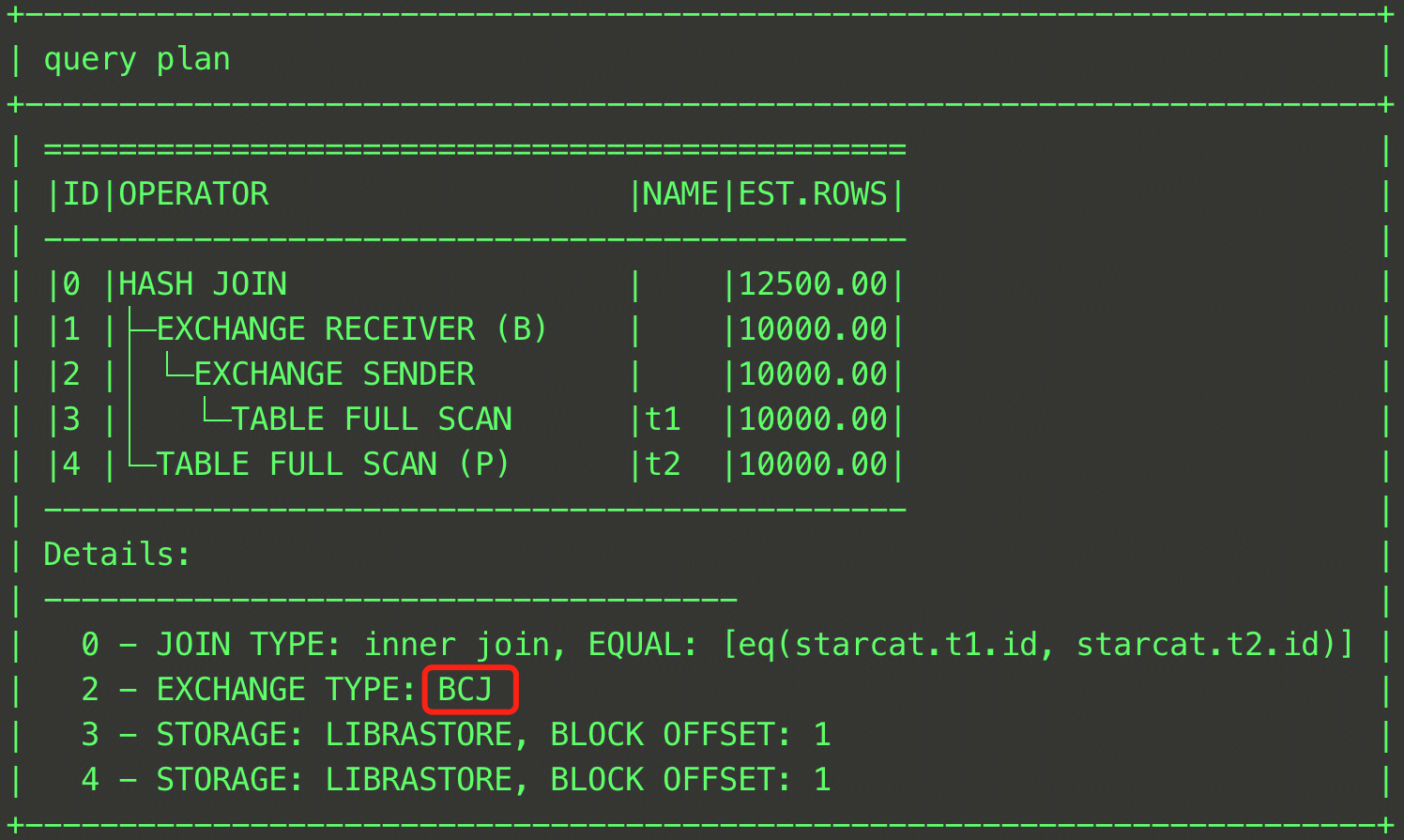
EXPLAIN SELECT /*+ BROADCAST_JOIN(t1) */ * FROM t1, t2 WHERE t1.id = t2.id;
In this SQL statement, the t1 and t2 tables perform a JOIN operation, and the JOIN method is specified as the broadcast join through the BROADCAST_JOIN hint. The final plan is shown in the figure below. It can be seen that the EXCHANGE TYPE in Rows 2 and 5 of Details has become BCJ, indicating that the broadcast is used.
Besides a single table, you can also specify the intermediate result in a JOIN operation for data broadcast.
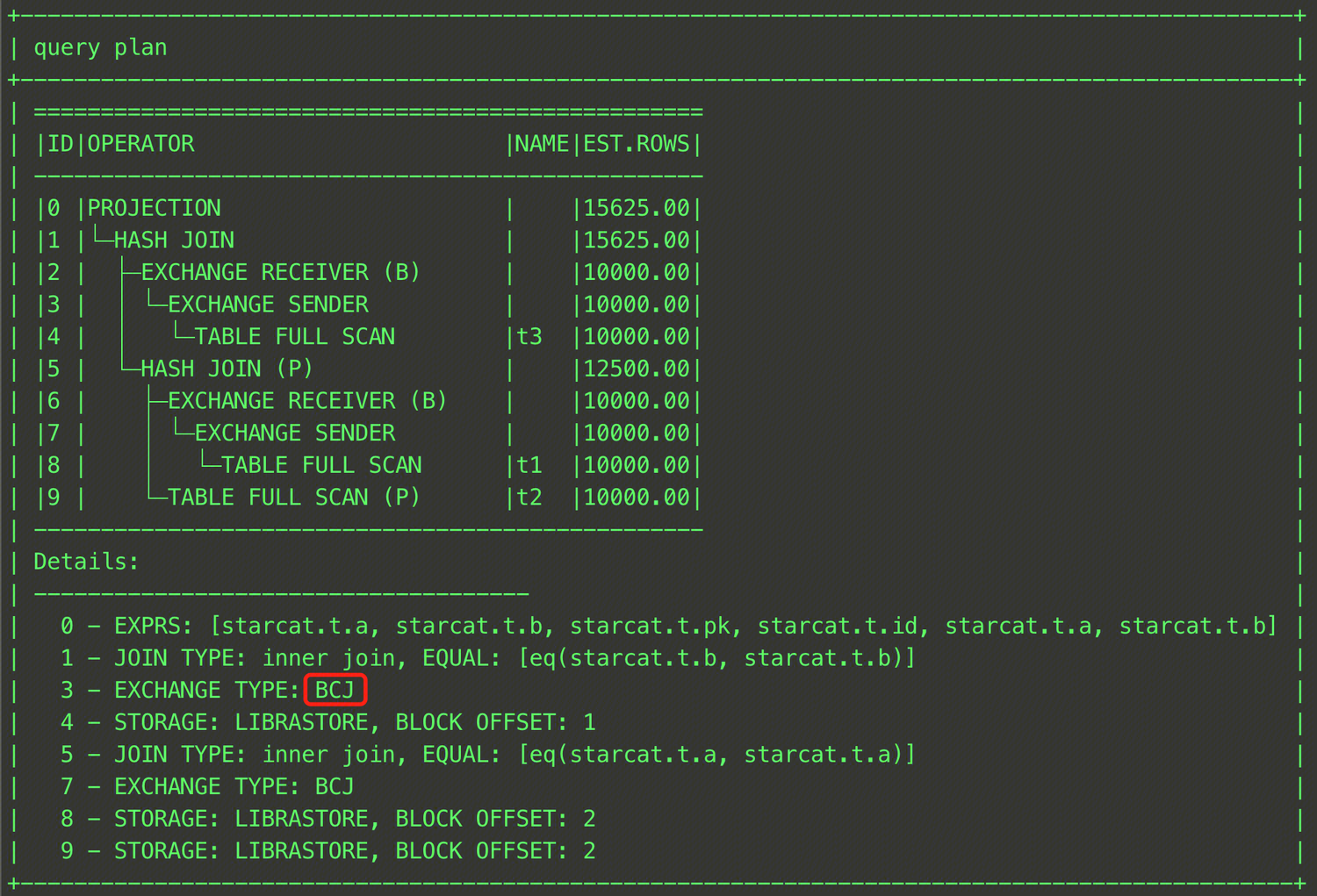
EXPLAIN SELECT /*+ BROADCAST_JOIN((t1@sel_2,t3@sel_1)) */ * FROM (SELECT t1.a, t1.b FROM t t1, t t2 WHERE t1.a = t2.a) t1, t t3 WHERE t1.b = t3.b;
As shown above, you can specify that the broadcast join is used to join the intermediate result of the JOIN operation between tables t1 and t3 with table t2 by enclosing tables t1 and t3 in parentheses and specifying the QB_NAME of each table. The result is shown in the figure below.
Note:
This hint is effective only when a distributed plan is generated and is not effective for a standalone plan.
The read-only analysis engine optimizer will select the Build side of the hash join as the broadcast table for the broadcast. If adjustment is needed, it can be adjusted together with HASH_JOIN_BUILD.
HASH_JOIN_BUILD(t1_name,t2_name…)
Usage instructions
HASH_JOIN_BUILD(t1_name,t2_name...) is used to instruct the read-only analysis engine optimizer to use the HASH JOIN algorithm for specified tables, and to designate the specified tables as the Build side for the HASH JOIN algorithm. Specifically, it means using the specified tables to build a hash table.
Reference examples
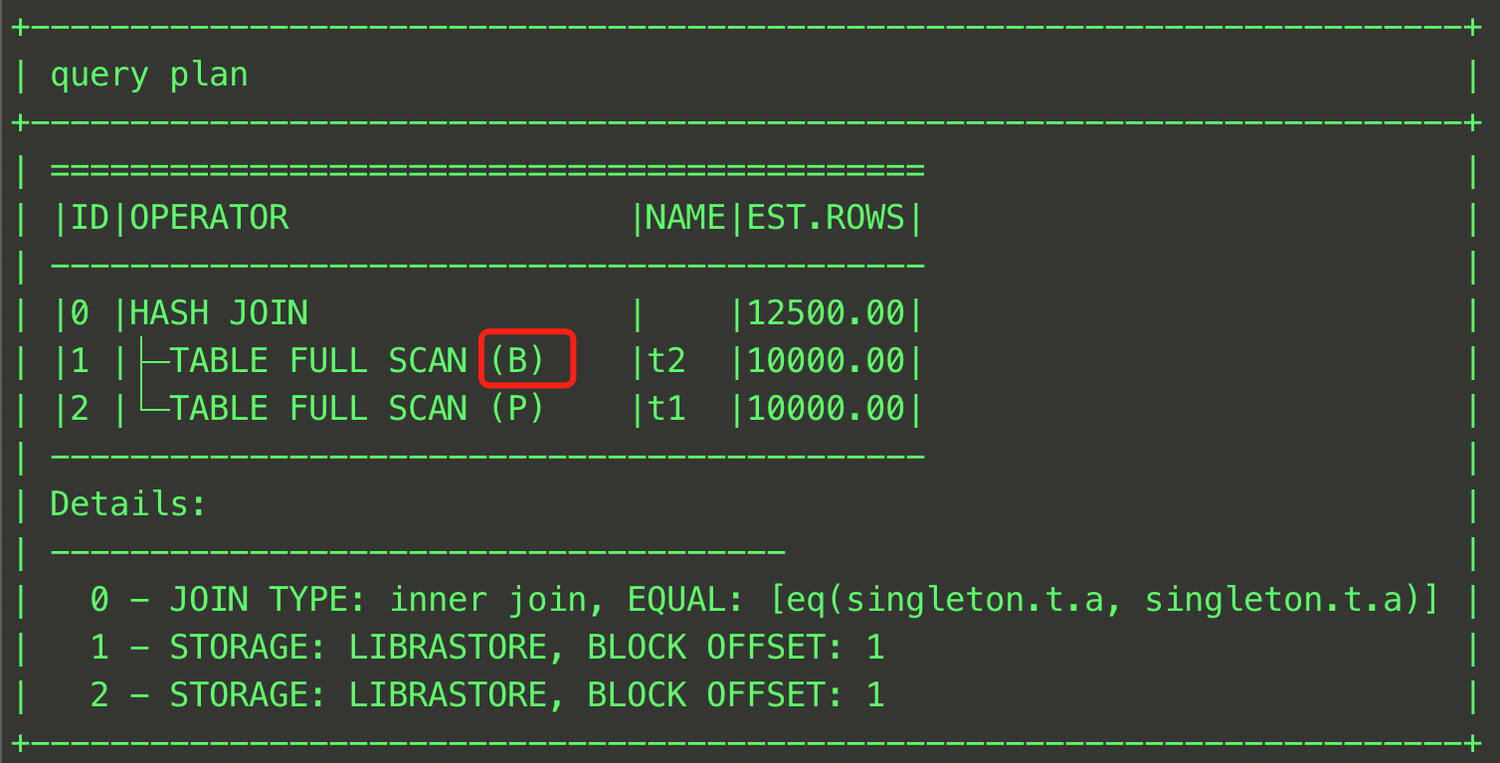
EXPLAIN SELECT /*+ HASH_JOIN_BUILD(t2)*/ * FROM t t1, t t2 WHERE t1.a = t2.a;
This SQL statement specifies table t2 as the Build table in the HASH JOIN operation. The final plan is shown in the figure below.
Besides a single table, you can also specify the intermediate result in a JOIN operation as the BUILD side. The following is an example.
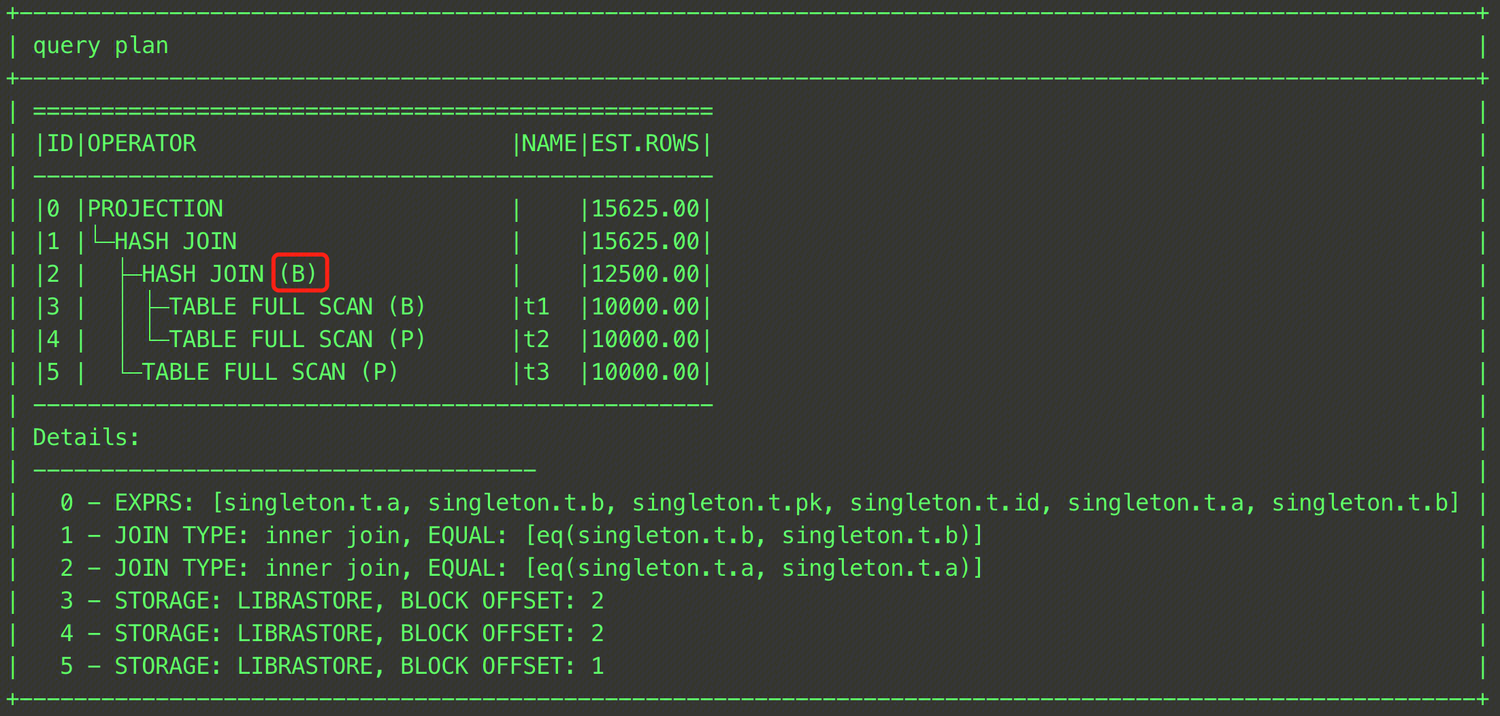
EXPLAIN SELECT /*+ HASH_JOIN_BUILD((t1@sel_2,t3@sel_1)) */ * FROM (SELECT t1.a, t1.b FROM t t1, t t2 WHERE t1.a = t2.a) t1, t t3 WHERE t1.b = t3.b;
As shown above, enclose tables t1 and t2 in parentheses and specify a QB_NAME for each table.
HASH_JOIN_PROBE(t1_name,t2_name…)
Usage instructions
HASH_JOIN_PROBE(t1_name,t2_name...) is used to instruct the optimizer to use the HASH JOIN algorithm for specified tables, and to designate the specified tables as the Probe side for the HASH JOIN algorithm. Specifically, it means using the specified tables as the Probe table in the HASH JOIN operation.
Reference examples
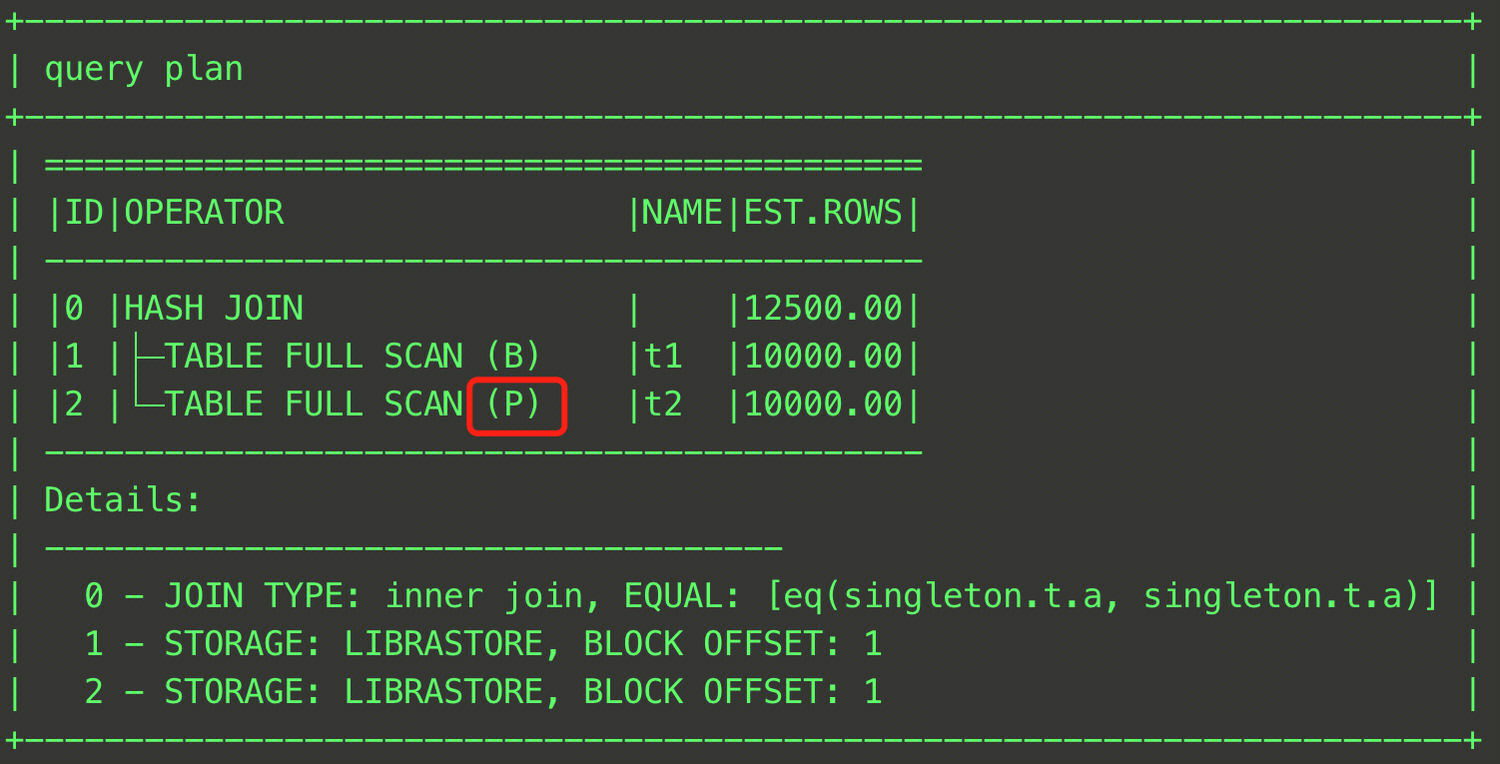
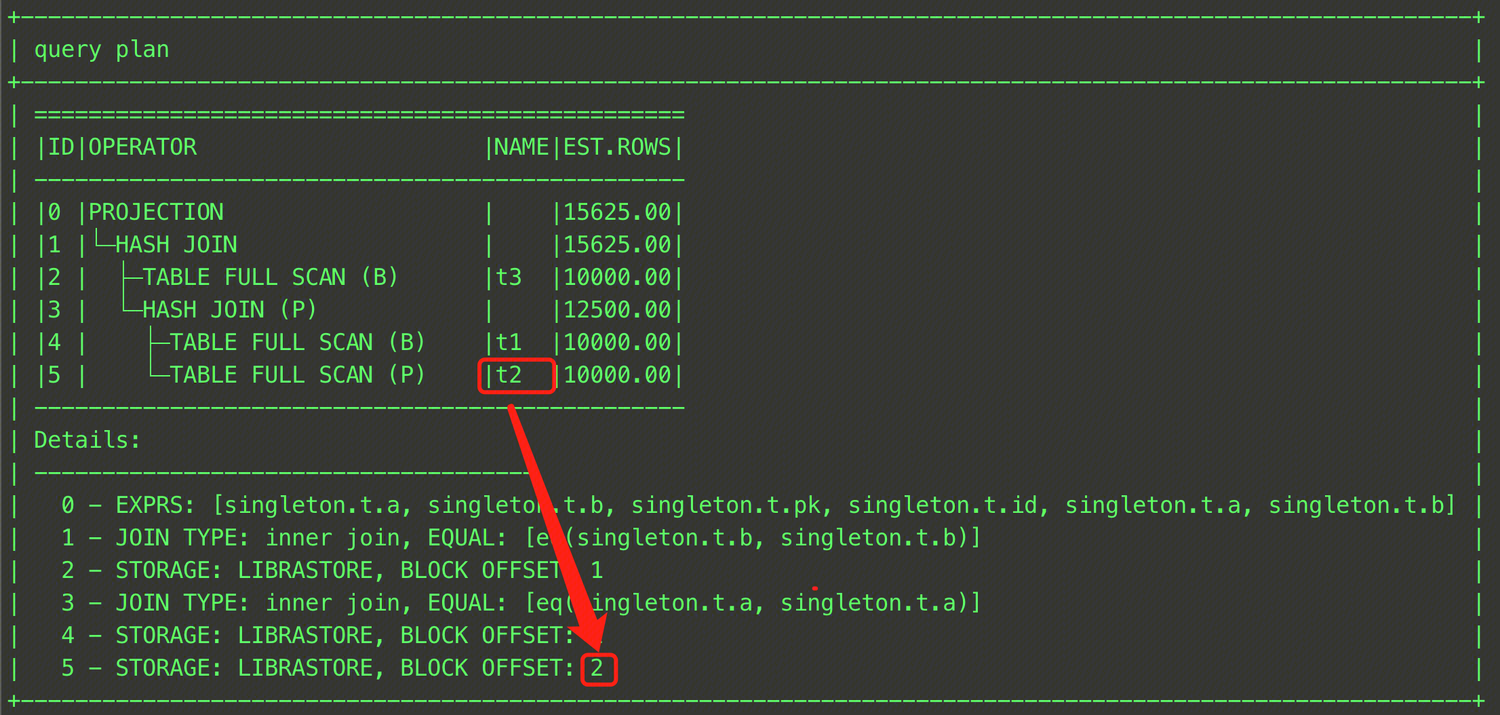
EXPLAIN SELECT /*+ HASH_JOIN_PROBE(t2)*/ * FROM t t1, t t2 WHERE t1.a = t2.a;
This SQL statement specifies table t2 as the Probe table in the HASH JOIN operation. The final plan is shown in the figure below.
Besides specifying a single table, you can also specify the intermediate result in a JOIN as the Probe side. The following is an example.
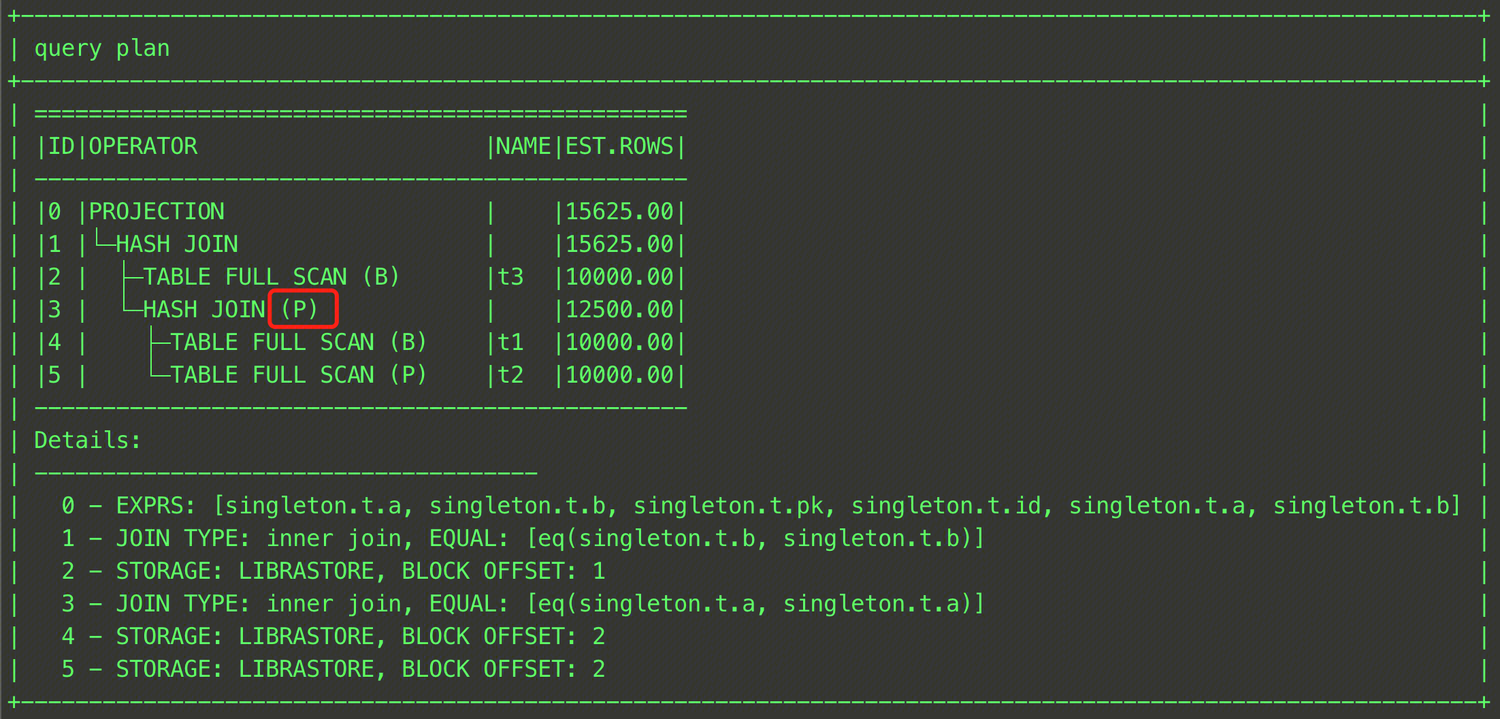
EXPLAIN SELECT /*+ HASH_JOIN_PROBE((t1@sel_2,t3@sel_1)) */ * FROM (SELECT t1.a, t1.b FROM t t1, t t2 WHERE t1.a = t2.a) t1, t t3 WHERE t1.b = t3.b;
As shown above, enclose tables t1 and t2 in parentheses and specify a QB_NAME for each table. The final plan is shown in the figure below.
LEADING(t1_name,t2_name …)
Usage instructions
Leading(t1_name,t2_name...) is used to control the join order generated by the optimizer during the join reorder phase. The optimizer will determine the join order according to the order in the Leading hint.
Reference examples
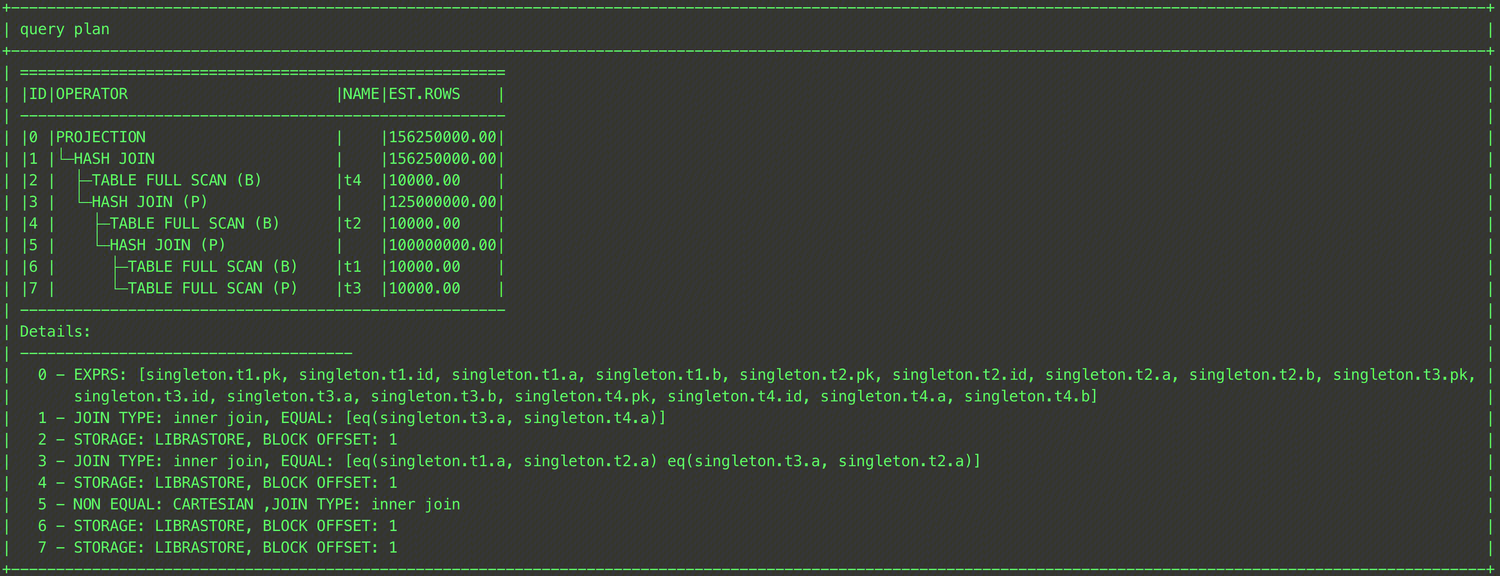
EXPLAIN SELECT /*+ LEADING(t1,t3,t2,t4)*/ * FROM t1,t2,t3,t4 WHERE t1.a = t2.a and t2.a = t3.a and t3.a = t4.a;
With the LEADING hint, this SQL statement explicitly specifies that table t1 first performs a JOIN operation with table t3, then with table t2, and finally with table t4. The final plan is shown in the figure below.
The above method can only generate a left deep tree by specifying the JOIN sequence, however, the read-only analysis engine also provides an advanced syntax for the LEADING hit, which can generate a bushy tree with the help of parentheses. An example is as follows.
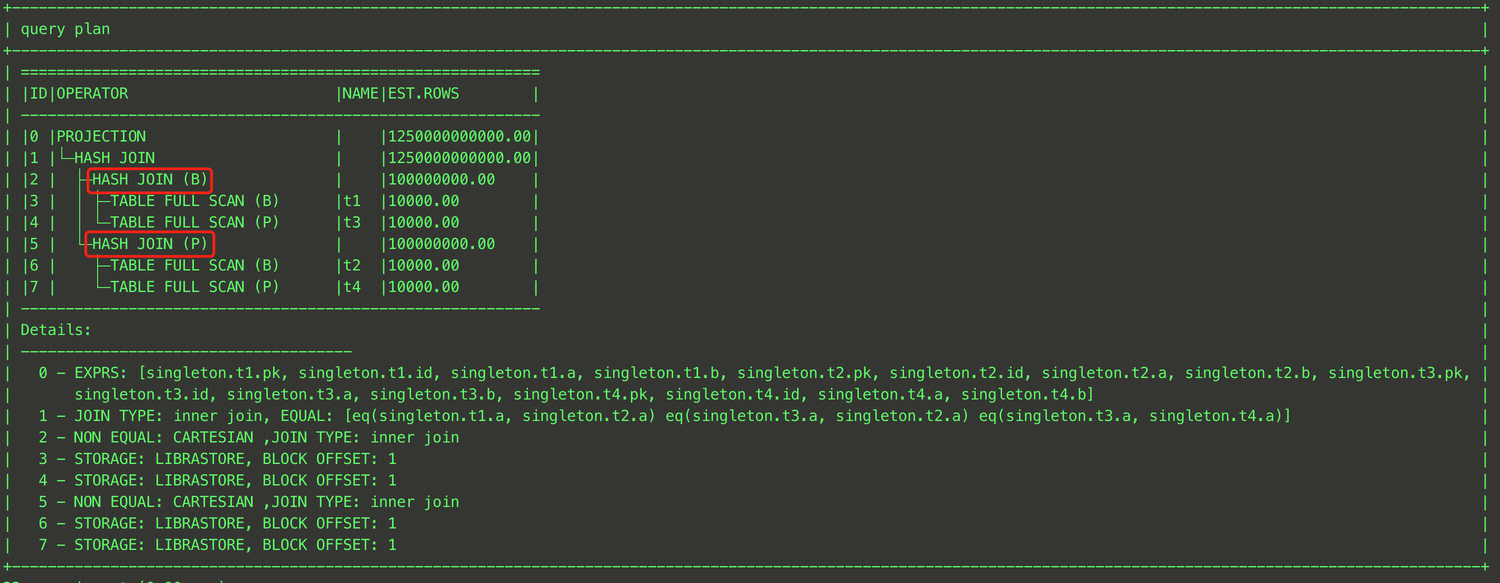
EXPLAIN SELECT /*+ LEADING((t1,t3),(t2,t4))*/ * FROM t1,t2,t3,t4 WHERE t1.a = t2.a and t2.a = t3.a and t3.a = t4.a;
The LEADING hint of this SQL statement first instructs the optimizer to perform a JOIN between table t1 and table t3 by (t1,t3), then a JOIN between table t2 and table t4 by (t2,t4), and finally a JOIN between the results of the above two JOIN operations by ((t1,t3),(t2,t4)). The final execution plan is shown in the figure below.
Note:
The hint will be invalid when there are multiple LEADING hints.
The hint will be invalid when the optimizer cannot perform the table join according to the LEADING hint.
SET_VAR(NAME="VALUE")
Usage instructions
SET_VAR(XXXX="YY") is used to temporarily modify system variables during the SQL execution. After the SQL execution is completed, the specified system variables will automatically revert to their original values. The usage is as follows.
Reference examples
SELECT /*+ SET_VAR(max_threads=64) */ * FROM t1
This SQL statement uses the SET_VAR hint to temporarily set the maximum thread count to 64 for the duration of the SQL execution.
Note:
Confirm that target parameters support for modification with the hint before use, as not all parameters support the SET_VAR hint. For parameters that can be modified with the hint, see System Variables. NO_PX_JOIN_FILTER_ID(ID)/PX_JOIN_FILTER_ID(ID)
Usage instructions
no_px_join_filter_id(ID)/px_join_filter_id(ID) is used to instruct the optimizer to disable or enable RuntimeFilter.
Reference examples
Common Hint Issues
Removal of Hint by MySQL Client Causes Ineffectiveness
The MySQL command-line client earlier than version 5.7 removed Optimizer hints by default. If you need to use the hint syntax in these earlier versions of the client, you need to add the --comments option when starting the client. For example: mysql -h 127.0.0.1 -P 4000 -u root -c.
Cross-Database Query Without a Database Name Specified Causes the Hint Not to Take Effect
For tables that require cross-database access in the query, you need to explicitly specify the database name in the hint, otherwise the hint may not take effect. For example, for the following SQL:
SELECT /*+ SHUFFLE_JOIN(t1) */ * FROM test1.t1, test2.t2 WHERE t1.id = t2.id;
The current t1 table is in the current database, causing the hint to be invalid. The Warning message is as follows.
mysql> show warnings;
+---------+------+---------------------------------------------------------------------------------------------------------------------------------------------------------+
| Level | Code | Message |
+---------+------+---------------------------------------------------------------------------------------------------------------------------------------------------------+
| Warning | 1815 | There are no matching table names for (t1) in optimizer hint /*+ SHUFFLE_JOIN(t1) */ or /*+ SHUFFLE_JOIN(t1) */. Maybe you can use the table alias name |
+---------+------+---------------------------------------------------------------------------------------------------------------------------------------------------------+
1 row in set (0.00 sec)
QB_NAME Not Specified/Incorrectly Specified Causes the Hint Not to Take Effect
For queries with multiple QB_NAMEs, if the hint is not written in the query block of the target table, it is necessary to explicitly specify the QB_NAME in the hint. If it is not specified, the Query hint may not take effect. For example:
SELECT /*+ HASH_JOIN_PROBE(t2) */ * FROM (SELECT t1.a, t1.b FROM t t1, t t2 WHERE t1.a = t2.a) t1, t t3 WHERE t1.b = t3.b;
The QB_NAME is not explicitly specified for the t1 table in the hint, causing the hint not to take effect. The Warning message is as follows.
mysql> show warnings;
+---------+------+---------------------------------------------------------------------------------------------------------------------------------+
| Level | Code | Message |
+---------+------+---------------------------------------------------------------------------------------------------------------------------------+
| Warning | 1815 | There are no matching table names for (t2) in optimizer hint /*+ HASH_JOIN_PROBE(t2) */. Maybe you can use the table alias name |
+---------+------+---------------------------------------------------------------------------------------------------------------------------------+
1 row in set (0.00 sec)
At this time, you can query the SQL plan by keywords to confirm the QB_NAME of the query block for each table.
Incorrect Position of the Hint Causes Ineffectiveness
If the hint is not correctly placed after the specified keyword according to the syntax of Optimizer hints, it will not take effect. For example:
MySQL> SELECT * /*+ SET_VAR(max_threads = 64)) */ FROM t;
ERROR 1064 (42000): You have an error in your SQL syntax; check the manual that corresponds to your MySQL server version for the right syntax to use line 1 column 42 near "/*+ SET_VAR(max_threads = 64)) */ FROM t"