This document helps you move a Web app from the Twilio Video SDK to the Tencent RTC Engine SDK. It covers key architecture differences, step-by-step migration instructions, practical feature examples, and advanced feature comparisons to help you migrate smoothly.
Core concepts and architecture differences
Concept Comparison
This section maps key concepts between Tencent RTC Engine and Twilio Video. For Tencent RTC terminology, see Basic Concepts. |
Room | Room | Room | The session space that connects RTC participants. Tencent RTC uses roomId (number) or strRoomId (string); Twilio uses name (string). |
User | User | Participant | All users participating in audio/video calls. |
Anchor | Anchor | - | User type with permission to publish streams; can send and receive audio/video streams. |
Audience | Audience | - | User type that can only receive audio/video streams. |
Application Identifier | SDKAppID | Account SID | Unique identifier for the application. |
Authentication Credential | UserSig | Access Token | Credential used for client authentication. |
User Identifier | userId | Identity | Unique identifier for each user. |
Technical Architecture Differences
Twilio Video Architecture
Twilio Video uses a track-based architecture:
You explicitly create LocalAudioTrack and LocalVideoTrack.
You call connect(token, { tracks }) and pass the local tracks to publish audio/video.
You subscribe to remote tracks via events such as room.on('participantConnected') or TrackPublication.on('subscribed').
You render media in the DOM using MediaTrack.attach(someHtmlElement).
Tencent RTC Engine Architecture
Tencent RTC Engine uses an API-driven architecture:
You create a client with TRTC.create() and call APIs such as startLocalVideo() / startLocalAudio() to capture and publish.
You listen for remote availability events (for example, TRTC.EVENT.REMOTE_VIDEO_AVAILABLE) and then call startRemoteVideo().
You generally don’t manage track objects yourself. For advanced scenarios, you can still access underlying tracks via getAudioTrack() and getVideoTrack().
This API design is more streamlined, while still providing access to underlying tracks for advanced scenarios.
Migration Preparation
Step 1. Activate the Service
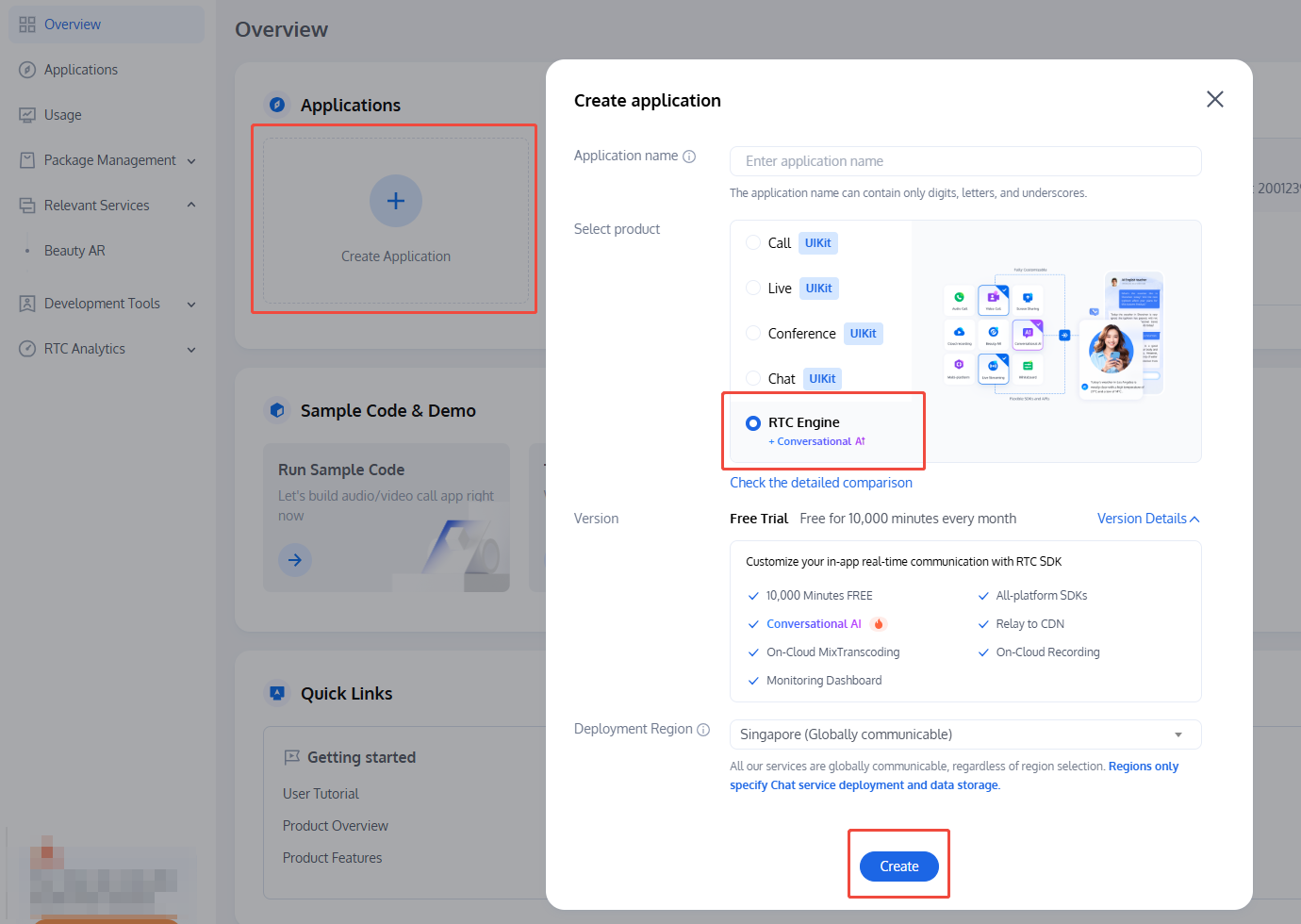
To use Tencent RTC Engine services, create an application and obtain credentials by following these steps:
2. Click Create Application.
3. In the popup, enter your application name, select RTC Engine, and click Create.
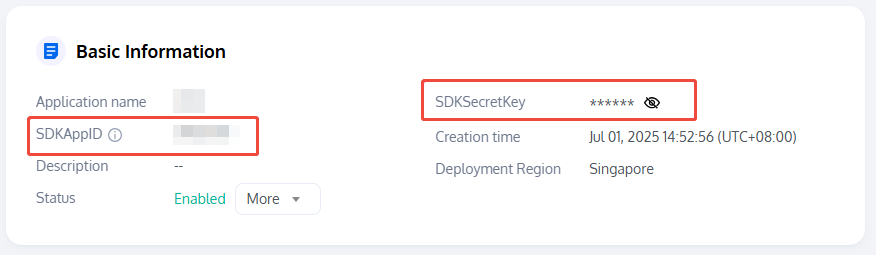
4. After the application is created, retrieve these credentials from Basic Information:
SDKAppID: Automatically generated; uniquely identifies your Tencent RTC application.
SDKSecretKey: Used to generate secure UserSig credentials for accessing Tencent RTC services.
Note:
Authentication Comparison: Twilio Video uses Access Token for authentication, whereas Tencent RTC uses UserSig. Both are time-limited credentials generated on the server side, but the generation methods differ. See UserSig Authentication Documentation. Step 2. Install SDK
Twilio Video SDK (Original Dependency)
// npm
npm install twilio-video --save
Tencent RTC Engine SDK (New Dependency)
// npm
npm install trtc-sdk-v5 --save
// yarn
yarn add trtc-sdk-v5
Alternatively, download trtc-sdk-v5, extract it, and copy the trtc-sdk-v5 directory to your project's node_modules. Step 3. Import SDK
Twilio Video SDK (Original Dependency)
import * as TwilioVideo from 'twilio-video';
Tencent RTC Engine SDK (New Dependency)
import TRTC from 'trtc-sdk-v5'
Note:
If you need to manually import the JS file, you can download trtc.js and include it with a `<script>` tag: <script src="/your_path/trtc.js"></script>
Migration Guide
Step 4. Create SDK Instance
Twilio Video
TwilioVideo.Logger.setLevel('debug');
Tencent RTC Engine
const trtc = TRTC.create();
Step 5. Set Event Listeners
Twilio Video
twilioRoom.on('participantConnected', participant => {
console.log(`Remote participant ${participant.identity} has connected.`);
});
twilioRoom.on('participantDisconnected', participant => {
console.log(`Remote participant ${participant.identity} has disconnected.`);
});
Tencent RTC Engine
trtc.on(TRTC.EVENT.REMOTE_USER_ENTER, event => {
console.log(`Remote user ${event.userId} has joined the room.`);
});
trtc.on(TRTC.EVENT.REMOTE_USER_EXIT, event => {
console.log(`Remote user ${event.userId} has left the room.`);
});
Step 6. Join/Connect to Room
Twilio Video
const accessToken = 'your_twilio_access_token';
const connectOptions = {
name: 'my_twilio_room'
};
const twilioRoom = await TwilioVideo.connect(accessToken, connectOptions);
Tencent RTC Engine
Use trtc.enterRoom() to create and join a room. Choose from the following scenarios: RTC Room Scenario (Default)
Interactive Live Streaming Scenario
When the scene parameter is set to TRTC.TYPE.SCENE_RTC or omitted, a real-time audio/video room is created (default). This mode supports up to 300 participants, with up to 50 users able to publish streams.
const options = {
sdkAppId: 2000000000,
userId: 'your_user_id',
userSig: 'your_usersig',
strRoomId: 'room_id',
};
try {
await trtc.enterRoom(options);
console.log('Joined RTC room successfully.');
} catch (err) {
console.error('Failed to join RTC room, err=' + err);
}
If the scene parameter is set to TRTC.TYPE.SCENE_LIVE, an interactive live streaming room is created. This mode supports up to 100,000 participants. Specify the role field to define the user's role when joining. Use trtc.switchRole() to change roles in the room.
const options = {
sdkAppId: 2000000000,
userId: 'your_user_id',
userSig: 'your_usersig',
strRoomId: 'room_id',
scene: TRTC.TYPE.SCENE_LIVE,
role: TRTC.TYPE.ROLE_ANCHOR
};
try {
await trtc.enterRoom(options);
console.log('Joined live room successfully.');
} catch (err) {
console.error('Failed to join live room, err=' + err);
}
Step 7. Capture and Publish Local Audio/Video Streams
Twilio Video
const localVideoTrack = await twilioVideo.createLocalVideoTrack();
twilioRoom.localParticipant.publishTrack(localVideoTrack);
const localVideoContainer = document.getElementById('local-video-container');
const localVideoElement = localVideoTrack.attach();
localMediaContainer!.appendChild(localVideoElement);
const localAudioTrack = await twilioVideo.createLocalAudioTrack();
twilioRoom.localParticipant.publishTrack(localAudioTrack);
const localAudioElement = localAudioTrack.attach();
document.body.appendChild(localAudioElement);
Tencent RTC Engine
const cameraList = await TRTC.getCameraList();
if (cameraList[0]) {
await trtc.startLocalVideo({
view: document.getElementById('local-video-container'),
options: { cameraId: cameraList[0].deviceId }
});
}
await trtc.stopLocalVideo();
const microphoneList = await TRTC.getMicrophoneList();
if (microphoneList[0]) {
await trtc.startLocalAudio({
options: { microphoneId: microphoneList[0].deviceId }
});
}
await trtc.stopLocalAudio();
Step 8. Subscribe and Play Remote Audio/Video Streams
Twilio Video
twilioRoom.on('participantConnected', participant => {
console.log(`Participant ${participant.sid} has joined the room.`);
const remoteContainer = document.createElement('div');
remoteContainer.id = `remote-container-${participant.sid}`;
participant.on('trackSubscribed', track => {
remoteContainer.appendChild(track.attach());
});
participant.tracks.forEach(publication => {
if (publication.isSubscribed) {
remoteContainer.appendChild(publication.track.attach());
}
});
participant.on('trackUnsubscribed', track => {
track.detach().forEach(element => element.remove());
});
document.body.appendChild(remoteContainer);
});
twilioRoom.on('participantDisconnected', participant => {
console.log(`Participant ${participant.sid} has left the room.`);
document.getElementById(`remote-container-${participant.sid}`).remove();
});
Tencent RTC Engine
trtc.on(TRTC.EVENT.REMOTE_VIDEO_AVAILABLE, ({ userId, streamType }) => {
const remoteContainerId = `${userId}_${streamType}`;
const remoteContainer = document.createElement('div');
remoteContainer.id = remoteContainerId;
document.body.appendChild(remoteContainer);
trtc.startRemoteVideo({ userId, streamType, view: remoteContainerId });
});
trtc.on(TRTC.EVENT.REMOTE_VIDEO_UNAVAILABLE, event => {
});
trtc.stopRemoteVideo({ userId: 'some_remote_user' });
Step 9. Mute/Unmute Local Audio/Video
Twilio Video
localVideoTrack.disable();
localVideoTrack.enable();
localAudioTrack.disable();
localAudioTrack.enable();
Tencent RTC Engine
await trtc.updateLocalVideo({ mute: true });
await trtc.updateLocalVideo({ mute: false });
await trtc.updateLocalAudio({ mute: true });
await trtc.updateLocalAudio({ mute: false });
Step 10. Mute/Unmute Remote Audio/Video
Twilio Video
const audioElement = remoteAudioTrack.attach();
remoteAudioTrack.detach(audioElement);
Tencent RTC Engine
await trtc.muteRemoteAudio('some_user_id', true);
await trtc.muteRemoteAudio('some_user_id', false);
await trtc.callExperimentalAPI('pauseRemotePlayer', { userId: 'some_user_id' });
await trtc.callExperimentalAPI('resumeRemotePlayer', { userId: 'some_user_id' });
Step 11. Leave Room
Twilio Video
Tencent RTC Engine
After leaving, if you no longer need the TRTC instance, call trtc.destroy() to release resources.
await trtc.exitRoom();
await trtc.destroy();
Advanced Features
Screen Sharing
Twilio Video
navigator.mediaDevices.getDisplayMedia().then(stream => {
return new TwilioVideo.LocalVideoTrack(stream.getVideoTracks()[0]);
});
Tencent RTC Engine
await trtc.startScreenShare();
await trtc.stopScreenShare();
trtc.on(TRTC.EVENT.REMOTE_VIDEO_AVAILABLE, ({ userId, streamType }) => {
if (streamType === TRTC.TYPE.STREAM_TYPE_MAIN) {
trtc.startRemoteVideo({ userId, streamType, view: `${userId}_main` });
} else {
trtc.startRemoteVideo({ userId, streamType, view: `${userId}_screen` });
}
})
trtc.enterRoom(roomConfig);
Audio/Video Encoding Configuration
Twilio Video
const videoEncodingProfile = {
width: 1280,
height: 720,
frameRate: 24
};
const audioEncodingProfile = {
sampleRate: 16000
};
await TwilioVideo.connect(token, {
video: videoEncodingProfile,
audio: audioEncodingProfile
});
Tencent RTC Engine
const videoEncodingProfile1 = {
option: {
profile: '1080p'
}
}
const videoEncodingProfile2 = {
option: {
profile: {
width: 1920,
height: 1080,
frameRate: 15,
bitrate: 2200
}
}
}
await trtc.startLocalVideo(videoEncodingProfile1);
await trtc.updateLocalVideo(videoEncodingProfile2);
await trtc.startLocalAudio({ option: { profile: TRTC.TYPE.AUDIO_PROFILE_STANDARD }});
Network Quality Monitoring
Twilio Video
await TwilioVideo.connect(token, {
networkQuality: {
local: 1,
remote: 1
}
});
Tencent RTC Engine
trtc.on(TRTC.EVENT.NETWORK_QUALITY, event => {
console.log(`network-quality, uplinkNetworkQuality:${event.uplinkNetworkQuality}, downlinkNetworkQuality:${event.downlinkNetworkQuality}`)
console.log(`uplink RTT:${event.uplinkRTT} loss:${event.uplinkLoss}`)
console.log(`downlink RTT:${event.downlinkRTT} loss:${event.downlinkLoss}`)
})
Custom Capture and Rendering
Twilio Video
const customStream = await someCustomCapture();
const customMSTrack = customStream.getVideoTracks()[0];
const customTwilioTrack = new TwilioVideo.LocalVideoTrack(customMSTrack, { name: 'my_custom_track' });
const room = await TwilioVideo.connect(token, {
tracks: [ customTwilioTrack ],
});
Tencent RTC Engine
const customStream = await someCustomCapture();
const customVideoMSTrack = customStream.getVideoTracks()[0];
const customAudioMSTrack = customStream.getAudioTracks()[0];
await trtc.startLocalVideo({ option: { videoTrack: customVideoMSTrack }});
await trtc.startLocalAudio({ option: { audioTrack: customAudioMSTrack }});
Data Channel / Custom Message
Twilio Video
const dataTrack = new TwilioVideo.LocalDataTrack();
const room = await TwilioVideo.connect(token, {
name: 'my_room',
tracks: [dataTrack ]
});
dataTrack.send('Hello!');
participant.on('trackSubscribed', track => {
console.log(`Participant "${participant.identity}" added ${track.kind} Track ${track.sid}`);
if (track.kind === 'data') {
track.on('message', data => {
console.log(data);
});
}
});
Tencent RTC Engine
SEI Message: trtc.sendSEIMessage() attaches SEI messages to video frames, suitable for time-sensitive scenarios like lyric sync or live quizzes.
trtc.sendCustomMessage({
cmdId: 1,
data: new TextEncoder().encode('Hello!').buffer
});
trtc.on(TRTC.EVENT.CUSTOM_MESSAGE, event => {
console.log(`
received custom msg from ${event.userId},
message: ${new TextDecoder().decode(event.data)}
`);
});
const trtc = TRTC.create({ enableSEI: true });
try {
const unit8Array = new Uint8Array([1, 2, 3]);
trtc.sendSEIMessage(unit8Array.buffer);
} catch(error) {
console.error(error);
}
trtc.on(TRTC.EVENT.SEI_MESSAGE, event =>
console.log(`
received SEI message from ${event.userId},
message: ${event.data}
`);
)
FAQs
What is the difference between Twilio Video's Access Token and TRTC's UserSig?
Both are time-sensitive credentials for client authentication, but their generation methods differ:
Twilio Access Token: Generated server-side using Account SID, API Key SID, and API Key Secret with Twilio SDK libraries.
TRTC UserSig: Generated server-side using SDKAppID and SDKSecretKey with HMAC SHA256.
How does Twilio's Room Name (string) map to TRTC's Room ID?
TRTC supports two types of room identifiers:
Numeric Room ID (roomId): Integer range 1 to 4294967294 (recommended).
String Room ID (strRoomId): Up to 64 bytes; supports letters, numbers, and select special characters.
If your Twilio project uses string room names, map them directly to strRoomId.
Note:
Within a single TRTC application, roomId and strRoomId cannot be mixed; they are not interoperable. If both are set in trtc.enterRoom(), roomId takes precedence.
Why does remote audio not require manual subscription in TRTC?
Twilio Video requires manual handling of remote audio via remoteParticipant.on('trackSubscribed'). In TRTC, remote audio streams are automatically played when the user joins the room. To control playback for a specific user, use muteRemoteAudio(userId, true/false).
More Information