Live Stream List(Android)
Feature Overview
This document provides a comprehensive introduction to the Voice Chat Room Live List Page in
TUILiveKit. Use this guide to quickly integrate our pre-built live list page into your project, or to deeply customize the page’s style, layout, and features to fit your requirements.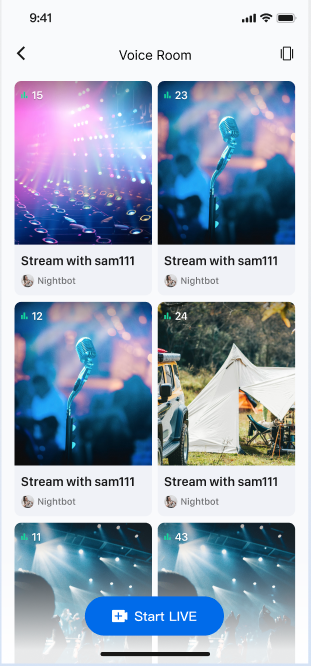
Quick Integration
Integrate the Component
Add the LiveListView
The voice chat room scenario currently supports only a two-column waterfall layout.
import android.content.Contextimport android.os.Bundleimport androidx.appcompat.app.AppCompatActivityimport com.trtc.uikit.livekit.features.livelist.LiveListViewimport com.trtc.uikit.livekit.features.livelist.Styleclass YourActivity : AppCompatActivity() {override fun onCreate(savedInstanceState: Bundle?) {super.onCreate(savedInstanceState)// 1. Create and initialize the waterfall viewval view = createLiveListView(this)// 2. Add the LiveListView to your Activity or FragmentsetContentView(view)}fun createLiveListView(context: Context): LiveListView {val liveListView = LiveListView(context)// Initialize with a double-column waterfall layoutliveListView.init(this, Style.DOUBLE_COLUMN)return liveListView}}
Enable Navigation from Live List to Audience Watch Page
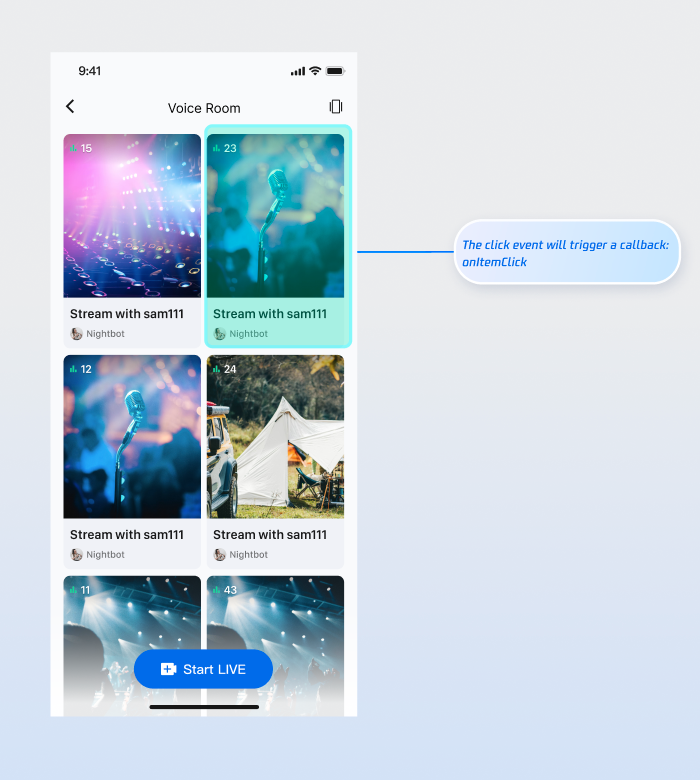
The live list handles click events through the
OnItemClickListener callback. Implement OnItemClickListener on the live list view to handle user clicks, and navigate to the audience watch page within onItemClick. For details on implementing the audience watch page, see Audience Watching.Interaction Example:
Code Example:
fun createLiveListView(context: Context): LiveListView {val liveListView = LiveListView(context)// Initialize with a double-column waterfall layoutliveListView.init(this, Style.DOUBLE_COLUMN)liveListView.setOnItemClickListener { view, liveInfo ->// Navigate to the audience watch page when a list item is clickedval intent = Intent(context, YourAudienceActivity::class.java)intent.putExtra("liveId", liveInfo.roomId)context.startActivity(intent)}return liveListView}
Customize UI
TUILiveKit provides flexible APIs for customizing the live list waterfall component. You can customize the data source and the appearance of list items to fit your business needs.Custom Data Source
If your backend provides a custom live list data source, implement the
LiveListDataSource interface to supply your own data instead of using the default component data.// 1. Import dependenciesimport com.trtc.uikit.livekit.features.livelist.LiveListDataSource;// 2. Implement LiveListDataSource to provide a custom data sourceval dataSource = object : LiveListDataSource {override fun fetchLiveList(param: FetchLiveListParam, callback: LiveListCallback) {// Connect to your backend and return data in the required formatval liveInfoList = mutableListOf<TUILiveListManager.LiveInfo>()val liveInfo = TUILiveListManager.LiveInfo().apply {roomInfo = TUIRoomDefine.RoomInfo().apply {roomId = "live_123456"name = "live_123456"}}liveInfoList.add(liveInfo)val cursor = "aabbccdd"callback.onSuccess(cursor, liveInfoList)}}// 3. Pass the custom dataSource during initializationliveListView.init(this, Style.DOUBLE_COLUMN, dataSource = dataSource)
Custom View
By default, waterfall list items display the room cover. To customize UI elements at the top of list items (such as host avatar, live title, etc.), implement the
LiveListViewAdapter interface.// 1. Import dependenciesimport com.trtc.uikit.livekit.features.livelist.LiveListViewAdapter;// 2. Implement LiveListViewAdapter to customize widgetsval liveListViewAdapter = object : LiveListViewAdapter {override fun createLiveInfoView(liveInfo: TUILiveListManager.LiveInfo): View {// Create your custom widget viewval widgetView = YourView(context)widgetView.init(liveInfo)return widgetView}override fun updateLiveInfoView(view: View, liveInfo: TUILiveListManager.LiveInfo) {// Update the widget view with new dataval widgetView = view as YourViewwidgetView.updateLiveInfoView(liveInfo)}}// 3. Pass the custom liveListViewAdapter during initializationliveListView.init(this, Style.DOUBLE_COLUMN, adapter = liveListViewAdapter)
Next Steps
You have now successfully integrated the Live Stream List feature. Next, implement additional features such as Host Live Streaming and Audience Viewing. See the table below for details:
Feature | Description | Integration Guide |
Host Live Streaming | Implements the complete process for a host to start a voice chat room live, including pre-live setup and in-session interactions. | |
Audience Viewing | Enables audience participation after joining the host’s voice chat room, including joining the mic, sending and receiving bullet comments, and more. |
FAQs
Why are no live streams displayed after integrating the live list feature?
If the page is blank, verify that you have completed the login. To test, use two devices: start a live stream on one device, and use the other device to open the live list page. The live list will display any active live rooms.
What should I do if I use a custom data source (LiveListDataSource) but the list does not display or refresh?
Ensure you have correctly implemented the
LiveListDataSource interface. Pay special attention to the following:1. Confirm that the
fetchLiveList method is being called.2. Always call
callback.onSuccess or callback.onFailure after fetching data, regardless of the result.3. Verify that your backend returns data in the correct format.
Help and Support
Was this page helpful?
You can also Contact sales or Submit a Ticket for help.
Help us improve! Rate your documentation experience in 5 mins.
Feedback