Introduction to Self-Built Database Access
Download
Mode fokus
Ukuran font
This document introduces the self-built databases supported by TencentDB for DBbrain, including supported database types, access entry, access methods, access steps, and feature comparisons of different access methods.
By accessing self-built databases, By accessing self-built databases, you can enable autonomous services such as Monitoring and Alarms, Performance Optimization, and Database Management provided by DBbrain.
Supported Self-Built Database Types
Self-built database on Tencent Cloud CVM: MySQL.
Self-built database on user local IDC or local IDC: MySQL.
Self-built databases on virtual machines of other cloud vendors: MySQL.
Connection Method
DBbrain supports the following two methods to access self-built databases:
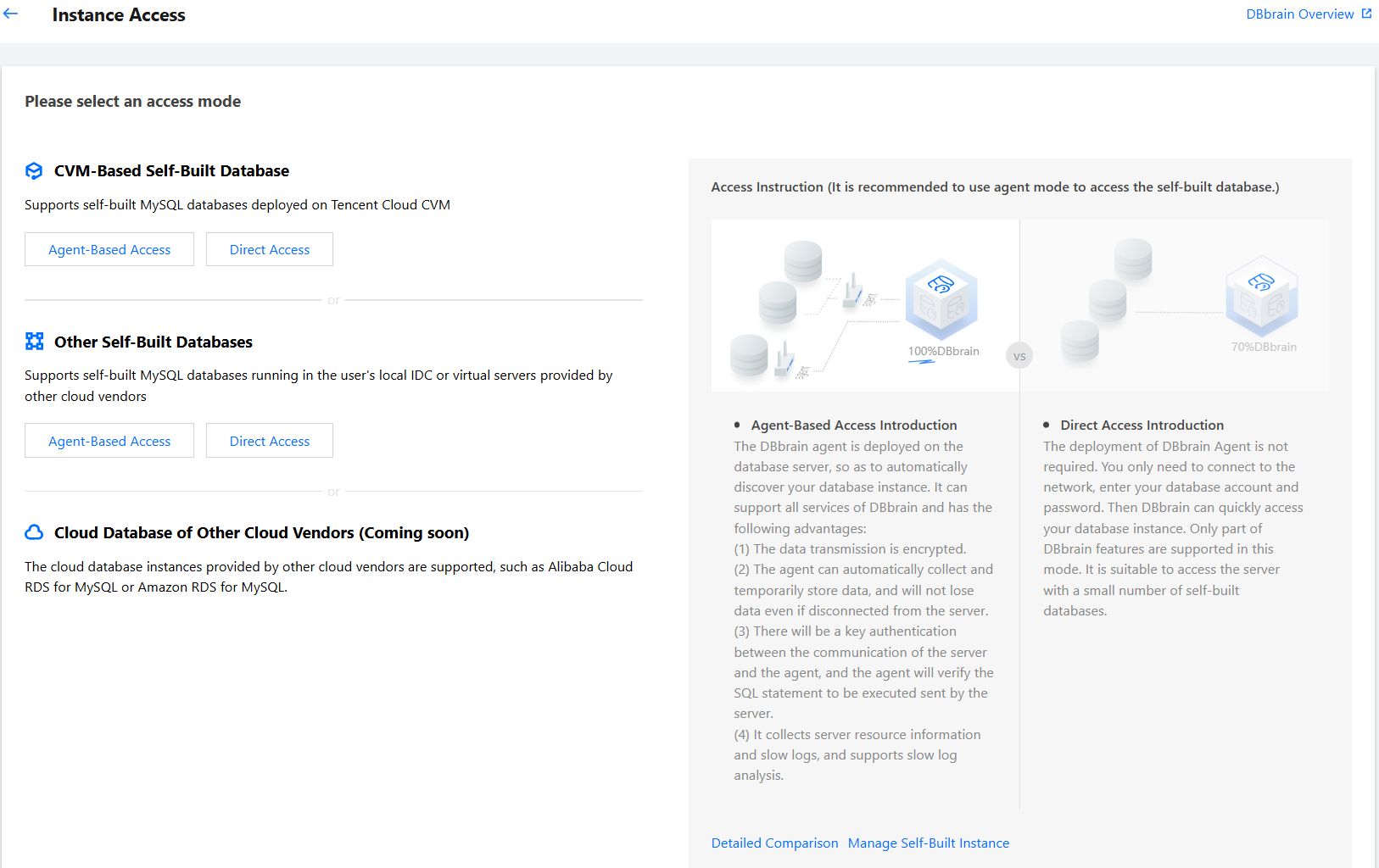
Agent-Based Access (Recommended)
Deploy the DBbrain Agent on the database host to automatically detect your database. This supports all autonomous services provided by DBbrain. Strengths include:
Data transmission is encrypted.
The Agent automatically collects and temporarily stores data, ensuring no data loss even if the connection to the server is lost.
Communication between the server side and the Agent requires authentication, and SQL statements sent to the Agent include verification.
It is capable of collecting host resource information and slow logs, supporting slow log analysis.
Direct Access
No need to deploy the DBbrain Agent. Simply enter the database account and password under the condition of network connectivity to quickly access your database. This method supports some of the autonomous services provided by DBbrain and is suitable for accessing fewer self-built databases.
Access Entry
1. Log in to the DBbrain console.
2. In the left sidebar, select Instance Overview.
3. At the top of the page, in the Self-Built Instance card, click Quick Access to enter the Self-Built Database Access page.

Access Process
The Self-Built Database Access page displays the entry for different types of self-built databases and access methods, as well as the description and feature comparison of the access methods.
Users can access the database based on the type of self-built database and access method. For details, see:
Feature Comparison of Access Methods
For better understanding, the feature comparison table of access methods uses the following annotations:
Supported: The feature is fully supported.
Not supported: The feature is unavailable due to limitations in data collection.
Partially supported: The feature is supported but cannot be fully used due to incomplete data collection.
Not yet supported: The feature is under development and will be available in future updates.
Function | Agent-Based Access (Recommended) | Direct Access | |
Monitoring Metrics | Database Monitoring Metrics | Supported | Supported |
| Host Resource Monitoring Metrics | Supported | Not Supported |
| Metric Collection Granularity | 5 second | 5 second |
| Historical Metric Retention | 30 days | 7 days |
Diagnosis | SQL Diagnosis | Supported | Supported |
| Lock Diagnosis | Supported | Supported |
| Transaction Diagnosis | Supported | Supported |
| Host Resource Diagnosis | Supported | Not Supported |
| Primary-Secondary Replication Diagnosis | Not Supported | Not Supported |
Database Management | Instance Overview | Supported | Supported |
| Instance Management | Supported | Supported |
Monitoring & Alarm | Database Inspection | Supported | Supported |
| Exception Alarm | Supported | Partially Supported |
| Monitoring Dashboard | Supported | Partially Supported |
| Full Instance Monitoring | Supported | Partially Supported |
Performance Optimization | Exception Diagnosis | Supported | Partially Supported |
| Performance Trends | Supported | Partially Supported |
| Real-Time Session | Supported | Supported |
| Slow SQL Analysis | Supported | Not Supported |
| Space Analysis | Supported | Partially Supported |
| SQL Optimization | Supported | Supported |
| Health Report | Supported | Supported |
Bantuan dan Dukungan
Apakah halaman ini membantu?
Anda juga dapat Menghubungi Penjualan atau Mengirimkan Tiket untuk meminta bantuan.
masukan