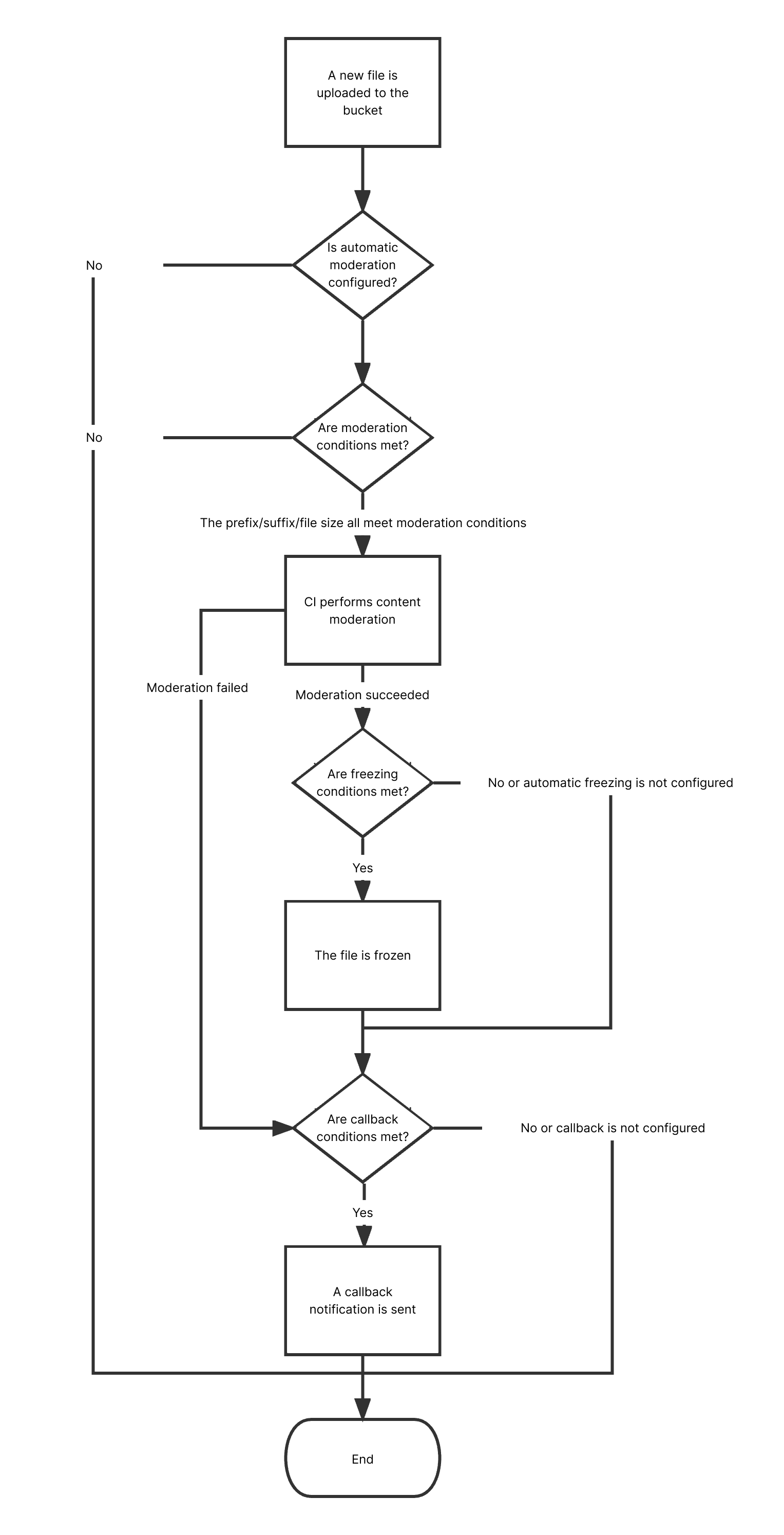
The text moderation feature can check text content for pornographic, illegal, advertising, and abusive information.
After you enable text moderation, new text files uploaded to a bucket will be automatically moderated, and the identified non-compliant content can be automatically blocked (by denying public read access to the content).
Note:
Text moderation is a paid feature.
Text moderation is billed by moderation times. Every 10,000 UTF-8 characters is counted as one moderation operation, and less than 10,000 characters are counted as 10,000 characters.
Currently, the text moderation feature supports TXT files and files without extensions, and the file size cannot exceed 1 MB.
Text moderation can recognize Mandarin and English.
3. Click the name of the target bucket to enter the configuration page.
4. On the left sidebar, select Sensitive Content Moderation > Automatic Moderation Configuration and click Text Moderation.
5. Click Add Automatic Text Moderation Configuration and set the following configuration items:
Moderation Scope: You can select The whole bucket or Specified Range.
Path: If you select Specified Range, enter the path of the text files to be moderated.
Example 1: To moderate files in the test directory, set this field to test/.
Example 2: To moderate files prefixed with 123, set this field to 123.
Note:
You can add multiple moderation configurations, but the paths cannot be duplicate or have inclusion relationships. If you have configured to moderate the entire bucket, you cannot add a moderation configuration for a specific path in the bucket.
Moderation Suffix: Options include TXT, HTML, and Without suffix.
Moderation Policy: Select a moderation policy. You can create different policies for refined moderation. Moderation scene options include Pornographic, Illegal, and Advertisement, and you can select one or multiple options.
Moderation Scene: Moderation scene options include Pornographic, Illegal, Advertisement, and Abuse, and you can select one or multiple options.
Restricted File Block: You can enable this service to authorize CI to perform automatic or manual moderation and block the identified non-compliant files by denying public read access to them.
Block Type: You can select a block type and mechanism. Machine moderation and block is selected by default. If you select Manual review freeze, TenDI's professional team will review suspiciously sensitive text files identified during machine moderation.
Callback: After callback is enabled, you will receive moderation results. You need to select the moderation type and callback content and set the callback URL. For more information, see Callback Content.
6. After completing the configuration, click Save. Text files uploaded subsequently will be moderated.
Callback Content
After callback is enabled, CI will send the following default callback message to the set URL to check whether it can receive callback messages normally:
{
"code": 0,
"data": {
"forbidden_status": 0,
"porn_info": {
"hit_flag": 0,
"label": "",
"count": 9
},
"result": 0,
"trace_id": "test_trace_id",
"url": "test_text"
},
"message": "Test request when setting callback url"
}
Note:
If the callback option is selected, text files frozen by Tencent Cloud will be returned to you, with public read access to them denied.
The callback URL must begin with "http" or "https" and return a 200 status code by default before it can be used. Check it before saving the settings.
The callback URL will take effect in 30 minutes.
After the callback URL takes effect, when an uploaded text file hits moderation rules, the system will call back the URL by default and send a standard HTTP POST notification message to it. The HTTP packet is as follows:
Parameter
Description
Type
Required
forbidden_status
Block status. Valid values: 0 (normal); 1 (blocked, only for text files stored in CI).
Int
Yes
porn_info
Porn detection information, including moderation result, score, and detailed tags.
json
Yes
ads_info
Ad detection information, including moderation result, score, and detailed tags.
json
Yes
result
Recognition result for reference. Valid values: 0 (normal), 1 (sensitive), 2 (suspiciously sensitive).
Int
Yes
trace_id
jobid of the submitted moderation job.
String
Yes
url
The URL of the uploaded resource, including the domain name.
String
Yes
illegal_info
Illegal information detection information, including moderation result, score, and detailed tags.
json
No
abuse_info
Abuse detection information, including moderation result, score, and detailed tags.
json
No
The moderation information (porn_info, ads_info, illegal_info, and abuse_info) has the following sub-nodes:
Parameter
Description
Type
Required
hit_flag
Whether the moderation type is hit.
Int
Yes
label
Recognized text tag.
String
Yes
count
Text file callback parameter, which is the number of sensitive text segments that hit the moderation scene.