Overview
Tencent Container Registry (TCR) Enterprise Edition supports protection for the hosted container image tags. Container image security is a key part of cloud-native application delivery. It enables tag immutability feature for the images hosted in TCR, which ensures the images of the same tag will only be successfully pushed once, thus effectively reduce the risk of tag overwriting caused by misoperation in the production environment. TCR supports tag protection at the namespace level. Users can fine-grainily define the repositories and image tags covered by the feature according to service demands.
Directions
Creating tag immutability rule
1. Log in to the TCR console and select Tag Management > Tag Immutability on the left sidebar. 2. Select the region where the instance is located and the instance name on the “Tag Immutability” page.
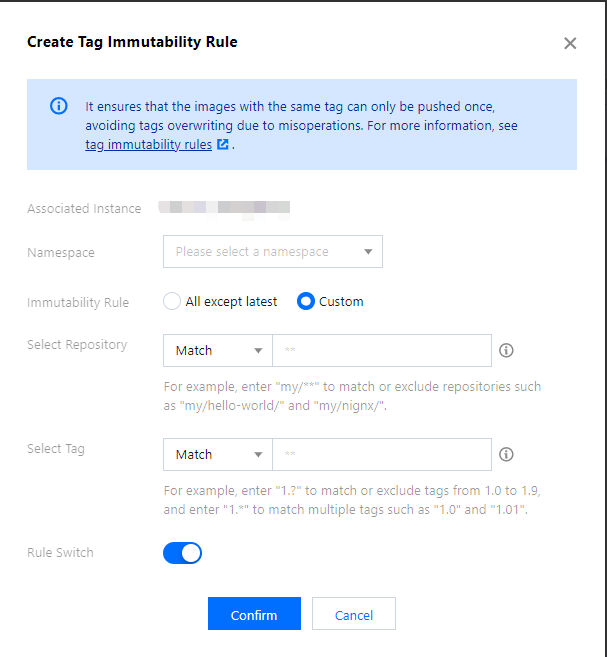
3. Click Create Rule. In the Create Tag Immutability Rule window, configure the rule based on the following information. See the figure below:
|
Associated instance | The instance which has been selected currently. |
Namespaces | The current instance needs to enable the namespace for tag protection. Only a rule can be created in a single namespace. |
Immutability rule | latest: in all repositories in the current namespace, all image tags are not allowed to be overwritten except the latest tag. |
| Custom: customize the configuration of the repository and image tag that need to be matched. Repository matching: select filter type for the image repository, and enter the name of the repository which needs to be filtered. Tag matching: select filter type for the image tag, and enter the name of the tag which needs to be filtered. |
Rule switch | The rule is effective as of creation by default. Enabling means the rule takes effect. You can enable/disable the rule in the configuration. |
4. Click Confirm to create the rule.
Managing tag immutability rule
You can view the rules on the “Tag Immutability” page after creation, and take the following actions to manage the rules.
Configuration: you can reconfigure the instance tag immutability rule but cannot modify the namespace for which it takes effect.
Delete: delete the tag immutability rule under the instance.