Unbind a Reseller Sub-Customer
Download
Mode fokus
Ukuran font
This document describes how a reseller can proactively disassociate the relationship with sub-customers.
Applicable Objects
This unbinding process is suitable for resellers, second-level resellers and distributors. The copywriting uses "reseller" for description.
Overview
Resellers can initiate the sub-customer unbinding process on the Partner Center > Customer Management webpage. Since there is a business cooperation relationship between resellers and sub-customers, the unbinding operation requires mutual confirmation before it can be executed. Refer to the figure below for the unbinding process:

Note:
Before initiating the unbinding process, the reseller must fully communicate with the sub-customer, handle potential past contract and billing matters, and confirm both parties have reached an agreement on the unbinding issue.
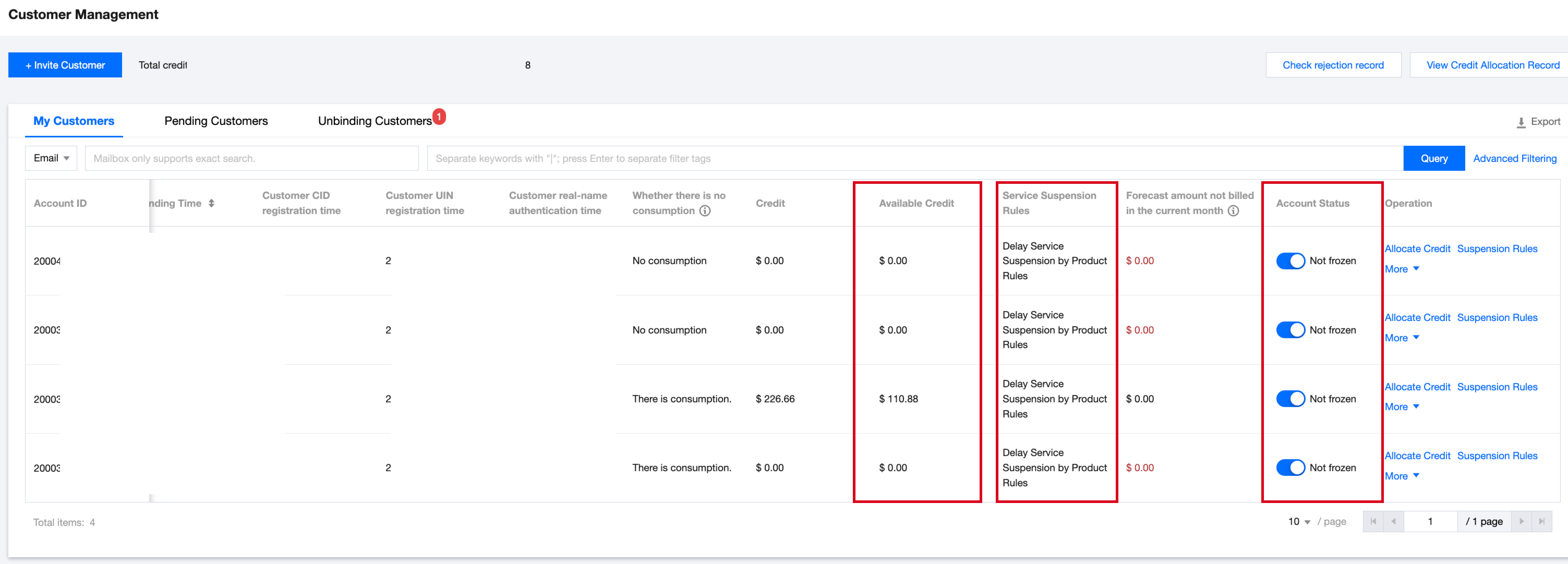
Before initiating unbinding, the reseller should adjust the sub-customer account to normal status as much as possible, i.e.:
The sub-customer account status is normal, not frozen. If the sub-customer account is frozen, please unfreeze it before unbinding. See Sub-customer Account Freeze and Recovery.
The sub-customer account has a credit limit equal to or greater than 0. If the available credit is less than 0, allocate credit to the sub-customer before unbinding. See Credit Allocation and Reclaim.
The uninterrupted service privilege during arrears for the sub-customer account has been closed. If the sub-customer has postpaid or prepaid non-stop service privileges, please disable the privileges before unbinding. See Configure Sub-customer Overdue Service Suspension Policy.
Unbinding Notice
To ensure your and your sub-customer's account and property safety, please read the following information carefully before proceeding with the operation:
Important Notice
The current process for unbinding a reseller is applicable only to Tencent Cloud resellers, second-level resellers, and distributors.
Confirm that the person submitting the unbinding application is yourself or a legally authorized agent/representative of the account holder. In the latter scenario, the agent/representative must inform the account holder of this Note and all steps in the process, ensuring the holder understands the entire content.
The unbinding process is designed to remove the relationship between you and your sub-customers. Ensure you agree upon the initiation with them before submitting a request.
After executing the reselling relationship removal, the action is uncancelable and irreversible. Ensure you have fully considered and confirmed the necessity of removing the reselling relationship.
During the period from initiating the application to operation completion for reselling relationship removal, all resource consumption will continue to generate bills as per the existing method, i.e., the original reseller will still bear the spending.
The billing process for Cloud Products may have delays. After terminating the reselling relationship, there will still be partial delayed billing costs charged under the pre-termination identity.
You have confirmed settling ALL overdue payments with this sub-customer.
You have confirmed deactivating ALL sub-customer discounts for this sub-customer.
Make sure you have understood the operation instruction for unbinding and possible issues as well as precautions.
Unbinding Process Operation Instruction
Follow the steps below for smooth completion.
1. Carefully read this document to understand related responsibilities and risks.
2. Communicate with the sub-customer to reach an agreement, properly handle the account assets, and submit an unbinding application.
3. The sub-customer will receive a notification and need to confirm the unbinding application.
4. If the sub-customer confirms unbinding, you will receive a system message. Please return to continue the subsequent operation.
5. If the sub-customer rejects the unbinding request, the process terminates.
Unbind restriction conditions
Under the following use limits, you may not be able to unbind the sub-customer:
1. The sub-customercannot be a Group Administrator or member. It must be removed from the group before unbinding.
2. The sub-customer cannot create/join a saving plan shared unit and must be removed before unbinding.
3. The sub-customer's service suspension policy cannot be "uninterrupted service privilege during arrears". Go to Partner Console > Customer Management > Operate: Service Suspension Policy, disable the privilege before unbinding.
4. The sub-customer cannot be frozen and must be unfrozen before unbinding.
Operation Steps
1. Resellers log in with the root account on the Tencent Cloud official website.
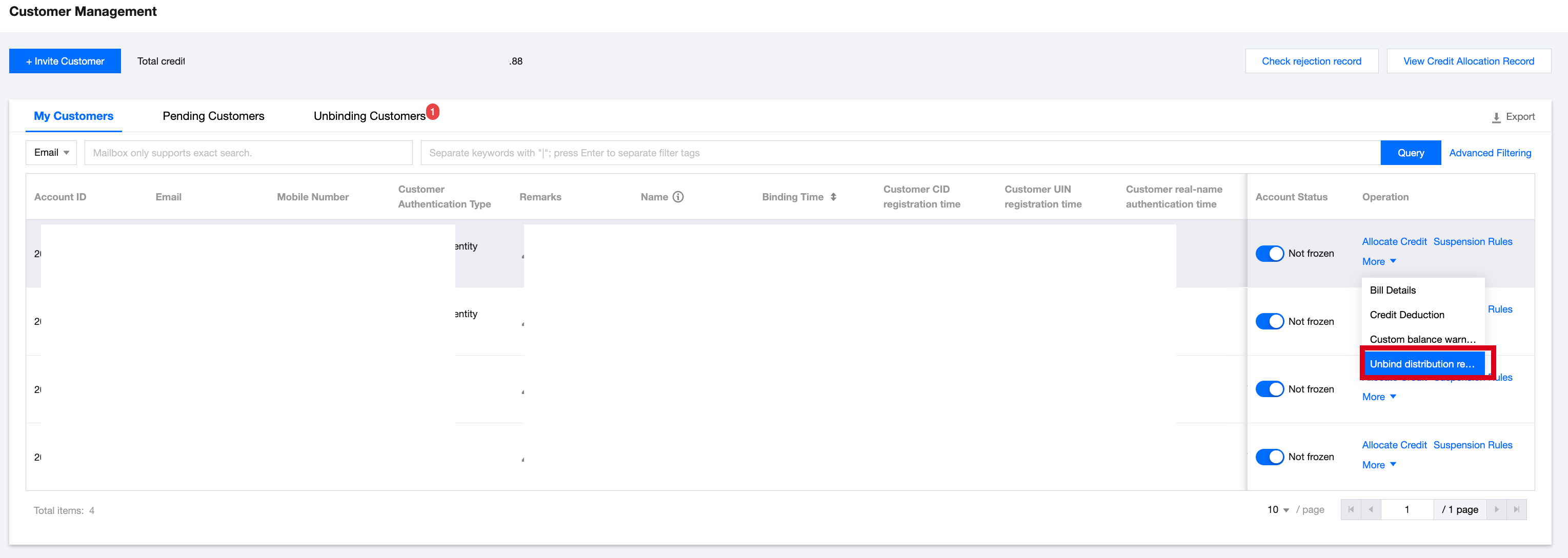
2. Resellers enter the Partner Center > Customer Management page and click Unbind Reselling Relationship.
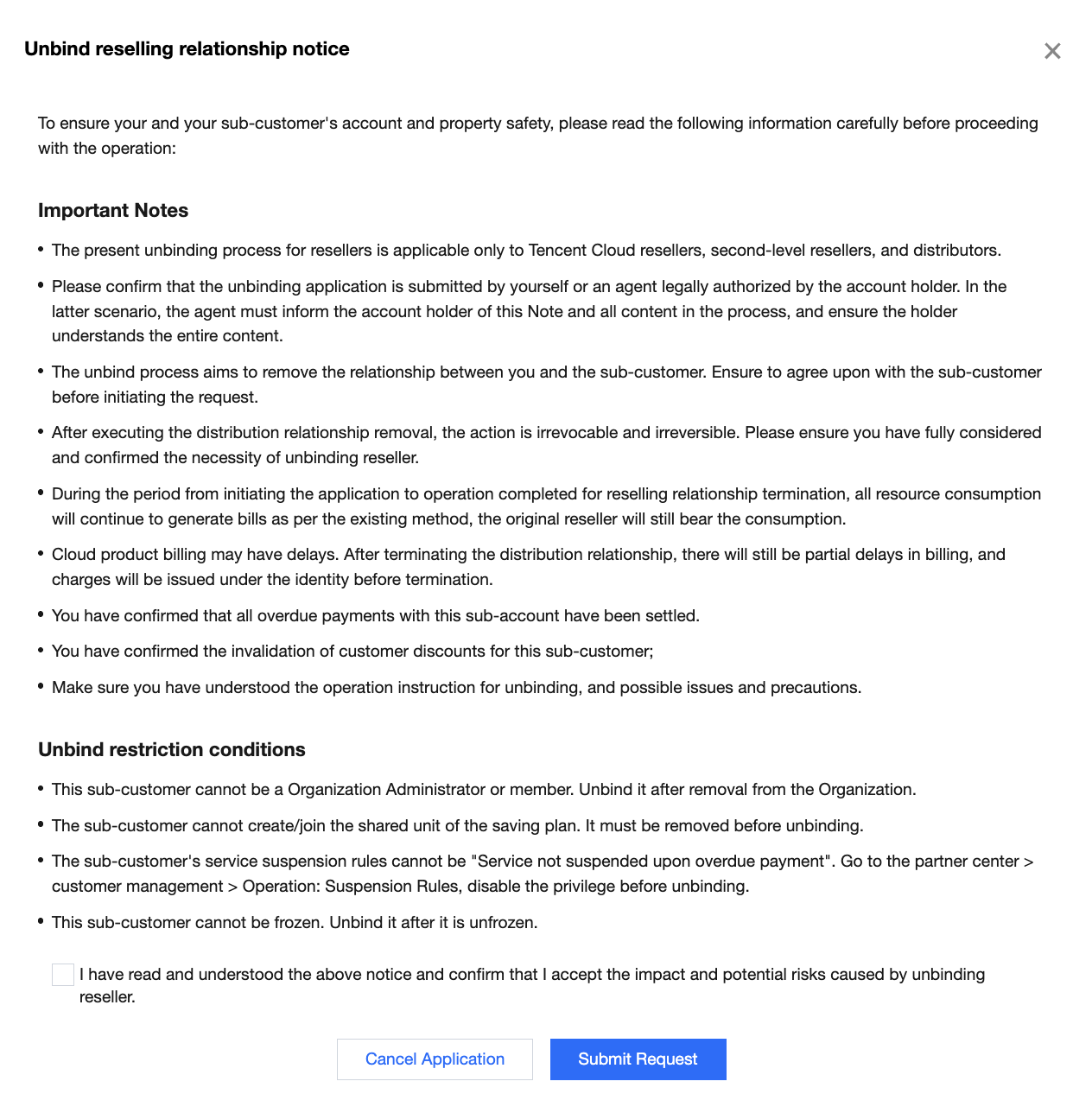
3. Read the notice on unbinding reselling relationship, check "I have read and understood the above notice, and confirm acceptance of the impact and possible risks caused by unbinding the reseller," then click Submit Application.
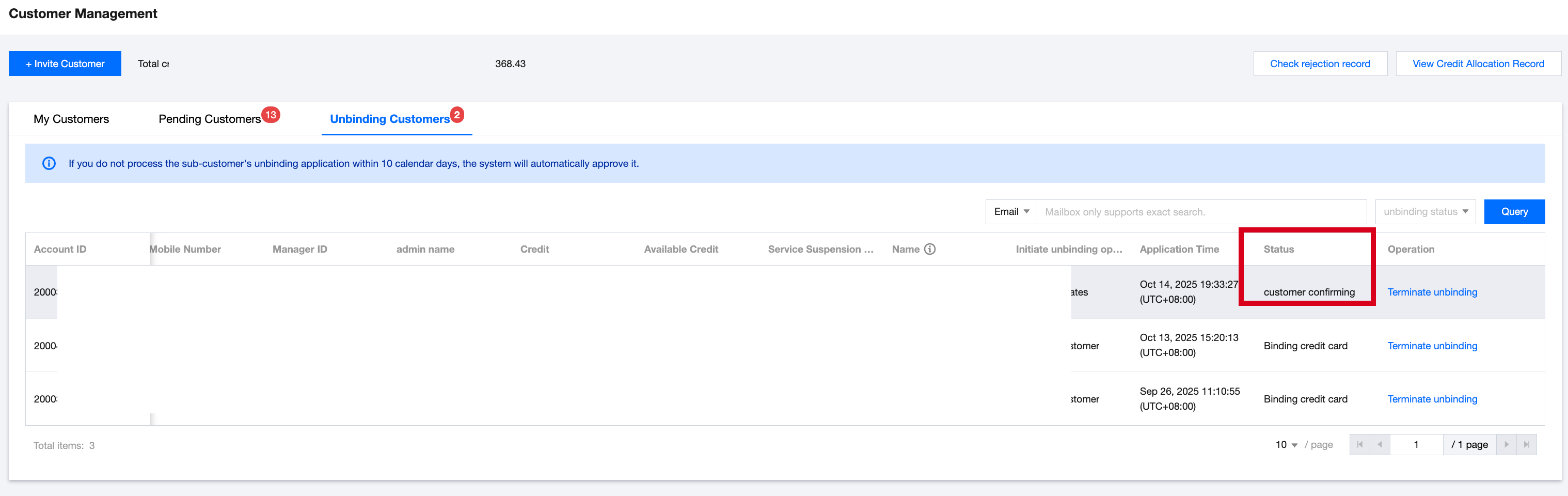
4. When submitting an unbinding application, the system will validate whether the sub-customer meets the unbinding conditions. After the verification passes, the system will generate an unbinding record and sync it to the Unbinding Customers page information.
If the customer is a sub-customer of a second-level reseller, the system will notify the distributor to review the initiated sub-customer unbinding application. After the fdistributor passes the review, the system will notify the sub-customer to confirm.
If the customer is not a sub-account of a second-level reseller, the system will directly notify the sub-customer to confirm the unbinding application.
5. After receiving your request, the sub-customer needs to confirm in Expense Center > Account Information. The sub-customer can choose Confirm Unbinding or Reject Unbinding.
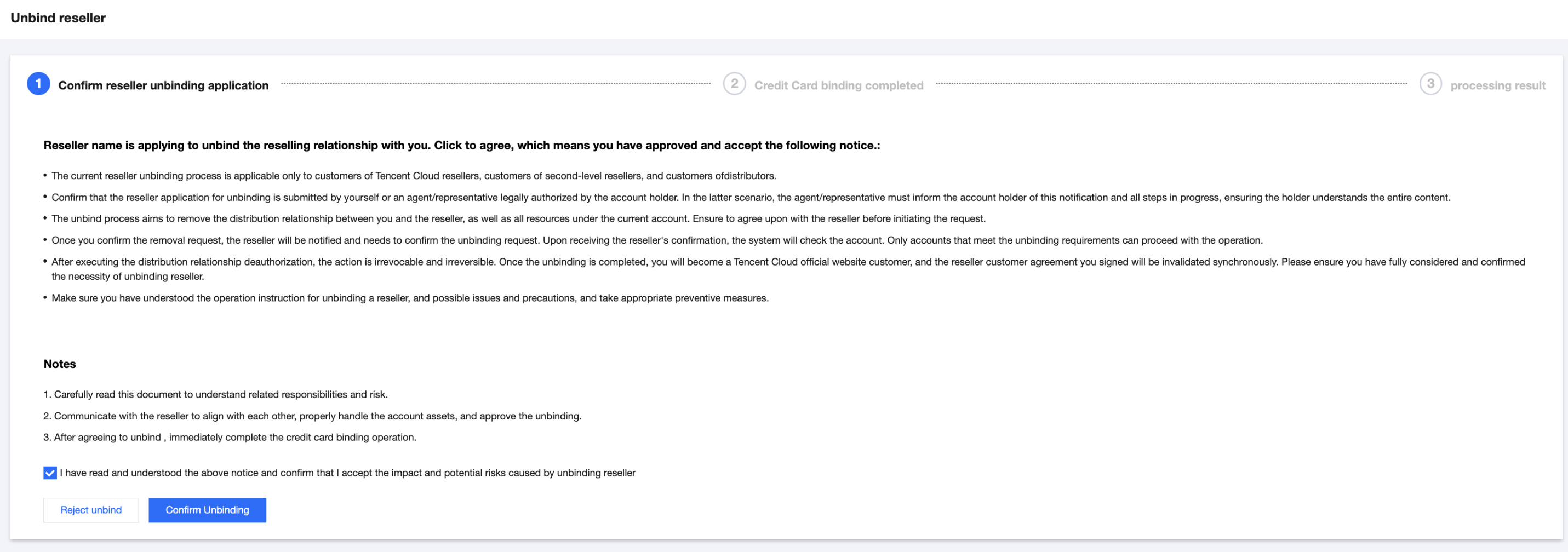
6. After the sub-customer consents, it needs to continue to complete card binding as prompted. (If a credit card has already been bound and information completed, no need to bind again or complete information.)
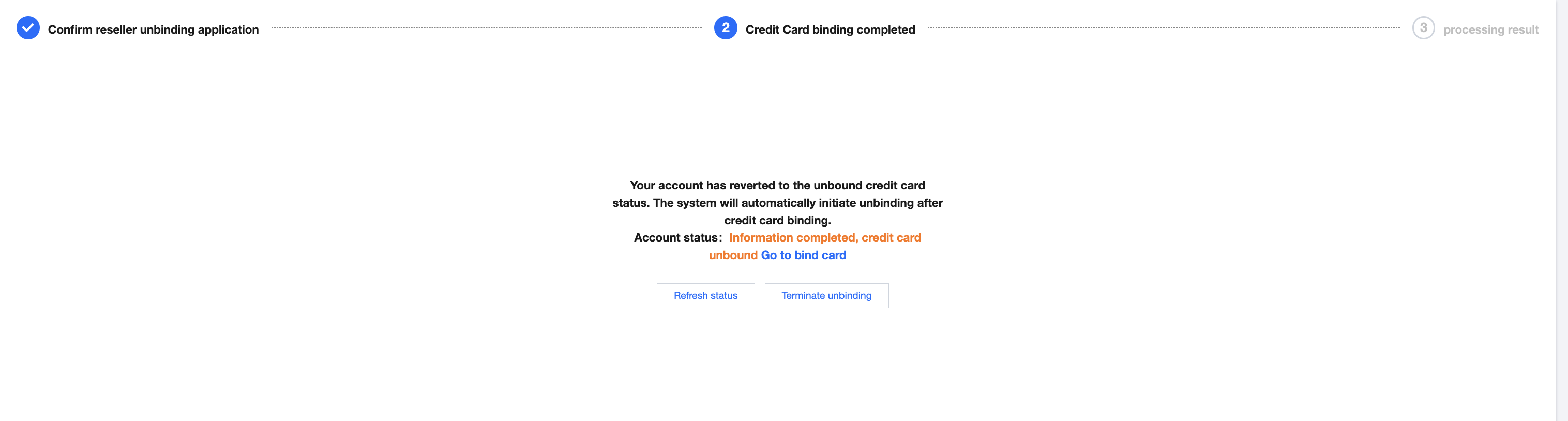
7. After completing the card binding process, the system will check if the pre conditions pass. If all pass, the unbinding is completed, the sub-customer will become a Tencent Cloud official website customer, and the signed reseller customer agreement will be invalidated synchronously.

Bantuan dan Dukungan
Apakah halaman ini membantu?
Anda juga dapat Menghubungi Penjualan atau Mengirimkan Tiket untuk meminta bantuan.
masukan