Dynamic Release Record (2026)
Spark
Note:
To start Hive and Spark component services in the EMR cluster, COS permission is required, and resource files need to be stored in COS.
Example: In the following example, the user has permission in the EMR cluster.
Feature Description
Submit a Spark task execution to the workflow scheduling platform of WeData.
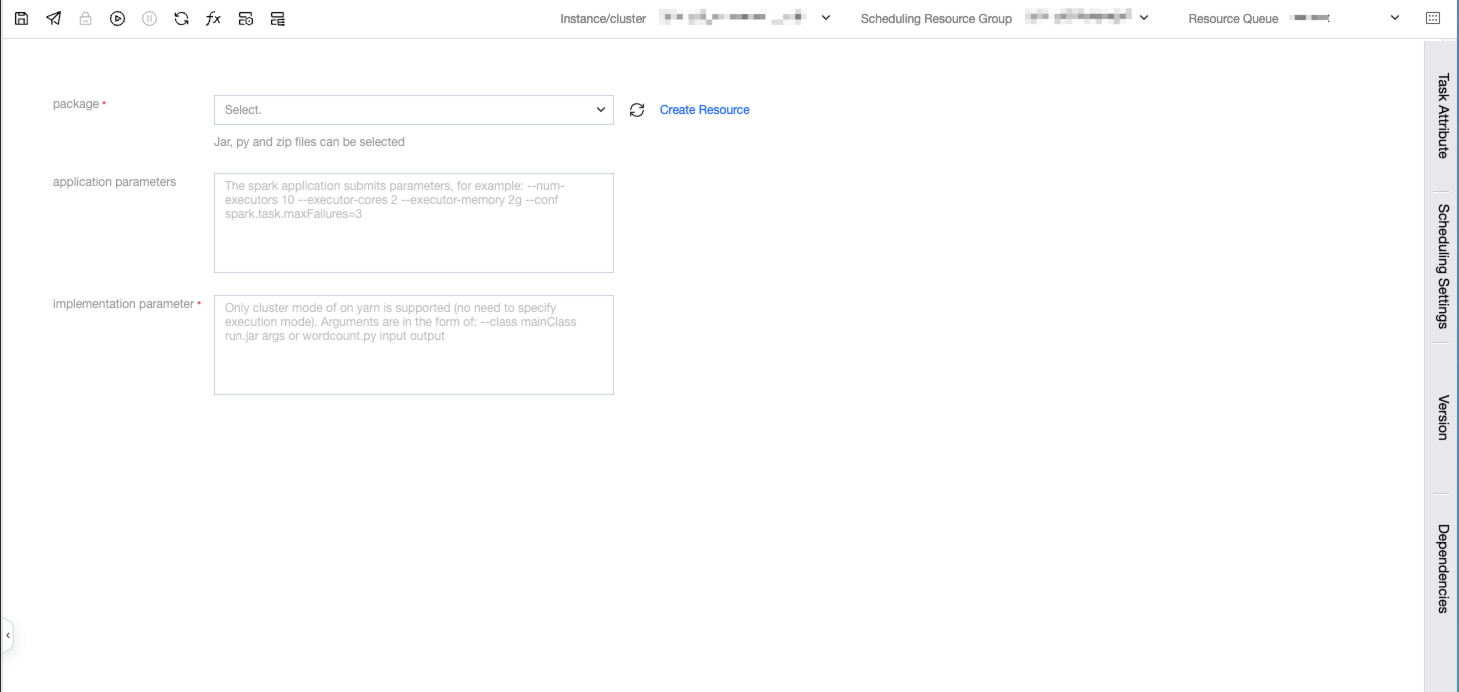
Parameter Description
Parameter | Description |
Spark program zip package | The user directly uploads the written spark program code file, which needs to be packaged into a jar, and then all custom dependencies are packaged into a zip file. Do not package directories, just package the files themselves. |
Execution Parameters | Execution parameters of the spark program. There is no need for the user to write spark-submit, specify the submitting user, specify the submission queue, or specify the submission mode (yarn by default). The parameter format is as follows: --class mainClass run.jar args or wordcount.py input output. |
Application Parameters | Application parameters of Spark. |
SparkJar Example:
To submit a task to count words, namely wordcount, you need to upload the file to be counted in COS in advance.
Step One: Write a Spark Jar Task Locally
Create Project
1. Taking Maven as an example, create a project and introduce Spark dependencies.
Notes:
Here, the `groupId` and `artifactId` need to be replaced with the actual `groupId` and `artifactId`.
Here, the scope of the Spark dependency is set to `scope`, indicating that Spark dependencies are only required during compilation and packaging, while runtime dependencies are provided by the platform.
# Generate a Maven project, which can also be done through an IDE.mvn archetype:generate -DgroupId=com.example -DartifactId=my-spark -DarchetypeArtifactId=maven-archetype-quickstart
2. The generated directory structure is as follows:
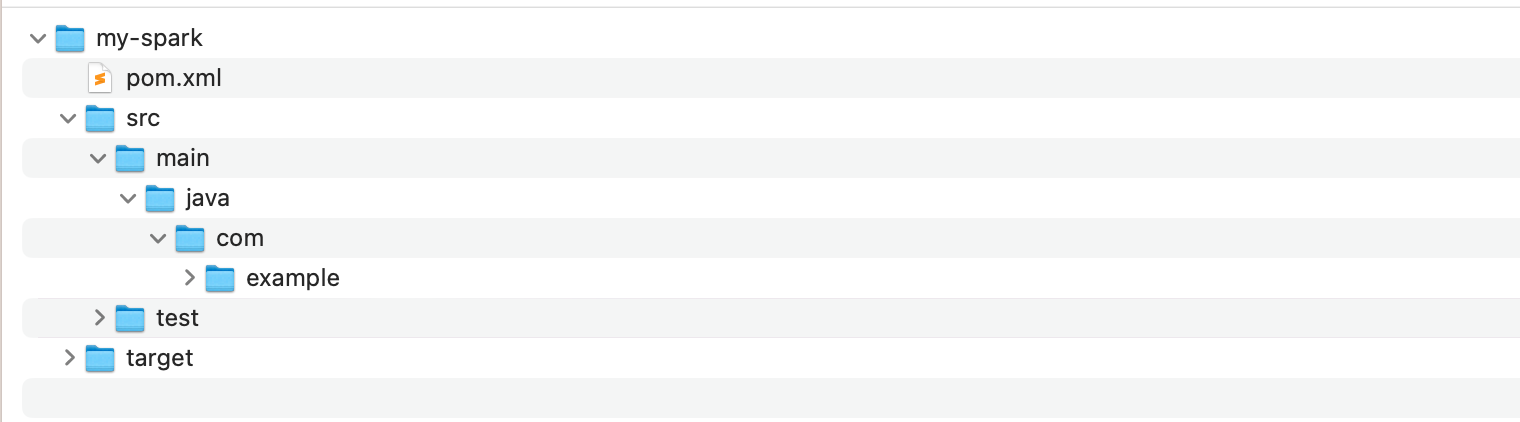
3. Introduce dependencies:
# Introduce spark dependency in pom.xml<dependencies><dependency><groupId>org.apache.spark</groupId><artifactId>spark-core_2.11</artifactId><version>2.4.7</version><scope>provided</scope></dependency></dependencies>
Writing Code
1. Create a new Java class named `WordCount` in the `src/main/java/com/example` directory and add the following sample code to the class:
package com.example;import java.util.Arrays;import org.apache.spark.SparkConf;import org.apache.spark.api.java.JavaPairRDD;import org.apache.spark.api.java.JavaRDD;import org.apache.spark.api.java.JavaSparkContext;import scala.Tuple2;public class WordCount {public static void main(String[] args) {// create SparkConf objectSparkConf conf = new SparkConf().setAppName("WordCount");// create JavaSparkContext objectJavaSparkContext sc = new JavaSparkContext(conf);// read input file to RDDJavaRDD<String> lines = sc.textFile(args[0]);// split each line into wordsJavaRDD<String> words = lines.flatMap(line -> Arrays.asList(line.split(" ")).iterator());// count the occurrence of each wordJavaPairRDD<String, Integer> wordCounts = words.mapToPair(word -> new Tuple2<>(word, 1)).reduceByKey((x, y) -> x + y);// save the word counts to output filewordCounts.saveAsTextFile(args[1]);}}
Notes:
Here, the scope of the Spark dependency is set to `scope`, indicating that Spark dependencies are only required during compilation and packaging. Runtime dependencies are provided by the platform.
2. Package the code into a jar file and add the following packaging plugin in Maven:
<build><plugins><plugin><groupId>org.apache.maven.plugins</groupId><artifactId>maven-compiler-plugin</artifactId><configuration><source>1.8</source><target>1.8</target><encoding>utf-8</encoding></configuration></plugin><plugin><artifactId>maven-assembly-plugin</artifactId><configuration><descriptorRefs><descriptorRef>jar-with-dependencies</descriptorRef></descriptorRefs></configuration><executions><execution><id>make-assembly</id><phase>package</phase><goals><goal>single</goal></goals></execution></executions></plugin></plugins></build>
3. Then execute in the root directory of the project:
mvn package
4. In the `target` directory, you can see the jar file that includes dependencies. Here it is `my-spark-1.0-SNAPSHOT-jar-with-dependencies.jar`.
Data Preparation
Since WeData data development only supports zip files, it is necessary to first convert the jar package into a zip file, and also perform the following operations to obtain the zip file. If there are other dependent configuration files, etc., they can also be packaged into a zip file together.
zip spark-wordcount.zip my-spark-1.0-SNAPSHOT-jar-with-dependencies.jar
Step Two: Upload the SparkJar Task Package
1. Create a new resource file in resource management and upload the resource file package.
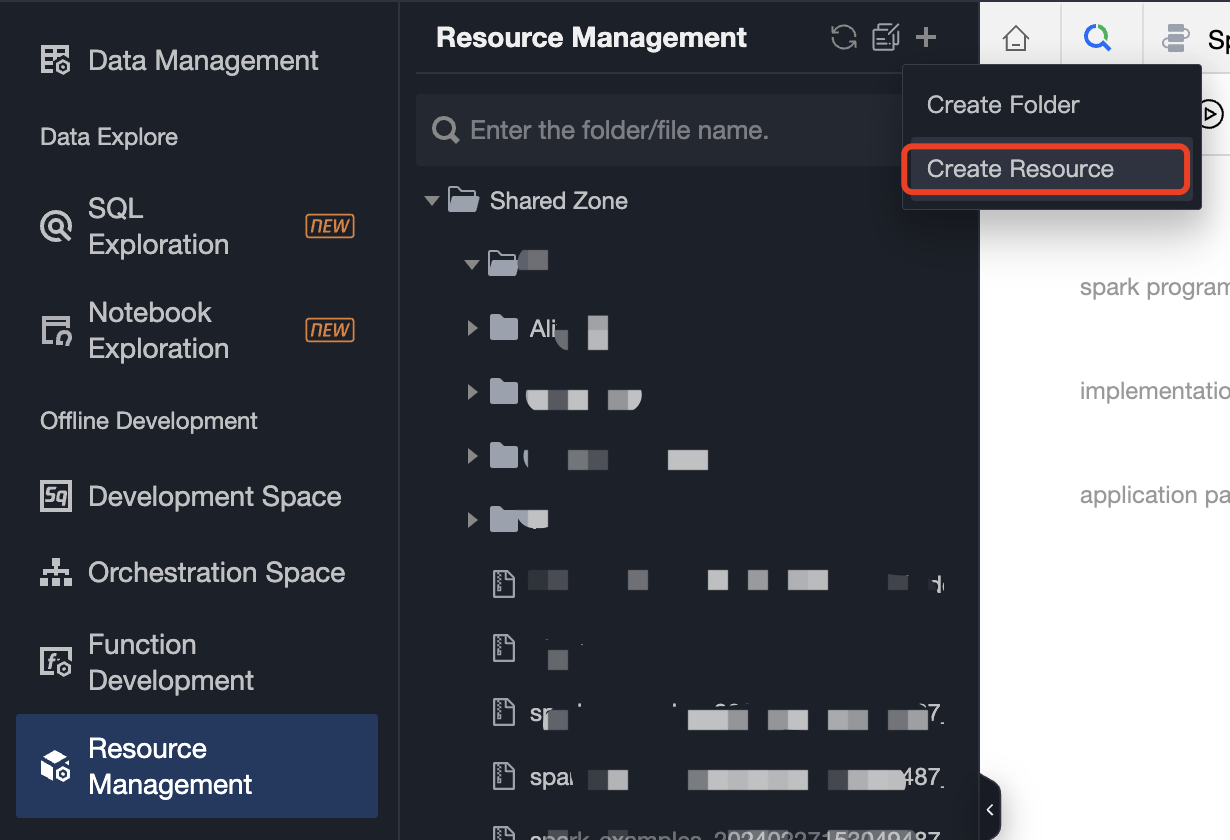
2. Create a new resource configuration:
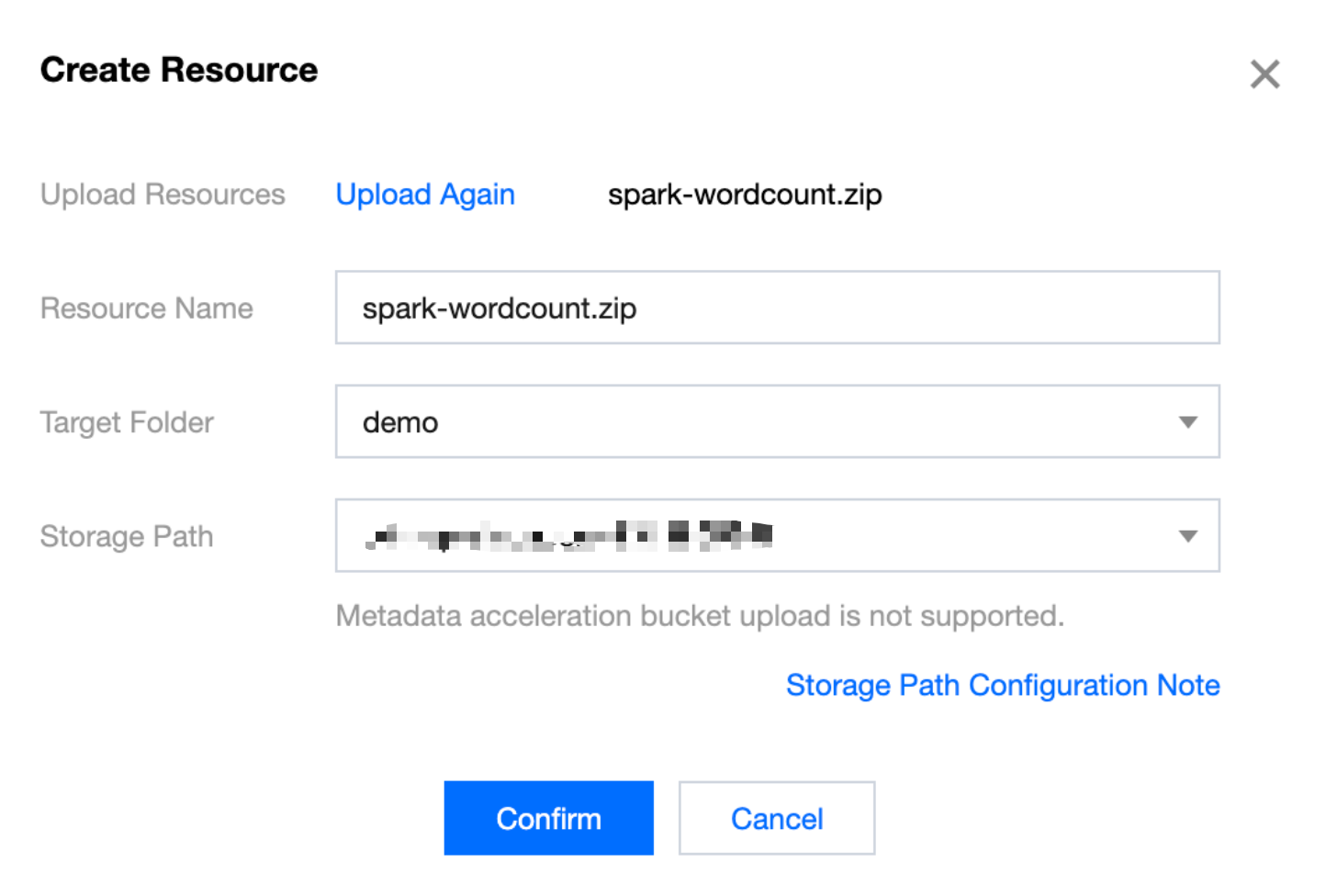
Step Three: Create a SparkJar Task and Configure Scheduling
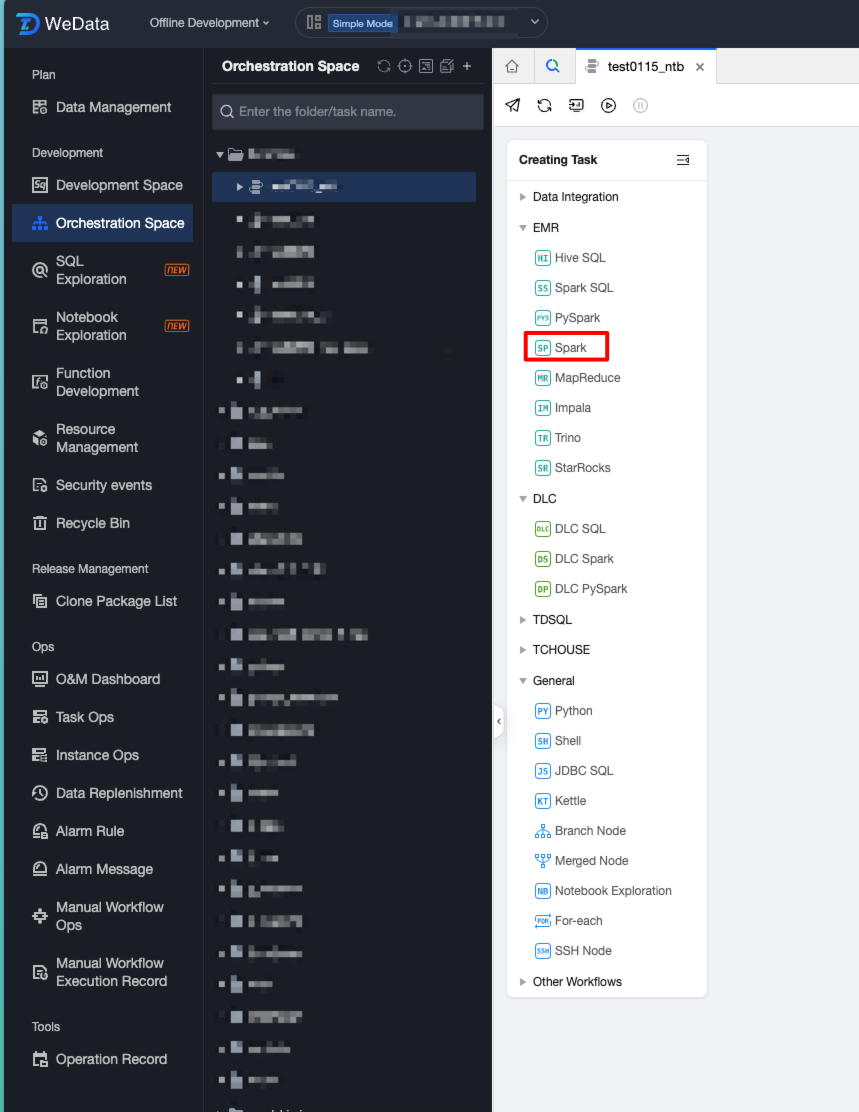
1. Create a new workflow in the orchestration space and create a Spark task in the workflow.
2. Fill in the task parameters.
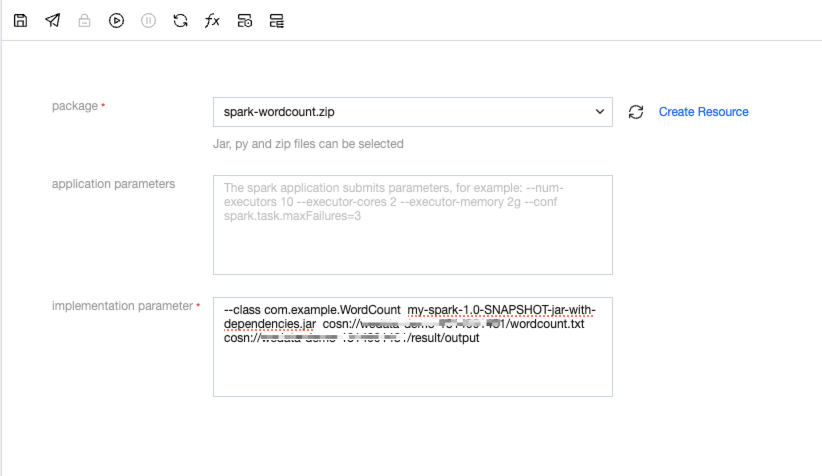
3. Example of execution parameter format:
--class mainClass run.jar args
Or
wordcount.py input output
4. The complete format in the example is as follows:
--class com.example.WordCount my-spark-1.0-SNAPSHOT-jar-with-dependencies.jar cosn://wedata-demo-1314991481/wordcount.txtcosn://wedata-demo-1314991481/result/output
Note:
Among them, cosn://wedata-demo-1314991481/wordcount.txt is the COS path of the file that needs to be processed.
cosn://wedata-demo-1314991481/result/output is the output COS path for the computation results. This folder directory cannot be created in advance; otherwise, the run will fail.
5. The sample file of wordcount.txt is as follows:
hello WeDatahello Sparkhello Scalahello PySparkhello Hive
6. After debugging, view the calculation results in cos.
7. Publish a Spark task and start scheduling. Submit a SparkJar task:
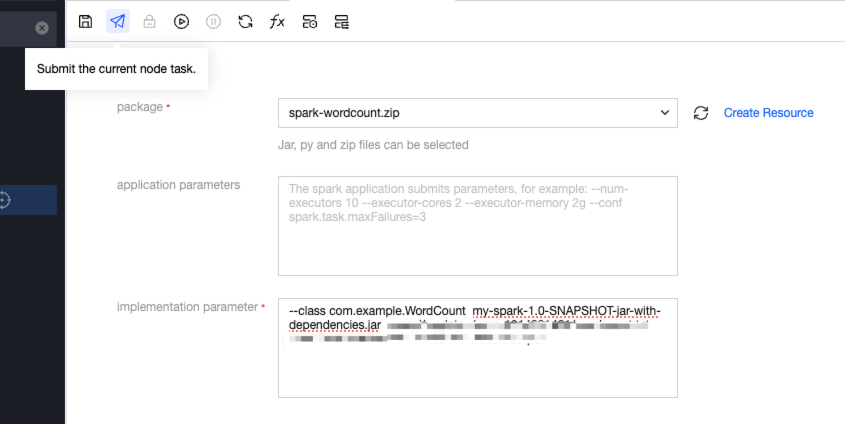
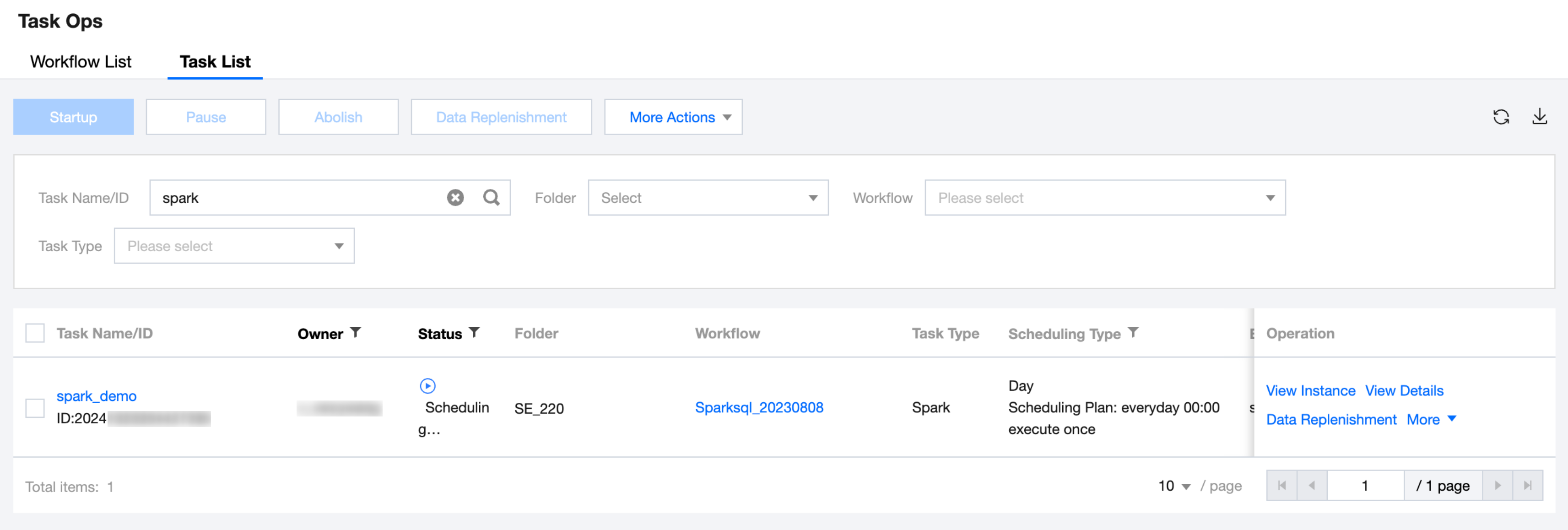
8. The Ops of the SparkJar task is shown in the following figure:
Bantuan dan Dukungan
Apakah halaman ini membantu?
Anda juga dapat Menghubungi Penjualan atau Mengirimkan Tiket untuk meminta bantuan.
masukan