Disaster Recovery Management Overview
Unduh
Mode fokus
Ukuran font
This guide explains how to create and manage disaster recovery instances through the console.
Scenarios
For scenarios with strong requirements for business continuity and data reliability, or those mandated by compliance, TDSQL Boundless provides cross-region disaster recovery/read-only instances. This helps users enhance their business continuity capabilities at a lower cost while also improving data reliability. If a failure occurs in the region where the primary instance is located, rendering the service unavailable, users can switch the disaster recovery instance to the primary instance to quickly restore business operations.
Note:
Disaster recovery/read-only instances are billed at the same rate as the primary instance. For details, see Billing Overview.
Applicable Scenarios
Cross-region Disaster Recovery: Disaster recovery instances can be used to back up services and data across multiple locations, ensuring data security. If a failure occurs in one region, you can quickly switch to a cross-region disaster recovery instance to minimize the impact of the failure on your business.
Proximity Access: Data is written to a primary instance in one region, while another region serves as a read-only instance. This architecture provides users with proximity access and cross-region read capabilities, improving access speed.
Multi-Region Deployment: TDSQL Boundless provides multi-region (Region) deployment capabilities. When a region experiences network fluctuations or becomes unavailable, you can manually switch to another region based on your business requirements.
Feature Characteristics
A separate database connection address is provided. Disaster recovery and read-only instances provide read access capabilities for scenarios such as proximity access and data analysis, while maintaining low device redundancy costs.
A primary instance can create a disaster recovery/read-only instance, which is deployed in a different region or AZ.
If the primary instance fails, you can proactively switch the disaster recovery/read-only instance to the primary instance through the console to restore full read and write capabilities.
Disaster recovery/Read-only instances are synchronized through the private network direct connection, providing low synchronization latency and higher stability. The synchronization linkage quality significantly surpasses public network connections.
Currently, the direct connection traffic is free during the promotion period, and the time for commercial charges will be announced separately.
Feature Limits
The version of disaster recovery/read-only instances is kept consistent with the primary instance by default. Version upgrades for the primary instance and disaster recovery/read-only instances can be performed by submitting a ticket.
Only cluster edition instances support creating disaster recovery/read-only instances. Basic edition instances do not support creating disaster recovery instances.
Disaster recovery instances can only be created for instances with a kernel version of V19.0.0 or higher.
Note:
For instances of version V19.X, disaster recovery instances can only be created by creating a new instance. Furthermore, disaster recovery instances cannot be added for an instance more than five days after its creation.
Instances of version V20.0.0 or higher support creating disaster recovery instances by cloning from a backup set. They also support cross-region disaster recovery.
The following tables cannot be synchronized via CLS. If such tables exist, the primary instance cannot establish a disaster recovery relationship:
Tables containing
HIDDEN PRIMARY KEYTables whose
PRIMARY KEY contains a string prefix indexAfter a disaster recovery relationship is established, the system automatically synchronizes database users from the primary instance to the disaster recovery instance. However, the following system-built-in users are excluded:
rootmysql.infoschemamysql.sessionmysql.sysWhen a disaster recovery relationship exists, isolation or deletion operations are not allowed on the primary instance or the disaster recovery instance. If you need to perform isolation or deletion operations, first Removing a Disaster Recovery/Read-Only Instance from Disaster Recovery Synchronization relationship.
How It Works
TDSQL Boundless disaster recovery instances implement asynchronous data replication via CLS. Data changes from the primary instance are transmitted to the disaster recovery instance in real time through CLS. The disaster recovery instance continuously replays logs to maintain data consistency. The disaster recovery synchronization architecture is as follows:
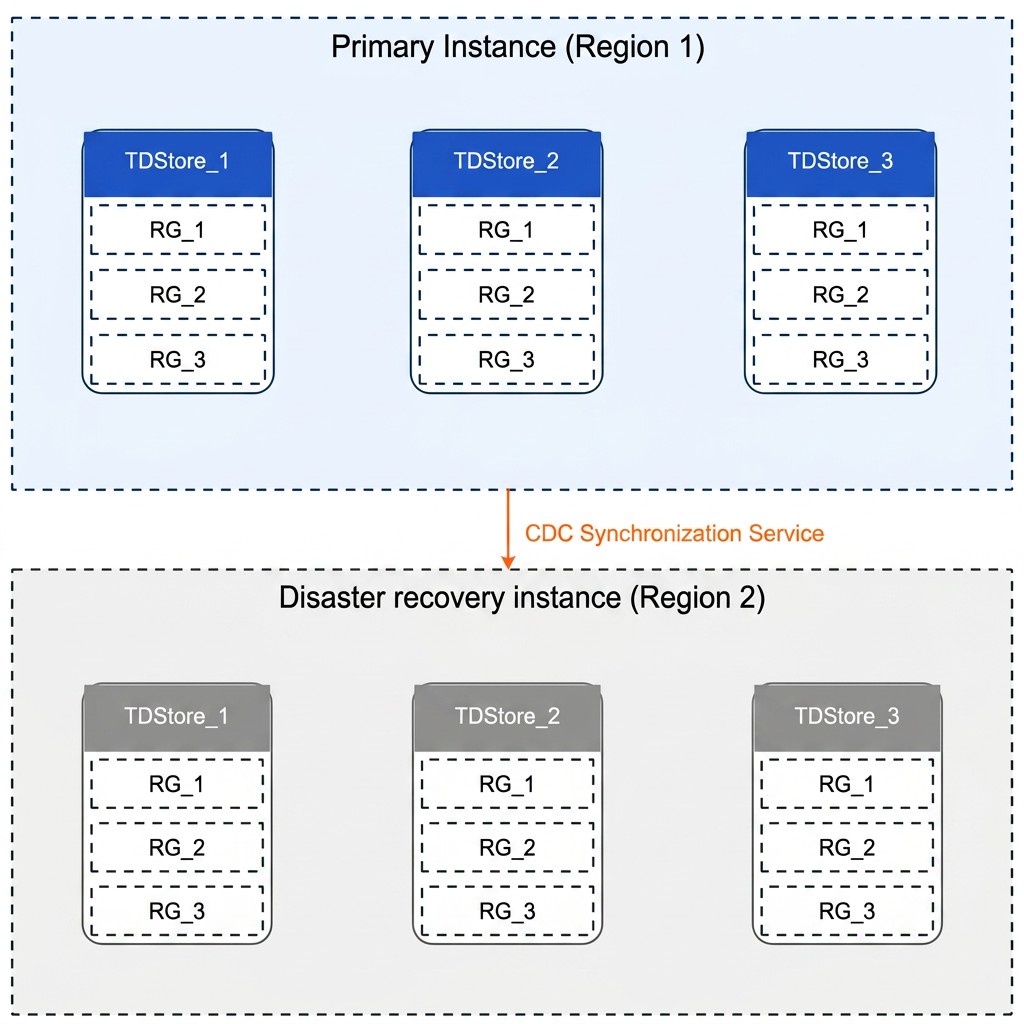
The instance roles and key characteristics in a disaster recovery relationship are as follows:
Project | Description |
Primary Instance | The primary database instance that provides read/write services |
Disaster Recovery Instance | A backup instance that asynchronously synchronizes data from the primary instance via CLS |
Synchronization Method | Asynchronously replicating (Async) data changes to disaster recovery instances via CLS |
Data Latency | When the primary/secondary relationship is switched or disaster recovery synchronization is disabled, you can set a synchronization delay threshold, with a value range of 5 - 600 seconds. |
Instance Architecture | Disaster recovery instances use the peer-to-peer architecture (HYBRID) by default and maintain the same kernel version as the primary instance. |
Operation Guide
Operation | Description |
Create a disaster recovery instance for the primary instance. | |
Promote the disaster recovery instance to the primary instance. | |
Severs the primary/secondary synchronization relationship, and the disaster recovery instance becomes an independent instance. |
Bantuan dan Dukungan
Apakah halaman ini membantu?
Anda juga dapat Menghubungi Penjualan atau Mengirimkan Tiket untuk meminta bantuan.
masukan