Promote a DR or Read-Only Instance to Primary
Unduh
Mode fokus
Ukuran font
This guide explains how to promote a disaster recovery/read-only instance to a primary instance through the console.
Scenarios
Scheduled Maintenance: Before maintenance operations such as promotes or restarts are performed on the primary instance, switch the disaster recovery instance to the primary instance to ensure business continuity.
Region Migration: Migrate your business from the current region to the region where the disaster recovery instance resides.
Fault Recovery: When the primary instance fails and cannot function normally, quickly switch the disaster recovery instance to the primary instance to restore business operations.
Limitations
During the promote of the primary instance, connections may experience brief interruptions lasting seconds. It is recommended to perform the switchover operation during off-peak business hours. Additionally, applications should have an automatic reconnection mechanism to avoid errors.
During the switchover, the status of the relevant instance changes to modifying. Avoid performing other change operations simultaneously.
If your business heavily relies on the original connection address, verify the instance connection address, account permissions, and access policies promptly after the promote, and synchronously update the configuration on the application side.
How It Works
TDSQL Boundless supports the following two switchover types:
Switch Type | Description | Scenarios | Feature |
Normal Switchover | During the switchover, the primary instance is set to read-only. After the switchover is complete, the new primary instance is opened for read and write operations. During the switchover, the data synchronization link from the original primary instance to the original secondary instance is disconnected. After the switchover is complete, a reverse data synchronization link from the new primary instance to the new secondary instance is established. After the switchover, use the IP address of the new primary instance to connect to the database service. | Planned maintenance, region migration | Data is strongly consistent, with no risk of data loss, and service experiences a second-level interruption. |
Forced Switch | During the switchover, the secondary instance disconnects from the primary instance, becomes an independent instance, and opens for read and write operations. During the switchover, the secondary instance does not wait for data synchronization with the primary instance, which may pose a risk of data loss. After the switchover, use the IP address of the new primary instance to connect to the database service. Note: When the primary instance is in a normal operating state, it is not recommended to use the forced switchover feature. | Primary instance failure cannot be recovered. | Recovery is fastest, but there is a risk of data loss. |
Steps
1. Log in to the TDSQL Boundless console.
2. In the left sidebar, select Instance List. Click the Instance ID of the target disaster recovery instance to go to the Instance Details page.
3. In the operation area at the top right corner of the Instance Details page, click Switch with the source instance.

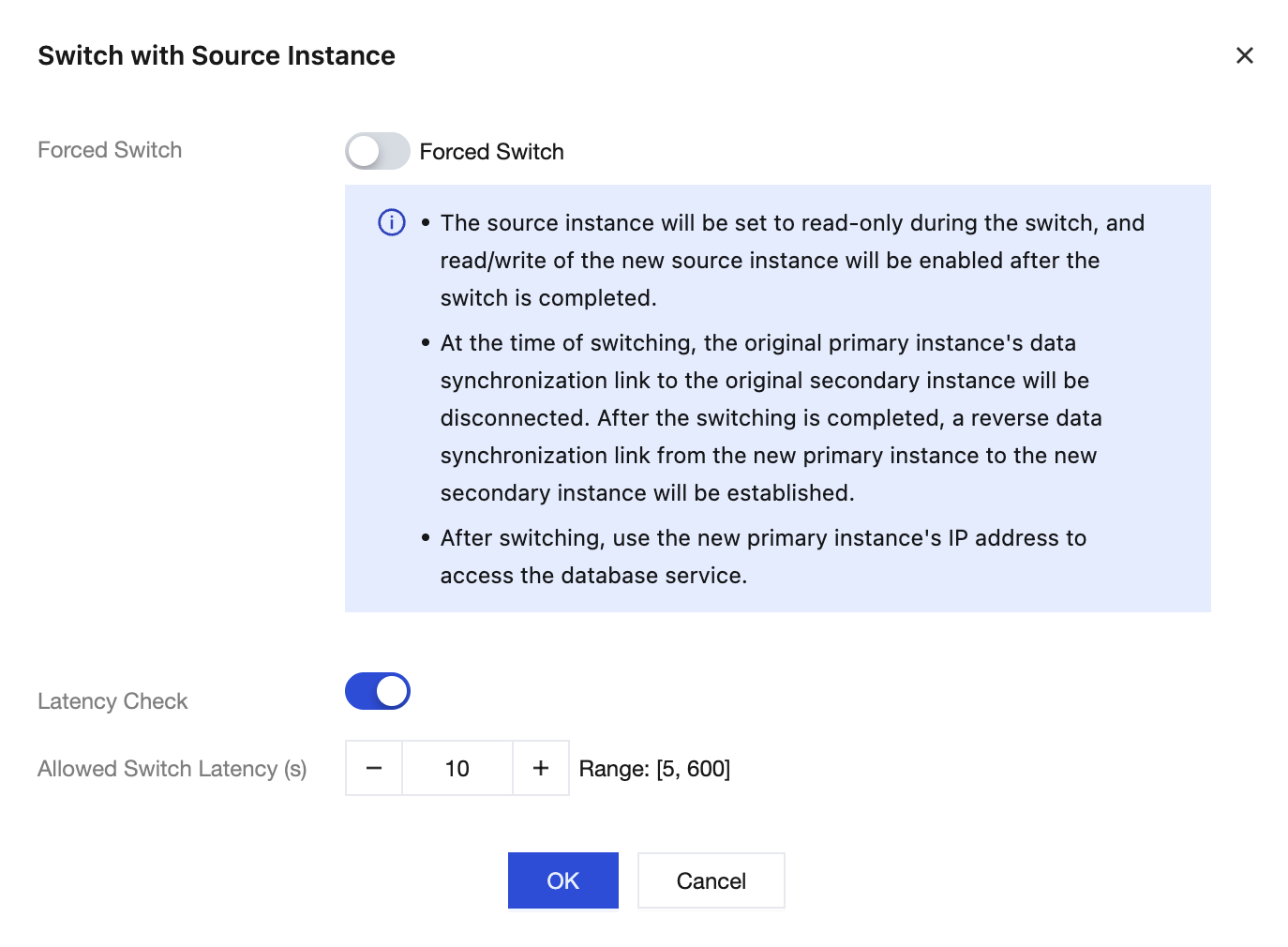
4. In the pop-up window, select Forced Switch and configure the parameters.
Parameter | Description |
Forced Switch | Close (default): Perform a regular switchover, which is safe and ensures no data loss. Enable: Performs a forced switchover for emergency disaster recovery, which carries the risk of data loss. |
Latency Check | This parameter takes effect only when regular switchover is performed. Enable (default): The system checks the primary/secondary synchronization delay. The switchover is allowed only when the delay is less than the threshold set below. Disable: The system does not check the synchronization delay and immediately starts the switchover process. |
Allowed Switch Latency (s) | When Latency Check is enabled, you need to set an allowed maximum synchronization delay. If the actual delay exceeds this value, the switchover will fail. Value range: 5 - 600 seconds |
5. Confirm that the information is correct and click OK.
After the two switchover types are completed, the results are as follows:
Regular Switchover: The original disaster recovery instance becomes the new primary instance, and the original primary instance becomes the new disaster recovery instance. Their roles are swapped, and the disaster recovery synchronization relationship is maintained. After the switchover, use the IP address of the new primary instance to access the database service.
Forced Switchover: The disaster recovery instance becomes an independent primary instance, and the original disaster recovery relationship is terminated. The new primary instance uses the connection address of the original disaster recovery instance. You need to update the connection configuration for your application.
Verifying After the Switchover
1. Check the instance status.
1.1 Return to the Instance List page and confirm that the status of the relevant instances has been restored to running.
1.2 Check whether the instance roles have been switched as expected.
2. Test the business connection.
2.1 Test the business connection using the new primary instance connection address.
2.2 Perform simple database operations to verify that the read and write features are functioning normally.
2.3 Check the application logs to confirm that there are no connection errors.
3. Monitor the business operation.
Monitor the key business metrics for 15 - 30 minutes to confirm that the business is running smoothly without abnormal fluctuations. If any issues arise, contact Tencent Cloud Technical Support promptly.
Bantuan dan Dukungan
Apakah halaman ini membantu?
Anda juga dapat Menghubungi Penjualan atau Mengirimkan Tiket untuk meminta bantuan.
masukan