Detach a DR or Read-Only Instance
Unduh
Mode fokus
Ukuran font
This document describes how to detach a disaster recovery (DR) instance from a TDSQL Boundless source instance. After detachment, the DR instance runs independently and no longer synchronizes data with the primary instance.
Prerequisites
Before you detach the DR instance, make sure that:
The disaster recovery instance must be in the running state.
The DR instance has a unique sync relationship with the source instance.
Limitations
Irreversible Operation: Detaching the disaster recovery synchronization is irreversible. Before performing this operation, confirm that your business no longer requires disaster recovery protection.
Status impact: During detachment, the related instances enter the modifying state, during which no other operations are allowed.
Data consistency: Before detachment, verify that data is fully synchronized.
Re-establishment: To re-establish a DR relationship, add a DR instance again.
Detachment modes
Mode | Workflow | Feature |
Standard Detach | 1. The system briefly sets the source instance to read-only to block new writes. 2. The system waits for data to fully sync to the DR instance (within your configured latency threshold). 3. Once the sync completes, the system disconnects the link and detaches the DR instance. | Data consistency: The DR instance ends up with data identical to the source instance, with no data loss. Business impact: The source instance has a brief read-only window during which writes are blocked. |
Force Detach | The system immediately disconnects the sync link without waiting for sync to complete. | Data inconsistency risk: Since sync is skipped, the DR instance may lag behind the source, causing data inconsistency or loss. Use case: Mainly for emergencies where the source instance has failed and is unreachable, and the DR instance must be activated immediately. |
Steps
1. Log in to the TDSQL Boundless console.
2. In the left sidebar, select Instance List. Click the Instance ID of the target DR instance to go to the Instance Details page.
3. On the Instance Details page, in the operation area at the top right corner, click More > Disable Disaster Recovery Instance Sync.
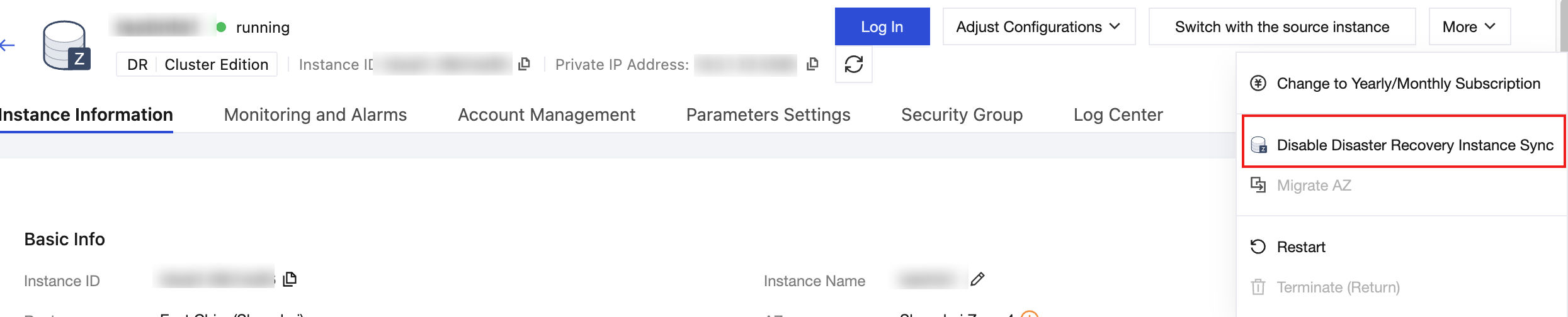
4. Set the removal parameters in the pop-up window.
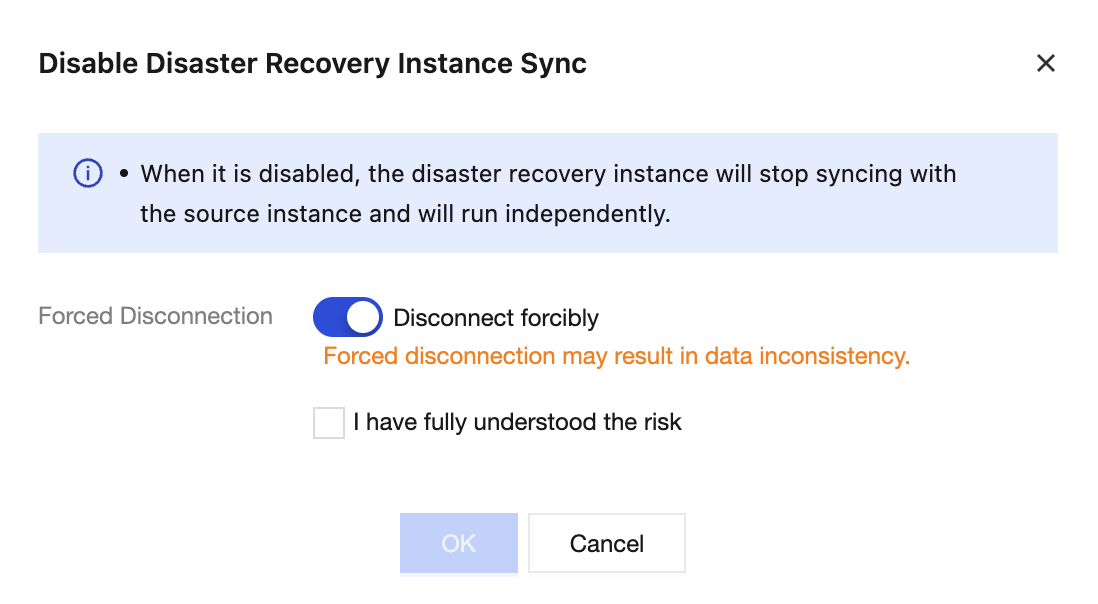
Parameter | Description |
Forced Disconnection | Off: Standard Detach. The system waits for sync to complete before disconnecting; the source instance is briefly set to read-only. On (default): Force Detach. The system disconnects immediately, with the risk of data inconsistency. |
Allowed Disconnection Latency (s) | Effective only for Standard Detach. Sets the maximum sync latency the system can tolerate; the detachment proceeds only when the actual latency is below this value. Value range: 5 - 600 seconds |
5. Confirm that the information is correct and click OK.
Impact After Deactivation
After successfully detaching disaster recovery sync:
Instance Roles: The former DR instance becomes an independent, read-write primary instance. The former source instance reverts to a regular instance with no DR relationship.
Feature Restriction Removal
Data sync between the two instances stops.
Restrictions on isolating or deleting either instance are lifted.
Next steps: You can manage the two instances independently, for example by adding a new DR instance to the former source instance.
Bantuan dan Dukungan
Apakah halaman ini membantu?
Anda juga dapat Menghubungi Penjualan atau Mengirimkan Tiket untuk meminta bantuan.
masukan