Setting Alarm Notifications
Unduh
Mode fokus
Ukuran font
After configuring an alarm policy, you need to add alarm recipients to obtain alarm information. You can add them under the alarm notification settings.
On the Manage Alarm Policies page, you can select an existing notification template or create a new one. This allows multiple policies to reuse a template with one click, helping to reduce repetitive configuration of user notifications. This document guides you through setting up an alarm notification template via the console.
Setting Alarm Notification Templates
1. Go to the Notification Template page in TCOP.
2. Click Create Notification Template. On the Create Notification Template page, configure the following information and then click Complete.
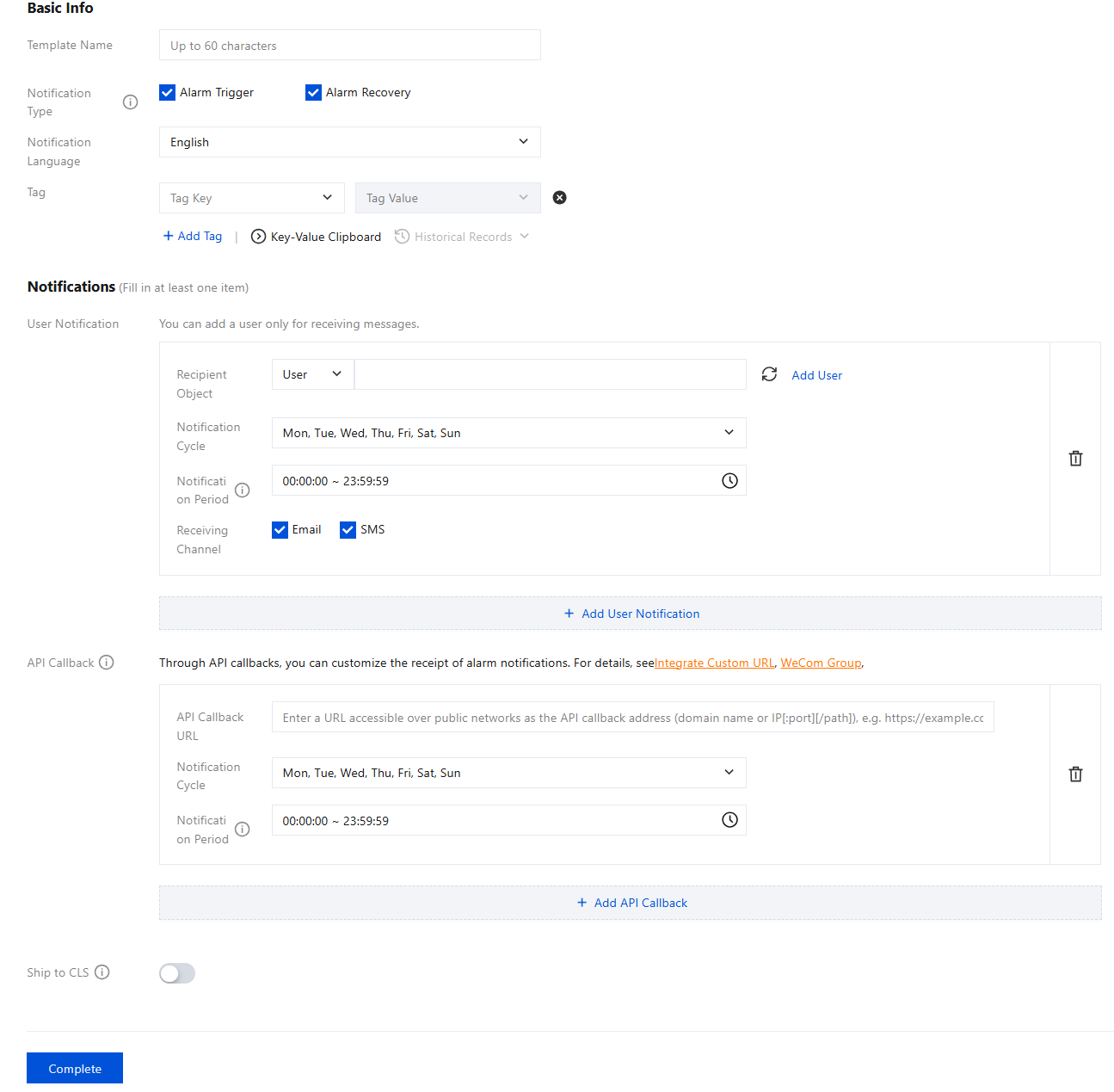
Configuration Type | Configuration Item | Description |
Basic Info | Template Name | Custom template name. |
| Notification Type | Selects the notification types to receive. Two types are supported: Alarm Trigger and Alarm Recovery. Multiple selections are supported. Alarm Trigger: A notification is sent when an alarm is triggered. Alarm Recovery: A notification is sent when an alarm is cleared. |
| Notification Language | Select the language of received notifications. Chinese and English are supported. |
| Tag | Select the corresponding Tag key and Tag value to facilitate the management of instances under the bound Tag. Multiple Tag keys and Tag values can be selected. To modify them, go to the Tag console. |
Notification Actions | User Notification | Recipient Object: You can select a recipient group or individual recipients. To create an alarm recipient group, see Create Alarm Recipient Group. Notification period: Define the time period for receiving alarms. Receiving Channel: Email, SMS, and phone calls are supported as alarm channels. You can also configure different alarm notification channels and notification periods based on different user dimensions. For details, see Alarm Types, Channels, and Quotas. Phone alarm configuration instructions: Polling Attempts: The maximum number of times sequential alarm calls will be made to all recipients if the calls are not successfully received. Polling Sequence: Alarm calls are made sequentially to recipients based on their order. Drag recipients up or down to adjust the calling sequence. Polling Interval: The time interval between sequential alarm calls made to recipients based on their order. Notification Delivery: A message is sent to all recipients when a phone call is successfully received or the polling process ends. SMS quota needs to be calculated. |
| API Callback | Enter a publicly accessible URL as the callback API address. Up to 3 alarm callback addresses can be entered. TCOP will promptly push alarm information to this address. An HTTP 200 response indicates successful verification. For alarm callback field descriptions, see Alarm Callback Description. |
| Deliver logs to CLS | When an alarm is triggered, the system pushes the alarm trigger/recovery notification data to the log topic in Tencent Cloud CLS. You can search and analyze the alarm notifications. Operation Steps: 1. In the log delivery service, select Enable. 2. Click Agree to Authorize in the pop-up window (authorization is only required for new users enabling the feature for the first time). This authorizes TCOP to push alarm messages to CLS. 3. Select the region of the logset to be delivered, the logset itself, and the log topic. |
Note:
After you save the callback URL, the system automatically verifies it once. The verification timeout is 5 seconds. When an alarm policy created by a user is triggered or restored, the system pushes the alarm message through the API callback. This alarm message can be pushed up to three times, and the timeout for each request is 5 seconds.
The system will push the alarm messages through the API callbacks when an alarm policy created by the user is triggered or restored. API callbacks also support repeated alarms.
The outbound IP addresses for the alarm callback API are dynamically and randomly assigned, so specific IP information cannot be provided to you. However, the IP address port is fixed at port 80. We recommend that you configure an allow-all policy in your security group based on port 80.
Configuring Alarm Notifications
1. Go to the TCOP Alarm Management > Alarm Configuration page.
2. On the Alarm Policy tab, select the alarm policy you need to modify and click its name.
3. Go to the Manage Alarm Policy page. In the Alarm Notification section, select alarm notification templates (you can select up to three notification templates).

4. After configuration is complete, if an exception triggers an alarm, the system will send it to the recipients via the notification channels you selected (email, SMS, or phone call).
Bantuan dan Dukungan
Apakah halaman ini membantu?
Anda juga dapat Menghubungi Penjualan atau Mengirimkan Tiket untuk meminta bantuan.
masukan